Let me document how I set up this WordPress site on a Raspberry Pi 4 and serve the pages out to the web from my home broadband connection
Why Do This
Of course you’ve come across the phrase “The cloud is someone else’s computer” – so why not prove this. We are all connected to the Web via our broadband connection – nowadays we can get symmetric fibre connectivity that allow fast upload and download speeds – ideal for serving a small service, like a WordPress site.
A raspberry Pi is a cheap computer that can run Linux server OS (like all the ones in the cloud!) with a 1Gbps network interface that can run a low load service like a low graphics-content website with a specific text content that only those interested will connect to see.
This is ideal for small experimental, hobby or personal site – serving out your skills and experience profile for job searching – have you not noticed when filling in your job application, they ask for your LinkedIn profile AND a website URL?
What is needed – what are the steps?
What we need:
- Broadband service with “port forwarding”
- Domain name
- Raspberry Pi
- Network cable
Steps:
- Install Ubuntu image on Raspberry Pi SD card
- Install and configure WordPress
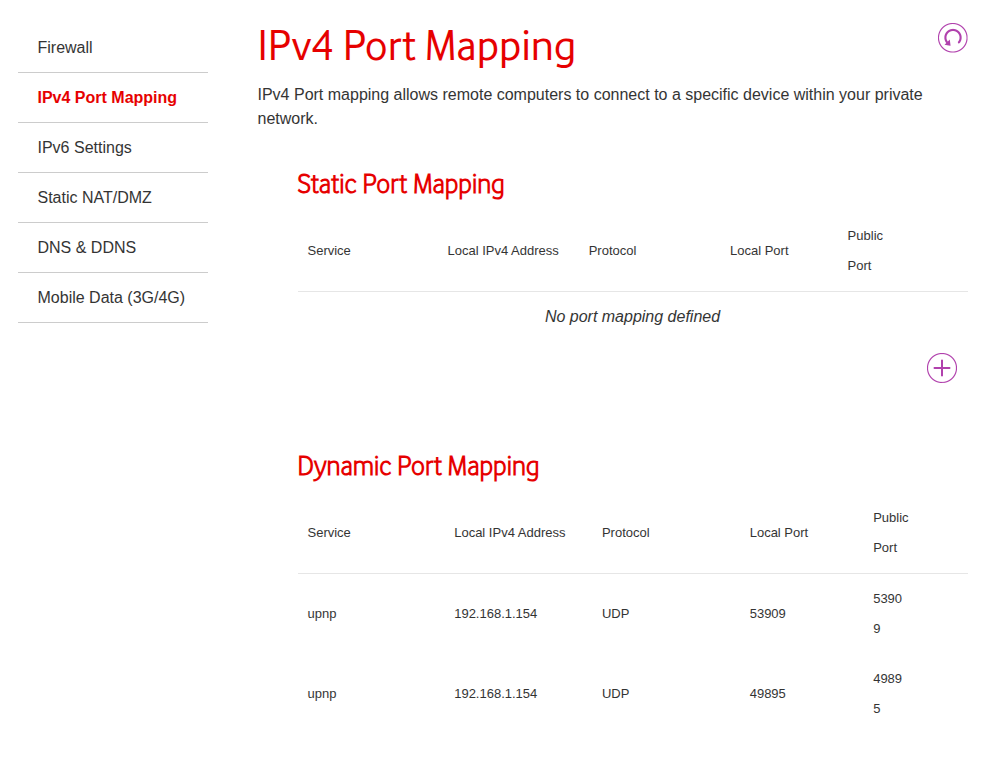
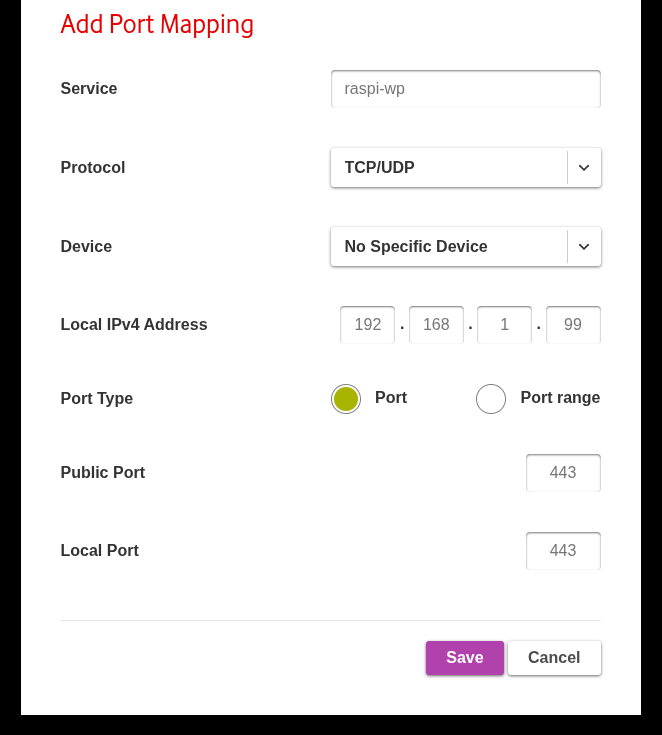
- Configure port forwarding on broadband router
- Point the domain name to our broadband connection’s IP address
Install Ubuntu image on Raspberry Pi SD card
We are making the Raspi’s OS Ubuntu (24.04.x)
Install and Configure WordPress
Configure port forwarding on broadband router
Point the domain name to our broadband connection’s IP address
Welcome to Ubuntu 24.04.3 LTS (GNU/Linux 6.8.0-88-generic x86_64)

 * Documentation:  https://help.ubuntu.com
 * Management:     https://landscape.canonical.com
 * Support:        https://ubuntu.com/pro

 System information as of Fri Dec 12 10:51:06 UTC 2025

  System load:           0.24
  Usage of /:            36.5% of 29.95GB
  Memory usage:          70%
  Swap usage:            0%
  Processes:             263
  Users logged in:       0


 * Strictly confined Kubernetes makes edge and IoT secure. Learn how MicroK8s
   just raised the bar for easy, resilient and secure K8s cluster deployment.

   https://ubuntu.com/engage/secure-kubernetes-at-the-edge

Expanded Security Maintenance for Applications is not enabled.

25 updates can be applied immediately.
To see these additional updates run: apt list --upgradable

Enable ESM Apps to receive additional future security updates.
See https://ubuntu.com/esm or run: sudo pro status