SQLite3
What SQLite3 is
SQLite3 is a lightweight, embedded relational database engine. Unlike PostgreSQL, MySQL, or MariaDB, SQLite does not run as a separate server process. Instead, the database engine is linked directly into the application, and the whole database is usually stored in a single file.
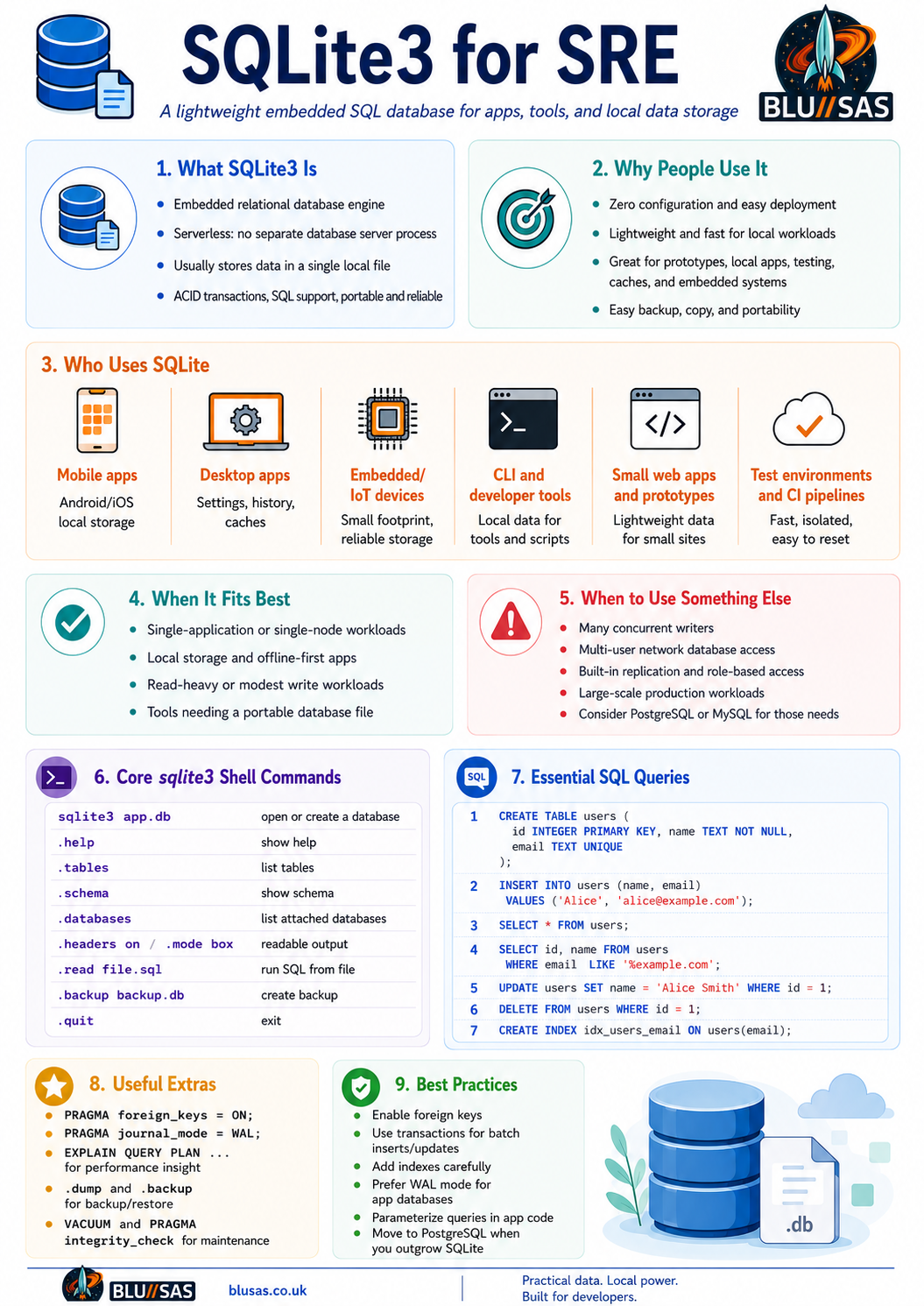
A SQLite database is commonly just a file such as:
app.db
users.sqlite
inventory.sqlite3
You interact with it using:
sqlite3 database.dbSQLite supports SQL, transactions, indexes, views, triggers, foreign keys, common table expressions, JSON functions, full-text search extensions, and many other serious database features.
Its key idea is:
A full SQL database engine stored in a local file, with no database server to install, configure, patch, or operate.
Why SQLite is useful
SQLite is useful because it is:
| Feature | Meaning |
|---|---|
| Serverless | No database daemon, listener, users, ports, or service manager |
| Single-file | Easy to copy, back up, move, version, or ship |
| Zero configuration | No setup beyond having the SQLite library or CLI |
| Transactional | Supports ACID transactions |
| Portable | Works on Linux, macOS, Windows, Android, iOS, embedded systems |
| Reliable | Heavily tested and widely deployed |
| Fast for local access | Very efficient when the app and DB are on the same machine |
| Small footprint | Excellent for embedded and edge use cases |
Who uses SQLite?
SQLite is extremely widely used. It appears in:
1. Mobile apps
Android and iOS applications often use SQLite for local storage.
Examples:
User settings
Offline cache
Messages
Local search indexes
App state
Sync queues
A mobile app may use SQLite locally, then sync to a cloud backend when online.
2. Desktop applications
Many desktop apps use SQLite for internal data storage.
Typical use cases:
Browser history
Bookmarks
Application settings
Plugin metadata
Local indexes
Recently opened files
Web browsers, media tools, password managers, IDEs, and note-taking apps often use SQLite internally.
3. Embedded systems
SQLite is common in appliances, IoT devices, routers, industrial devices, cars, and monitoring agents.
It is useful where you need structured storage but do not want to run a full database service.
Example:
Sensor readings
Device configuration
Event logs
Local telemetry queue
Firmware state
4. CLI tools and developer tools
Many command-line programs use SQLite because it is easy to bundle.
Examples:
Package metadata
Local caches
Build history
Test results
Job queues
Audit logs
For an SRE or DevOps engineer, SQLite is very handy for small automation tools.
5. Web applications
SQLite is commonly used for:
Small websites
Internal admin tools
Development environments
Prototypes
Single-node applications
Read-heavy apps
Static-site metadata
It is not always the best fit for high-write, multi-node web systems, but it is excellent for simpler deployments.
6. Testing and prototyping
Developers often use SQLite for:
Unit tests
Local integration tests
Proofs of concept
Data modelling
Temporary analysis
SQL learning
Because it has no server dependency, it is convenient in CI pipelines.
When SQLite is a good choice
SQLite is a strong fit when:
The database is local to one application
The app is single-node
Reads are more common than writes
You want simple deployment
You want a portable database file
You do not want a separate database server
The dataset is modest to medium-sized
Examples:
A Go CLI tool storing scan results
A Python app storing user state
A local monitoring cache
A desktop app database
A small WordPress-like prototype
A game save database
An IoT device configuration store
When SQLite is not the best choice
SQLite is usually not ideal when:
Many servers need concurrent write access
You need networked database access
You need fine-grained database users and roles
You need built-in replication
You need high write concurrency
You need large-scale multi-tenant workloads
You need PostgreSQL/MySQL-compatible operational features
For these cases, use something like:
PostgreSQL
MySQL / MariaDB
CockroachDB
MongoDB
Redis
ClickHouse
SQLite allows many concurrent readers, but writes are more constrained because writing requires locking. WAL mode improves this substantially, but SQLite is still not the same operational model as PostgreSQL.
Installing SQLite3
Debian / Ubuntu
sudo apt update
sudo apt install sqlite3
Rocky Linux / RHEL / CentOS / Fedora
sudo dnf install sqlitemacOS
SQLite is usually already installed:
sqlite3 --versionWith Homebrew:
brew install sqliteWindows
Install via winget:
winget install SQLite.SQLiteOr download the SQLite tools bundle and add it to your PATH.
Opening a database
Create or open a database:
sqlite3 app.dbYou will enter the SQLite shell:
SQLite version 3.x.x
Enter ".help" for usage hints.
sqlite>
Exit:
.quitor:
.exitSQLite shell commands
SQLite has two types of commands:
- SQL statements
- SQLite shell dot commands
Dot commands begin with a period:
.tables
.schema
.mode
.headers on
.quit
They are not SQL. They are commands for the sqlite3 CLI shell.
Core SQLite dot commands
Help
.helpShow help for one command:
.help .schemaList databases
.databasesExample output:
main: /home/user/app.db r/wSQLite can attach multiple databases in one session.
List tables
.tablesShow schema
Show all schema:
.schemaShow schema for one table:
.schema usersShow table details
PRAGMA table_info(users);Example:
0|id|INTEGER|0||1
1|name|TEXT|1||0
2|email|TEXT|1||0
More modern detail:
PRAGMA table_xinfo(users);Show indexes
.indexesFor a specific table:
.indexes usersChange output mode
Column mode:
.mode columnBox mode:
.mode boxMarkdown mode:
.mode markdownCSV mode:
.mode csvJSON mode:
.mode jsonLine mode:
.mode lineShow column headers
.headers onTurn them off:
.headers offPretty output setup
A useful interactive setup:
.headers on
.mode box
Example:
SELECT id, name, email FROM users;Output:
┌────┬────────┬───────────────────┐
│ id │  name  │       email       │
├────┼────────┼───────────────────┤
│ 1  │ Alice  │ alice@example.com │
│ 2  │ Bob    │ bob@example.com   │
└────┴────────┴───────────────────┘
Run SQL from a file
Create a file:
cat > schema.sql <<'EOF'
CREATE TABLE users (
    id INTEGER PRIMARY KEY,
    name TEXT NOT NULL,
    email TEXT NOT NULL UNIQUE
);
EOF
Run it:
sqlite3 app.db < schema.sqlOr inside the shell:
.read schema.sqlExport query output to a file
Inside SQLite:
.output users.txt
SELECT * FROM users;
.output stdout
Export as CSV
.headers on
.mode csv
.output users.csv
SELECT * FROM users;
.output stdout
Or directly from shell:
sqlite3 -header -csv app.db "SELECT * FROM users;" > users.csvImport CSV
Assume users.csv:
name,email
Alice,alice@example.com
Bob,bob@example.com
Create table:
CREATE TABLE users (
    name TEXT,
    email TEXT
);
Import:
.mode csv
.import users.csv users
If the CSV has a header row, newer SQLite versions support:
.import --csv --skip 1 users.csv usersCreating tables
Basic table:
CREATE TABLE users (
    id INTEGER PRIMARY KEY,
    name TEXT NOT NULL,
    email TEXT NOT NULL UNIQUE,
    created_at TEXT DEFAULT CURRENT_TIMESTAMP
);
Important SQLite types:
| Type | Usage |
|---|---|
INTEGER | Whole numbers |
REAL | Floating-point numbers |
TEXT | Strings |
BLOB | Binary data |
NUMERIC | Numeric values |
BOOLEAN | Usually stored as 0 or 1 |
DATETIME | Usually stored as text, integer timestamp, or real Julian date |
SQLite uses dynamic typing, so type enforcement is more flexible than PostgreSQL or MySQL.
Strict tables
Modern SQLite supports STRICT tables, which enforce types more strongly.
CREATE TABLE users (
    id INTEGER PRIMARY KEY,
    name TEXT NOT NULL,
    email TEXT NOT NULL UNIQUE
) STRICT;
This is useful when you want SQLite to behave more like a traditional relational database.
Inserting data
Insert one row
INSERT INTO users (name, email)
VALUES ('Alice', 'alice@example.com');
Insert multiple rows
INSERT INTO users (name, email)
VALUES
    ('Bob', 'bob@example.com'),
    ('Carol', 'carol@example.com'),
    ('Dave', 'dave@example.com');
Insert with explicit ID
INSERT INTO users (id, name, email)
VALUES (100, 'Eve', 'eve@example.com');
Selecting data
Select all rows
SELECT * FROM users;Select specific columns
SELECT id, name, email FROM users;Filter rows
SELECT * FROM users
WHERE name = 'Alice';
Filter with multiple conditions
SELECT * FROM users
WHERE name = 'Alice'
  AND email = 'alice@example.com';
OR condition
SELECT * FROM users
WHERE name = 'Alice'
   OR name = 'Bob';
Pattern matching
SELECT * FROM users
WHERE email LIKE '%example.com';
Case-sensitive pattern matching can be controlled with:
PRAGMA case_sensitive_like = ON;Sorting and limiting
Sort ascending
SELECT * FROM users
ORDER BY name ASC;
Sort descending
SELECT * FROM users
ORDER BY created_at DESC;
Limit results
SELECT * FROM users
LIMIT 10;
Pagination
SELECT * FROM users
ORDER BY id
LIMIT 10 OFFSET 20;
This gets rows 21–30.
Updating data
UPDATE users
SET email = 'alice.new@example.com'
WHERE name = 'Alice';
Always use a WHERE clause unless you intend to update every row.
Dangerous:
UPDATE users
SET email = 'unknown@example.com';
That updates every row.
Deleting data
Delete one row:
DELETE FROM users
WHERE id = 1;
Delete matching rows:
DELETE FROM users
WHERE email LIKE '%old-domain.com';
Delete all rows:
DELETE FROM users;Drop the whole table:
DROP TABLE users;Transactions
Transactions group multiple operations into a single atomic unit.
BEGIN;

INSERT INTO users (name, email)
VALUES ('Frank', 'frank@example.com');

INSERT INTO users (name, email)
VALUES ('Grace', 'grace@example.com');

COMMIT;
If something goes wrong:
ROLLBACK;Example:
BEGIN;

UPDATE accounts
SET balance = balance - 100
WHERE id = 1;

UPDATE accounts
SET balance = balance + 100
WHERE id = 2;

COMMIT;
This ensures both updates happen together.
Constraints
Primary key
CREATE TABLE users (
    id INTEGER PRIMARY KEY,
    name TEXT NOT NULL
);
In SQLite, INTEGER PRIMARY KEY is special. It aliases the internal rowid.
Not null
name TEXT NOT NULLPrevents null values.
Unique
email TEXT UNIQUEPrevents duplicate values.
Check
CREATE TABLE products (
    id INTEGER PRIMARY KEY,
    name TEXT NOT NULL,
    price REAL NOT NULL CHECK (price >= 0)
);
Foreign keys
SQLite supports foreign keys, but they need to be enabled per connection.
Enable:
PRAGMA foreign_keys = ON;Example:
CREATE TABLE users (
    id INTEGER PRIMARY KEY,
    name TEXT NOT NULL
);

CREATE TABLE orders (
    id INTEGER PRIMARY KEY,
    user_id INTEGER NOT NULL,
    total REAL NOT NULL,
    FOREIGN KEY (user_id) REFERENCES users(id)
);
Insert:
INSERT INTO users (id, name)
VALUES (1, 'Alice');

INSERT INTO orders (user_id, total)
VALUES (1, 49.99);
This fails if user_id does not exist:
INSERT INTO orders (user_id, total)
VALUES (999, 10.00);
Joins
Create example tables:
CREATE TABLE users (
    id INTEGER PRIMARY KEY,
    name TEXT NOT NULL
);

CREATE TABLE orders (
    id INTEGER PRIMARY KEY,
    user_id INTEGER NOT NULL,
    total REAL NOT NULL,
    created_at TEXT DEFAULT CURRENT_TIMESTAMP,
    FOREIGN KEY (user_id) REFERENCES users(id)
);
Insert data:
INSERT INTO users (id, name)
VALUES
    (1, 'Alice'),
    (2, 'Bob'),
    (3, 'Carol');

INSERT INTO orders (user_id, total)
VALUES
    (1, 25.50),
    (1, 40.00),
    (2, 12.75);
Inner join
Returns users with orders:
SELECT
    users.name,
    orders.total,
    orders.created_at
FROM users
JOIN orders ON orders.user_id = users.id;
Left join
Returns all users, even those without orders:
SELECT
    users.name,
    orders.total
FROM users
LEFT JOIN orders ON orders.user_id = users.id;
Aggregate with join
SELECT
    users.name,
    COUNT(orders.id) AS order_count,
    SUM(orders.total) AS total_spent
FROM users
LEFT JOIN orders ON orders.user_id = users.id
GROUP BY users.id, users.name
ORDER BY total_spent DESC;
Aggregates
Count rows
SELECT COUNT(*) FROM users;Sum
SELECT SUM(total) FROM orders;Average
SELECT AVG(total) FROM orders;Minimum and maximum
SELECT MIN(total), MAX(total) FROM orders;Group by
SELECT
    user_id,
    COUNT(*) AS order_count,
    SUM(total) AS total_spent
FROM orders
GROUP BY user_id;
Having
WHERE filters rows before grouping.HAVING filters groups after grouping.
SELECT
    user_id,
    SUM(total) AS total_spent
FROM orders
GROUP BY user_id
HAVING total_spent > 50;
Indexes
Indexes speed up lookups, joins, sorting, and filtering.
Create an index:
CREATE INDEX idx_users_email
ON users(email);
Create a unique index:
CREATE UNIQUE INDEX idx_users_email_unique
ON users(email);
Create a composite index:
CREATE INDEX idx_orders_user_id_created_at
ON orders(user_id, created_at);
Show indexes:
.indexes usersDrop index:
DROP INDEX idx_users_email;Query planning
Use EXPLAIN QUERY PLAN to see how SQLite runs a query.
EXPLAIN QUERY PLAN
SELECT * FROM users
WHERE email = 'alice@example.com';
Without an index, you may see a table scan.
After creating an index:
CREATE INDEX idx_users_email ON users(email);Run again:
EXPLAIN QUERY PLAN
SELECT * FROM users
WHERE email = 'alice@example.com';
You should see that SQLite uses the index.
Views
A view is a saved query.
CREATE VIEW user_order_totals AS
SELECT
    users.id AS user_id,
    users.name,
    COUNT(orders.id) AS order_count,
    COALESCE(SUM(orders.total), 0) AS total_spent
FROM users
LEFT JOIN orders ON orders.user_id = users.id
GROUP BY users.id, users.name;
Query the view:
SELECT * FROM user_order_totals;Drop the view:
DROP VIEW user_order_totals;Triggers
Triggers run automatically when data changes.
Example audit table:
CREATE TABLE user_audit (
    id INTEGER PRIMARY KEY,
    user_id INTEGER,
    action TEXT,
    changed_at TEXT DEFAULT CURRENT_TIMESTAMP
);
Trigger on insert:
CREATE TRIGGER trg_users_insert
AFTER INSERT ON users
BEGIN
    INSERT INTO user_audit (user_id, action)
    VALUES (NEW.id, 'INSERT');
END;
Trigger on update:
CREATE TRIGGER trg_users_update
AFTER UPDATE ON users
BEGIN
    INSERT INTO user_audit (user_id, action)
    VALUES (NEW.id, 'UPDATE');
END;
Trigger on delete:
CREATE TRIGGER trg_users_delete
AFTER DELETE ON users
BEGIN
    INSERT INTO user_audit (user_id, action)
    VALUES (OLD.id, 'DELETE');
END;
Show triggers:
SELECT name FROM sqlite_master
WHERE type = 'trigger';
Drop trigger:
DROP TRIGGER trg_users_insert;Common Table Expressions
CTEs make complex SQL easier to read.
WITH high_value_orders AS (
    SELECT *
    FROM orders
    WHERE total > 30
)
SELECT
    users.name,
    high_value_orders.total
FROM high_value_orders
JOIN users ON users.id = high_value_orders.user_id;
Recursive CTE example:
WITH RECURSIVE numbers(n) AS (
    SELECT 1
    UNION ALL
    SELECT n + 1
    FROM numbers
    WHERE n < 10
)
SELECT n FROM numbers;
Upserts
SQLite supports ON CONFLICT.
Create table:
CREATE TABLE users (
    id INTEGER PRIMARY KEY,
    name TEXT NOT NULL,
    email TEXT NOT NULL UNIQUE
);
Insert or update:
INSERT INTO users (name, email)
VALUES ('Alice', 'alice@example.com')
ON CONFLICT(email)
DO UPDATE SET name = excluded.name;
Insert or ignore:
INSERT OR IGNORE INTO users (name, email)
VALUES ('Alice', 'alice@example.com');
Replace existing row:
INSERT OR REPLACE INTO users (id, name, email)
VALUES (1, 'Alice Updated', 'alice@example.com');
Be careful with REPLACE: it effectively deletes and reinserts the row, which can affect foreign keys and triggers.
Date and time queries
SQLite does not have a dedicated native timestamp type. Common patterns use text timestamps.
Current timestamp:
SELECT CURRENT_TIMESTAMP;Current date:
SELECT date('now');Current time:
SELECT time('now');Add days:
SELECT datetime('now', '+7 days');Subtract hours:
SELECT datetime('now', '-2 hours');Create table:
CREATE TABLE events (
    id INTEGER PRIMARY KEY,
    name TEXT NOT NULL,
    created_at TEXT DEFAULT CURRENT_TIMESTAMP
);
Recent rows:
SELECT *
FROM events
WHERE created_at >= datetime('now', '-1 day');
Group by date:
SELECT
    date(created_at) AS day,
    COUNT(*) AS event_count
FROM events
GROUP BY day
ORDER BY day;
JSON in SQLite
SQLite can work with JSON data if JSON functions are enabled.
Create table:
CREATE TABLE logs (
    id INTEGER PRIMARY KEY,
    payload TEXT NOT NULL
);
Insert JSON:
INSERT INTO logs (payload)
VALUES ('{"level":"error","service":"api","duration_ms":153}');
Extract JSON fields:
SELECT
    json_extract(payload, '$.level') AS level,
    json_extract(payload, '$.service') AS service,
    json_extract(payload, '$.duration_ms') AS duration_ms
FROM logs;
Filter by JSON field:
SELECT *
FROM logs
WHERE json_extract(payload, '$.level') = 'error';
Create generated column from JSON:
CREATE TABLE app_logs (
    id INTEGER PRIMARY KEY,
    payload TEXT NOT NULL,
    level TEXT GENERATED ALWAYS AS (json_extract(payload, '$.level')) STORED,
    service TEXT GENERATED ALWAYS AS (json_extract(payload, '$.service')) STORED
);
Index the generated column:
CREATE INDEX idx_app_logs_level
ON app_logs(level);
Full-text search
SQLite supports full-text search using FTS extensions.
Example using FTS5:
CREATE VIRTUAL TABLE documents
USING fts5(title, body);
Insert data:
INSERT INTO documents (title, body)
VALUES
    ('SQLite Guide', 'SQLite is an embedded SQL database engine.'),
    ('PostgreSQL Guide', 'PostgreSQL is a server-based relational database.');
Search:
SELECT rowid, title
FROM documents
WHERE documents MATCH 'embedded';
Search phrase:
SELECT rowid, title
FROM documents
WHERE documents MATCH '"SQL database"';
Backups
Simple file copy
If no process is writing to the database:
cp app.db app-backup.dbFor live databases, use the SQLite backup command.
Backup from SQLite shell
.backup app-backup.dbBackup from command line
sqlite3 app.db ".backup app-backup.db"Dump as SQL
sqlite3 app.db .dump > backup.sqlRestore:
sqlite3 restored.db < backup.sqlVacuuming
SQLite databases can retain unused space after deletes.
Reclaim space:
VACUUM;Vacuum into a new file:
VACUUM INTO 'compacted.db';Integrity checks
Check database integrity:
PRAGMA integrity_check;Fast check:
PRAGMA quick_check;Expected output:
okUseful PRAGMA commands
PRAGMA commands inspect or configure SQLite behaviour.
Enable foreign keys
PRAGMA foreign_keys = ON;Check:
PRAGMA foreign_keys;Show journal mode
PRAGMA journal_mode;Enable WAL mode
PRAGMA journal_mode = WAL;WAL means Write-Ahead Logging.
It improves concurrency because readers and writers interfere less.
Useful for applications with concurrent reads and occasional writes.
Synchronous mode
PRAGMA synchronous;Set normal mode:
PRAGMA synchronous = NORMAL;Set full durability mode:
PRAGMA synchronous = FULL;Common WAL setup:
PRAGMA journal_mode = WAL;
PRAGMA synchronous = NORMAL;
PRAGMA foreign_keys = ON;
Show database page size
PRAGMA page_size;Show cache size
PRAGMA cache_size;Show table list
PRAGMA table_list;Show table columns
PRAGMA table_info(users);Show foreign keys
PRAGMA foreign_key_list(orders);Attach multiple databases
SQLite can attach another database file:
ATTACH DATABASE 'archive.db' AS archive;List:
.databasesQuery attached DB:
SELECT * FROM archive.old_users;Copy between databases:
INSERT INTO archive.old_users
SELECT * FROM main.users;
Detach:
DETACH DATABASE archive;Command-line one-liners
Run a query
sqlite3 app.db "SELECT COUNT(*) FROM users;"Pretty table output
sqlite3 -box -header app.db "SELECT * FROM users LIMIT 5;"CSV output
sqlite3 -csv -header app.db "SELECT * FROM users;" > users.csvJSON output
sqlite3 -json app.db "SELECT * FROM users LIMIT 10;"Show tables
sqlite3 app.db ".tables"Show schema
sqlite3 app.db ".schema"Integrity check
sqlite3 app.db "PRAGMA integrity_check;"Backup
sqlite3 app.db ".backup app-backup.db"Dump
sqlite3 app.db .dump > app.sqlExample complete session
Create a database:
sqlite3 shop.dbInside SQLite:
.headers on
.mode box
PRAGMA foreign_keys = ON;

CREATE TABLE customers (
    id INTEGER PRIMARY KEY,
    name TEXT NOT NULL,
    email TEXT NOT NULL UNIQUE,
    created_at TEXT DEFAULT CURRENT_TIMESTAMP
);

CREATE TABLE orders (
    id INTEGER PRIMARY KEY,
    customer_id INTEGER NOT NULL,
    total REAL NOT NULL CHECK (total >= 0),
    created_at TEXT DEFAULT CURRENT_TIMESTAMP,
    FOREIGN KEY (customer_id) REFERENCES customers(id)
);

INSERT INTO customers (name, email)
VALUES
    ('Alice', 'alice@example.com'),
    ('Bob', 'bob@example.com'),
    ('Carol', 'carol@example.com');

INSERT INTO orders (customer_id, total)
VALUES
    (1, 99.99),
    (1, 25.50),
    (2, 12.00);

CREATE INDEX idx_orders_customer_id
ON orders(customer_id);

SELECT
    customers.name,
    customers.email,
    COUNT(orders.id) AS order_count,
    COALESCE(SUM(orders.total), 0) AS total_spent
FROM customers
LEFT JOIN orders ON orders.customer_id = customers.id
GROUP BY customers.id, customers.name, customers.email
ORDER BY total_spent DESC;
Exit:
.quitRun same report from shell:
sqlite3 -box -header shop.db "
SELECT
    customers.name,
    customers.email,
    COUNT(orders.id) AS order_count,
    COALESCE(SUM(orders.total), 0) AS total_spent
FROM customers
LEFT JOIN orders ON orders.customer_id = customers.id
GROUP BY customers.id, customers.name, customers.email
ORDER BY total_spent DESC;
"
SQLite for SRE / DevOps use cases
SQLite is very useful for small operational tooling.
1. Store scan results
CREATE TABLE host_scans (
    id INTEGER PRIMARY KEY,
    hostname TEXT NOT NULL,
    ip_address TEXT,
    os TEXT,
    kernel TEXT,
    scanned_at TEXT DEFAULT CURRENT_TIMESTAMP
);
Query recent scans:
SELECT *
FROM host_scans
WHERE scanned_at >= datetime('now', '-24 hours');
2. Store job runs
CREATE TABLE job_runs (
    id INTEGER PRIMARY KEY,
    job_name TEXT NOT NULL,
    status TEXT NOT NULL CHECK (status IN ('success', 'failed', 'running')),
    started_at TEXT NOT NULL,
    finished_at TEXT,
    error_message TEXT
);
Find failed jobs:
SELECT *
FROM job_runs
WHERE status = 'failed'
ORDER BY started_at DESC;
3. Store deployment history
CREATE TABLE deployments (
    id INTEGER PRIMARY KEY,
    service TEXT NOT NULL,
    version TEXT NOT NULL,
    environment TEXT NOT NULL,
    deployed_by TEXT,
    deployed_at TEXT DEFAULT CURRENT_TIMESTAMP
);
Latest deployment per service:
SELECT service, MAX(deployed_at) AS latest_deploy
FROM deployments
GROUP BY service;
4. Store local metrics snapshots
CREATE TABLE metric_samples (
    id INTEGER PRIMARY KEY,
    metric_name TEXT NOT NULL,
    value REAL NOT NULL,
    labels TEXT,
    sampled_at TEXT DEFAULT CURRENT_TIMESTAMP
);
Average CPU by hour:
SELECT
    strftime('%Y-%m-%d %H:00:00', sampled_at) AS hour,
    AVG(value) AS avg_value
FROM metric_samples
WHERE metric_name = 'cpu_usage_percent'
GROUP BY hour
ORDER BY hour;
SQLite with Python
import sqlite3

conn = sqlite3.connect("app.db")
conn.execute("PRAGMA foreign_keys = ON")

conn.execute("""
CREATE TABLE IF NOT EXISTS users (
    id INTEGER PRIMARY KEY,
    name TEXT NOT NULL,
    email TEXT NOT NULL UNIQUE
)
""")

conn.execute(
    "INSERT INTO users (name, email) VALUES (?, ?)",
    ("Alice", "alice@example.com")
)

conn.commit()

rows = conn.execute("SELECT id, name, email FROM users").fetchall()

for row in rows:
    print(row)

conn.close()
Use parameterized queries:
conn.execute(
    "SELECT * FROM users WHERE email = ?",
    (email,)
)
Do not build SQL like this:
query = f"SELECT * FROM users WHERE email = '{email}'"That risks SQL injection.
SQLite with Go
package main

import (
	"database/sql"
	"log"

	_ "modernc.org/sqlite"
)

func main() {
	db, err := sql.Open("sqlite", "app.db")
	if err != nil {
		log.Fatal(err)
	}
	defer db.Close()

	_, err = db.Exec(`
		CREATE TABLE IF NOT EXISTS users (
			id INTEGER PRIMARY KEY,
			name TEXT NOT NULL,
			email TEXT NOT NULL UNIQUE
		)
	`)
	if err != nil {
		log.Fatal(err)
	}

	_, err = db.Exec(
		`INSERT INTO users (name, email) VALUES (?, ?)`,
		"Alice",
		"alice@example.com",
	)
	if err != nil {
		log.Fatal(err)
	}

	rows, err := db.Query(`SELECT id, name, email FROM users`)
	if err != nil {
		log.Fatal(err)
	}
	defer rows.Close()

	for rows.Next() {
		var id int
		var name string
		var email string

		if err := rows.Scan(&id, &name, &email); err != nil {
			log.Fatal(err)
		}

		log.Printf("%d %s %s", id, name, email)
	}
}
Best practices
Use WAL mode for application databases
PRAGMA journal_mode = WAL;
PRAGMA synchronous = NORMAL;
Enable foreign keys
PRAGMA foreign_keys = ON;Use transactions for batches
Instead of:
INSERT INTO logs VALUES (...);
INSERT INTO logs VALUES (...);
INSERT INTO logs VALUES (...);
Use:
BEGIN;
INSERT INTO logs VALUES (...);
INSERT INTO logs VALUES (...);
INSERT INTO logs VALUES (...);
COMMIT;
This is much faster and safer.
Use indexes deliberately
Index columns used in:
WHERE
JOIN
ORDER BY
GROUP BY
But do not index everything. Indexes speed reads but add write overhead.
Back up with .backup
sqlite3 app.db ".backup app-backup.db"Check integrity
sqlite3 app.db "PRAGMA integrity_check;"Avoid using SQLite over network filesystems
Avoid placing active SQLite databases on NFS, SMB, or other network filesystems unless you fully understand the locking semantics.
Use PostgreSQL when you outgrow SQLite
Move to PostgreSQL when you need:
Many concurrent writers
Network database access
Replication
Role-based access control
High write throughput
Large multi-user workloads
Advanced operational tooling
Practical SQLite cheat sheet
# Create/open DB
sqlite3 app.db

# Show help
.help

# List tables
.tables

# Show schema
.schema

# Pretty output
.headers on
.mode box

# Create table
CREATE TABLE users (
    id INTEGER PRIMARY KEY,
    name TEXT NOT NULL,
    email TEXT NOT NULL UNIQUE,
    created_at TEXT DEFAULT CURRENT_TIMESTAMP
);

# Insert
INSERT INTO users (name, email)
VALUES ('Alice', 'alice@example.com');

# Query
SELECT * FROM users;

# Filter
SELECT * FROM users WHERE email LIKE '%example.com';

# Update
UPDATE users SET name = 'Alice Smith' WHERE id = 1;

# Delete
DELETE FROM users WHERE id = 1;

# Index
CREATE INDEX idx_users_email ON users(email);

# Query plan
EXPLAIN QUERY PLAN SELECT * FROM users WHERE email = 'alice@example.com';

# Transaction
BEGIN;
INSERT INTO users (name, email) VALUES ('Bob', 'bob@example.com');
COMMIT;

# Backup
.backup app-backup.db

# Dump
sqlite3 app.db .dump > app.sql

# Restore
sqlite3 restored.db < app.sql

# Integrity check
PRAGMA integrity_check;

# Exit
.quit
Bottom line
SQLite3 is one of the most useful databases to know because it gives you a real SQL engine with almost no operational overhead. It is excellent for local apps, CLI tools, embedded systems, prototypes, testing, small web applications, mobile apps, and SRE automation.
Use SQLite when you want:
Simple deployment
A local database file
SQL querying
Reliable transactions
No database server
Fast local reads
Easy backup and portability
Use PostgreSQL or another server database when you need:
Multi-user network access
Heavy write concurrency
Replication
Role-based security
Large-scale production workloads
PostgreSQL
What PostgreSQL is
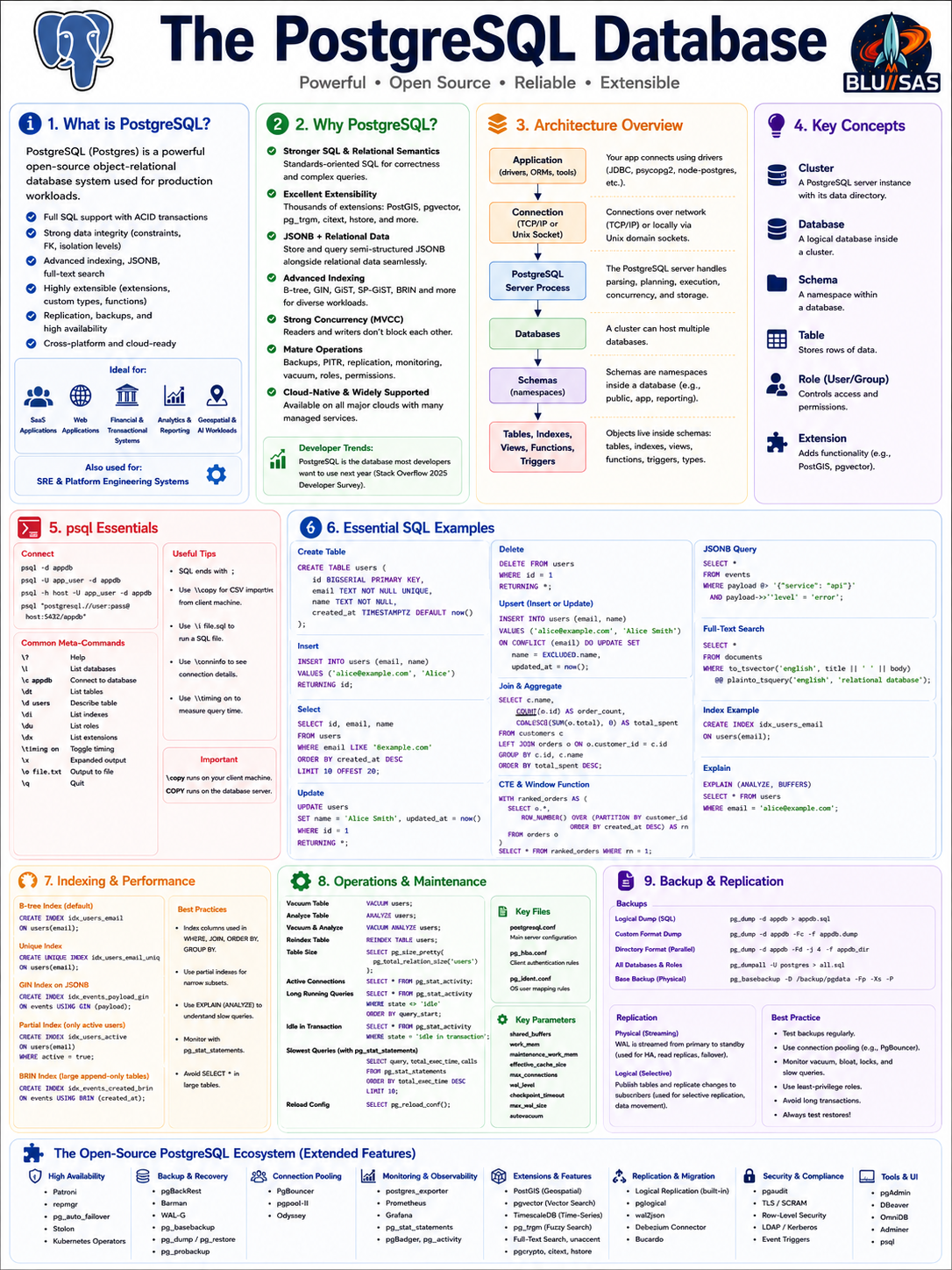
PostgreSQL, often called Postgres, is a powerful open-source object-relational database management system. It is a full server-based database, unlike SQLite, and is designed for multi-user, networked, production workloads.
PostgreSQL is used when you need:
Reliable relational data storage
Strong SQL support
Concurrent users
Transactions
Indexes
JSON support
Replication
Backups
Role-based access
Extensions
High data integrity
The PostgreSQL project describes it as an open-source object-relational database system with more than 35 years of development, known for reliability, feature robustness, and performance. It is also highly extensible: users can define custom data types, functions, operators, extensions, and procedural languages.
A typical PostgreSQL deployment looks like this:
Application
   |
   | TCP/IP or Unix socket
   v
PostgreSQL server process
   |
   v
Databases
   |
   v
Schemas
   |
   v
Tables, indexes, views, functions, triggers
PostgreSQL vs SQLite vs MySQL
| Feature | SQLite | MySQL | PostgreSQL |
|---|---|---|---|
| Server process | No | Yes | Yes |
| Best for | Local embedded DB | Web apps, CMS, OLTP | Serious relational + analytical workloads |
| Concurrency | Limited writes | Good | Excellent |
| SQL depth | Good | Good | Very strong |
| JSON support | Good | Good | Very strong with JSONB |
| Extensions | Limited | Plugin-based | Very strong |
| Replication | Not built-in server replication | Built-in | Built-in physical and logical replication |
| Roles/users | No server users | Yes | Yes |
| Stored procedures | Limited | Yes | Yes |
| Advanced indexes | Limited | Good | Excellent |
| Operational complexity | Low | Medium | Medium/high |
Who uses PostgreSQL?
PostgreSQL is used by a very broad range of organisations and workloads.
1. SaaS companies
PostgreSQL is common for SaaS platforms because it handles multi-tenant application data well.
Examples:
Users
Accounts
Billing records
Subscriptions
Audit logs
Feature flags
Application metadata
A SaaS app might use PostgreSQL as its primary transactional database and Redis, Kafka, Elasticsearch, or ClickHouse around it for caching, streaming, search, and analytics.
2. Web applications
PostgreSQL is widely used behind web frameworks such as:
Django
Ruby on Rails
Phoenix / Elixir
Laravel
Spring Boot
Node.js apps
Go web services
FastAPI
Typical data:
Users
Sessions
Orders
Products
Posts
Comments
Permissions
Transactions
3. Financial and transactional systems
PostgreSQL is popular where correctness matters.
Examples:
Payments
Ledgers
Invoices
Order books
Audit trails
Banking-style workflows
Inventory movement
Its support for ACID transactions, constraints, isolation levels, foreign keys, and transactional DDL makes it suitable for high-integrity systems.
4. Analytics and reporting workloads
Although PostgreSQL is not a columnar warehouse like ClickHouse, BigQuery, Snowflake, or Redshift, it is often used for operational analytics.
Examples:
Business dashboards
Internal reporting
Aggregated application data
Daily summaries
Operational metrics
Customer reporting
PostgreSQL also supports materialized views, window functions, common table expressions, JSON queries, full-text search, and extensions.
5. Geospatial systems
PostgreSQL is widely used with the PostGIS extension for geospatial workloads.
Examples:
Maps
Routing
Delivery zones
Location search
Fleet tracking
Geofencing
Spatial analytics
PostGIS is one of the major reasons PostgreSQL is attractive beyond ordinary relational workloads.
6. AI and vector-search applications
PostgreSQL has become more popular in AI-era application stacks because extensions such as pgvector allow vector embeddings to be stored and queried inside PostgreSQL.
Example use cases:
Semantic search
RAG applications
Document similarity
Recommendation systems
Embedding storage
Hybrid relational + vector search
This does not mean PostgreSQL replaces specialised vector databases in every case, but it is attractive when teams want to keep application metadata, relational records, and embeddings in one database.
7. SRE and platform engineering systems
For SREs, PostgreSQL commonly appears behind:
Internal developer platforms
CMDBs
Incident-management tools
Deployment systems
Service catalogues
Kubernetes control-plane adjacent apps
Observability metadata stores
Asset inventories
Access-control systems
Automation portals
It is also useful for home-lab and platform projects because it teaches real production database concepts: users, roles, WAL, backups, replication, schema migrations, query plans, indexes, vacuuming, and connection pooling.
Is PostgreSQL more popular than MySQL?
The careful answer is:
PostgreSQL is more popular than MySQL among many professional developers and new application stacks, but MySQL is still ahead in some broad popularity rankings and remains extremely widely deployed.
For example, Stack Overflow’s 2025 Developer Survey press release says PostgreSQL ranked highest among database technologies that developers want to use next year, and among those who used it this year and want to continue using it next year, for the third year in a row.
However, DB-Engines’ overall ranking still places MySQL above PostgreSQL in its broad database popularity index, while PostgreSQL is close behind and highly ranked. DB-Engines also notes that its ranking is updated monthly and measures popularity using its own methodology.
So the better framing is:
Among developers building modern applications: PostgreSQL often feels more popular.
Across the total installed base of existing systems: MySQL remains huge.
Across broad popularity indexes: MySQL may still rank higher.
Across developer enthusiasm and future intent: PostgreSQL often leads.
Why PostgreSQL is often preferred over MySQL
1. Stronger SQL and relational semantics
PostgreSQL has a reputation for stricter, more standards-oriented SQL behaviour.
That matters when you care about:
Correctness
Complex joins
Transactional consistency
Constraints
Window functions
CTEs
Advanced indexing
Rich data modelling
PostgreSQL tends to be preferred by engineers who want the database to enforce correctness instead of pushing too much integrity logic into the application.
2. Excellent extensibility
PostgreSQL is famous for extensions.
Common examples:
PostGIS       geospatial data
pgvector      vector embeddings
pg_stat_statements query performance analysis
pg_trgm       trigram search
uuid-ossp     UUID generation
citext        case-insensitive text
hstore        key/value data
postgres_fdw  foreign data wrapper
The official PostgreSQL site explicitly highlights extensibility: custom data types, custom functions, and code from different programming languages can be added without recompiling the database.
This is one of PostgreSQL’s biggest advantages over MySQL.
3. JSONB plus relational data
PostgreSQL is relational, but it also handles semi-structured JSON data well.
Example:
CREATE TABLE events (
    id BIGSERIAL PRIMARY KEY,
    payload JSONB NOT NULL,
    created_at TIMESTAMPTZ DEFAULT now()
);
Query JSON:
SELECT payload->>'service' AS service
FROM events
WHERE payload->>'level' = 'error';
This lets teams use PostgreSQL for hybrid workloads:
Structured relational data
Semi-structured JSON events
Application metadata
Configuration records
Audit payloads
PostgreSQL 17 added further SQL/JSON capabilities, including JSON_TABLE(), which converts JSON data into a table representation.
4. Better advanced indexing options
PostgreSQL supports several index types:
B-tree
Hash
GIN
GiST
SP-GiST
BRIN
This gives PostgreSQL strong options for:
JSONB queries
Full-text search
Geospatial search
Array fields
Trigram similarity
Time-series-like data
Large append-only tables
Example GIN index on JSONB:
CREATE INDEX idx_events_payload_gin
ON events
USING GIN (payload);
Example trigram index:
CREATE EXTENSION IF NOT EXISTS pg_trgm;

CREATE INDEX idx_users_email_trgm
ON users
USING GIN (email gin_trgm_ops);
5. Strong concurrency model
PostgreSQL uses MVCC, or Multi-Version Concurrency Control.
That means readers and writers can often work without blocking each other.
Example:
User A reads a row
User B updates the row
User A still sees a consistent snapshot
User B can commit independently
This is one reason PostgreSQL works well for busy multi-user systems.
6. Strong operational features
PostgreSQL has mature tooling for:
Backups
Point-in-time recovery
Streaming replication
Logical replication
Query planning
Statistics
Vacuuming
Roles and permissions
Connection pooling
High availability patterns
PostgreSQL supports both physical and logical replication; logical replication allows fine-grained replication of data objects and their changes, while physical replication works at the block/WAL level.
7. Cloud-native popularity
Managed PostgreSQL is widely available:
AWS RDS PostgreSQL
Amazon Aurora PostgreSQL
Google Cloud SQL for PostgreSQL
Azure Database for PostgreSQL
Neon
Supabase
Crunchy Bridge
Aiven
Timescale
EDB
This makes PostgreSQL easy to adopt without having to operate it from scratch.
PostgreSQL architecture basics
Cluster
A PostgreSQL cluster is a data directory managed by one PostgreSQL server instance.
Example:
/var/lib/postgresql/16/main
/var/lib/pgsql/16/data
A cluster can contain multiple databases.
Database
A database is an isolated logical database inside the cluster.
Example:
CREATE DATABASE appdb;Schema
A schema is a namespace inside a database.
Example:
CREATE SCHEMA app;Objects live inside schemas:
app.users
app.orders
public.products
Table
A table stores rows.
CREATE TABLE app.users (
    id BIGSERIAL PRIMARY KEY,
    email TEXT NOT NULL UNIQUE,
    name TEXT NOT NULL,
    created_at TIMESTAMPTZ DEFAULT now()
);
Role
A role is a user or group.
CREATE ROLE app_user LOGIN PASSWORD 'change-me';Extension
An extension adds functionality.
CREATE EXTENSION IF NOT EXISTS pg_stat_statements;
CREATE EXTENSION IF NOT EXISTS pg_trgm;
CREATE EXTENSION IF NOT EXISTS "uuid-ossp";
Installing PostgreSQL
Ubuntu / Debian
sudo apt update
sudo apt install postgresql postgresql-client
Check service:
sudo systemctl status postgresqlSwitch to the postgres OS user:
sudo -iu postgresOpen psql:
psqlRocky Linux / RHEL / Fedora
sudo dnf install postgresql-server postgresql-contribInitialise database:
sudo postgresql-setup --initdbStart and enable:
sudo systemctl enable --now postgresqlOpen psql:
sudo -iu postgres psqlPackage names and versions vary depending on whether you use the distro packages or the PostgreSQL upstream repository.
Connecting with psql
Basic local connection:
psqlConnect to a database:
psql -d appdbConnect as a user:
psql -U app_user -d appdbConnect to remote host:
psql -h db.example.com -p 5432 -U app_user -d appdbUse a connection string:
psql "postgresql://app_user:password@db.example.com:5432/appdb"Prompt for password:
psql -h localhost -U app_user -d appdb -WUseful psql meta-commands
PostgreSQL SQL commands end with ;.
psql shell commands begin with a backslash.
Help
\?SQL help:
\hHelp for a specific SQL command:
\h CREATE TABLEList databases
\lor:
\listConnect to another database
\c appdbConnect as another user:
\c appdb app_userList schemas
\dnList tables
\dtList tables in all schemas:
\dt *.*Describe table
\d usersMore detail:
\d+ usersList indexes
\diList views
\dvList functions
\dfList roles
\duList extensions
\dxShow current connection info
\conninfoToggle expanded output
Useful for wide rows:
\xRun a SQL file
\i schema.sqlFrom shell:
psql -d appdb -f schema.sqlOutput to file
\o output.txt
SELECT * FROM users;
\o
CSV export from psql
\copy users TO 'users.csv' CSV HEADERExport query result:
\copy (SELECT id, email FROM users) TO 'users.csv' CSV HEADERImport CSV:
\copy users(email, name) FROM 'users.csv' CSV HEADERImportant distinction:
COPY     runs on the database server
\copy    runs from the psql client machine
For most SRE/admin work, \copy is often easier.
Timing queries
\timing onExit
\qCore PostgreSQL admin commands
Create database
From shell:
createdb appdbFrom SQL:
CREATE DATABASE appdb;Drop database
dropdb appdbor:
DROP DATABASE appdb;Force disconnect active sessions first if needed:
SELECT pg_terminate_backend(pid)
FROM pg_stat_activity
WHERE datname = 'appdb'
  AND pid <> pg_backend_pid();
Then:
DROP DATABASE appdb;Create user / role
CREATE ROLE app_user
LOGIN
PASSWORD 'change-me';
Create a read-only role:
CREATE ROLE readonly;Grant login user membership:
GRANT readonly TO analyst_user;Change password
ALTER ROLE app_user PASSWORD 'new-password';Grant database access
GRANT CONNECT ON DATABASE appdb TO app_user;Grant schema usage:
GRANT USAGE ON SCHEMA public TO app_user;Grant table privileges:
GRANT SELECT, INSERT, UPDATE, DELETE
ON ALL TABLES IN SCHEMA public
TO app_user;
Grant sequence privileges:
GRANT USAGE, SELECT
ON ALL SEQUENCES IN SCHEMA public
TO app_user;
Default privileges for future tables:
ALTER DEFAULT PRIVILEGES IN SCHEMA public
GRANT SELECT, INSERT, UPDATE, DELETE ON TABLES TO app_user;
Creating tables
Simple table
CREATE TABLE users (
    id BIGSERIAL PRIMARY KEY,
    email TEXT NOT NULL UNIQUE,
    name TEXT NOT NULL,
    created_at TIMESTAMPTZ NOT NULL DEFAULT now()
);
Table with explicit identity column
Modern PostgreSQL style:
CREATE TABLE users (
    id BIGINT GENERATED ALWAYS AS IDENTITY PRIMARY KEY,
    email TEXT NOT NULL UNIQUE,
    name TEXT NOT NULL,
    created_at TIMESTAMPTZ NOT NULL DEFAULT now()
);
Table with UUID primary key
CREATE EXTENSION IF NOT EXISTS "uuid-ossp";

CREATE TABLE accounts (
    id UUID PRIMARY KEY DEFAULT uuid_generate_v4(),
    name TEXT NOT NULL,
    created_at TIMESTAMPTZ NOT NULL DEFAULT now()
);
Alternatively, with gen_random_uuid():
CREATE EXTENSION IF NOT EXISTS pgcrypto;

CREATE TABLE accounts (
    id UUID PRIMARY KEY DEFAULT gen_random_uuid(),
    name TEXT NOT NULL,
    created_at TIMESTAMPTZ NOT NULL DEFAULT now()
);
PostgreSQL data types
Common types:
| Type | Use |
|---|---|
SMALLINT | Small integer |
INTEGER | Normal integer |
BIGINT | Large integer |
NUMERIC(10,2) | Exact decimal, good for money-like values |
REAL | 32-bit floating point |
DOUBLE PRECISION | 64-bit floating point |
TEXT | Variable-length text |
VARCHAR(n) | Text with max length |
BOOLEAN | true / false |
DATE | Date only |
TIME | Time only |
TIMESTAMP | Timestamp without timezone |
TIMESTAMPTZ | Timestamp with timezone handling |
UUID | UUID |
JSON | JSON text |
JSONB | Binary JSON, usually preferred |
BYTEA | Binary data |
INET | IP address |
CIDR | Network range |
ARRAY | Array values |
ENUM | Enumerated values |
For application timestamps, prefer:
TIMESTAMPTZrather than:
TIMESTAMPInsert queries
Insert one row
INSERT INTO users (email, name)
VALUES ('alice@example.com', 'Alice');
Insert many rows
INSERT INTO users (email, name)
VALUES
    ('bob@example.com', 'Bob'),
    ('carol@example.com', 'Carol'),
    ('dave@example.com', 'Dave');
Insert and return generated ID
INSERT INTO users (email, name)
VALUES ('eve@example.com', 'Eve')
RETURNING id;
Insert and return whole row
INSERT INTO users (email, name)
VALUES ('frank@example.com', 'Frank')
RETURNING *;
Select queries
Select all rows
SELECT *
FROM users;
Select specific columns
SELECT id, email, name
FROM users;
Filter
SELECT *
FROM users
WHERE email = 'alice@example.com';
Multiple conditions
SELECT *
FROM users
WHERE created_at >= now() - interval '7 days'
  AND email LIKE '%example.com';
Sort
SELECT *
FROM users
ORDER BY created_at DESC;
Limit
SELECT *
FROM users
ORDER BY created_at DESC
LIMIT 10;
Pagination
SELECT *
FROM users
ORDER BY id
LIMIT 50 OFFSET 100;
For large datasets, keyset pagination is often better:
SELECT *
FROM users
WHERE id > 1000
ORDER BY id
LIMIT 50;
Update queries
Update one row
UPDATE users
SET name = 'Alice Smith'
WHERE id = 1;
Update and return changed row
UPDATE users
SET name = 'Alice Smith'
WHERE id = 1
RETURNING *;
Update with timestamp
UPDATE users
SET
    name = 'Alice Smith',
    updated_at = now()
WHERE id = 1;
Delete queries
Delete one row
DELETE FROM users
WHERE id = 1;
Delete and return deleted row
DELETE FROM users
WHERE id = 1
RETURNING *;
Delete old rows
DELETE FROM events
WHERE created_at < now() - interval '90 days';
For very large deletes, batch them to avoid huge transactions.
Upserts
PostgreSQL supports ON CONFLICT.
Insert or ignore
INSERT INTO users (email, name)
VALUES ('alice@example.com', 'Alice')
ON CONFLICT (email) DO NOTHING;
Insert or update
INSERT INTO users (email, name)
VALUES ('alice@example.com', 'Alice Smith')
ON CONFLICT (email)
DO UPDATE SET
    name = EXCLUDED.name;
Upsert with timestamp
INSERT INTO users (email, name, created_at)
VALUES ('alice@example.com', 'Alice Smith', now())
ON CONFLICT (email)
DO UPDATE SET
    name = EXCLUDED.name,
    updated_at = now();
Constraints
Primary key
CREATE TABLE users (
    id BIGSERIAL PRIMARY KEY,
    email TEXT NOT NULL
);
Unique
CREATE TABLE users (
    id BIGSERIAL PRIMARY KEY,
    email TEXT NOT NULL UNIQUE
);
Check
CREATE TABLE products (
    id BIGSERIAL PRIMARY KEY,
    name TEXT NOT NULL,
    price NUMERIC(10,2) NOT NULL CHECK (price >= 0)
);
Foreign key
CREATE TABLE users (
    id BIGSERIAL PRIMARY KEY,
    email TEXT NOT NULL UNIQUE
);

CREATE TABLE orders (
    id BIGSERIAL PRIMARY KEY,
    user_id BIGINT NOT NULL REFERENCES users(id),
    total NUMERIC(10,2) NOT NULL CHECK (total >= 0),
    created_at TIMESTAMPTZ NOT NULL DEFAULT now()
);
Foreign key with cascade
CREATE TABLE orders (
    id BIGSERIAL PRIMARY KEY,
    user_id BIGINT NOT NULL REFERENCES users(id) ON DELETE CASCADE,
    total NUMERIC(10,2) NOT NULL
);
Use ON DELETE CASCADE carefully. It can delete many related rows automatically.
Joins
Create example tables:
CREATE TABLE customers (
    id BIGSERIAL PRIMARY KEY,
    email TEXT NOT NULL UNIQUE,
    name TEXT NOT NULL
);

CREATE TABLE orders (
    id BIGSERIAL PRIMARY KEY,
    customer_id BIGINT NOT NULL REFERENCES customers(id),
    total NUMERIC(10,2) NOT NULL,
    created_at TIMESTAMPTZ NOT NULL DEFAULT now()
);
Inner join
Only customers with matching orders:
SELECT
    c.id,
    c.name,
    o.id AS order_id,
    o.total
FROM customers c
JOIN orders o ON o.customer_id = c.id;
Left join
All customers, even those without orders:
SELECT
    c.id,
    c.name,
    o.id AS order_id,
    o.total
FROM customers c
LEFT JOIN orders o ON o.customer_id = c.id;
Aggregate join
SELECT
    c.id,
    c.name,
    COUNT(o.id) AS order_count,
    COALESCE(SUM(o.total), 0) AS total_spent
FROM customers c
LEFT JOIN orders o ON o.customer_id = c.id
GROUP BY c.id, c.name
ORDER BY total_spent DESC;
Aggregates
Count
SELECT COUNT(*)
FROM users;
Sum
SELECT SUM(total)
FROM orders;
Average
SELECT AVG(total)
FROM orders;
Min and max
SELECT MIN(total), MAX(total)
FROM orders;
Group by
SELECT
    customer_id,
    COUNT(*) AS order_count,
    SUM(total) AS total_spent
FROM orders
GROUP BY customer_id;
Having
SELECT
    customer_id,
    SUM(total) AS total_spent
FROM orders
GROUP BY customer_id
HAVING SUM(total) > 100;
Window functions
Window functions calculate values across related rows without collapsing the result set.
Row number
SELECT
    id,
    customer_id,
    total,
    ROW_NUMBER() OVER (
        PARTITION BY customer_id
        ORDER BY created_at DESC
    ) AS order_rank
FROM orders;
Running total
SELECT
    customer_id,
    created_at,
    total,
    SUM(total) OVER (
        PARTITION BY customer_id
        ORDER BY created_at
    ) AS running_total
FROM orders;
Latest order per customer
WITH ranked_orders AS (
    SELECT
        o.*,
        ROW_NUMBER() OVER (
            PARTITION BY customer_id
            ORDER BY created_at DESC
        ) AS rn
    FROM orders o
)
SELECT *
FROM ranked_orders
WHERE rn = 1;
Common Table Expressions
Basic CTE
WITH recent_orders AS (
    SELECT *
    FROM orders
    WHERE created_at >= now() - interval '30 days'
)
SELECT
    customer_id,
    COUNT(*) AS order_count,
    SUM(total) AS total_spent
FROM recent_orders
GROUP BY customer_id;
Recursive CTE
WITH RECURSIVE numbers(n) AS (
    SELECT 1
    UNION ALL
    SELECT n + 1
    FROM numbers
    WHERE n < 10
)
SELECT n
FROM numbers;
Indexes
Indexes are critical for PostgreSQL performance.
Basic B-tree index
CREATE INDEX idx_users_email
ON users(email);
Unique index
CREATE UNIQUE INDEX idx_users_email_unique
ON users(email);
Composite index
CREATE INDEX idx_orders_customer_created
ON orders(customer_id, created_at DESC);
Partial index
Only index active users:
CREATE INDEX idx_users_active_email
ON users(email)
WHERE active = true;
Expression index
CREATE INDEX idx_users_lower_email
ON users(lower(email));
Query:
SELECT *
FROM users
WHERE lower(email) = lower('Alice@Example.com');
GIN index for JSONB
CREATE INDEX idx_events_payload_gin
ON events
USING GIN (payload);
BRIN index for large append-only tables
CREATE INDEX idx_events_created_at_brin
ON events
USING BRIN (created_at);
BRIN indexes are useful for huge tables where data is naturally ordered, such as time-series/event tables.
Query planning and performance
Explain query
EXPLAIN
SELECT *
FROM users
WHERE email = 'alice@example.com';
Explain with actual runtime
EXPLAIN ANALYZE
SELECT *
FROM users
WHERE email = 'alice@example.com';
More detailed output
EXPLAIN (ANALYZE, BUFFERS)
SELECT *
FROM users
WHERE email = 'alice@example.com';
Be careful: EXPLAIN ANALYZE actually runs the query.
For destructive queries, wrap in a transaction and roll back:
BEGIN;

EXPLAIN ANALYZE
DELETE FROM events
WHERE created_at < now() - interval '90 days';

ROLLBACK;
Views and materialized views
View
A view is a saved query.
CREATE VIEW customer_order_totals AS
SELECT
    c.id AS customer_id,
    c.name,
    COUNT(o.id) AS order_count,
    COALESCE(SUM(o.total), 0) AS total_spent
FROM customers c
LEFT JOIN orders o ON o.customer_id = c.id
GROUP BY c.id, c.name;
Query it:
SELECT *
FROM customer_order_totals;Materialized view
A materialized view stores the result physically.
CREATE MATERIALIZED VIEW daily_order_totals AS
SELECT
date_trunc('day', created_at) AS day,
COUNT(*) AS order_count,
SUM(total) AS total_revenue
FROM orders
GROUP BY day;Refresh it:
REFRESH MATERIALIZED VIEW daily_order_totals;For concurrent refresh:
CREATE UNIQUE INDEX idx_daily_order_totals_day
ON daily_order_totals(day);
REFRESH MATERIALIZED VIEW CONCURRENTLY daily_order_totals;JSONB queries
Create table:
CREATE TABLE events (
id BIGSERIAL PRIMARY KEY,
payload JSONB NOT NULL,
created_at TIMESTAMPTZ NOT NULL DEFAULT now()
);Insert JSON:
INSERT INTO events (payload)
VALUES
('{"level":"error","service":"api","duration_ms":153}'),
('{"level":"info","service":"worker","duration_ms":42}');Extract JSON text:
SELECT payload->>'service' AS service
FROM events;Extract JSON object:
SELECT payload->'service'
FROM events;Filter JSON:
SELECT *
FROM events
WHERE payload->>'level' = 'error';JSON containment:
SELECT *
FROM events
WHERE payload @> '{"service":"api"}';Index JSONB:
CREATE INDEX idx_events_payload
ON events
USING GIN (payload);Full-text search
Create table:
CREATE TABLE documents (
id BIGSERIAL PRIMARY KEY,
title TEXT NOT NULL,
body TEXT NOT NULL
);Insert:
INSERT INTO documents (title, body)
VALUES
('PostgreSQL Guide', 'PostgreSQL is a powerful relational database.'),
('SQLite Guide', 'SQLite is a lightweight embedded database.');Search:
SELECT *
FROM documents
WHERE to_tsvector('english', title || ' ' || body)
@@ plainto_tsquery('english', 'relational database');Create index:
CREATE INDEX idx_documents_search
ON documents
USING GIN (
to_tsvector('english', title || ' ' || body)
);Transactions
Basic transaction
BEGIN;
UPDATE accounts
SET balance = balance - 100
WHERE id = 1;
UPDATE accounts
SET balance = balance + 100
WHERE id = 2;
COMMIT;Rollback:
ROLLBACK;Savepoint
BEGIN;
INSERT INTO users (email, name)
VALUES ('a@example.com', 'A');
SAVEPOINT before_second_insert;
INSERT INTO users (email, name)
VALUES ('b@example.com', 'B');
ROLLBACK TO SAVEPOINT before_second_insert;
COMMIT;Locking and concurrency
See active queries
SELECT
pid,
usename,
datname,
state,
wait_event_type,
wait_event,
query,
now() - query_start AS query_age
FROM pg_stat_activity
ORDER BY query_start;See blocking queries
SELECT
blocked.pid AS blocked_pid,
blocked.query AS blocked_query,
blocking.pid AS blocking_pid,
blocking.query AS blocking_query
FROM pg_stat_activity blocked
JOIN pg_locks blocked_locks
ON blocked_locks.pid = blocked.pid
JOIN pg_locks blocking_locks
ON blocking_locks.locktype = blocked_locks.locktype
AND blocking_locks.database IS NOT DISTINCT FROM blocked_locks.database
AND blocking_locks.relation IS NOT DISTINCT FROM blocked_locks.relation
AND blocking_locks.page IS NOT DISTINCT FROM blocked_locks.page
AND blocking_locks.tuple IS NOT DISTINCT FROM blocked_locks.tuple
AND blocking_locks.virtualxid IS NOT DISTINCT FROM blocked_locks.virtualxid
AND blocking_locks.transactionid IS NOT DISTINCT FROM blocked_locks.transactionid
AND blocking_locks.classid IS NOT DISTINCT FROM blocked_locks.classid
AND blocking_locks.objid IS NOT DISTINCT FROM blocked_locks.objid
AND blocking_locks.objsubid IS NOT DISTINCT FROM blocked_locks.objsubid
AND blocking_locks.pid != blocked_locks.pid
JOIN pg_stat_activity blocking
ON blocking.pid = blocking_locks.pid
WHERE NOT blocked_locks.granted
AND blocking_locks.granted;Kill a query
Cancel query:
SELECT pg_cancel_backend(12345);Terminate connection:
SELECT pg_terminate_backend(12345);Use pg_terminate_backend carefully.
Maintenance commands
Vacuum
VACUUM;Vacuum one table:
VACUUM users;Verbose:
VACUUM VERBOSE users;Analyze
ANALYZE;Analyze one table:
ANALYZE users;Vacuum and analyze
VACUUM ANALYZE users;Reindex
REINDEX TABLE users;Check table size
SELECT pg_size_pretty(pg_total_relation_size('users')) AS total_size;Largest tables
SELECT
schemaname,
relname AS table_name,
pg_size_pretty(pg_total_relation_size(relid)) AS total_size
FROM pg_catalog.pg_statio_user_tables
ORDER BY pg_total_relation_size(relid) DESC
LIMIT 20;Backup and restore
PostgreSQL has several backup methods:
Logical backup with pg_dump
Whole-cluster logical backup with pg_dumpall
Physical backup with pg_basebackup
WAL archiving and point-in-time recovery
Storage-level snapshots, if coordinated correctlyThe official PostgreSQL documentation states that pg_dump can export an entire database and that, when used with archive formats, pg_restore can examine and selectively restore parts of the archive. The custom format -Fc and directory format -Fd are described as flexible options.
Dump one database as SQL
pg_dump -U app_user -h localhost -d appdb > appdb.sqlRestore:
psql -U app_user -h localhost -d appdb < appdb.sqlCustom-format backup
pg_dump -U app_user -h localhost -d appdb -Fc -f appdb.dumpRestore:
pg_restore -U app_user -h localhost -d appdb appdb.dumpRestore with clean
pg_restore -U app_user -h localhost -d appdb --clean --if-exists appdb.dumpParallel dump
Directory format:
pg_dump -U app_user -h localhost -d appdb -Fd -j 4 -f appdb_dirRestore:
pg_restore -U app_user -h localhost -d appdb -j 4 appdb_dirDump all databases and roles
pg_dumpall -U postgres > all_databases.sqlRestore:
psql -U postgres < all_databases.sqlReplication basics
Physical streaming replication
Used for high availability and read replicas.
Concept:
Primary PostgreSQL server
|
| WAL stream
v
Standby PostgreSQL serverUses:
Failover
Read scaling
Disaster recovery
Maintenance windowsLogical replication
Used for selective table/database replication.
Concept:
Publisher
|
| Publication
v
SubscriberPostgreSQL’s logical replication replicates data object changes based on replication identity, usually a primary key, and allows more fine-grained control than physical replication.
Example publisher:
CREATE PUBLICATION app_pub
FOR TABLE users, orders;Example subscriber:
CREATE SUBSCRIPTION app_sub
CONNECTION 'host=primary.example.com dbname=appdb user=repl password=secret'
PUBLICATION app_pub;Useful SRE monitoring queries
Active connections
SELECT
datname,
usename,
state,
COUNT(*) AS connections
FROM pg_stat_activity
GROUP BY datname, usename, state
ORDER BY connections DESC;Long-running queries
SELECT
pid,
usename,
datname,
state,
now() - query_start AS duration,
query
FROM pg_stat_activity
WHERE state <> 'idle'
ORDER BY duration DESC;Idle in transaction
SELECT
pid,
usename,
datname,
now() - xact_start AS transaction_age,
query
FROM pg_stat_activity
WHERE state = 'idle in transaction'
ORDER BY transaction_age DESC;Cache hit ratio
SELECT
datname,
blks_hit,
blks_read,
round(
100.0 * blks_hit / NULLIF(blks_hit + blks_read, 0),
2
) AS cache_hit_percent
FROM pg_stat_database
ORDER BY cache_hit_percent ASC;Database sizes
SELECT
datname,
pg_size_pretty(pg_database_size(datname)) AS size
FROM pg_database
ORDER BY pg_database_size(datname) DESC;Table bloat indicators
A full bloat analysis can be complex, but dead tuple counts are a useful start:
SELECT
schemaname,
relname,
n_live_tup,
n_dead_tup,
last_vacuum,
last_autovacuum
FROM pg_stat_user_tables
ORDER BY n_dead_tup DESC
LIMIT 20;Slow queries with pg_stat_statements
Enable extension:
CREATE EXTENSION IF NOT EXISTS pg_stat_statements;Query slowest total time:
SELECT
query,
calls,
total_exec_time,
mean_exec_time,
rows
FROM pg_stat_statements
ORDER BY total_exec_time DESC
LIMIT 10;Query slowest average time:
SELECT
query,
calls,
mean_exec_time,
rows
FROM pg_stat_statements
WHERE calls > 10
ORDER BY mean_exec_time DESC
LIMIT 10;PostgreSQL configuration files
Common files:
postgresql.conf
pg_hba.conf
pg_ident.confpostgresql.conf
Controls server configuration:
listen_addresses
port
shared_buffers
work_mem
maintenance_work_mem
effective_cache_size
max_connections
wal_level
archive_mode
log_min_duration_statementpg_hba.conf
Controls client authentication.
Example local development rule:
host appdb app_user 127.0.0.1/32 scram-sha-256Example network rule:
host appdb app_user 10.0.0.0/8 scram-sha-256Reload after changes:
SELECT pg_reload_conf();or:
sudo systemctl reload postgresqlCommon tuning parameters
These are not universal values. They depend on RAM, workload, storage, query patterns, and connection count.
| Parameter | Purpose |
|---|---|
shared_buffers | PostgreSQL buffer cache |
work_mem | Memory for sorts/hash operations per operation |
maintenance_work_mem | Memory for vacuum, create index, alter table |
effective_cache_size | Planner estimate of OS + DB cache |
max_connections | Max direct DB connections |
wal_buffers | WAL buffering |
checkpoint_timeout | Checkpoint interval |
max_wal_size | WAL growth before checkpoint pressure |
autovacuum | Automatic vacuum process |
log_min_duration_statement | Slow query logging threshold |
For SREs, one of the most important practical lessons is:
Do not let application servers open unlimited direct PostgreSQL connections.
Use a connection pooler such as PgBouncer when needed.Security basics
Use least privilege
Do not run applications as postgres.
Create a dedicated app user:
CREATE ROLE app_user LOGIN PASSWORD 'strong-password';
GRANT CONNECT ON DATABASE appdb TO app_user;
GRANT USAGE ON SCHEMA public TO app_user;
GRANT SELECT, INSERT, UPDATE, DELETE ON ALL TABLES IN SCHEMA public TO app_user;Use read-only users for reporting
CREATE ROLE readonly;
GRANT CONNECT ON DATABASE appdb TO readonly;
GRANT USAGE ON SCHEMA public TO readonly;
GRANT SELECT ON ALL TABLES IN SCHEMA public TO readonly;
CREATE ROLE analyst LOGIN PASSWORD 'strong-password';
GRANT readonly TO analyst;Set default privileges
ALTER DEFAULT PRIVILEGES IN SCHEMA public
GRANT SELECT ON TABLES TO readonly;Prefer SCRAM authentication
Modern PostgreSQL deployments should generally prefer SCRAM password authentication over older MD5 authentication where possible.
Practical PostgreSQL cheat sheet
# Connect
psql -h localhost -U app_user -d appdb
# Connect as postgres on Linux
sudo -iu postgres psql
# Create database
createdb appdb
# Drop database
dropdb appdb
# Run SQL file
psql -d appdb -f schema.sql
# Backup
pg_dump -d appdb -Fc -f appdb.dump
# Restore
pg_restore -d appdb appdb.dump
# List databases inside psql
\l
# Connect to database inside psql
\c appdb
# List tables
\dt
# Describe table
\d+ users
# List roles
\du
# List extensions
\dx
# Toggle timing
\timing on
# Exit
\qSQL cheat sheet:
-- Create table
CREATE TABLE users (
id BIGSERIAL PRIMARY KEY,
email TEXT NOT NULL UNIQUE,
name TEXT NOT NULL,
created_at TIMESTAMPTZ DEFAULT now()
);
-- Insert
INSERT INTO users (email, name)
VALUES ('alice@example.com', 'Alice')
RETURNING id;
-- Select
SELECT id, email, name
FROM users
WHERE email LIKE '%example.com'
ORDER BY created_at DESC
LIMIT 10;
-- Update
UPDATE users
SET name = 'Alice Smith'
WHERE id = 1
RETURNING *;
-- Delete
DELETE FROM users
WHERE id = 1
RETURNING *;
-- Upsert
INSERT INTO users (email, name)
VALUES ('alice@example.com', 'Alice Smith')
ON CONFLICT (email)
DO UPDATE SET name = EXCLUDED.name;
-- Index
CREATE INDEX idx_users_email ON users(email);
-- Explain
EXPLAIN (ANALYZE, BUFFERS)
SELECT * FROM users WHERE email = 'alice@example.com';PostgreSQL best practices for SREs
1. Always test backups
A backup that has not been restored is only a hope.
Use:
pg_dump
pg_restore
pg_basebackup
WAL archiving
PITR tests2. Monitor connections
Watch:
Connection count
Idle in transaction sessions
Long-running queries
Blocked queries
Connection pool saturation3. Monitor vacuum
Watch:
Dead tuples
Autovacuum activity
Transaction ID wraparound risk
Table bloat
Index bloat4. Use indexes deliberately
Index columns used in:
WHERE
JOIN
ORDER BY
GROUP BY
UNIQUE constraints
Foreign keysBut avoid indexing everything. Indexes improve reads but slow writes and consume storage.
5. Use migrations
Use schema migration tools such as:
Flyway
Liquibase
Sqitch
Alembic
Django migrations
Rails migrations
Goose
Atlas6. Avoid unbounded queries
Dangerous:
SELECT * FROM events;Better:
SELECT *
FROM events
ORDER BY created_at DESC
LIMIT 100;7. Use EXPLAIN ANALYZE
Do not guess why a query is slow. Check the plan:
EXPLAIN (ANALYZE, BUFFERS)
SELECT ...8. Avoid long transactions
Long transactions can prevent vacuum from cleaning old row versions.
Watch for:
SELECT *
FROM pg_stat_activity
WHERE state = 'idle in transaction';9. Use connection pooling
For high-traffic apps, use:
PgBouncer
Application-side pooling
Managed database proxy features10. Prefer PostgreSQL when correctness matters
PostgreSQL is a very strong default choice when you need:
Reliable transactions
Data integrity
Advanced SQL
JSON plus relational modelling
Extension ecosystem
Operational maturity
Future flexibilityBottom-line comparison
Use PostgreSQL when you want a serious production relational database with strong SQL, integrity, extensibility, JSONB, rich indexing, replication, and advanced query capabilities.
Use MySQL when you are working in ecosystems where it is already standard, especially legacy LAMP stacks, WordPress-style workloads, simple high-read web workloads, or existing MySQL operational environments.
Use SQLite when you want a local embedded database with no server.
For SRE learning, PostgreSQL is especially valuable because it exposes you to real-world database operations: roles, backups, WAL, replication, vacuuming, query plans, indexes, locks, connection limits, and production incident patterns.
PostgreSQL Database Extended Features
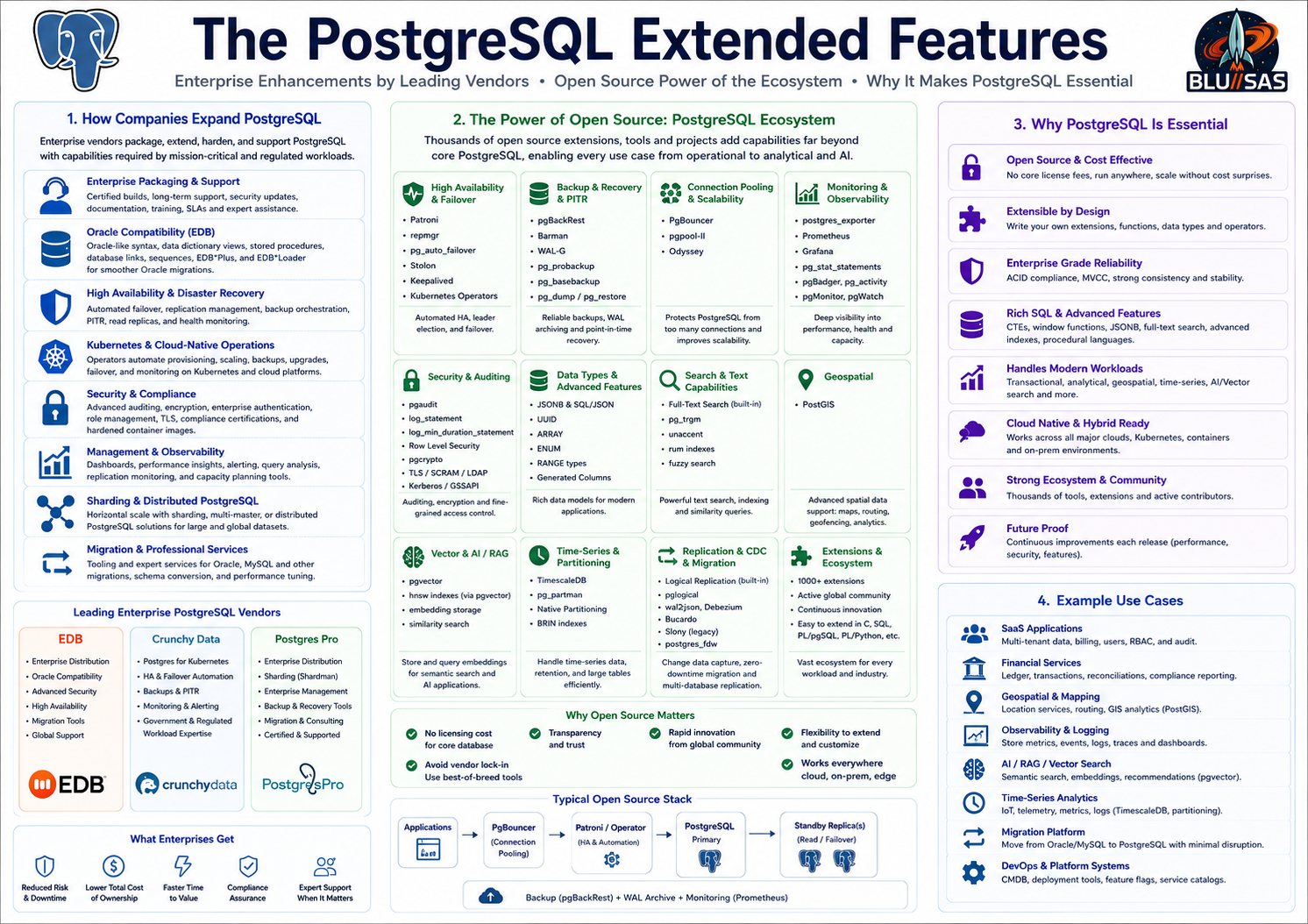
How enterprise PostgreSQL vendors extend it
1. Enterprise packaging and support
They provide tested PostgreSQL builds, version compatibility, support SLAs, security updates, documentation, certified platforms, and upgrade guidance.
This matters to banks, governments, SaaS companies, and regulated enterprises because they need predictable support, not just community mailing lists.
2. Oracle compatibility
This is especially associated with EDB Postgres Advanced Server. EDB adds compatibility features for Oracle-style applications, including Oracle-like syntax, data dictionary views, procedural language features, database links, EDBPlus, and EDBLoader-style tooling. This is aimed at Oracle migration projects where companies want to reduce licence cost without rewriting every application immediately.
3. High availability and disaster recovery
Enterprise vendors bundle or integrate tooling for:
Streaming replication
Failover automation
Backup orchestration
Point-in-time recovery
Read replicas
Replication monitoring
Cluster health checksCrunchy Data, for example, positions Crunchy Postgres and Crunchy Postgres for Kubernetes around production deployment, backups, HA, monitoring, disaster recovery, and connection scaling.
4. Kubernetes operators
Crunchy Data is strong here. Its Postgres Operator automates PostgreSQL lifecycle tasks on Kubernetes: provisioning, backups, failover, upgrades, scaling, monitoring, and disaster recovery.
This turns PostgreSQL into a more cloud-native service:
kubectl apply -f postgres-cluster.yaml
operator reconciles desired state
creates primary + replicas
configures backups
handles failover
exposes metrics
manages upgrades5. Security and compliance
Enterprise editions often add or package features around:
Auditing
Encryption
Authentication integration
Role management
Password profiles
TLS defaults
Compliance certifications
Hardened container images
Security patch lifecycleEDB markets enterprise PostgreSQL with security, diagnostics, high availability, advanced replication, reporting, and Oracle compatibility.
6. Management and observability
Enterprise vendors provide dashboards, CLIs, GUIs, monitoring exporters, alerting rules, health checks, and performance diagnostics.
Typical enterprise views include:
slow queries
replication lag
table bloat
dead tuples
connection pressure
checkpoint activity
backup status
failover status
disk growthPostgres Pro, for example, lists products and services around Enterprise, Shardman, Enterprise Manager, audit, HA deployment, migration, and remote DBA support.
7. Sharding and distributed PostgreSQL
Some vendors extend PostgreSQL for horizontal scale.
Examples include:
Postgres Pro Shardman
pgEdge distributed PostgreSQL
Citus-style distributed Postgres
logical replication based multi-node systemsThe goal is to overcome standard PostgreSQL’s single-primary scaling model for selected workloads.
8. Migration tooling
Enterprise vendors commonly provide tooling and services for:
Oracle to PostgreSQL
MySQL to PostgreSQL
schema conversion
stored procedure conversion
data loading
replication-based migration
compatibility assessment
performance tuning after migrationThis is often as important as the database product itself.
Vendor comparison
| Vendor | Main enterprise angle |
|---|---|
| EDB | Oracle compatibility, enterprise Postgres distribution, security, replication, migration tooling, support |
| Crunchy Data | Secure Postgres, Kubernetes operator, HA, backup, monitoring, government/regulated deployments |
| Postgres Pro | Enterprise distribution, certified editions, management tools, sharding, backup tooling, support |
| Percona | Open-source database support, PostgreSQL operator, monitoring, backup, MySQL/Postgres expertise |
| Aiven / Timescale / Supabase / Neon | Managed Postgres platforms with cloud-native developer features |
| pgEdge | Distributed PostgreSQL and edge/multi-master style deployments |
Open-source extended PostgreSQL features
PostgreSQL has a very strong open-source extension ecosystem. Many “enterprise” features can be built from open-source components.
High availability
Patroni
repmgr
pg_auto_failover
Stolon
Kubernetes operatorsPatroni is one of the most common open-source HA frameworks. It uses a distributed consensus store such as etcd, Consul, or Kubernetes API to coordinate leader election and failover.
Typical stack:
PostgreSQL
Patroni
etcd / Consul / Kubernetes
HAProxy or PgBouncer
Prometheus exporter
pgBackRestBackup and recovery
pgBackRest
Barman
WAL-G
pg_basebackup
pg_dump
pg_restore
pg_probackupThe PostgreSQL wiki lists backup tools including pg_probackup, describing it as a utility for managing backup and recovery of PostgreSQL clusters.
Common production backup pattern:
Full backup weekly
Incremental/differential backups
Continuous WAL archiving
Point-in-time recovery
Restore testing
Backup monitoringConnection pooling
PgBouncer
pgpool-II
OdysseyPgBouncer is especially common. It protects PostgreSQL from too many direct application connections.
Typical use:
Application servers
|
v
PgBouncer
|
v
PostgreSQLThis is important because PostgreSQL connections are process-backed and heavier than lightweight app connections.
Monitoring and observability
postgres_exporter
Prometheus
Grafana dashboards
pg_stat_statements
pgBadger
pg_activity
pg_top
pganalyze collectorUseful built-in views:
SELECT * FROM pg_stat_activity;
SELECT * FROM pg_stat_database;
SELECT * FROM pg_stat_user_tables;
SELECT * FROM pg_stat_replication;Enable query statistics:
CREATE EXTENSION IF NOT EXISTS pg_stat_statements;Auditing
pgaudit
log_statement
log_min_duration_statement
event triggers
row-level securitypgaudit is widely used when organisations need more detailed audit trails than normal PostgreSQL logging.
Geospatial
PostGISPostGIS is one of the most important PostgreSQL extensions. It turns PostgreSQL into a serious geospatial database for maps, routing, location search, logistics, and spatial analytics.
Example:
CREATE EXTENSION IF NOT EXISTS postgis;Vector search and AI/RAG
pgvectorpgvector adds vector embeddings and similarity search to PostgreSQL. Google Cloud’s PostgreSQL extension documentation describes pgvector as an open-source extension for storing and searching vector embeddings in PostgreSQL databases.
Example:
CREATE EXTENSION IF NOT EXISTS vector;
CREATE TABLE documents (
id BIGSERIAL PRIMARY KEY,
content TEXT,
embedding vector(1536)
);Time-series
TimescaleDB
pg_partman
native PostgreSQL partitioningTimescaleDB extends PostgreSQL for time-series workloads. pg_partman helps manage partitioned tables.
Full-text and fuzzy search
built-in full text search
pg_trgm
unaccent
rum indexesExample:
CREATE EXTENSION IF NOT EXISTS pg_trgm;
CREATE INDEX idx_users_email_trgm
ON users USING GIN (email gin_trgm_ops);Partitioning and lifecycle management
PostgreSQL has native partitioning, and open-source tools extend it.
native declarative partitioning
pg_partman
BRIN indexes
retention jobs
archive tablesExample:
CREATE TABLE events (
id BIGSERIAL,
created_at TIMESTAMPTZ NOT NULL,
payload JSONB NOT NULL
) PARTITION BY RANGE (created_at);Logical replication and migration
built-in logical replication
pglogical
wal2json
Debezium PostgreSQL connector
Bucardo
Slony, mostly legacyUseful for:
zero-downtime migration
CDC pipelines
data warehouse feeds
blue/green database migration
selective table replicationForeign data wrappers
postgres_fdw
mysql_fdw
tds_fdw
oracle_fdw
file_fdwThese allow PostgreSQL to query external systems.
Example:
CREATE EXTENSION IF NOT EXISTS postgres_fdw;Security extensions and features
Open-source PostgreSQL already includes many enterprise-grade security capabilities:
SCRAM authentication
TLS
roles and grants
row-level security
security-barrier views
pgcrypto
LDAP/Kerberos/GSSAPI integration
client certificate authExample row-level security:
ALTER TABLE customer_data ENABLE ROW LEVEL SECURITY;Administration and UI
pgAdmin
DBeaver
OmniDB
Adminer
psqlKubernetes operators
Open-source or partly open ecosystems include:
CloudNativePG
Zalando Postgres Operator
Crunchy Postgres Operator
Percona Operator for PostgreSQL
StackGresOperators usually provide:
cluster creation
replica management
backup integration
failover
rolling upgrades
monitoring
TLS
connection poolingWhat enterprise vendors add beyond open source
The open-source ecosystem is powerful, but enterprises pay vendors for integration and accountability.
| Area | Open-source possible? | Vendor value |
|---|---|---|
| PostgreSQL binaries | Yes | Certified, supported builds |
| HA | Yes | Tested HA architecture and support |
| Backup/PITR | Yes | Integrated policies, dashboards, support |
| Monitoring | Yes | Curated dashboards, alerts, diagnostics |
| Security | Yes | Compliance, hardened builds, certifications |
| Oracle compatibility | Partly | EDB-style compatibility layer is major vendor value |
| Kubernetes | Yes | Supported operator, lifecycle automation |
| Migration | Yes | Tooling, assessment, expert services |
| Support | No | SLA, escalation, patches, advisory |
| Training | No | Formal enablement and runbooks |
SRE view
A practical enterprise PostgreSQL platform usually combines:
PostgreSQL
PgBouncer
Patroni or Kubernetes operator
pgBackRest or WAL-G
Prometheus postgres_exporter
Grafana dashboards
pg_stat_statements
pgaudit
TLS + SCRAM
tested restore process
documented failover process
migration tooling
runbooksThe enterprise vendors take that architecture, package it, certify it, support it, and often add proprietary compatibility, management, security, and automation layers.
MySQL and MariaDB
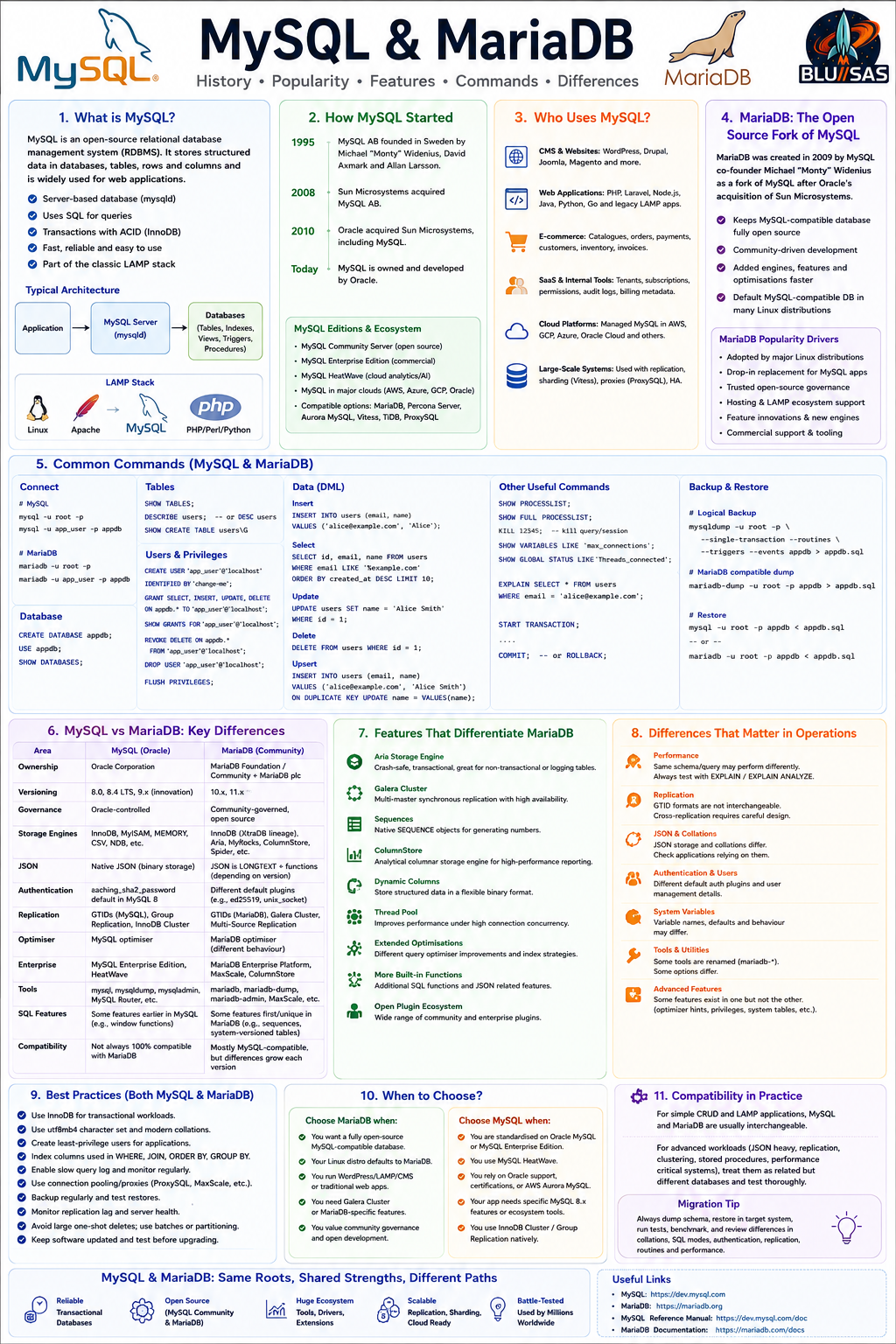
What MySQL is
MySQL is an open-source relational database management system, or RDBMS. It stores structured data in databases, tables, rows, and columns, and you query it using SQL.
It is a server-based database, unlike SQLite. A typical MySQL setup looks like this:
Application
|
| TCP/IP or Unix socket
v
MySQL server process: mysqld
|
v
Databases
|
v
Tables, indexes, views, triggers, stored proceduresMySQL is especially associated with the classic LAMP stack:
Linux
Apache
MySQL
PHP / Perl / PythonIt became one of the default databases for web applications because it was free/open-source, easy to install, fast for common web workloads, and well supported by hosting providers.
How MySQL started
MySQL was created by the Swedish company MySQL AB, founded in 1995 by Michael “Monty” Widenius, David Axmark, and Allan Larsson. MySQL AB built the database and commercialised it with a dual model: open-source community use plus paid commercial licensing/support.
The ownership timeline is:
1995 MySQL AB founded
2008 Sun Microsystems acquired MySQL AB
2010 Oracle acquired Sun Microsystems, including MySQL
Today MySQL is owned and developed by OracleSun Microsystems bought MySQL AB in 2008 for about $1 billion, and Oracle completed its acquisition of Sun Microsystems in January 2010, which brought MySQL under Oracle ownership.
That Oracle ownership is why the wider MySQL ecosystem also includes important forks and compatible variants, especially:
MariaDB
Percona Server for MySQL
Amazon Aurora MySQL-compatible edition
TiDB
VitessMariaDB was started by MySQL co-founder Monty Widenius as a fork after Oracle’s acquisition of Sun/MySQL.
Who uses MySQL now?
MySQL is still widely used, especially in web, SaaS, commerce, hosting, and content-management environments.
1. WordPress and CMS platforms
MySQL remains extremely important because WordPress traditionally runs on MySQL or MariaDB.
Typical CMS data:
Posts
Pages
Users
Metadata
Comments
Plugin settings
Theme options
WooCommerce ordersThis alone keeps MySQL/MariaDB highly relevant across the internet.
2. Web applications
MySQL is common in:
PHP applications
Laravel apps
Node.js apps
Java apps
Go services
Python web apps
Legacy LAMP systems
Hosting platformsTypical web app tables:
users
sessions
orders
products
payments
audit_logs
notifications3. E-commerce
MySQL is used by many commerce systems because it handles classic transactional workloads well.
Examples:
Product catalogues
Shopping carts
Orders
Customers
Payments
Stock levels
Promotions
Invoices4. SaaS and internal tools
Many SaaS systems use MySQL for relational application data:
Accounts
Tenants
Subscriptions
Permissions
Audit trails
Configuration
Billing metadata5. Cloud platforms
MySQL is available as managed database services from major clouds:
Amazon RDS for MySQL
Amazon Aurora MySQL-compatible
Google Cloud SQL for MySQL
Azure Database for MySQL
Oracle MySQL HeatWave
Aiven for MySQL
DigitalOcean Managed MySQL6. Large-scale internet systems
Some very large systems use MySQL-compatible architectures with sharding, replication, and middleware.
Important technologies include:
Vitess
ProxySQL
MySQL Group Replication
InnoDB Cluster
Amazon Aurora MySQL
PlanetScale-style Vitess deploymentsMySQL editions and ecosystem
Oracle provides MySQL in several forms, including the open-source Community Edition and commercial/enterprise offerings. The current Oracle documentation includes MySQL 8.4 LTS and newer innovation releases, and the MySQL reference manual documents both MySQL Server and NDB Cluster versions.
Common ecosystem options:
| Product | Description |
|---|---|
| MySQL Community Server | Open-source Oracle MySQL |
| MySQL Enterprise Edition | Commercial Oracle edition with enterprise features/support |
| MySQL HeatWave | Oracle’s managed MySQL cloud analytics/AI-oriented platform |
| MariaDB | Fork from original MySQL lineage |
| Percona Server for MySQL | MySQL-compatible distribution with performance/operational enhancements |
| Amazon Aurora MySQL | AWS-managed MySQL-compatible database |
| Vitess | Sharding/scaling layer for MySQL |
| ProxySQL | MySQL-aware proxy for routing, pooling, failover patterns |
MySQL architecture basics
Server
The MySQL server process is usually:
mysqldYou connect using clients such as:
mysql
mysqladmin
mysqldump
mysqlpump
mysqlshow
mysqlimportDatabase
In MySQL, a database is a logical container for tables and other objects. It is roughly similar to a PostgreSQL schema in many day-to-day workflows.
CREATE DATABASE appdb;Table
A table stores rows.
CREATE TABLE users (
id BIGINT AUTO_INCREMENT PRIMARY KEY,
email VARCHAR(255) NOT NULL UNIQUE,
name VARCHAR(255) NOT NULL,
created_at TIMESTAMP DEFAULT CURRENT_TIMESTAMP
);Storage engine
MySQL supports storage engines. The most important one is:
InnoDBInnoDB is the default transactional engine and supports:
ACID transactions
row-level locking
foreign keys
crash recovery
MVCC
indexesOlder MySQL systems may still contain MyISAM tables, but modern production MySQL should normally use InnoDB.
Check engines:
SHOW ENGINES;Check table engine:
SHOW TABLE STATUS LIKE 'users';Installing MySQL
Ubuntu / Debian
sudo apt update
sudo apt install mysql-server mysql-clientCheck service:
sudo systemctl status mysqlSecure initial setup where available:
sudo mysql_secure_installationConnect locally:
sudo mysqlor:
mysql -u root -pRocky Linux / RHEL / Fedora
Package names vary depending on distribution repositories and whether you use Oracle’s MySQL repo.
Typical install:
sudo dnf install mysql-server
sudo systemctl enable --now mysqld
sudo systemctl status mysqldSecure setup:
sudo mysql_secure_installationConnect:
mysql -u root -pConnecting to MySQL
Local connection
mysql -u root -pConnect to a database
mysql -u app_user -p appdbRemote host
mysql -h db.example.com -P 3306 -u app_user -p appdbUnix socket
mysql --socket=/var/run/mysqld/mysqld.sock -u root -pRun a one-line query
mysql -u app_user -p -e "SHOW DATABASES;"Run SQL from a file
mysql -u app_user -p appdb < schema.sqlUseful MySQL shell commands
Inside the mysql client:
Help
help;or:
\hList databases
SHOW DATABASES;Use a database
USE appdb;List tables
SHOW TABLES;Describe a table
DESCRIBE users;or:
DESC users;Show create statement
SHOW CREATE TABLE users\GShow indexes
SHOW INDEX FROM users;Show users
SELECT user, host
FROM mysql.user;Show current user
SELECT USER(), CURRENT_USER();Show current database
SELECT DATABASE();Vertical output
Useful for wide rows:
SELECT * FROM users\GExit
exit;or:
\qMySQL admin commands
Check server status
mysqladmin -u root -p statusPing server
mysqladmin -u root -p pingShow server variables
SHOW VARIABLES;Specific variable:
SHOW VARIABLES LIKE 'max_connections';Show server status counters
SHOW GLOBAL STATUS;Specific counters:
SHOW GLOBAL STATUS LIKE 'Threads_connected';
SHOW GLOBAL STATUS LIKE 'Questions';
SHOW GLOBAL STATUS LIKE 'Slow_queries';Show process list
SHOW PROCESSLIST;Full process list:
SHOW FULL PROCESSLIST;Kill a query/session:
KILL 12345;Create databases and users
Create database
CREATE DATABASE appdb;With charset and collation:
CREATE DATABASE appdb
CHARACTER SET utf8mb4
COLLATE utf8mb4_0900_ai_ci;utf8mb4 is the modern choice because it supports the full Unicode range, including emoji.
Create user
CREATE USER 'app_user'@'localhost'
IDENTIFIED BY 'change-me';Remote user:
CREATE USER 'app_user'@'%'
IDENTIFIED BY 'change-me';Specific subnet/host patterns are better than % where possible.
Grant privileges
GRANT SELECT, INSERT, UPDATE, DELETE
ON appdb.*
TO 'app_user'@'localhost';Grant all privileges on one database:
GRANT ALL PRIVILEGES
ON appdb.*
TO 'app_user'@'localhost';Apply changes:
FLUSH PRIVILEGES;In modern MySQL, many privilege changes take effect immediately, but FLUSH PRIVILEGES is still commonly seen in admin runbooks.
Show grants
SHOW GRANTS FOR 'app_user'@'localhost';Revoke privileges
REVOKE DELETE
ON appdb.*
FROM 'app_user'@'localhost';Drop user
DROP USER 'app_user'@'localhost';Creating tables
Basic table
CREATE TABLE users (
id BIGINT AUTO_INCREMENT PRIMARY KEY,
email VARCHAR(255) NOT NULL UNIQUE,
name VARCHAR(255) NOT NULL,
active BOOLEAN NOT NULL DEFAULT TRUE,
created_at TIMESTAMP NOT NULL DEFAULT CURRENT_TIMESTAMP
) ENGINE=InnoDB;Table with update timestamp
CREATE TABLE users (
id BIGINT AUTO_INCREMENT PRIMARY KEY,
email VARCHAR(255) NOT NULL UNIQUE,
name VARCHAR(255) NOT NULL,
created_at TIMESTAMP NOT NULL DEFAULT CURRENT_TIMESTAMP,
updated_at TIMESTAMP NULL DEFAULT NULL
ON UPDATE CURRENT_TIMESTAMP
) ENGINE=InnoDB;Table with foreign key
CREATE TABLE customers (
id BIGINT AUTO_INCREMENT PRIMARY KEY,
email VARCHAR(255) NOT NULL UNIQUE,
name VARCHAR(255) NOT NULL
) ENGINE=InnoDB;
CREATE TABLE orders (
id BIGINT AUTO_INCREMENT PRIMARY KEY,
customer_id BIGINT NOT NULL,
total DECIMAL(10,2) NOT NULL,
created_at TIMESTAMP NOT NULL DEFAULT CURRENT_TIMESTAMP,
CONSTRAINT fk_orders_customer
FOREIGN KEY (customer_id)
REFERENCES customers(id)
) ENGINE=InnoDB;Foreign key with cascade
CREATE TABLE orders (
id BIGINT AUTO_INCREMENT PRIMARY KEY,
customer_id BIGINT NOT NULL,
total DECIMAL(10,2) NOT NULL,
CONSTRAINT fk_orders_customer
FOREIGN KEY (customer_id)
REFERENCES customers(id)
ON DELETE CASCADE
) ENGINE=InnoDB;Use ON DELETE CASCADE carefully because deleting one customer can delete many related rows.
MySQL data types
Common MySQL types:
| Type | Use |
|---|---|
TINYINT | Small integer, often boolean-like |
INT | Normal integer |
BIGINT | Large integer |
DECIMAL(10,2) | Exact decimal, good for money |
FLOAT | Approximate floating point |
DOUBLE | Larger approximate floating point |
CHAR(n) | Fixed-length string |
VARCHAR(n) | Variable-length string |
TEXT | Long text |
JSON | JSON document |
DATE | Date |
TIME | Time |
DATETIME | Date and time |
TIMESTAMP | Timestamp, timezone-converted behaviour |
BLOB | Binary data |
ENUM | Enumerated string values |
For financial values, prefer:
DECIMAL(10,2)rather than:
FLOATInsert queries
Insert one row
INSERT INTO users (email, name)
VALUES ('alice@example.com', 'Alice');Insert many rows
INSERT INTO users (email, name)
VALUES
('bob@example.com', 'Bob'),
('carol@example.com', 'Carol'),
('dave@example.com', 'Dave');Get last inserted ID
SELECT LAST_INSERT_ID();Insert ignore
INSERT IGNORE INTO users (email, name)
VALUES ('alice@example.com', 'Alice');This ignores duplicate-key errors and some other insert errors, so use it deliberately.
Select queries
Select all rows
SELECT *
FROM users;Select specific columns
SELECT id, email, name
FROM users;Filter
SELECT *
FROM users
WHERE email = 'alice@example.com';Multiple conditions
SELECT *
FROM users
WHERE active = TRUE
AND email LIKE '%example.com';Sort
SELECT *
FROM users
ORDER BY created_at DESC;Limit
SELECT *
FROM users
ORDER BY created_at DESC
LIMIT 10;Pagination
SELECT *
FROM users
ORDER BY id
LIMIT 50 OFFSET 100;For large tables, prefer keyset pagination:
SELECT *
FROM users
WHERE id > 1000
ORDER BY id
LIMIT 50;Update queries
Update one row
UPDATE users
SET name = 'Alice Smith'
WHERE id = 1;Update multiple columns
UPDATE users
SET
name = 'Alice Smith',
active = TRUE
WHERE id = 1;Dangerous update
UPDATE users
SET active = FALSE;That updates every row. For safety, use transactions and WHERE.
Delete queries
Delete one row
DELETE FROM users
WHERE id = 1;Delete old rows
DELETE FROM events
WHERE created_at < NOW() - INTERVAL 90 DAY;Delete in batches
For large tables, avoid deleting millions of rows in one transaction:
DELETE FROM events
WHERE created_at < NOW() - INTERVAL 90 DAY
LIMIT 1000;Repeat until affected rows are zero.
Upserts
MySQL uses ON DUPLICATE KEY UPDATE.
INSERT INTO users (email, name)
VALUES ('alice@example.com', 'Alice Smith')
ON DUPLICATE KEY UPDATE
name = VALUES(name);Modern style can use aliases:
INSERT INTO users (email, name)
VALUES ('alice@example.com', 'Alice Smith') AS new
ON DUPLICATE KEY UPDATE
name = new.name;This requires a unique or primary key conflict, such as:
email VARCHAR(255) NOT NULL UNIQUETransactions
InnoDB supports transactions.
START TRANSACTION;
UPDATE accounts
SET balance = balance - 100
WHERE id = 1;
UPDATE accounts
SET balance = balance + 100
WHERE id = 2;
COMMIT;Rollback:
ROLLBACK;Check autocommit:
SELECT @@autocommit;Disable autocommit for session:
SET autocommit = 0;Re-enable:
SET autocommit = 1;Joins
Create example tables:
CREATE TABLE customers (
id BIGINT AUTO_INCREMENT PRIMARY KEY,
email VARCHAR(255) NOT NULL UNIQUE,
name VARCHAR(255) NOT NULL
) ENGINE=InnoDB;
CREATE TABLE orders (
id BIGINT AUTO_INCREMENT PRIMARY KEY,
customer_id BIGINT NOT NULL,
total DECIMAL(10,2) NOT NULL,
created_at TIMESTAMP DEFAULT CURRENT_TIMESTAMP,
CONSTRAINT fk_orders_customer
FOREIGN KEY (customer_id)
REFERENCES customers(id)
) ENGINE=InnoDB;Inner join
SELECT
c.id,
c.name,
o.id AS order_id,
o.total
FROM customers c
JOIN orders o ON o.customer_id = c.id;Left join
SELECT
c.id,
c.name,
o.id AS order_id,
o.total
FROM customers c
LEFT JOIN orders o ON o.customer_id = c.id;Aggregate join
SELECT
c.id,
c.name,
COUNT(o.id) AS order_count,
COALESCE(SUM(o.total), 0) AS total_spent
FROM customers c
LEFT JOIN orders o ON o.customer_id = c.id
GROUP BY c.id, c.name
ORDER BY total_spent DESC;Aggregates
Count
SELECT COUNT(*)
FROM users;Sum
SELECT SUM(total)
FROM orders;Average
SELECT AVG(total)
FROM orders;Minimum and maximum
SELECT MIN(total), MAX(total)
FROM orders;Group by
SELECT
customer_id,
COUNT(*) AS order_count,
SUM(total) AS total_spent
FROM orders
GROUP BY customer_id;Having
SELECT
customer_id,
SUM(total) AS total_spent
FROM orders
GROUP BY customer_id
HAVING SUM(total) > 100;Indexes
Basic index
CREATE INDEX idx_users_email
ON users(email);Unique index
CREATE UNIQUE INDEX idx_users_email_unique
ON users(email);Composite index
CREATE INDEX idx_orders_customer_created
ON orders(customer_id, created_at);Prefix index
Useful for large text/varchar columns:
CREATE INDEX idx_users_email_prefix
ON users(email(32));Show indexes
SHOW INDEX FROM users;Drop index
DROP INDEX idx_users_email ON users;Query planning and performance
Explain query
EXPLAIN
SELECT *
FROM users
WHERE email = 'alice@example.com';Explain analyze
Modern MySQL supports runtime explain:
EXPLAIN ANALYZE
SELECT *
FROM users
WHERE email = 'alice@example.com';Use this to see whether queries are using indexes or doing table scans.
Views
CREATE VIEW customer_order_totals AS
SELECT
c.id AS customer_id,
c.name,
COUNT(o.id) AS order_count,
COALESCE(SUM(o.total), 0) AS total_spent
FROM customers c
LEFT JOIN orders o ON o.customer_id = c.id
GROUP BY c.id, c.name;Query:
SELECT *
FROM customer_order_totals;Drop:
DROP VIEW customer_order_totals;Stored procedures
Create procedure
Change delimiter first because procedures contain semicolons.
DELIMITER //
CREATE PROCEDURE get_user_by_email(IN p_email VARCHAR(255))
BEGIN
SELECT id, email, name
FROM users
WHERE email = p_email;
END //
DELIMITER ;Call:
CALL get_user_by_email('alice@example.com');Drop:
DROP PROCEDURE get_user_by_email;Triggers
Audit table
CREATE TABLE user_audit (
id BIGINT AUTO_INCREMENT PRIMARY KEY,
user_id BIGINT,
action VARCHAR(20),
changed_at TIMESTAMP DEFAULT CURRENT_TIMESTAMP
) ENGINE=InnoDB;Insert trigger
DELIMITER //
CREATE TRIGGER trg_users_insert
AFTER INSERT ON users
FOR EACH ROW
BEGIN
INSERT INTO user_audit (user_id, action)
VALUES (NEW.id, 'INSERT');
END //
DELIMITER ;Update trigger
DELIMITER //
CREATE TRIGGER trg_users_update
AFTER UPDATE ON users
FOR EACH ROW
BEGIN
INSERT INTO user_audit (user_id, action)
VALUES (NEW.id, 'UPDATE');
END //
DELIMITER ;Show triggers:
SHOW TRIGGERS;Drop trigger:
DROP TRIGGER trg_users_insert;Common Table Expressions
Basic CTE
WITH recent_orders AS (
SELECT *
FROM orders
WHERE created_at >= NOW() - INTERVAL 30 DAY
)
SELECT
customer_id,
COUNT(*) AS order_count,
SUM(total) AS total_spent
FROM recent_orders
GROUP BY customer_id;Recursive CTE
WITH RECURSIVE numbers(n) AS (
SELECT 1
UNION ALL
SELECT n + 1
FROM numbers
WHERE n < 10
)
SELECT n
FROM numbers;Window functions
Row number
SELECT
id,
customer_id,
total,
ROW_NUMBER() OVER (
PARTITION BY customer_id
ORDER BY created_at DESC
) AS order_rank
FROM orders;Running total
SELECT
customer_id,
created_at,
total,
SUM(total) OVER (
PARTITION BY customer_id
ORDER BY created_at
) AS running_total
FROM orders;JSON queries
Create table:
CREATE TABLE events (
id BIGINT AUTO_INCREMENT PRIMARY KEY,
payload JSON NOT NULL,
created_at TIMESTAMP DEFAULT CURRENT_TIMESTAMP
) ENGINE=InnoDB;Insert JSON:
INSERT INTO events (payload)
VALUES
('{"level":"error","service":"api","duration_ms":153}'),
('{"level":"info","service":"worker","duration_ms":42}');Extract JSON:
SELECT
JSON_EXTRACT(payload, '$.service') AS service
FROM events;Extract unquoted text:
SELECT
JSON_UNQUOTE(JSON_EXTRACT(payload, '$.service')) AS service
FROM events;Shortcut operator:
SELECT payload->>'$.service' AS service
FROM events;Filter JSON:
SELECT *
FROM events
WHERE payload->>'$.level' = 'error';Generated column for indexing JSON value:
ALTER TABLE events
ADD COLUMN service VARCHAR(100)
GENERATED ALWAYS AS (payload->>'$.service') STORED;
CREATE INDEX idx_events_service
ON events(service);Full-text search
Create table with full-text index:
CREATE TABLE documents (
id BIGINT AUTO_INCREMENT PRIMARY KEY,
title VARCHAR(255) NOT NULL,
body TEXT NOT NULL,
FULLTEXT KEY idx_documents_search (title, body)
) ENGINE=InnoDB;Search:
SELECT *
FROM documents
WHERE MATCH(title, body)
AGAINST('relational database');Boolean mode:
SELECT *
FROM documents
WHERE MATCH(title, body)
AGAINST('+mysql +database' IN BOOLEAN MODE);Backup and restore
The official MySQL documentation describes mysqldump as a client utility for logical backups; it produces SQL statements that can recreate database objects and data, and it can dump one or more databases for backup or transfer.
Dump one database
mysqldump -u root -p appdb > appdb.sqlRestore one database
mysql -u root -p appdb < appdb.sqlDump all databases
mysqldump -u root -p --all-databases > all_databases.sqlDump with routines, triggers, and events
mysqldump -u root -p \
--routines \
--triggers \
--events \
appdb > appdb_full.sqlConsistent InnoDB backup
mysqldump -u root -p \
--single-transaction \
--routines \
--triggers \
--events \
appdb > appdb.sql--single-transaction is important for InnoDB logical backups because it gives a consistent snapshot without locking all tables for the whole dump.
Physical backups
For larger production systems, physical backup tools are often used:
MySQL Enterprise Backup
Percona XtraBackup
Storage snapshots with proper coordination
Cloud-managed backup systemsReplication basics
MySQL replication is commonly used for:
read replicas
failover
backup replicas
analytics offload
migration
disaster recoveryCommon patterns:
Primary -> Replica
Primary -> Multiple replicas
Group Replication
InnoDB Cluster
Semi-sync replication
Delayed replica
Binlog-based CDCKey concepts:
| Concept | Meaning |
|---|---|
| Binary log | Records changes for replication/recovery |
| Source/primary | Server accepting writes |
| Replica | Server applying changes from primary |
| GTID | Global Transaction Identifier |
| Relay log | Replica-side log of events fetched from primary |
| Replication lag | How far the replica is behind |
Show replication status on a replica:
SHOW REPLICA STATUS\GOlder syntax:
SHOW SLAVE STATUS\GShow binary log files:
SHOW BINARY LOGS;Show primary status:
SHOW BINARY LOG STATUS;Older syntax:
SHOW MASTER STATUS;Useful SRE monitoring queries
Active connections
SHOW FULL PROCESSLIST;or:
SELECT
id,
user,
host,
db,
command,
time,
state,
info
FROM information_schema.processlist
ORDER BY time DESC;Connection count
SHOW GLOBAL STATUS LIKE 'Threads_connected';Max connections
SHOW VARIABLES LIKE 'max_connections';Slow queries counter
SHOW GLOBAL STATUS LIKE 'Slow_queries';InnoDB status
SHOW ENGINE INNODB STATUS\GTable sizes
SELECT
table_schema,
table_name,
ROUND((data_length + index_length) / 1024 / 1024, 2) AS size_mb
FROM information_schema.tables
WHERE table_schema NOT IN ('mysql', 'information_schema', 'performance_schema', 'sys')
ORDER BY size_mb DESC
LIMIT 20;Database sizes
SELECT
table_schema AS database_name,
ROUND(SUM(data_length + index_length) / 1024 / 1024, 2) AS size_mb
FROM information_schema.tables
GROUP BY table_schema
ORDER BY size_mb DESC;Long-running queries
SELECT
id,
user,
host,
db,
command,
time,
state,
info
FROM information_schema.processlist
WHERE command <> 'Sleep'
ORDER BY time DESC;Check buffer pool size
SHOW VARIABLES LIKE 'innodb_buffer_pool_size';Check slow query log
SHOW VARIABLES LIKE 'slow_query_log';
SHOW VARIABLES LIKE 'long_query_time';
SHOW VARIABLES LIKE 'slow_query_log_file';Enable for session/testing:
SET GLOBAL slow_query_log = 'ON';
SET GLOBAL long_query_time = 1;MySQL configuration files
Common locations:
/etc/mysql/mysql.conf.d/mysqld.cnf
/etc/my.cnf
/etc/mysql/my.cnfImportant settings:
[mysqld]
bind-address = 127.0.0.1
port = 3306
max_connections = 200
innodb_buffer_pool_size = 2G
slow_query_log = ON
long_query_time = 1
log_bin = mysql-bin
server_id = 1
binlog_format = ROWReload/restart depends on the setting:
sudo systemctl reload mysql
sudo systemctl restart mysqlSome variables can be changed dynamically:
SET GLOBAL max_connections = 300;But many changes should also be written to config so they survive restart.
MySQL best practices for SREs
1. Use InnoDB
Use InnoDB for transactional production tables:
ENGINE=InnoDB2. Use utf8mb4
Avoid old utf8/utf8mb3 defaults.
CHARACTER SET utf8mb4
COLLATE utf8mb4_0900_ai_ci3. Use least-privilege users
Do not run applications as root.
CREATE USER 'app_user'@'10.%' IDENTIFIED BY 'strong-password';
GRANT SELECT, INSERT, UPDATE, DELETE
ON appdb.*
TO 'app_user'@'10.%';4. Enable and review slow query logging
SET GLOBAL slow_query_log = 'ON';
SET GLOBAL long_query_time = 1;Then analyse queries with:
mysqldumpslow
pt-query-digest
Performance Schema
EXPLAIN
EXPLAIN ANALYZE5. Index deliberately
Index columns used in:
WHERE
JOIN
ORDER BY
GROUP BY
UNIQUE constraints
foreign keys6. Use transactions for multi-step changes
START TRANSACTION;
...
COMMIT;7. Test restores
A backup is not proven until you restore it.
8. Watch replication lag
SHOW REPLICA STATUS\GImportant fields include replica I/O/SQL state and lag indicators.
9. Avoid huge one-shot deletes
Use partitioning or batch deletes:
DELETE FROM events
WHERE created_at < NOW() - INTERVAL 90 DAY
LIMIT 1000;10. Use connection pooling/proxies where needed
Common tools:
ProxySQL
HAProxy
MaxScale
Cloud provider proxies
Application-side poolingPractical MySQL cheat sheet
# Connect locally
mysql -u root -p
# Connect to database
mysql -h localhost -u app_user -p appdb
# Run SQL file
mysql -u app_user -p appdb < schema.sql
# Run one query
mysql -u app_user -p -e "SHOW DATABASES;"
# Backup
mysqldump -u root -p --single-transaction appdb > appdb.sql
# Restore
mysql -u root -p appdb < appdb.sql
# Server ping
mysqladmin -u root -p ping
# Server status
mysqladmin -u root -p statusSQL cheat sheet:
-- List databases
SHOW DATABASES;
-- Create database
CREATE DATABASE appdb
CHARACTER SET utf8mb4
COLLATE utf8mb4_0900_ai_ci;
-- Use database
USE appdb;
-- List tables
SHOW TABLES;
-- Create table
CREATE TABLE users (
id BIGINT AUTO_INCREMENT PRIMARY KEY,
email VARCHAR(255) NOT NULL UNIQUE,
name VARCHAR(255) NOT NULL,
created_at TIMESTAMP DEFAULT CURRENT_TIMESTAMP
) ENGINE=InnoDB;
-- Insert
INSERT INTO users (email, name)
VALUES ('alice@example.com', 'Alice');
-- Select
SELECT id, email, name
FROM users
WHERE email LIKE '%example.com'
ORDER BY created_at DESC
LIMIT 10;
-- Update
UPDATE users
SET name = 'Alice Smith'
WHERE id = 1;
-- Delete
DELETE FROM users
WHERE id = 1;
-- Upsert
INSERT INTO users (email, name)
VALUES ('alice@example.com', 'Alice Smith') AS new
ON DUPLICATE KEY UPDATE
name = new.name;
-- Index
CREATE INDEX idx_users_email ON users(email);
-- Explain
EXPLAIN ANALYZE
SELECT *
FROM users
WHERE email = 'alice@example.com';
-- Show process list
SHOW FULL PROCESSLIST;
-- Exit
exit;MySQL in one paragraph
MySQL is a server-based open-source relational database that became famous as the database of the LAMP web stack. It started at MySQL AB in Sweden in the 1990s, was bought by Sun Microsystems in 2008, and is now owned by Oracle after Oracle acquired Sun in 2010. It remains widely used for websites, WordPress, SaaS systems, e-commerce, managed cloud databases, and large-scale MySQL-compatible architectures. Its strengths are broad ecosystem support, operational familiarity, easy hosting, good transactional performance with InnoDB, and compatibility with decades of web applications.
Describe the OSS fork of MySQL to MariaDB and how its popularity has gained over the years – detail the common commands between MySQL and MariaDB and what the differences areThought for 8s
MariaDB: the open-source fork of MySQL
MariaDB is an open-source relational database management system that began as a fork of MySQL. It was created to preserve a fully open, community-driven MySQL-compatible database after Oracle’s acquisition path put MySQL under Oracle control.
The simplified history is:
1995 MySQL AB founded
2008 Sun Microsystems acquired MySQL AB
2009 Oracle announced/acquired Sun; concern grew over MySQL’s future
2009 MySQL founder Michael “Monty” Widenius forked MySQL into MariaDB
2010 Oracle completed the acquisition of Sun, including MySQL
Today MySQL is Oracle-owned; MariaDB is community-developed and commercially supportedMariaDB’s own project history says that when MySQL was bought by Oracle, Michael “Monty” Widenius forked the project because of concerns about Oracle’s stewardship; MariaDB is named after his second daughter, Maria, just as MySQL was named after his first daughter, My.
The MariaDB Foundation describes MariaDB Server as being made by the original developers of MySQL and “guaranteed to stay open source”; it also says MariaDB is part of most cloud offerings and the default in most Linux distributions.
Why MariaDB was created
The fork was not mainly because MySQL was technically bad. It was a governance and trust issue.
The concerns were:
Would Oracle keep MySQL truly open?
Would development stay transparent?
Would community contributions remain welcome?
Would enterprise-only features grow at the expense of the community edition?
Would MySQL become strategically constrained because Oracle Database is Oracle’s flagship commercial database?MariaDB’s purpose was therefore:
Keep a MySQL-compatible database fully open source
Continue development outside Oracle control
Preserve drop-in compatibility where practical
Add new engines, features, and optimisations faster
Give Linux distributions a community-governed MySQL-compatible defaultHow MariaDB gained popularity
MariaDB gained popularity through several reinforcing channels.
1. Linux distribution adoption
A major driver was that many Linux distributions moved from MySQL to MariaDB as the default MySQL-compatible database.
This mattered because users installing:
sudo apt install mysql-server
sudo dnf install mariadb-server
sudo yum install mysql-serveroften ended up with MariaDB depending on the distribution and version.
MariaDB became especially common in:
RHEL / CentOS-era systems
Fedora
openSUSE
Arch Linux
Debian-derived server environments
Hosting stacks
Control panels
LAMP replacementsThat made MariaDB popular without every user making an explicit architectural decision. It became “the MySQL-compatible database that ships with the OS.”
2. Drop-in replacement story
Early MariaDB deliberately aimed to be a drop-in replacement for MySQL.
In practice, this meant:
Same client protocol
Same default port: 3306
Same mysql client compatibility
Same SQL style for common workloads
Same mysqldump-style backup/restore patterns
Same WordPress/LAMP compatibility for many apps
Same application drivers in many casesMariaDB’s documentation says older MariaDB branches functioned as limited drop-in replacements for MySQL 5.6 and MySQL 5.7, while noting that implementation differences have grown over time.
AWS’s comparison similarly notes that MariaDB followed MySQL version numbering until MariaDB 5.5, then diverged at MariaDB 10.0 while MySQL went to 5.6, because MariaDB had accumulated features not available in MySQL.
3. Open-source trust
For organisations wary of Oracle control, MariaDB became the politically and operationally safer open-source choice.
That was particularly attractive to:
Linux distributions
Open-source projects
Hosting companies
Public-sector deployments
Developers who wanted vendor-neutral infrastructure
Companies already standardised on MySQL syntax and tooling4. Hosting and control-panel ecosystems
Shared hosting providers, cPanel-like platforms, and LAMP stacks adopted MariaDB because it worked with many MySQL-oriented PHP applications.
That included:
WordPress
Drupal
Joomla
Magento-style systems
Custom PHP apps
Laravel apps
Legacy LAMP applications5. Feature additions
MariaDB added features and storage-engine options that differentiated it from Oracle MySQL.
Examples include:
Aria storage engine
MyRocks support in some MariaDB builds
ColumnStore for analytical workloads
Galera Cluster integration
Sequence support
Different optimiser improvements
Additional JSON-related functions
More open plugin ecosystem
Thread pool in MariaDB community builds6. Commercial backing
MariaDB is not only a community project. It has commercial backing through MariaDB plc/MariaDB Corporation and ecosystem vendors.
That gave enterprises:
Support contracts
Enterprise binaries
Consulting
Migration help
Security updates
Managed cloud offerings
Training
Operational toolingHas MariaDB overtaken MySQL?
No, not globally.
The careful answer is:
MariaDB became very popular as the open-source MySQL-compatible alternative, especially in Linux distributions, hosting, and LAMP-style systems. But MySQL remains more widely recognised and still ranks higher overall in broad popularity indexes.
DB-Engines says its ranking measures DBMS popularity and is updated monthly; its June 2026 ranking still lists MySQL near the very top globally.
So the popularity story is not “MariaDB replaced MySQL everywhere.” It is more accurate to say:
MySQL remains the better-known global brand.
MariaDB became the default MySQL-compatible choice in many Linux/open-source environments.
MariaDB is strong in hosting, Linux distributions, and open-source stacks.
MySQL remains strong in Oracle, AWS, commercial SaaS, legacy enterprise, and managed cloud environments.
PostgreSQL has taken much of the developer mindshare for new relational apps.MariaDB and MySQL compatibility
MariaDB and MySQL are still closely related, but they are no longer identical.
For common application workloads, they often feel the same:
CREATE DATABASE
CREATE TABLE
INSERT
SELECT
UPDATE
DELETE
JOIN
GROUP BY
ORDER BY
LIMIT
Indexes
Views
Triggers
Stored procedures
Users and grants
mysqldump-style backups
Replication conceptsBut for deeper operational and application compatibility, the differences matter:
Version numbers diverged
Optimisers differ
Replication features differ
JSON implementation differs
Authentication plugins differ
Enterprise features differ
Some SQL features exist in one but not the other
Some system variables and status counters differ
Some storage engines differ
Some backup and clustering tooling differsMariaDB’s compatibility documentation explicitly warns that while older MariaDB versions worked as limited drop-in replacements for certain MySQL versions, implementation differences continue to grow in each new MariaDB version.
Common commands shared by MySQL and MariaDB
Most day-to-day CLI and SQL commands are the same or extremely similar.
Service management
On many Linux systems:
sudo systemctl status mysql
sudo systemctl start mysql
sudo systemctl stop mysql
sudo systemctl restart mysqlFor MariaDB specifically:
sudo systemctl status mariadb
sudo systemctl start mariadb
sudo systemctl stop mariadb
sudo systemctl restart mariadbDepending on the distro, either mysql or mariadb may be the service name.
Client connection
MySQL style:
mysql -u root -pMariaDB style:
mariadb -u root -pIn many MariaDB installs, mysql is still available as a compatibility symlink or client command.
Connect to a database:
mysql -u app_user -p appdbor:
mariadb -u app_user -p appdbRemote connection:
mysql -h db.example.com -P 3306 -u app_user -p appdbor:
mariadb -h db.example.com -P 3306 -u app_user -p appdbShow version
SELECT VERSION();MySQL might return something like:
8.4.0MariaDB might return something like:
11.4.5-MariaDBCheck server comment:
SHOW VARIABLES LIKE 'version_comment';List databases
SHOW DATABASES;Create database
CREATE DATABASE appdb;Recommended modern character set:
CREATE DATABASE appdb
CHARACTER SET utf8mb4
COLLATE utf8mb4_unicode_ci;MySQL 8 often uses:
utf8mb4_0900_ai_ciMariaDB commonly uses collations such as:
utf8mb4_unicode_ci
utf8mb4_general_ci
uca1400_ai_ciCollation compatibility is one of the areas to check during migration.
Use database
USE appdb;List tables
SHOW TABLES;Describe table
DESCRIBE users;or:
DESC users;Show create table
SHOW CREATE TABLE users\GCreate table
CREATE TABLE users (
id BIGINT AUTO_INCREMENT PRIMARY KEY,
email VARCHAR(255) NOT NULL UNIQUE,
name VARCHAR(255) NOT NULL,
active BOOLEAN NOT NULL DEFAULT TRUE,
created_at TIMESTAMP NOT NULL DEFAULT CURRENT_TIMESTAMP
) ENGINE=InnoDB;This works in both MySQL and MariaDB for ordinary workloads.
Insert
INSERT INTO users (email, name)
VALUES ('alice@example.com', 'Alice');Insert multiple rows:
INSERT INTO users (email, name)
VALUES
('bob@example.com', 'Bob'),
('carol@example.com', 'Carol');Select
SELECT id, email, name
FROM users;Filter:
SELECT *
FROM users
WHERE email = 'alice@example.com';Sort and limit:
SELECT *
FROM users
ORDER BY created_at DESC
LIMIT 10;Pagination:
SELECT *
FROM users
ORDER BY id
LIMIT 50 OFFSET 100;Update
UPDATE users
SET name = 'Alice Smith'
WHERE id = 1;Delete
DELETE FROM users
WHERE id = 1;Batch delete:
DELETE FROM events
WHERE created_at < NOW() - INTERVAL 90 DAY
LIMIT 1000;Upsert
Both support:
INSERT INTO users (email, name)
VALUES ('alice@example.com', 'Alice Smith')
ON DUPLICATE KEY UPDATE
name = VALUES(name);In newer MySQL, VALUES() in this context has been deprecated in favour of row aliases, while MariaDB still commonly supports the traditional syntax. For maximum cross-compatibility, test this carefully if targeting modern MySQL and MariaDB together.
Joins
SELECT
c.id,
c.name,
o.id AS order_id,
o.total
FROM customers c
JOIN orders o ON o.customer_id = c.id;Left join:
SELECT
c.id,
c.name,
o.id AS order_id,
o.total
FROM customers c
LEFT JOIN orders o ON o.customer_id = c.id;Aggregates
SELECT COUNT(*)
FROM users;SELECT
customer_id,
COUNT(*) AS order_count,
SUM(total) AS total_spent
FROM orders
GROUP BY customer_id;SELECT
customer_id,
SUM(total) AS total_spent
FROM orders
GROUP BY customer_id
HAVING SUM(total) > 100;Indexes
CREATE INDEX idx_users_email
ON users(email);Unique index:
CREATE UNIQUE INDEX idx_users_email_unique
ON users(email);Composite index:
CREATE INDEX idx_orders_customer_created
ON orders(customer_id, created_at);Show indexes:
SHOW INDEX FROM users;Drop index:
DROP INDEX idx_users_email ON users;Transactions
START TRANSACTION;
UPDATE accounts
SET balance = balance - 100
WHERE id = 1;
UPDATE accounts
SET balance = balance + 100
WHERE id = 2;
COMMIT;Rollback:
ROLLBACK;Users and permissions
Create user:
CREATE USER 'app_user'@'localhost'
IDENTIFIED BY 'change-me';Grant privileges:
GRANT SELECT, INSERT, UPDATE, DELETE
ON appdb.*
TO 'app_user'@'localhost';Show grants:
SHOW GRANTS FOR 'app_user'@'localhost';Revoke:
REVOKE DELETE
ON appdb.*
FROM 'app_user'@'localhost';Drop user:
DROP USER 'app_user'@'localhost';Process list and active sessions
SHOW PROCESSLIST;More detail:
SHOW FULL PROCESSLIST;From information_schema:
SELECT
id,
user,
host,
db,
command,
time,
state,
info
FROM information_schema.processlist
ORDER BY time DESC;Kill session/query:
KILL 12345;Explain query
EXPLAIN
SELECT *
FROM users
WHERE email = 'alice@example.com';Modern versions of both have some form of runtime execution analysis, but syntax and output can differ by version:
EXPLAIN ANALYZE
SELECT *
FROM users
WHERE email = 'alice@example.com';Always test against the exact server version.
Backup and restore
MySQL-style logical backup:
mysqldump -u root -p appdb > appdb.sqlMariaDB-style logical backup:
mariadb-dump -u root -p appdb > appdb.sqlMany MariaDB installations still provide mysqldump as a compatibility command.
Consistent InnoDB backup:
mysqldump -u root -p \
--single-transaction \
--routines \
--triggers \
--events \
appdb > appdb.sqlRestore:
mysql -u root -p appdb < appdb.sqlor:
mariadb -u root -p appdb < appdb.sqlMain differences between MySQL and MariaDB
1. Governance and ownership
| Area | MySQL | MariaDB |
|---|---|---|
| Main steward | Oracle | MariaDB Foundation/community plus MariaDB plc/commercial ecosystem |
| Origin | Original database | Fork of MySQL |
| Open-source trust issue | Oracle-owned | Created to remain open-source |
| Commercial edition | MySQL Enterprise Edition, HeatWave | MariaDB Enterprise Platform |
| Community perception | Huge installed base, Oracle controlled | More community/open-source aligned |
MariaDB’s central identity is “MySQL-compatible but not Oracle-controlled.”
2. Version numbers diverged
Originally, MariaDB tracked MySQL version numbers:
MySQL 5.1 ~ MariaDB 5.1
MySQL 5.5 ~ MariaDB 5.5Then MariaDB jumped to:
MariaDB 10.0while MySQL moved to:
MySQL 5.6
MySQL 5.7
MySQL 8.0
MySQL 8.4 LTS
MySQL 9.x innovation releasesThis means you cannot assume:
MariaDB 10.x = MySQL 10.xThere is no simple one-to-one version mapping.
3. Optimiser differences
Both systems have query optimisers, but they have diverged.
Practical implication:
The same query may choose different indexes
The same schema may perform differently
EXPLAIN output may differ
Some optimiser hints differ
Statistics behaviour may differ
Execution plans may change after migrationFor SREs, this means you should never migrate MySQL to MariaDB, or MariaDB to MySQL, without checking:
EXPLAIN SELECT ...
EXPLAIN ANALYZE SELECT ...and benchmarking real production queries.
4. Storage engines
Both commonly use InnoDB, but MariaDB has historically offered or promoted additional engines.
| Engine / feature | MySQL | MariaDB |
|---|---|---|
| InnoDB | Yes | Yes, often using MariaDB’s InnoDB/XtraDB lineage depending on version |
| MyISAM | Legacy | Legacy |
| MEMORY | Yes | Yes |
| CSV | Yes | Yes |
| Aria | No | Yes |
| MyRocks | Not standard Oracle MySQL | Available in MariaDB ecosystem/builds |
| ColumnStore | No | MariaDB ecosystem |
| Federated/FederatedX | Different support | MariaDB has FederatedX |
| Spider | No standard Oracle MySQL | MariaDB has Spider/sharding-oriented engine |
For ordinary apps, you will mostly use:
ENGINE=InnoDBBut if you inherit a MariaDB system, check engines:
SELECT
table_schema,
table_name,
engine
FROM information_schema.tables
WHERE table_schema NOT IN ('mysql', 'information_schema', 'performance_schema', 'sys')
ORDER BY table_schema, table_name;5. JSON differences
MySQL has a native JSON type with binary JSON storage.
MariaDB’s JSON is historically an alias for LONGTEXT with JSON validation functions/checks, depending on version.
Practical difference:
MySQL JSON storage and indexing behaviour differs from MariaDB
JSON function support overlaps but is not identical
Generated columns may be needed for indexing JSON paths
Migration requires testing JSON-heavy applicationsCommon cross-compatible style:
CREATE TABLE events (
id BIGINT AUTO_INCREMENT PRIMARY KEY,
payload JSON NOT NULL,
created_at TIMESTAMP DEFAULT CURRENT_TIMESTAMP
);Extract value:
SELECT JSON_UNQUOTE(JSON_EXTRACT(payload, '$.service')) AS service
FROM events;But for performance-sensitive JSON workloads, test both implementations.
6. Authentication differences
MySQL 8 changed defaults around authentication, especially with caching_sha2_password.
MariaDB commonly uses different authentication plugins and account handling.
Practical impact:
Old clients may fail against MySQL 8 defaults
Some MySQL auth plugins do not exist in MariaDB
Some MariaDB auth plugins do not exist in MySQL
Application driver compatibility must be checkedUseful checks:
SELECT user, host, plugin
FROM mysql.user;7. Replication differences
Both support replication, but features and terminology have diverged.
Common concepts:
Binary logs
Primary/source
Replica
GTIDs
Replication lag
Semi-sync options
Multi-source replicationMySQL commands increasingly use source/replica terminology:
SHOW REPLICA STATUS\GOlder MySQL and MariaDB commonly use:
SHOW SLAVE STATUS\GMariaDB has its own GTID implementation, which is not directly the same as MySQL GTID.
Practical implication:
MySQL GTID replication and MariaDB GTID replication are not interchangeable in a trivial way.
Cross-replication must be designed and tested carefully.8. Clustering and HA differences
| Area | MySQL | MariaDB |
|---|---|---|
| Native HA ecosystem | InnoDB Cluster, Group Replication, MySQL Router | MariaDB Galera Cluster, MaxScale |
| Proxy/routing | MySQL Router, ProxySQL | MaxScale, ProxySQL |
| Multi-primary style | Group Replication/InnoDB Cluster | Galera-based clustering |
| Enterprise tooling | Oracle MySQL Enterprise | MariaDB Enterprise |
Both can be made highly available, but the operational runbooks differ.
9. Enterprise features differ
Oracle MySQL Enterprise includes Oracle-specific enterprise tooling and services.
MariaDB Enterprise includes MariaDB-specific enterprise features, MaxScale, enterprise support, security features, and platform tooling.
The community editions are not identical to the enterprise editions in either ecosystem.
10. Some SQL features differ
Examples of areas where differences can appear:
Sequences
Window functions by version
Common table expressions by version
CHECK constraint enforcement by version
Invisible columns/indexes
Roles
System-versioned tables
JSON functions
Optimizer hints
RETURNING support
INTERSECT / EXCEPT support
Stored procedure details
Information_schema differences
Performance_schema differencesMariaDB supports some SQL features that MySQL historically lacked or implemented differently, and MySQL has some features MariaDB lacks or implements differently.
Commands that may differ
Client command names
| Purpose | MySQL | MariaDB |
|---|---|---|
| Connect | mysql | mariadb or mysql |
| Dump | mysqldump | mariadb-dump or mysqldump |
| Admin | mysqladmin | mariadb-admin or mysqladmin |
| Install DB | mysqld --initialize | mariadb-install-db / distro tooling |
| Check/repair legacy tables | mysqlcheck | mariadb-check |
MariaDB has been renaming tools from mysql* to mariadb*, but compatibility names often still exist.
Replication status
MySQL modern:
SHOW REPLICA STATUS\GMariaDB and older MySQL:
SHOW SLAVE STATUS\GServer executable/service
MySQL:
mysqld
mysql.serviceMariaDB:
mariadbd
mariadb.serviceBut many systems still expose compatibility names.
Migration checks: MySQL to MariaDB
Before migrating MySQL to MariaDB, check:
SELECT VERSION();
SHOW VARIABLES LIKE 'version_comment';
SHOW ENGINES;
SHOW PLUGINS;
SHOW VARIABLES LIKE 'sql_mode';
SHOW VARIABLES LIKE 'character_set_server';
SHOW VARIABLES LIKE 'collation_server';Check table engines:
SELECT
table_schema,
table_name,
engine
FROM information_schema.tables
WHERE table_schema NOT IN ('mysql', 'information_schema', 'performance_schema', 'sys');Check routines/triggers/events:
SHOW PROCEDURE STATUS WHERE Db = 'appdb';
SHOW TRIGGERS FROM appdb;
SHOW EVENTS FROM appdb;Dump schema only:
mysqldump -u root -p --no-data --routines --triggers --events appdb > schema.sqlTest restore into MariaDB:
mariadb -u root -p testdb < schema.sqlThen test application queries, especially:
JSON queries
Stored procedures
Generated columns
Collations
Authentication
Replication
ORM migrations
Full-text search
Date/time behaviour
Strict SQL modesMigration checks: MariaDB to MySQL
This is often harder than MySQL to MariaDB, especially if the MariaDB system uses MariaDB-only features.
Check for:
Aria tables
Sequence objects
MariaDB-specific syntax
MariaDB GTIDs
Galera assumptions
MaxScale-specific topology
System-versioned tables
MariaDB-only JSON behaviour
MariaDB-specific collations
MariaDB-only pluginsSchema-only dump:
mariadb-dump -u root -p --no-data --routines --triggers --events appdb > schema.sqlTest restore into MySQL:
mysql -u root -p testdb < schema.sqlPractical compatibility rule
For simple LAMP-style applications, MySQL and MariaDB are often interchangeable.
For example:
WordPress
Basic PHP CRUD apps
Simple Laravel apps
Small CMS sites
Basic reporting databases
Classic InnoDB tablesFor complex systems, treat them as related but different databases:
Heavy JSON use
Advanced replication
Stored procedures
Large query workloads
Custom SQL modes
Complex indexes
HA clusters
Galera / Group Replication
Enterprise plugins
Cloud-managed MySQL featuresThe more advanced the workload, the more you need testing.
Quick common SQL cheat sheet
These are broadly portable between MySQL and MariaDB:
CREATE DATABASE appdb;
USE appdb;
CREATE TABLE users (
id BIGINT AUTO_INCREMENT PRIMARY KEY,
email VARCHAR(255) NOT NULL UNIQUE,
name VARCHAR(255) NOT NULL,
created_at TIMESTAMP DEFAULT CURRENT_TIMESTAMP
) ENGINE=InnoDB;
INSERT INTO users (email, name)
VALUES ('alice@example.com', 'Alice');
SELECT id, email, name
FROM users
WHERE email LIKE '%example.com'
ORDER BY created_at DESC
LIMIT 10;
UPDATE users
SET name = 'Alice Smith'
WHERE id = 1;
DELETE FROM users
WHERE id = 1;
CREATE INDEX idx_users_email
ON users(email);
EXPLAIN
SELECT *
FROM users
WHERE email = 'alice@example.com';
START TRANSACTION;
UPDATE users SET name = 'Alice' WHERE id = 1;
COMMIT;SRE view: when MariaDB is a good choice
MariaDB is a strong choice when:
You want MySQL compatibility without Oracle ownership
Your Linux distribution defaults to MariaDB
You run traditional LAMP/CMS workloads
You want a familiar MySQL-like operational model
You need Galera-based clustering
You want MariaDB-specific features or engines
You value community/open-source governanceMySQL may be the better choice when:
You are standardised on Oracle MySQL
You use MySQL Enterprise Edition
You use Oracle HeatWave
You use Amazon Aurora MySQL compatibility
Your vendor certifies only MySQL
Your application depends on MySQL 8-specific behaviour
Your replication/HA tooling is built around MySQL InnoDB ClusterPostgreSQL may be the better choice when:
You are building a new relational application
You need advanced SQL, JSONB, PostGIS, pgvector, and extensibility
You want stronger standards-oriented relational behaviour
You are not tied to MySQL/MariaDB compatibilityBottom line
MariaDB exists because the original MySQL community wanted a fully open, MySQL-compatible database outside Oracle control. Its popularity grew through Linux distributions, hosting providers, open-source trust, compatibility with MySQL applications, and enterprise support from the MariaDB ecosystem. For common CRUD and LAMP workloads, MariaDB and MySQL feel very similar. For advanced features, replication, JSON, authentication, HA, and performance tuning, they should be treated as separate database products with a shared ancestry.
MySQL/MariaDB Most Valuable Features
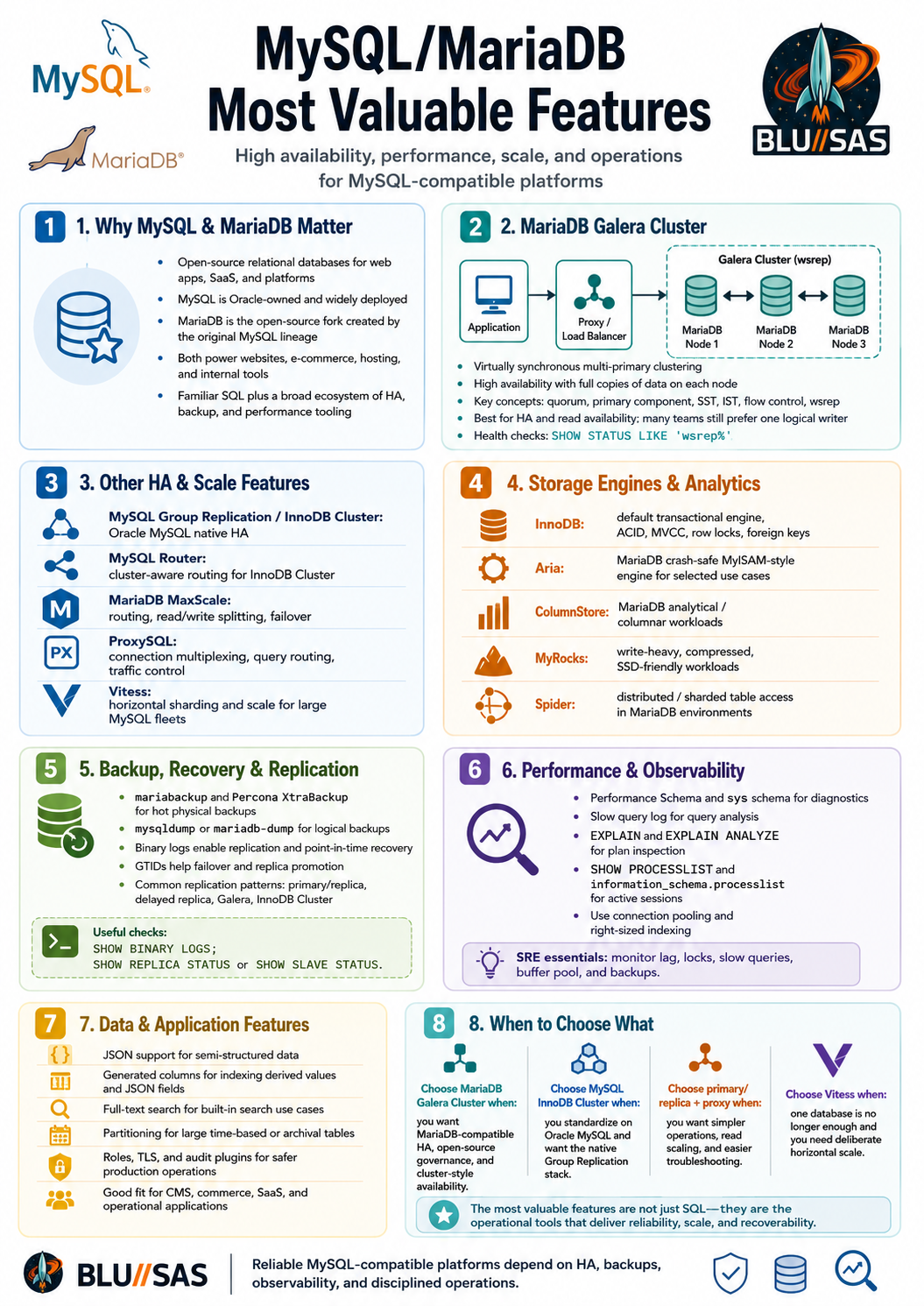
MariaDB Galera Cluster
MariaDB Galera Cluster is a high-availability clustering technology for MariaDB. It uses Galera to provide a virtually synchronous, multi-primary cluster, meaning multiple database nodes participate in one logical cluster and changes are replicated between nodes with strong consistency semantics. MariaDB’s own documentation distinguishes this from ordinary multi-master ring replication, which is asynchronous; Galera is the virtually synchronous multi-primary option.
In a typical layout:
Application
|
v
Load balancer / ProxySQL / MariaDB MaxScale / HAProxy
|
+------------------+------------------+
| | |
v v v
MariaDB Node 1 MariaDB Node 2 MariaDB Node 3
Galera Galera GaleraEach node has a full copy of the data. Writes are certified and replicated across the cluster. In practice, many teams still prefer to route writes to one node and use the others for reads/failover, even though the cluster supports multi-primary writes, because that avoids more write-conflict edge cases.
What Galera gives you
Galera is valuable when you need:
High availability
Automatic node membership
Fast failover
Synchronous or near-synchronous consistency
Read scaling across nodes
No traditional primary/replica lag
Maintenance with reduced downtimeIt is especially attractive for traditional LAMP/CMS/hosting workloads where the app expects a MySQL-compatible backend but the platform team wants a clustered database.
How it differs from standard MySQL/MariaDB replication
Traditional MySQL/MariaDB replication is usually:
Primary -> Replica
asynchronous
replication lag possible
replica may be stale
failover requires promotionGalera is different:
Multi-node cluster
virtually synchronous replication
all nodes contain the same dataset
cluster membership is managed
write conflicts are detected/certifiedSeveralnines describes Galera as a synchronous multi-master replication plugin for InnoDB and notes that it addresses issues such as replication lag and replicas going out of sync with the primary.
Important Galera operational concepts
| Concept | Meaning |
|---|---|
| Primary component | The healthy majority partition of the cluster |
| Quorum | Cluster needs a majority to avoid split brain |
| wsrep | Write-set replication API used by Galera |
| SST | State Snapshot Transfer: full node provisioning |
| IST | Incremental State Transfer: catch-up from recent writes |
| Certification | Conflict detection before a transaction commits |
| Flow control | Slows writers if a node falls behind |
| Donor node | Existing node used to seed or catch up another node |
Useful Galera status checks:
SHOW STATUS LIKE 'wsrep%';Key fields:
SHOW STATUS LIKE 'wsrep_cluster_size';
SHOW STATUS LIKE 'wsrep_cluster_status';
SHOW STATUS LIKE 'wsrep_local_state_comment';
SHOW STATUS LIKE 'wsrep_ready';
SHOW STATUS LIKE 'wsrep_connected';
SHOW STATUS LIKE 'wsrep_flow_control_paused';Healthy examples usually look like:
wsrep_cluster_status Primary
wsrep_local_state_comment Synced
wsrep_ready ON
wsrep_connected ONTypical Galera configuration ideas
A simplified example:
[mariadb]
binlog_format=ROW
default_storage_engine=InnoDB
innodb_autoinc_lock_mode=2
wsrep_on=ON
wsrep_provider=/usr/lib/galera/libgalera_smm.so
wsrep_cluster_name="prod-galera"
wsrep_cluster_address="gcomm://db1,db2,db3"
wsrep_node_name="db1"
wsrep_node_address="10.0.0.11"
wsrep_sst_method=mariabackupYou normally want three nodes minimum for quorum:
1 node no HA
2 nodes dangerous without arbitrator/quorum design
3 nodes normal minimum production layout
5 nodes stronger tolerance but more replication overheadFor two data nodes, use garbd, the Galera arbitrator, to provide quorum without storing data.
Galera limitations and gotchas
Galera is powerful, but it is not magic.
Common concerns:
Write-heavy workloads can suffer from certification conflicts
Multi-primary writes require careful application design
Large transactions are bad for cluster stability
Long-running transactions are risky
Network latency directly affects write performance
DDL needs care
All tables should use InnoDB
Primary-key discipline matters
AUTO_INCREMENT handling differs in clustered writes
Split-brain avoidance depends on quorum
Backups and restores must be Galera-awareSRE rule of thumb:
Use Galera for HA and read availability, but design your application as if there is one preferred writer unless you have tested true multi-writer behaviour.
Other valuable MySQL/MariaDB features and extensions
1. InnoDB
InnoDB is the default and most important storage engine for modern MySQL and MariaDB.
It provides:
ACID transactions
Row-level locking
Foreign keys
Crash recovery
MVCC
Buffer pool caching
Redo logs
IndexesUse it for almost all production transactional tables:
CREATE TABLE orders (
id BIGINT AUTO_INCREMENT PRIMARY KEY,
customer_id BIGINT NOT NULL,
total DECIMAL(10,2) NOT NULL,
created_at TIMESTAMP DEFAULT CURRENT_TIMESTAMP
) ENGINE=InnoDB;Check table engines:
SELECT table_schema, table_name, engine
FROM information_schema.tables
WHERE table_schema NOT IN ('mysql', 'information_schema', 'performance_schema', 'sys')
ORDER BY table_schema, table_name;2. MySQL Group Replication and InnoDB Cluster
On the Oracle MySQL side, the closest native HA equivalent is Group Replication, usually managed as InnoDB Cluster.
Oracle’s documentation describes InnoDB Cluster as a programmatic way to work with Group Replication; it integrates with MySQL Shell and MySQL Router so applications can connect to the cluster without implementing their own failover logic.
Architecture:
Application
|
v
MySQL Router
|
v
InnoDB Cluster
|
+-- MySQL node 1
+-- MySQL node 2
+-- MySQL node 3Useful for:
MySQL-native HA
Automated failover
Read replicas
Single-primary or multi-primary modes
Managed routing through MySQL RouterGalera is more associated with MariaDB/Percona-style ecosystems; InnoDB Cluster is more associated with Oracle MySQL.
3. MariaDB MaxScale
MariaDB MaxScale is a database proxy/router for MariaDB.
It can provide:
Read/write splitting
Query routing
Connection routing
Failover support
Traffic filtering
Security controls
Observability
Binlog routing
Cluster-aware routingTypical layout:
Application
|
v
MaxScale
|
+--> writer
+--> reader 1
+--> reader 2MaxScale is particularly useful with:
MariaDB replication
MariaDB Galera Cluster
MariaDB Enterprise deployments
Read-heavy apps
Operational failover designsComparable tools include ProxySQL, HAProxy, and MySQL Router, depending on whether you are in MariaDB, generic MySQL-compatible, or Oracle MySQL ecosystems.
4. ProxySQL
ProxySQL is a very popular MySQL/MariaDB proxy.
It is valuable because it can do:
Connection multiplexing
Read/write splitting
Query routing
Query rewriting
Hostgroup failover
Query caching
Traffic mirroring
Runtime configuration changes
User-based routingExample use case:
Application writes -> primary
Application reads -> replicas
Slow/reporting queries -> reporting replicaFor SREs, ProxySQL is valuable because it lets you shift traffic without changing application code.
5. MySQL Router
MySQL Router is Oracle’s lightweight router for MySQL InnoDB Cluster.
It is most useful when paired with:
MySQL Shell
Group Replication
InnoDB Cluster
InnoDB ClusterSetUse it when you are standardising on Oracle MySQL’s native HA stack rather than MariaDB Galera/MaxScale or ProxySQL.
6. MariaDB Aria storage engine
Aria is a MariaDB storage engine often described as a crash-safe alternative to MyISAM. MariaDB’s storage engine documentation highlights its pluggable storage engine architecture and key engines such as InnoDB, MyISAM, and Aria.
Aria is useful for:
Internal temporary tables
Read-heavy non-transactional workloads
Some legacy MyISAM replacement cases
Crash-safe table recovery compared with MyISAMBut for normal application data, prefer:
InnoDB7. MariaDB ColumnStore
MariaDB ColumnStore is a columnar analytics engine for MariaDB.
It is designed for:
Analytical queries
Large scans
Aggregations
Reporting
Data warehouse-style workloadsSeveralnines describes MariaDB ColumnStore as a pluggable columnar storage engine that runs on MariaDB Server and uses a parallel distributed data architecture while keeping a SQL interface.
Use it when you want MariaDB-compatible SQL but more analytical behaviour than row-oriented InnoDB provides.
For very serious analytics, also compare:
ClickHouse
PostgreSQL + columnar extensions
BigQuery
Snowflake
Redshift
DuckDB8. MyRocks
MyRocks is a storage engine based on RocksDB, originally popularised by Facebook/Meta.
It is useful for:
Write-heavy workloads
Compression-sensitive workloads
Large datasets
SSD-friendly LSM-tree storage patterns
High ingest workloadsCompared with InnoDB, MyRocks can reduce write amplification and storage footprint for suitable workloads, but it changes operational behaviour. It is not a drop-in “always better” engine.
Use only after benchmarking.
9. Spider storage engine
Spider is a MariaDB storage engine for sharding/federation-style architectures.
It can spread tables across multiple backend servers.
Useful for:
Horizontal partitioning
Sharded datasets
Distributed table access
Legacy scale-out designsBut it adds complexity. For new large-scale MySQL-compatible sharding designs, also evaluate:
Vitess
Application-level sharding
Citus/PostgreSQL if changing database family
Distributed SQL databases10. Vitess
Vitess is one of the most important MySQL-compatible scale-out technologies.
It was originally created at YouTube and is now widely associated with large-scale MySQL sharding.
It provides:
Horizontal sharding
Query routing
Connection pooling
Online resharding
Topology management
Kubernetes-native operation
MySQL-compatible protocol
Operational tooling for large fleetsTypical architecture:
Application
|
v
vtgate
|
v
vttablet
|
v
MySQL shardsUse Vitess when one MySQL instance or one primary/replica set is no longer enough and you need deliberate horizontal scale.
11. Percona XtraBackup and MariaDB Backup
For production, logical backups with mysqldump are often not enough.
Important physical backup tools:
Percona XtraBackup
MariaDB Backup / mariabackup
MySQL Enterprise Backup
Cloud-provider physical backupsThese are useful for:
Large databases
Hot backups
Fast restores
Replica provisioning
Backup automation
Point-in-time recovery with binlogsGalera commonly uses backup-based SST methods such as mariabackup.
12. Binary logs and point-in-time recovery
Binary logs are essential for replication and recovery.
Useful settings/concepts:
log_bin
server_id
binlog_format=ROW
expire_logs_days / binlog_expire_logs_seconds
GTID
replication user
point-in-time restore
CDC pipelinesShow binary logs:
SHOW BINARY LOGS;Show current binlog position:
SHOW BINARY LOG STATUS;Older syntax:
SHOW MASTER STATUS;For MariaDB, syntax may vary by version.
13. GTID replication
GTID means Global Transaction ID.
It helps with:
Failover
Replica promotion
Replication consistency
Simpler topology changes
Automated recoveryBut MySQL GTID and MariaDB GTID are not identical, so cross-family replication needs care.
Useful checks:
SHOW VARIABLES LIKE '%gtid%';
SHOW REPLICA STATUS\G;MariaDB often uses:
SHOW SLAVE STATUS\G;14. Semi-synchronous replication
Semi-sync replication sits between fully async replication and synchronous clustering.
The idea:
Primary commits only after at least one replica acknowledges receiving the transactionBenefits:
Lower data-loss risk than pure async replication
Less overhead than fully synchronous clustering
Useful for primary/replica HATrade-off:
Commit latency increases
Replica/network problems can affect write path
Still not the same model as Galera15. Performance Schema and sys schema
MySQL and MariaDB both provide metadata and performance views, although details differ.
Useful areas:
Active queries
Wait events
Statement statistics
I/O statistics
Lock waits
Memory usage
Index usage
Table statisticsCommon queries:
SHOW FULL PROCESSLIST;
SELECT *
FROM information_schema.processlist
ORDER BY time DESC;In MySQL, the sys schema is especially useful for DBA/SRE diagnostics.
Examples:
SELECT *
FROM sys.statement_analysis
ORDER BY total_latency DESC
LIMIT 10;
SELECT *
FROM sys.schema_table_statistics
ORDER BY total_latency DESC
LIMIT 10;Availability and exact view names vary between MySQL and MariaDB.
16. Slow query log
One of the most valuable operational features.
Enable:
SET GLOBAL slow_query_log = 'ON';
SET GLOBAL long_query_time = 1;Check:
SHOW VARIABLES LIKE 'slow_query_log';
SHOW VARIABLES LIKE 'long_query_time';
SHOW VARIABLES LIKE 'slow_query_log_file';Analyse with:
mysqldumpslow
pt-query-digest
Performance Schema
EXPLAIN
EXPLAIN ANALYZE17. EXPLAIN and EXPLAIN ANALYZE
For performance tuning:
EXPLAIN
SELECT *
FROM users
WHERE email = 'alice@example.com';Runtime analysis:
EXPLAIN ANALYZE
SELECT *
FROM users
WHERE email = 'alice@example.com';Useful to detect:
Full table scans
Wrong index choice
Bad join order
Filesort
Temporary tables
Missing composite indexes
Poor cardinality estimates18. Full-text search
MySQL and MariaDB support full-text indexes.
Example:
CREATE TABLE documents (
id BIGINT AUTO_INCREMENT PRIMARY KEY,
title VARCHAR(255) NOT NULL,
body TEXT NOT NULL,
FULLTEXT KEY ft_documents (title, body)
) ENGINE=InnoDB;Query:
SELECT *
FROM documents
WHERE MATCH(title, body)
AGAINST('database replication');Boolean mode:
SELECT *
FROM documents
WHERE MATCH(title, body)
AGAINST('+database +replication' IN BOOLEAN MODE);Good for simple search. For advanced search, use:
OpenSearch
Elasticsearch
Meilisearch
PostgreSQL full-text search
Sphinx/Manticore19. JSON support
Both MySQL and MariaDB support JSON functions, but their implementations differ.
Common portable style:
CREATE TABLE events (
id BIGINT AUTO_INCREMENT PRIMARY KEY,
payload JSON NOT NULL,
created_at TIMESTAMP DEFAULT CURRENT_TIMESTAMP
);Query:
SELECT JSON_UNQUOTE(JSON_EXTRACT(payload, '$.service')) AS service
FROM events;Filter:
SELECT *
FROM events
WHERE JSON_UNQUOTE(JSON_EXTRACT(payload, '$.level')) = 'error';For performance, use generated columns:
ALTER TABLE events
ADD COLUMN service VARCHAR(100)
GENERATED ALWAYS AS (
JSON_UNQUOTE(JSON_EXTRACT(payload, '$.service'))
) STORED;
CREATE INDEX idx_events_service
ON events(service);20. Generated columns
Generated columns are valuable for:
Indexing JSON fields
Normalising derived values
Avoiding repeated expression logic
Improving query performanceExample:
CREATE TABLE access_logs (
id BIGINT AUTO_INCREMENT PRIMARY KEY,
payload JSON NOT NULL,
service VARCHAR(100)
GENERATED ALWAYS AS (
JSON_UNQUOTE(JSON_EXTRACT(payload, '$.service'))
) STORED,
created_at TIMESTAMP DEFAULT CURRENT_TIMESTAMP,
INDEX idx_service_created (service, created_at)
);21. Partitioning
Partitioning helps with large time-based or range-based tables.
Example:
CREATE TABLE events (
id BIGINT NOT NULL,
created_at DATE NOT NULL,
payload JSON NOT NULL,
PRIMARY KEY (id, created_at)
)
PARTITION BY RANGE COLUMNS(created_at) (
PARTITION p202601 VALUES LESS THAN ('2026-02-01'),
PARTITION p202602 VALUES LESS THAN ('2026-03-01'),
PARTITION pmax VALUES LESS THAN (MAXVALUE)
);Useful for:
Large event tables
Fast retention/drop old data
Time-based reporting
Reducing index working set
Operational lifecycle managementDropping a partition is often much faster than deleting millions of rows.
22. Roles
Modern MySQL and MariaDB support roles, though exact behaviour differs by version.
Example:
CREATE ROLE app_readonly;
GRANT SELECT
ON appdb.*
TO app_readonly;
GRANT app_readonly
TO 'analyst'@'%';Show grants:
SHOW GRANTS FOR 'analyst'@'%';Roles help avoid repeating privilege sets across many users.
23. Encryption and TLS
Useful security features include:
TLS client/server encryption
Password plugins
At-rest encryption options
Tablespace encryption
Binary log encryption
Backup encryption
Key management pluginsCheck TLS:
SHOW VARIABLES LIKE 'have_ssl';
SHOW STATUS LIKE 'Ssl_cipher';For production, you normally want:
TLS for remote DB connections
Least-privilege users
No app login as root
Secrets in a vault
Auditable grants
Network segmentation24. Audit plugins
Audit features are important for regulated environments.
Options include:
MariaDB Audit Plugin
MySQL Enterprise Audit
Percona audit log plugin
Proxy-level query logging
Application-level audit tablesAudit logs can capture:
Logins
Failed logins
DDL
DML
Privilege changes
Sensitive table access
Administrative commands25. Thread pool
Thread pool features help under high connection concurrency.
Useful when:
Many client connections exist
Workload has bursts
Too many active threads hurt performance
Connection pooling is not sufficientMariaDB has historically made thread pool functionality more accessible in community-oriented builds than Oracle MySQL, where some enterprise features are commercial.
Still, for most SREs, first solve connection pressure with:
ProxySQL
MaxScale
Application connection pooling
Right-sized max_connectionsPopular ecosystem tools
| Area | MySQL/MariaDB tools |
|---|---|
| HA / clustering | Galera, InnoDB Cluster, Group Replication |
| Routing / proxy | MaxScale, ProxySQL, MySQL Router, HAProxy |
| Backup | mariabackup, Percona XtraBackup, mysqldump, MySQL Enterprise Backup |
| Monitoring | mysqld_exporter, PMM, Grafana, Performance Schema, sys schema |
| Query analysis | slow query log, pt-query-digest, EXPLAIN ANALYZE |
| Sharding | Vitess, Spider, application sharding |
| Analytics | ColumnStore, HeatWave, external warehouses |
| Security | audit plugins, TLS, roles, encryption |
| CDC | binlog, Debezium, Maxwell, Canal |
| Online schema change | gh-ost, pt-online-schema-change |
| Admin GUIs | DBeaver, MySQL Workbench, phpMyAdmin, Adminer |
The most useful features for SREs
For real operations, the most valuable features are usually not the most exotic ones. They are:
InnoDB
Binary logs
GTID replication
Backups with tested restores
Slow query log
EXPLAIN ANALYZE
Performance Schema / sys schema
Connection pooling
Read/write routing
Partitioning for large tables
Online schema-change tooling
TLS and least-privilege grants
Monitoring and alertingA strong MySQL/MariaDB SRE stack might look like:
Application
|
v
ProxySQL or MaxScale
|
+--> Primary / writer
+--> Replica / reader
+--> Replica / backup/reporting
Backups: mariabackup or XtraBackup + binlogs
Monitoring: mysqld_exporter + Prometheus + Grafana
Query analysis: slow query log + pt-query-digest
Schema changes: gh-ost or pt-online-schema-change
Security: TLS + least privilege + audit pluginFor MariaDB HA specifically:
Application
|
v
MaxScale / ProxySQL / HAProxy
|
v
MariaDB Galera Cluster
|
+--> Node 1
+--> Node 2
+--> Node 3Practical recommendation
Use MariaDB Galera Cluster when your priority is high availability for MariaDB-compatible workloads and you can control application write behaviour. Use MySQL InnoDB Cluster / Group Replication when you are standardising on Oracle MySQL. Use traditional primary/replica replication when you need simpler operations, read scaling, backups, or delayed replicas. Use Vitess when you need serious MySQL-compatible horizontal sharding.
For most production systems, the winning combination is not one feature; it is the full operational stack: InnoDB + replication or clustering + proxy/routing + tested backups + monitoring + slow query analysis + safe schema changes.