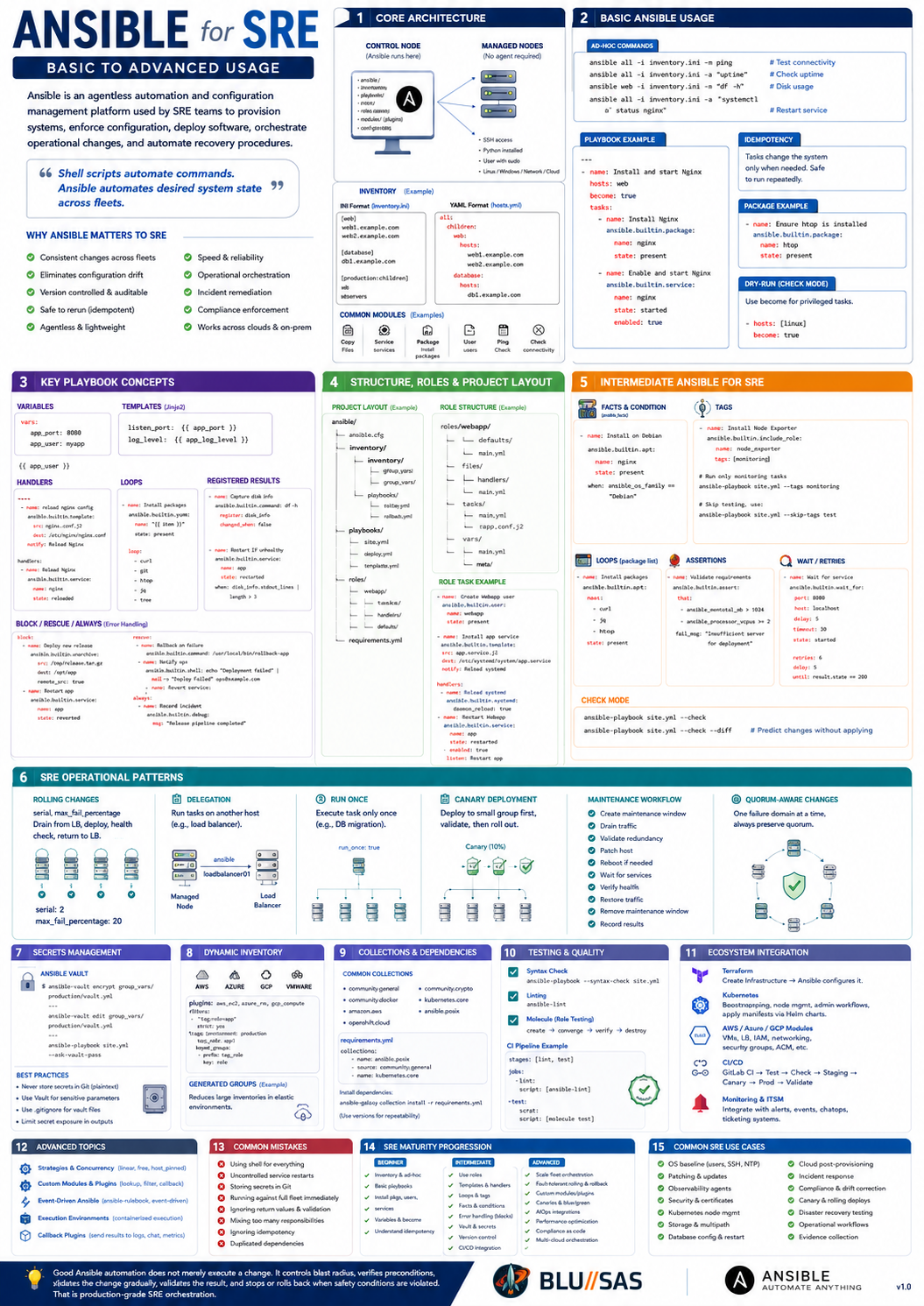
Ansible is an agentless automation and configuration-management platform commonly used by SRE teams to provision systems, enforce configuration, deploy software, orchestrate operational changes, and automate recovery procedures.
It is especially useful when the same change must be applied consistently across many Linux servers, virtual machines, network devices, Kubernetes nodes, or cloud instances.
1. Why Ansible matters to SRE
SRE work repeatedly involves tasks such as:
- installing and configuring software;
- applying operating-system baselines;
- deploying monitoring agents;
- rotating certificates;
- patching fleets;
- changing kernel or network settings;
- performing controlled service restarts;
- gathering diagnostic information;
- remediating known failure conditions.
Doing these tasks manually creates configuration drift, inconsistent results, and poor auditability. Ansible converts operational procedures into version-controlled automation.
A useful summary is:
Shell scripts automate commands. Ansible automates desired system state across fleets.
Ansible is not limited to configuration management. It can also perform:
- provisioning;
- deployment;
- orchestration;
- validation;
- compliance enforcement;
- incident remediation;
- operational data collection.
2. Core architecture
Ansible normally uses a control node to manage one or more managed nodes.
Control node
The control node runs:
ansible;ansible-playbook;- collections and roles;
- inventory;
- configuration;
- playbooks.
It connects to managed nodes, usually over SSH.
Managed nodes
Managed nodes generally do not require an Ansible agent. They usually need:
- SSH access;
- Python for most Linux modules;
- an account with suitable privileges;
sudoaccess where required.
Inventory
The inventory defines the systems Ansible manages.
Example:
[web]
web01.example.com
web02.example.com

[database]
db01.example.com

[production:children]
web
database
Inventory can also be written in YAML:
all:
  children:
    web:
      hosts:
        web01.example.com:
        web02.example.com:
    database:
      hosts:
        db01.example.com:
Modules
Modules perform operations such as:
- installing packages;
- creating users;
- copying files;
- managing services;
- modifying firewall rules;
- interacting with clouds and APIs.
Examples include:
ansible.builtin.package
ansible.builtin.service
ansible.builtin.template
ansible.builtin.user
ansible.builtin.file
ansible.builtin.copy
ansible.builtin.uri
Playbooks
Playbooks are YAML files describing operations to perform on target systems.
Example:
---
- name: Install and start Nginx
  hosts: web
  become: true

  tasks:
    - name: Install Nginx
      ansible.builtin.package:
        name: nginx
        state: present

    - name: Enable and start Nginx
      ansible.builtin.service:
        name: nginx
        state: started
        enabled: true
3. Basic Ansible usage
3.1 Ad hoc commands
Ad hoc commands are useful for quick checks and one-off operations.
Test connectivity:
ansible all -i inventory.ini -m ansible.builtin.pingCheck uptime:
ansible all -i inventory.ini -a "uptime"Check disk usage:
ansible all -i inventory.ini -a "df -h"Restart a service:
ansible web -i inventory.ini \
  -b \
  -m ansible.builtin.service \
  -a "name=nginx state=restarted"
Ad hoc commands are useful during incidents, but repeatable operations should normally become playbooks.
3.2 Idempotency
One of Ansible’s most important concepts is idempotency.
An idempotent task changes a system only when necessary.
For example:
- name: Ensure Chrony is installed
  ansible.builtin.package:
    name: chrony
    state: present
Running this task repeatedly should not reinstall the package each time. If the desired state already exists, Ansible reports ok rather than changed.
Idempotency matters to SRE because automation must be safe to rerun after:
- partial failures;
- interrupted deployments;
- host reboots;
- incident recovery;
- operator uncertainty.
3.3 Variables
Variables allow the same playbook to work across different systems and environments.
---
- name: Configure application
  hosts: app
  become: true

  vars:
    app_port: 8080
    app_user: myapp

  tasks:
    - name: Create application user
      ansible.builtin.user:
        name: "{{ app_user }}"
        system: true

    - name: Render application configuration
      ansible.builtin.template:
        src: app.conf.j2
        dest: /etc/myapp/app.conf
        mode: "0644"
Variables can come from:
- playbooks;
- inventory;
group_vars;host_vars;- roles;
- command-line arguments;
- external secret stores;
- dynamic inventory.
3.4 Templates
Ansible uses Jinja2 templates to generate configuration files.
Template:
listen_port = {{ app_port }}
log_level = {{ app_log_level }}
Task:
- name: Install application configuration
  ansible.builtin.template:
    src: app.conf.j2
    dest: /etc/myapp/app.conf
    owner: root
    group: root
    mode: "0644"
  notify: Restart application
Templates are useful for:
- Prometheus configuration;
- systemd units;
- Nginx configuration;
- OpenTelemetry Collector pipelines;
- application settings;
- kernel tuning files.
3.5 Handlers
Handlers run only when notified by a changed task.
tasks:
  - name: Update Nginx configuration
    ansible.builtin.template:
      src: nginx.conf.j2
      dest: /etc/nginx/nginx.conf
      mode: "0644"
    notify: Reload Nginx

handlers:
  - name: Reload Nginx
    ansible.builtin.service:
      name: nginx
      state: reloaded
This avoids unnecessary restarts.
For SRE systems, unnecessary restarts can cause:
- avoidable outages;
- connection resets;
- cache loss;
- leader elections;
- delayed recovery;
- increased error rates.
3.6 Privilege escalation
Use become for privileged operations:
- name: Configure operating system
  hosts: linux
  become: true
Command-line equivalent:
ansible-playbook site.yml --becomeCredentials should not be embedded directly in playbooks.
4. Structuring Ansible projects
A simple project might look like:
ansible/
├── ansible.cfg
├── inventories/
│   ├── development/
│   │   ├── hosts.yml
│   │   └── group_vars/
│   └── production/
│       ├── hosts.yml
│       └── group_vars/
├── playbooks/
│   ├── deploy.yml
│   ├── patch.yml
│   └── validate.yml
├── roles/
│   ├── common/
│   ├── node_exporter/
│   └── application/
└── requirements.yml
This separates:
- inventory;
- environment-specific variables;
- reusable roles;
- operational workflows;
- third-party dependencies.
5. Roles
Roles package related tasks, templates, handlers, defaults, and files into reusable components.
Example structure:
roles/node_exporter/
├── defaults/
│   └── main.yml
├── handlers/
│   └── main.yml
├── tasks/
│   └── main.yml
├── templates/
│   └── node_exporter.service.j2
└── vars/
    └── main.yml
Example role task:
---
- name: Create Node Exporter user
  ansible.builtin.user:
    name: node_exporter
    system: true
    shell: /usr/sbin/nologin

- name: Install Node Exporter systemd unit
  ansible.builtin.template:
    src: node_exporter.service.j2
    dest: /etc/systemd/system/node_exporter.service
    mode: "0644"
  notify:
    - Reload systemd
    - Restart Node Exporter
Roles help SRE teams:
- standardise configurations;
- reduce duplicated YAML;
- test components independently;
- reuse automation across environments;
- assign ownership to specific teams.
6. Intermediate Ansible for SRE
6.1 Facts
Ansible gathers host information called facts.
Examples include:
ansible_distribution
ansible_distribution_version
ansible_architecture
ansible_default_ipv4
ansible_memtotal_mb
ansible_processor_vcpus
Conditional task:
- name: Install package on Debian systems
  ansible.builtin.apt:
    name: chrony
    state: present
    update_cache: true
  when: ansible_os_family == "Debian"
Facts are useful for heterogeneous fleets containing:
- Ubuntu;
- RHEL;
- Debian;
- Rocky Linux;
- different CPU architectures;
- bare metal and virtual machines.
6.2 Conditionals
- name: Enable large-host tuning
  ansible.builtin.template:
    src: large-host-sysctl.conf.j2
    dest: /etc/sysctl.d/90-large-host.conf
  when: ansible_memtotal_mb > 65536
Conditionals should be used carefully. Excessive branching can make playbooks difficult to understand and test.
6.3 Loops
- name: Install operational packages
  ansible.builtin.package:
    name: "{{ item }}"
    state: present
  loop:
    - curl
    - jq
    - tcpdump
    - strace
    - sysstat
For package installation, passing a list directly is usually more efficient:
- name: Install operational packages
  ansible.builtin.package:
    name:
      - curl
      - jq
      - tcpdump
      - strace
      - sysstat
    state: present
6.4 Registered results
Task output can be captured and evaluated.
- name: Check application health
  ansible.builtin.uri:
    url: http://localhost:8080/health
    return_content: true
    status_code: 200
  register: health_result

- name: Display health response
  ansible.builtin.debug:
    var: health_result.json
Registered values can drive subsequent decisions:
- name: Restart application when unhealthy
  ansible.builtin.service:
    name: myapp
    state: restarted
  when: health_result.status != 200
For reliable remediation, also consider retries, validation, and failure limits.
6.5 Error handling
Ansible supports structured failure handling using block, rescue, and always.
- name: Deploy application safely
  block:
    - name: Install new release
      ansible.builtin.unarchive:
        src: /tmp/myapp.tar.gz
        dest: /opt/myapp
        remote_src: true

    - name: Restart application
      ansible.builtin.service:
        name: myapp
        state: restarted

    - name: Verify health
      ansible.builtin.uri:
        url: http://localhost:8080/health
        status_code: 200

  rescue:
    - name: Restore previous release
      ansible.builtin.command:
        cmd: /usr/local/bin/rollback-myapp

    - name: Restart rolled-back release
      ansible.builtin.service:
        name: myapp
        state: restarted

  always:
    - name: Record deployment completion
      ansible.builtin.debug:
        msg: "Deployment workflow completed"
This pattern is useful for:
- rollback;
- partial failure cleanup;
- temporary maintenance mode;
- draining and rejoining nodes;
- restoring load-balancer membership.
6.6 Assertions
Assertions provide explicit precondition and validation checks.
- name: Validate host requirements
  ansible.builtin.assert:
    that:
      - ansible_memtotal_mb >= 8192
      - ansible_processor_vcpus >= 4
      - data_disk is defined
    fail_msg: "Host does not meet the deployment requirements"
Assertions are important when a failed assumption could cause an outage.
6.7 Tags
Tags allow subsets of a playbook to run.
- name: Install Node Exporter
  ansible.builtin.include_role:
    name: node_exporter
  tags:
    - monitoring
    - node_exporter
Run only monitoring tasks:
ansible-playbook site.yml --tags monitoringSkip restart tasks:
ansible-playbook site.yml --skip-tags restartTags are useful, but they should not replace properly separated playbooks and roles.
7. SRE operational patterns
7.1 Safe rolling changes
When modifying production systems, avoid changing the entire fleet simultaneously.
---
- name: Rolling application update
  hosts: app
  serial: 2
  max_fail_percentage: 20
  become: true

  tasks:
    - name: Remove node from load balancer
      ansible.builtin.uri:
        url: "https://loadbalancer.example/api/nodes/{{ inventory_hostname }}/disable"
        method: POST

    - name: Stop application
      ansible.builtin.service:
        name: myapp
        state: stopped

    - name: Deploy release
      ansible.builtin.unarchive:
        src: myapp.tar.gz
        dest: /opt/myapp

    - name: Start application
      ansible.builtin.service:
        name: myapp
        state: started

    - name: Wait for health endpoint
      ansible.builtin.uri:
        url: http://localhost:8080/health
        status_code: 200
      register: health
      retries: 12
      delay: 5
      until: health.status == 200

    - name: Return node to load balancer
      ansible.builtin.uri:
        url: "https://loadbalancer.example/api/nodes/{{ inventory_hostname }}/enable"
        method: POST
Relevant controls include:
serial;max_fail_percentage;- health checks;
- load-balancer draining;
- explicit rollback;
- maintenance windows;
- approval gates.
7.2 Delegation
A task can execute on another system.
- name: Remove host from load balancer
  ansible.builtin.command:
    cmd: "/usr/local/bin/lb-disable {{ inventory_hostname }}"
  delegate_to: loadbalancer01
This is useful when orchestrating dependencies between:
- application hosts;
- load balancers;
- monitoring systems;
- database clusters;
- DNS providers;
- service registries.
7.3 Run once
Some tasks should execute only once:
- name: Run database migration
  ansible.builtin.command:
    cmd: /opt/myapp/bin/migrate
  run_once: true
This must be used carefully. A database migration should normally have:
- locking;
- backward compatibility;
- pre-deployment backup;
- validation;
- rollback planning.
7.4 Waiting and retries
- name: Wait for service port
  ansible.builtin.wait_for:
    host: "{{ inventory_hostname }}"
    port: 9090
    timeout: 120
API retry:
- name: Wait for application readiness
  ansible.builtin.uri:
    url: http://localhost:8080/ready
    status_code: 200
  register: readiness
  retries: 20
  delay: 5
  until: readiness.status == 200
This is preferable to arbitrary sleep commands.
7.5 Check mode
Check mode predicts changes without applying them:
ansible-playbook site.yml --checkAdd diffs:
ansible-playbook site.yml --check --diffCheck mode is valuable in production reviews, although not every module supports it fully.
A strong production workflow is:
syntax check
→ lint
→ molecule tests
→ check mode
→ staging deployment
→ canary deployment
→ rolling production deployment
→ post-deployment validation
8. Secrets management
Secrets should never be stored as plaintext in Git.
Ansible Vault
Encrypt a variable file:
ansible-vault encrypt group_vars/production/vault.ymlEdit it:
ansible-vault edit group_vars/production/vault.ymlRun a playbook:
ansible-playbook site.yml --ask-vault-passExample variable layout:
database_password: "{{ vault_database_password }}"Encrypted file:
vault_database_password: very-secret-valueFor larger organisations, Ansible may retrieve secrets from:
- HashiCorp Vault;
- cloud secret managers;
- CyberArk;
- external credential brokers;
- CI/CD credential stores.
Secrets should also be protected from output:
- name: Configure sensitive credentials
  ansible.builtin.template:
    src: credentials.j2
    dest: /etc/myapp/credentials
    mode: "0600"
  no_log: true
Use no_log selectively because it reduces troubleshooting visibility.
9. Dynamic inventory
Static inventory becomes difficult to maintain in elastic environments.
Dynamic inventory can discover hosts from:
- AWS;
- Azure;
- Google Cloud;
- VMware;
- OpenStack;
- Kubernetes;
- NetBox;
- Proxmox;
- custom APIs.
Example conceptual AWS inventory:
plugin: amazon.aws.aws_ec2
regions:
  - eu-west-2

filters:
  tag:Environment: production

keyed_groups:
  - key: tags.Role
    prefix: role
This can generate groups such as:
role_web
role_database
role_monitoring
Dynamic inventory reduces stale host lists and enables automation against infrastructure metadata.
10. Collections
Collections package:
- modules;
- roles;
- plugins;
- documentation.
Examples include:
community.general
community.crypto
community.docker
kubernetes.core
amazon.aws
openstack.cloud
ansible.posix
Install dependencies from requirements.yml:
---
collections:
  - name: ansible.posix
  - name: community.general
  - name: kubernetes.core
Install:
ansible-galaxy collection install -r requirements.ymlPin collection versions where reproducibility matters.
11. Ansible for observability
Ansible is particularly effective for deploying and configuring observability agents.
Examples include:
- Prometheus Node Exporter;
- Grafana Alloy;
- OpenTelemetry Collector;
- Fluent Bit;
- Vector;
- Filebeat;
- Telegraf;
- Zabbix Agent;
- auditd rules;
- systemd journal forwarding.
Example:
- name: Deploy OpenTelemetry Collector
  hosts: linux
  become: true

  roles:
    - otel_collector
An SRE-quality role should handle:
- package or binary installation;
- service user creation;
- configuration rendering;
- certificate installation;
- endpoint configuration;
- resource limits;
- systemd hardening;
- service restart;
- health validation;
- version reporting.
12. Ansible for incident response
Ansible can automate repetitive incident procedures.
Evidence collection
- name: Collect incident diagnostics
  hosts: affected
  become: true

  tasks:
    - name: Capture system state
      ansible.builtin.shell: |
        set -o pipefail
        {
          date
          uptime
          free -m
          df -h
          ss -s
          ps aux --sort=-%cpu | head -30
          journalctl -p err --since "-30 minutes"
        } > /tmp/incident-{{ inventory_hostname }}.txt
      args:
        executable: /bin/bash
      changed_when: false

    - name: Fetch diagnostic file
      ansible.builtin.fetch:
        src: "/tmp/incident-{{ inventory_hostname }}.txt"
        dest: "./incident-data/"
        flat: false
Known remediation
- name: Recover stuck service
  hosts: affected
  serial: 1
  become: true

  tasks:
    - name: Restart service
      ansible.builtin.service:
        name: myapp
        state: restarted

    - name: Verify recovery
      ansible.builtin.uri:
        url: http://localhost:8080/ready
        status_code: 200
      register: readiness
      retries: 10
      delay: 3
      until: readiness.status == 200
Automated remediation should only be used when:
- the failure mode is well understood;
- the remediation is safe and bounded;
- validation is reliable;
- escalation occurs when recovery fails;
- repeated remediation cannot create a loop.
13. Ansible with Kubernetes
Ansible can manage Kubernetes resources using the Kubernetes collection.
- name: Deploy application to Kubernetes
  hosts: localhost
  connection: local

  tasks:
    - name: Apply deployment
      kubernetes.core.k8s:
        state: present
        src: manifests/deployment.yml
It can also:
- bootstrap Kubernetes hosts;
- install container runtimes;
- configure kernel modules;
- distribute certificates;
- install Helm charts;
- label or cordon nodes;
- drain nodes before maintenance;
- validate workloads after changes.
However, Ansible should not duplicate the work of Kubernetes controllers.
A reasonable separation is:
- Ansible configures hosts and bootstraps clusters;
- Helm or GitOps manages long-running Kubernetes applications;
- Kubernetes controllers continuously reconcile workload state.
14. Ansible with Terraform
Terraform and Ansible solve different problems.
Terraform
Best suited to:
- creating infrastructure;
- managing cloud resources;
- defining networks;
- provisioning instances;
- managing lifecycle through provider APIs.
Ansible
Best suited to:
- configuring operating systems;
- installing packages;
- deploying applications;
- performing orchestration;
- executing operational workflows.
A common pattern is:
Terraform creates infrastructure
→ dynamic inventory discovers it
→ Ansible configures it
→ monitoring validates it
Avoid having Terraform and Ansible manage the same resource property. Competing ownership causes drift and unpredictable changes.
15. Testing and quality
Production Ansible should be treated as software.
Syntax checking
ansible-playbook --syntax-check playbooks/site.ymlLinting
ansible-lintTypical linting checks include:
- fully qualified collection names;
- risky shell usage;
- missing task names;
- file permissions;
- idempotency concerns;
- YAML formatting.
Molecule
Molecule can test roles inside containers or virtual machines.
Typical test workflow:
create
→ prepare
→ converge
→ idempotence
→ verify
→ destroy
Tests should verify:
- packages are installed;
- configuration files exist;
- permissions are correct;
- services are running;
- ports are listening;
- repeat runs produce no changes.
CI pipeline example
stages:
  - lint
  - test

ansible-lint:
  stage: lint
  script:
    - ansible-lint

molecule:
  stage: test
  script:
    - molecule test
16. Advanced execution control
Strategies
The default strategy is generally linear: hosts progress through tasks together.
The free strategy allows each host to proceed independently:
- hosts: all
  strategy: free
Use it only when task ordering across hosts does not matter.
Forks
Forks control parallelism:
[defaults]
forks = 20
Increasing forks can improve speed, but may overload:
- SSH bastions;
- package repositories;
- APIs;
- storage systems;
- control nodes;
- managed services.
Throttling
Limit concurrency for a particular task:
- name: Restart storage daemon
  ansible.builtin.service:
    name: storage-daemon
    state: restarted
  throttle: 1
This is valuable for quorum-based or stateful systems.
17. Advanced SRE orchestration patterns
Quorum-aware maintenance
For systems such as Ceph, Elasticsearch, etcd, Consul, or databases:
- assess cluster health before maintenance;
- modify one failure domain at a time;
- preserve quorum;
- verify recovery before continuing;
- halt on degraded state.
Conceptual example:
- name: Maintain cluster nodes safely
  hosts: storage
  serial: 1
  any_errors_fatal: true

  pre_tasks:
    - name: Verify cluster is healthy
      ansible.builtin.command:
        cmd: clusterctl health
      register: cluster_health
      changed_when: false
      failed_when: "'HEALTH_OK' not in cluster_health.stdout"

  tasks:
    - name: Perform maintenance
      ansible.builtin.include_role:
        name: storage_maintenance

  post_tasks:
    - name: Wait for cluster recovery
      ansible.builtin.command:
        cmd: clusterctl health
      register: recovered
      retries: 30
      delay: 10
      until: "'HEALTH_OK' in recovered.stdout"
      changed_when: false
Canary deployment
Deploy to a small group first:
[app_canary]
app01

[app_remaining]
app02
app03
app04
Workflow:
Deploy canary
→ verify metrics and health
→ pause or approve
→ deploy remaining nodes
Maintenance orchestration
A complete workflow might:
- create a maintenance window in monitoring;
- drain traffic;
- validate redundancy;
- patch the host;
- reboot if required;
- wait for services;
- verify health;
- restore traffic;
- remove the maintenance window;
- record results.
This is much safer than a simple package-update playbook.
18. Custom modules and plugins
When built-in modules are insufficient, advanced users can create:
- custom modules;
- inventory plugins;
- lookup plugins;
- filter plugins;
- callback plugins;
- action plugins.
A custom module is preferable to complex shell logic when the operation needs:
- structured parameters;
- idempotency;
- check-mode support;
- JSON output;
- reusable error handling;
- consistent reporting.
Filter plugins can encapsulate complex data transformations used in templates.
Callback plugins can send execution results to:
- logging platforms;
- event systems;
- chat systems;
- metrics backends;
- audit repositories.
19. Event-driven Ansible
Traditional Ansible is usually executed on demand or through a schedule. Event-driven automation triggers playbooks or rulebooks in response to events.
Possible event sources include:
- alerts;
- webhooks;
- Kafka messages;
- cloud events;
- monitoring systems;
- service-management tools.
Example workflow:
Alertmanager fires alert
→ event rule matches known failure
→ Ansible runs diagnostic checks
→ bounded remediation is attempted
→ health is validated
→ incident system is updated
→ human is paged if remediation fails
This can support auto-remediation, but safeguards are essential:
- rate limits;
- deduplication;
- cooldown periods;
- maximum retry counts;
- blast-radius controls;
- human approval for high-risk actions.
20. AWX and Ansible Automation Platform
For team and enterprise usage, Ansible is often operated through AWX or an enterprise automation platform.
These systems add:
- web interface;
- role-based access control;
- credential management;
- job templates;
- schedules;
- surveys and input forms;
- workflow orchestration;
- audit history;
- notifications;
- execution environments;
- API access.
This turns a command-line playbook repository into a controlled automation service.
An SRE team might expose job templates for:
- patching a fleet;
- restarting an application safely;
- gathering diagnostics;
- rotating certificates;
- deploying monitoring agents;
- draining Kubernetes nodes;
- expanding storage;
- running disaster-recovery tests.
21. Common Ansible mistakes
Using shell for everything
Poor:
- name: Install package
  ansible.builtin.shell: apt-get install -y nginx
Better:
- name: Install package
  ansible.builtin.apt:
    name: nginx
    state: present
Modules provide idempotency, validation, check mode, and structured errors.
Uncontrolled service restarts
Do not restart services after every run. Use handlers and reloads where possible.
Storing secrets in Git
Use Vault or an external secret manager.
Running against the full fleet immediately
Use canaries, serial, health validation, and failure thresholds.
Ignoring return values
A command completing successfully does not prove the service is healthy. Validate readiness, traffic, metrics, and cluster state.
Mixing too many responsibilities
Do not create one enormous playbook that provisions infrastructure, configures hosts, deploys applications, and performs database migrations without clear separation.
Ignoring idempotency
A production playbook should normally produce zero changes on its second run.
Unpinned dependencies
Unpinned roles, collections, packages, and container images can make identical automation behave differently over time.
22. SRE maturity progression
Beginner
An SRE should be able to:
- create inventory files;
- run ad hoc commands;
- write basic playbooks;
- install packages;
- manage users and files;
- start and stop services;
- use variables;
- use
become; - understand idempotency.
Intermediate
An intermediate practitioner should be able to:
- build reusable roles;
- use templates and handlers;
- organise
group_varsandhost_vars; - use loops and conditionals;
- manage secrets;
- use dynamic inventory;
- perform rolling changes;
- validate service health;
- integrate Ansible into CI/CD.
Advanced
An advanced practitioner should be able to:
- design safe fleet-wide orchestration;
- handle partial failure and rollback;
- automate quorum-based systems;
- build custom plugins or modules;
- implement testing with Molecule;
- operate AWX or an automation platform;
- create execution environments;
- integrate secrets and identity systems;
- build event-driven remediation;
- design audit, approval, and access controls;
- measure automation reliability.
23. Practical SRE use cases
Ansible is commonly used for:
| Area | Example |
|---|---|
| OS baseline | Users, SSH, sudo, NTP, sysctl, auditd |
| Patching | Controlled package updates and reboots |
| Observability | Node Exporter, Alloy, OTel Collector |
| Security | Certificates, hardening, firewall rules |
| Kubernetes | Node preparation, upgrades, drain workflows |
| Storage | Mounts, multipath, Ceph configuration |
| Databases | Configuration, backup, rolling restart |
| Cloud | Post-provisioning and dynamic inventory |
| Incidents | Evidence collection and safe remediation |
| Compliance | Desired-state checks and drift correction |
| Deployment | Canary and rolling application releases |
| Disaster recovery | Restore procedures and validation |
24. What interviewers expect an SRE to explain
A strong answer should show that Ansible is more than a tool for installing packages.
Interviewers usually want evidence that you understand:
- agentless architecture;
- inventory and dynamic inventory;
- modules and playbooks;
- roles and collections;
- variables and templates;
- handlers;
- idempotency;
- secrets management;
- check mode and testing;
- rolling deployment controls;
- failure handling and rollback;
- CI/CD integration;
- operational safety;
- infrastructure scale;
- auditability.
The most important advanced point is:
Good Ansible automation does not merely execute a change. It controls blast radius, verifies preconditions, applies the change gradually, validates the result, and stops or rolls back when safety conditions are violated.
That is the distinction between basic configuration automation and production-grade SRE orchestration.
Terraform for SRE
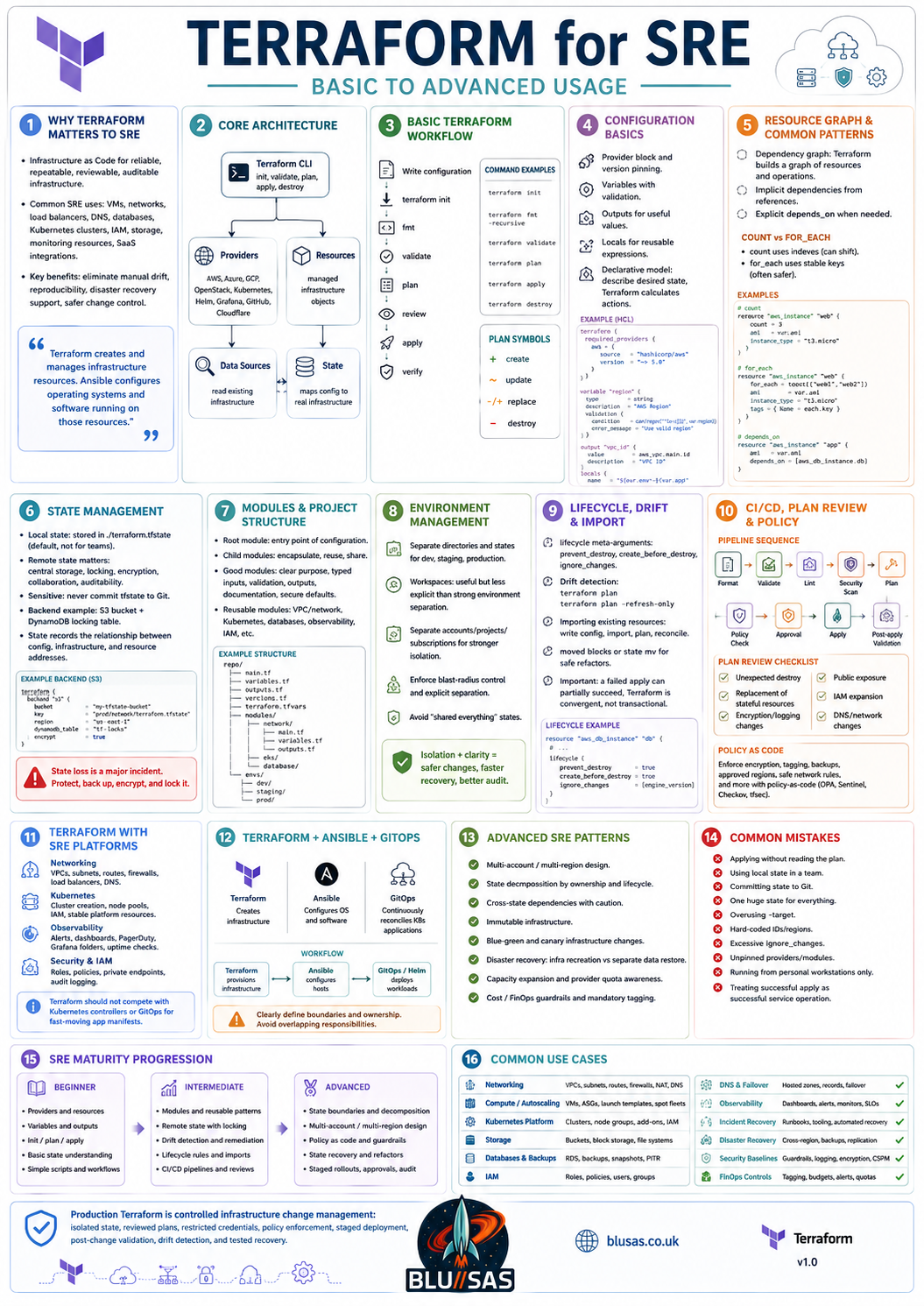
Terraform for SRE: Basic to Advanced Usage
Terraform is an Infrastructure as Code tool used to define, provision, modify, and retire infrastructure through declarative configuration.
For SRE teams, Terraform is primarily used to manage the infrastructure on which reliable services depend:
- virtual machines;
- networks and subnets;
- load balancers;
- DNS records;
- databases;
- object storage;
- Kubernetes clusters;
- IAM roles and policies;
- monitoring resources;
- cloud services;
- SaaS integrations.
Terraform is most effective when infrastructure must be:
- repeatable;
- reviewable;
- version-controlled;
- reproducible across environments;
- auditable;
- recoverable after failure.
A useful distinction is:
Terraform creates and manages infrastructure resources. Ansible configures operating systems and software running on those resources.
1. Why Terraform matters to SRE
SRE teams need infrastructure changes to be predictable and low-risk.
Manual infrastructure changes create several problems:
- undocumented configuration;
- drift between environments;
- inconsistent recovery procedures;
- unclear ownership;
- accidental changes;
- weak audit trails;
- difficult rollback;
- poor disaster recovery.
Terraform addresses these problems by representing infrastructure as code.
A Terraform configuration can describe:
VPC
→ subnets
→ routing
→ firewall rules
→ load balancers
→ instances
→ databases
→ DNS
→ monitoring
The same configuration can be reviewed, tested, applied, and reproduced consistently.
2. Terraform architecture
Terraform works through several major components.
Terraform CLI
The Terraform CLI is used to:
- initialise projects;
- validate configuration;
- generate execution plans;
- apply changes;
- inspect state;
- import resources;
- destroy infrastructure.
Common commands include:
terraform init
terraform fmt
terraform validate
terraform plan
terraform apply
terraform destroy
Configuration
Terraform configuration is normally written in HashiCorp Configuration Language, or HCL.
Example:
resource "aws_instance" "web" {
  ami           = var.ami_id
  instance_type = var.instance_type

  tags = {
    Name        = "web-01"
    Environment = var.environment
  }
}
Providers
Providers allow Terraform to communicate with external systems.
Examples include:
- AWS;
- Azure;
- Google Cloud;
- OpenStack;
- Kubernetes;
- Helm;
- VMware;
- GitHub;
- Cloudflare;
- Grafana;
- PagerDuty;
- Datadog.
A provider exposes resources and data sources.
Resources
A resource represents something Terraform manages.
Examples:
resource "aws_vpc" "main" {
  cidr_block = "10.10.0.0/16"
}
resource "aws_s3_bucket" "logs" {
bucket = "production-observability-logs"
}Data sources
A data source reads information that already exists.
data "aws_ami" "ubuntu" {
  most_recent = true

  filter {
    name   = "name"
    values = ["ubuntu/images/hvm-ssd/*"]
  }
}
Resources create or manage infrastructure. Data sources query infrastructure.
State
Terraform state records the relationship between:
- configuration;
- real infrastructure;
- Terraform resource addresses.
State is fundamental to Terraform operation.
Example resource address:
aws_instance.webTerraform uses state to determine whether a resource should be:
- created;
- changed;
- replaced;
- deleted;
- left unchanged.
3. Basic Terraform workflow
The basic lifecycle is:
Write configuration
→ initialise
→ format
→ validate
→ plan
→ review
→ apply
→ verify
Initialise
terraform initThis:
- downloads providers;
- initialises the backend;
- installs modules;
- prepares the working directory.
Format
terraform fmt -recursiveThis applies canonical formatting.
Validate
terraform validateThis checks configuration syntax and internal consistency.
Plan
terraform planTerraform compares configuration with the current state and infrastructure.
A plan may show:
+ create
~ update in place
-/+ replace
- destroy
Apply
terraform applyTerraform performs the planned changes.
For controlled environments, save the plan first:
terraform plan -out=tfplan
terraform apply tfplan
This ensures the reviewed plan is the one being applied.
4. Terraform configuration basics
Provider configuration
terraform {
  required_providers {
    aws = {
      source  = "hashicorp/aws"
      version = "~> 5.0"
    }
  }
}

provider "aws" {
  region = var.aws_region
}
Version constraints improve reproducibility.
Variables
Variables make configurations reusable.
variable "environment" {
  type        = string
  description = "Deployment environment"

  validation {
    condition     = contains(["dev", "staging", "production"], var.environment)
    error_message = "Environment must be dev, staging, or production."
  }
}
Variable values may come from:
- defaults;
.tfvarsfiles;- environment variables;
- command-line arguments;
- automation platforms;
- CI/CD secret stores.
Example:
variable "instance_type" {
  type    = string
  default = "t3.medium"
}
Outputs
Outputs expose useful values.
output "load_balancer_dns_name" {
  value = aws_lb.application.dns_name
}
Outputs can be consumed by:
- operators;
- CI/CD pipelines;
- other Terraform configurations;
- configuration-management tools.
Locals
Locals simplify repeated expressions.
locals {
  common_tags = {
    Environment = var.environment
    ManagedBy   = "terraform"
    Service     = var.service_name
  }
}
Usage:
tags = local.common_tags5. Declarative infrastructure
Terraform is declarative.
You describe the desired result:
resource "aws_instance" "web" {
  instance_type = "t3.large"
}
You do not normally write procedural instructions such as:
Connect to cloud
Find instance
Compare size
Stop instance
Change type
Restart instance
Terraform calculates the required operations.
This is one of its major strengths, but also one of its risks. A small configuration change may trigger a destructive replacement.
For example, a plan may show:
-/+ resource must be replacedAn SRE must read the plan carefully before applying it.
6. Dependencies and the resource graph
Terraform builds a dependency graph.
Implicit dependency:
resource "aws_subnet" "application" {
  vpc_id     = aws_vpc.main.id
  cidr_block = "10.10.10.0/24"
}
Because the subnet references the VPC ID, Terraform understands that the VPC must exist first.
Explicit dependency:
resource "aws_instance" "application" {
  depends_on = [
    aws_iam_role_policy.application
  ]
}
Use depends_on only when Terraform cannot infer the dependency.
Overusing explicit dependencies reduces parallelism and can make the graph harder to understand.
7. Common resource patterns
count
resource "aws_instance" "worker" {
  count = 3

  ami           = var.ami_id
  instance_type = var.instance_type

  tags = {
    Name = "worker-${count.index + 1}"
  }
}
This creates indexed resources:
aws_instance.worker[0]
aws_instance.worker[1]
aws_instance.worker[2]
for_each
resource "aws_instance" "worker" {
  for_each = {
    worker-a = "10.10.10.11"
    worker-b = "10.10.10.12"
    worker-c = "10.10.10.13"
  }

  ami           = var.ami_id
  instance_type = var.instance_type

  tags = {
    Name = each.key
  }
}
for_each is often safer because resources use stable names rather than numeric indexes.
Dynamic blocks
dynamic "ingress" {
  for_each = var.ingress_rules

  content {
    from_port   = ingress.value.port
    to_port     = ingress.value.port
    protocol    = ingress.value.protocol
    cidr_blocks = ingress.value.cidrs
  }
}
Dynamic blocks reduce duplication, but excessive dynamic logic can make configuration difficult to read.
8. State management
Terraform state is one of the most important subjects for SREs.
Local state
By default, Terraform writes state locally:
terraform.tfstateLocal state is unsuitable for most team environments because:
- it is easy to lose;
- multiple operators can conflict;
- locking may be unavailable;
- sensitive values may be exposed;
- CI/CD cannot reliably share it.
Remote state
Production teams generally use a remote backend.
Remote state provides:
- central storage;
- state locking;
- controlled access;
- backup;
- encryption;
- collaboration.
A conceptual backend configuration:
terraform {
  backend "s3" {
    bucket         = "company-terraform-state"
    key            = "production/network/terraform.tfstate"
    region         = "eu-west-2"
    encrypt        = true
    dynamodb_table = "terraform-locks"
  }
}
Backend credentials should not be hard-coded.
State locking
Locking prevents multiple Terraform executions from modifying the same state concurrently.
Without locking:
Pipeline A reads state
Pipeline B reads same state
Pipeline A applies changes
Pipeline B applies stale plan
→ inconsistent or lost state
A production backend must support reliable locking or equivalent concurrency controls.
9. Sensitive information and state
Terraform state can contain sensitive values, even when outputs are marked sensitive.
output "database_password" {
  value     = random_password.database.result
  sensitive = true
}
The sensitive flag prevents casual CLI display, but the value may still exist in the state file.
Therefore:
- encrypt state at rest;
- restrict backend access;
- use least-privilege IAM;
- enable audit logging;
- avoid unnecessary secret generation;
- rotate compromised credentials;
- never commit state to Git.
A .gitignore should usually include:
.terraform/
*.tfstate
*.tfstate.*
*.tfplan
crash.log
10. Modules
Modules are reusable Terraform packages.
A module may create:
- a VPC;
- a Kubernetes cluster;
- a database;
- a monitoring stack;
- a standard application environment;
- an IAM role;
- an object-storage service.
Example module usage:
module "network" {
  source = "../../modules/network"

  environment = var.environment
  vpc_cidr    = "10.10.0.0/16"
  az_count    = 3
}
Module structure:
modules/network/
├── main.tf
├── variables.tf
├── outputs.tf
├── versions.tf
└── README.md
Good modules should have:
- a clear purpose;
- typed variables;
- input validation;
- useful outputs;
- predictable naming;
- minimal hidden behaviour;
- documented assumptions;
- versioning;
- tests.
11. Root modules and child modules
The directory where Terraform is executed is the root module.
Modules called by the root module are child modules.
Example:
production/
├── main.tf
├── providers.tf
├── variables.tf
├── outputs.tf
└── terraform.tfvars
Inside main.tf:
module "vpc" {
  source = "../../modules/vpc"
}

module "cluster" {
  source = "../../modules/kubernetes"

  vpc_id = module.vpc.vpc_id
}
This creates a dependency between the VPC and cluster modules.
12. Environment management
Several patterns are used to separate environments.
Separate directories
environments/
├── development/
├── staging/
└── production/
Each directory has independent:
- state;
- variables;
- provider configuration;
- deployment lifecycle.
This is often the clearest production pattern.
Workspaces
Terraform workspaces allow multiple states from one configuration.
terraform workspace new staging
terraform workspace select production
Workspaces may suit similar, low-risk environments, but they can make production separation less explicit.
For strongly isolated environments, separate directories, accounts, subscriptions, projects, or repositories are often safer.
Separate cloud accounts or projects
Strong isolation may require:
Development account
Staging account
Production account
Security account
Shared services account
Terraform should reflect this separation rather than weakening it.
13. Importing existing infrastructure
Terraform can adopt resources created outside Terraform.
Example:
terraform import aws_instance.web i-0123456789abcdef0Importing normally requires:
- writing the matching configuration;
- importing the real resource into state;
- running a plan;
- reconciling differences;
- validating that no unintended change occurs.
Import does not automatically guarantee that the written configuration matches reality.
After import, always run:
terraform planA successful import followed by a destructive plan is not a successful migration.
14. State operations
Common commands include:
terraform state list
terraform state show aws_instance.web
terraform state mv
terraform state rm
Move a resource address
terraform state mv \
  aws_instance.web \
  module.compute.aws_instance.web
This is useful when refactoring configuration.
Remove from state
terraform state rm aws_instance.legacyThis stops Terraform managing the resource without deleting it.
State manipulation is high-risk. Always:
- back up state;
- lock the state;
- confirm the exact address;
- review the resulting plan;
- avoid concurrent runs.
15. Lifecycle controls
Terraform provides lifecycle settings that affect resource behaviour.
Prevent destruction
resource "aws_db_instance" "production" {
  lifecycle {
    prevent_destroy = true
  }
}
This can protect critical resources such as:
- databases;
- storage buckets;
- key-management resources;
- production clusters.
It is a guardrail, not a backup strategy.
Create before destroy
lifecycle {
  create_before_destroy = true
}
This is useful for reducing downtime when replacement is required.
However, it only works where the provider and naming constraints allow both resources to exist simultaneously.
Ignore changes
lifecycle {
  ignore_changes = [
    tags["LastPatched"]
  ]
}
Use this carefully. Ignoring too many fields can hide real drift.
16. Drift detection
Drift occurs when real infrastructure differs from Terraform configuration or state.
Causes include:
- manual console changes;
- emergency actions;
- external automation;
- provider-side defaults;
- auto-scaling;
- platform-managed changes;
- deleted resources;
- expired credentials.
A plan can detect drift:
terraform planA dedicated refresh-only plan can inspect external changes:
terraform plan -refresh-onlyAn SRE workflow should regularly detect drift and determine whether to:
- restore the declared state;
- update the code;
- import a resource;
- remove a resource from management;
- investigate unauthorised modification.
17. Terraform and CI/CD
Terraform should normally be run through a controlled pipeline rather than directly from an engineer’s workstation.
Typical pipeline:
Format
→ validate
→ lint
→ security scan
→ plan
→ policy check
→ human approval
→ apply
→ post-apply validation
Example CI stages
stages:
  - validate
  - plan
  - apply
Conceptual commands:
terraform fmt -check -recursive
terraform init -input=false
terraform validate
terraform plan -input=false -out=tfplan
terraform apply -input=false tfplan
Plan artifacts
The pipeline should preserve:
- plan output;
- plan file;
- logs;
- commit SHA;
- actor;
- approval;
- apply result.
This creates a strong audit trail.
18. Plan review
A production Terraform plan should be reviewed for:
- unexpected deletion;
- replacement of stateful resources;
- public network exposure;
- IAM privilege expansion;
- changes to encryption;
- subnet or routing changes;
- DNS changes;
- capacity reduction;
- monitoring removal;
- resource recreation;
- provider upgrades;
- backend changes.
The most dangerous plan output is often not a large change, but a single line such as:
-/+ must be replacedFor a stateless instance, replacement may be harmless.
For a database or cluster control plane, it may be catastrophic.
19. Policy as code
Policy as code enforces infrastructure rules before apply.
Typical policies include:
- storage must be encrypted;
- public access is prohibited;
- production deletion requires approval;
- resources must include ownership tags;
- only approved regions may be used;
- databases require backups;
- network rules must not expose administrative ports globally;
- instance types must be approved;
- logging must be enabled.
Policy engines can evaluate plans and reject unsafe changes.
This moves governance from documentation into enforceable automation.
20. Validation and preconditions
Terraform supports input validation and resource conditions.
Variable validation
variable "replica_count" {
  type = number

  validation {
    condition     = var.replica_count >= 3
    error_message = "Production clusters require at least three replicas."
  }
}
Preconditions
resource "example_cluster" "main" {
  replica_count = var.replica_count

  lifecycle {
    precondition {
      condition     = var.environment != "production" || var.replica_count >= 3
      error_message = "Production requires at least three replicas."
    }
  }
}
Postconditions
A postcondition can verify properties after Terraform reads or creates a resource.
These features make assumptions explicit and fail early.
21. Testing Terraform
Terraform configuration should be tested like application code.
Formatting
terraform fmt -check -recursiveValidation
terraform validateLinting
Linting can detect:
- deprecated arguments;
- missing provider constraints;
- invalid conventions;
- common provider mistakes;
- unused declarations.
Security scanning
Security tools can identify:
- open firewall rules;
- unencrypted storage;
- public buckets;
- missing logging;
- weak IAM policies;
- insecure databases;
- disabled backups.
Unit and integration testing
Tests may verify:
- module inputs;
- module outputs;
- naming;
- resource count;
- encryption;
- high availability;
- tagging;
- network isolation;
- deployed behaviour.
An integration test may:
- deploy temporary infrastructure;
- validate it;
- run functional checks;
- destroy it.
22. Terraform for SRE observability
Terraform can manage observability infrastructure and configuration.
Examples include:
- monitoring workspaces;
- alert rules;
- dashboards;
- notification channels;
- log-storage buckets;
- metric retention;
- uptime checks;
- PagerDuty services;
- Grafana folders;
- data sources;
- cloud monitoring policies.
Conceptual example:
resource "grafana_folder" "sre" {
  title = "SRE"
}
resource "pagerduty_service" "payments" {
name = "payments-production"
}Terraform can make observability configuration:
- consistent;
- reviewable;
- recoverable;
- linked to service ownership.
A limitation is that large dashboard JSON documents can become cumbersome. Sometimes dashboards are better generated or managed through dedicated deployment tooling.
23. Terraform for networking
Terraform is widely used for:
- virtual networks;
- subnets;
- route tables;
- gateways;
- NAT;
- load balancers;
- DNS;
- private endpoints;
- firewall rules;
- security groups.
Networking changes require special care because one plan can affect the connectivity of an entire environment.
SRE controls should include:
- plan review by network owners;
- staged application;
- connectivity tests;
- management-plane access validation;
- rollback procedures;
- out-of-band access;
- dependency awareness.
Never assume a successful terraform apply means network functionality is correct.
24. Terraform for Kubernetes
Terraform can create and bootstrap Kubernetes infrastructure.
Typical responsibilities:
- cluster control plane;
- worker node pools;
- network integration;
- IAM;
- storage classes;
- load balancer integration;
- DNS;
- cluster-level add-ons;
- initial namespaces.
Terraform can also manage Kubernetes resources directly:
resource "kubernetes_namespace" "observability" {
  metadata {
    name = "observability"
  }
}
However, Terraform should not compete with Kubernetes controllers or GitOps systems.
A reasonable ownership model is:
Terraform
→ cloud infrastructure and cluster creation

Helm or GitOps
→ applications and continuously reconciled cluster resources
Terraform is suitable for relatively stable platform components. GitOps is often more appropriate for frequently changing workload manifests.
25. Terraform and Ansible
Terraform and Ansible are complementary.
Terraform manages
- VMs;
- cloud accounts;
- networks;
- subnets;
- disks;
- load balancers;
- managed databases;
- Kubernetes clusters;
- IAM;
- DNS.
Ansible manages
- operating-system configuration;
- packages;
- users;
- services;
- files;
- application deployment;
- patching;
- host-level remediation.
Common workflow:
Terraform provisions VMs
→ Terraform outputs IP addresses
→ dynamic inventory discovers hosts
→ Ansible configures operating systems
→ monitoring verifies service health
Avoid overlapping ownership.
For example, do not let Terraform and Ansible both manage the same DNS record, firewall rule, or Kubernetes resource.
26. Terraform and GitOps
Terraform and GitOps solve related but distinct problems.
Terraform is strong at:
- infrastructure provisioning;
- cross-provider dependencies;
- cloud resource lifecycle;
- stateful API-managed resources.
GitOps is strong at:
- continuous Kubernetes reconciliation;
- workload deployment;
- deployment history;
- automatic drift correction;
- cluster-native operations.
Common model:
Terraform creates cluster and GitOps controller
→ GitOps controller deploys cluster applications
27. Advanced provider management
Provider aliases
Aliases allow multiple regions, subscriptions, or accounts.
provider "aws" {
  alias  = "primary"
  region = "eu-west-2"
}

provider "aws" {
  alias  = "secondary"
  region = "eu-west-1"
}
Usage:
resource "aws_s3_bucket" "replica" {
  provider = aws.secondary
  bucket   = "replica-bucket"
}
Assume-role patterns
A CI pipeline may authenticate to a central account and assume restricted roles in target accounts.
This supports:
- separation of duties;
- short-lived credentials;
- central audit;
- environment isolation;
- least privilege.
Static long-lived cloud credentials should be avoided where federation is available.
28. Advanced module design
Production modules should not merely wrap every provider argument.
A well-designed module provides an intentional platform abstraction.
Poor module:
100 input variables
1:1 mapping to provider
No policy
No defaults
No guardrails
Good module:
Standard architecture
Secure defaults
Required tags
Encryption enabled
Logging enabled
Validated inputs
Minimal escape hatches
Useful outputs
For example, a company database module might enforce:
- encryption;
- backups;
- monitoring;
- private networking;
- deletion protection;
- minimum replica count;
- approved versions.
29. Multi-account and multi-region infrastructure
Advanced Terraform designs may manage many:
- cloud accounts;
- subscriptions;
- projects;
- regions;
- environments;
- business units.
The design should prevent accidental cross-environment changes.
Controls include:
- separate state per account and region;
- separate execution roles;
- provider aliases;
- strict directory boundaries;
- policy enforcement;
- environment-specific approvals;
- independent blast radii.
Example state separation:
production/eu-west-2/network
production/eu-west-2/kubernetes
production/eu-west-2/database
production/eu-west-1/disaster-recovery
Large monolithic state files should generally be avoided.
30. State decomposition
A single state containing an entire company platform creates:
- large blast radius;
- slow plans;
- broad permissions;
- lock contention;
- complex dependencies;
- risky applies.
Split state by logical ownership and lifecycle.
Typical boundaries:
Network
Identity
Shared services
Kubernetes platform
Databases
Observability
Application infrastructure
State should not be split so aggressively that every change requires complex cross-state lookups.
The correct boundary balances:
- ownership;
- change frequency;
- blast radius;
- dependency structure;
- access control.
31. Cross-state dependencies
One Terraform stack may consume outputs from another.
Example:
data "terraform_remote_state" "network" {
  backend = "s3"

  config = {
    bucket = "company-terraform-state"
    key    = "production/network/terraform.tfstate"
    region = "eu-west-2"
  }
}
Usage:
vpc_id = data.terraform_remote_state.network.outputs.vpc_idCross-state dependencies should be limited because they create coupling.
Alternatives include publishing shared values to:
- parameter stores;
- service catalogues;
- DNS;
- configuration registries;
- secret stores.
32. Failure and recovery
Terraform apply may partially succeed.
Example:
Network created
Subnet created
Load balancer created
Database creation failed
Terraform does not normally roll back all successful changes automatically.
The next action is usually:
- inspect the error;
- verify real infrastructure;
- run another plan;
- correct configuration or permissions;
- apply again.
SREs must understand that Terraform is convergent, not transactional.
A failed apply may leave useful, billable, or exposed infrastructure behind.
33. Recovering lost or damaged state
State loss is a major incident.
Recovery may involve:
- restoring backend versions;
- restoring backups;
- importing resources;
- rebuilding state;
- reconciling configuration;
- preventing concurrent writes.
Recovery precautions:
- enable backend versioning;
- enable encryption;
- enable locking;
- restrict delete permissions;
- test state recovery;
- document import procedures;
- monitor backend integrity.
State backup is as important as infrastructure backup because it represents Terraform’s management model.
34. Refactoring safely
Moving code can cause Terraform to think resources were deleted and recreated.
For example, moving:
aws_instance.webto:
module.compute.aws_instance.webmay cause replacement unless state is moved.
Modern Terraform supports moved declarations:
moved {
  from = aws_instance.web
  to   = module.compute.aws_instance.web
}
A safe refactor should produce a plan showing no infrastructure changes.
The ideal result is:
0 to add, 0 to change, 0 to destroy35. Immutable infrastructure
Terraform fits well with immutable infrastructure.
Instead of modifying a server in place:
Patch existing machine
Change packages
Restart services
an immutable workflow may be:
Build new image
→ create replacement instances
→ validate
→ shift traffic
→ destroy old instances
Benefits include:
- reproducibility;
- easier rollback;
- less configuration drift;
- clearer deployment history.
Terraform often manages the infrastructure replacement, while image-building tools create the machine image.
36. SRE operational patterns
Canary infrastructure changes
Apply to a limited scope first:
One region
One availability zone
One node pool
One non-critical service
Validate:
- health;
- latency;
- errors;
- saturation;
- cost;
- logs;
- capacity.
Then expand.
Blue-green infrastructure
Maintain two environments:
Blue: current production
Green: replacement infrastructure
Workflow:
Create green
→ deploy application
→ validate
→ switch traffic
→ observe
→ retire blue
Disaster recovery
Terraform can recreate:
- networks;
- clusters;
- databases;
- DNS;
- IAM;
- storage;
- monitoring.
However, Terraform only recreates infrastructure. Data recovery requires separate:
- backups;
- replication;
- restore processes;
- recovery testing.
Capacity expansion
Terraform can increase:
- node counts;
- instance sizes;
- storage;
- database replicas;
- throughput;
- cluster capacity.
Capacity changes should be validated against provider quotas and service limits before apply.
37. Cost and FinOps controls
Terraform can support cost control through:
- standard instance types;
- mandatory tags;
- budget alerts;
- environment shutdown schedules;
- lifecycle policies;
- storage retention;
- resource ownership;
- policy checks.
A plan should be reviewed not only for reliability, but also cost impact.
A small HCL change may create:
- large databases;
- high-capacity load balancers;
- cross-region traffic;
- long-retention storage;
- expensive GPU instances.
Cost estimation can be included in CI before approval.
38. Security controls
Terraform can improve security by encoding:
- least-privilege IAM;
- private networking;
- encryption;
- audit logging;
- key management;
- secure defaults;
- network restrictions;
- secret-store integration.
Terraform can also introduce security risks through:
- overly broad IAM;
- public endpoints;
- exposed outputs;
- insecure state;
- hard-coded credentials;
- unreviewed modules;
- compromised providers.
Provider and module dependencies should be treated as part of the software supply chain.
39. Common Terraform mistakes
Applying without reading the plan
Never treat the plan as noise.
Using local state in a team
This risks loss and conflicting changes.
Committing state to Git
State may contain credentials and internal data.
Using one state for everything
This creates excessive blast radius.
Overusing -target
terraform apply -target=...Targeting can be useful during recovery, but repeated use can leave infrastructure partially converged.
Hard-coding values
Hard-coded IDs, account numbers, regions, and addresses reduce portability.
Excessive ignore_changes
This can hide drift and undermine desired-state management.
Unpinned providers and modules
Unexpected upgrades may change behaviour.
Running from personal workstations
This weakens auditability and reproducibility.
Treating apply success as service success
Terraform verifies API operations, not application reliability.
Managing highly dynamic data with Terraform
Terraform is not a database migration engine, configuration store, or runtime orchestrator.
40. Terraform maturity progression
Beginner
An SRE should understand:
- providers;
- resources;
- variables;
- outputs;
- locals;
init;plan;apply;destroy;- state;
- basic dependencies.
Intermediate
An intermediate practitioner should be able to:
- build modules;
- use remote state;
- manage multiple environments;
- use
for_each; - import resources;
- detect drift;
- use lifecycle rules;
- integrate Terraform with CI/CD;
- scan for security issues;
- review production plans.
Advanced
An advanced practitioner should be able to:
- design state boundaries;
- operate multi-account infrastructure;
- create secure reusable modules;
- refactor without replacement;
- recover lost state;
- implement policy as code;
- manage provider aliases;
- build disaster-recovery stacks;
- automate testing;
- integrate approvals and audit;
- control blast radius;
- design safe infrastructure rollouts.
41. Practical SRE use cases
| Area | Terraform usage |
|---|---|
| Networking | VPCs, subnets, routes, gateways, firewalls |
| Compute | VMs, instance groups, auto-scaling |
| Kubernetes | Clusters, node pools, IAM, networking |
| Storage | Object stores, disks, lifecycle rules |
| Databases | Managed databases, replicas, backups |
| IAM | Roles, policies, service identities |
| DNS | Zones, records, failover routing |
| Observability | Alerts, dashboards, monitoring workspaces |
| Incident response | Rebuild damaged infrastructure |
| Disaster recovery | Recreate services in another region |
| Security | Encryption, logging, private endpoints |
| FinOps | Tagging, sizing, retention, budget controls |
42. What interviewers expect an SRE to explain
A strong SRE answer should cover more than writing HCL.
Interviewers usually expect understanding of:
- declarative infrastructure;
- providers and resources;
- plan and apply;
- state and locking;
- remote backends;
- modules;
- variables and outputs;
- dependencies;
- drift;
- import;
- lifecycle management;
- CI/CD;
- secrets;
- plan review;
- destructive changes;
- policy as code;
- environment isolation;
- state recovery;
- operational safety.
The strongest advanced point is:
Production Terraform is not merely resource creation. It is controlled infrastructure change management: isolated state, reviewed plans, restricted credentials, policy enforcement, staged deployment, post-change validation, drift detection, and tested recovery.
Terraform becomes an SRE tool when it is used to reduce operational risk, not simply to automate cloud API calls.
Terraform + Ansible = Terrible?
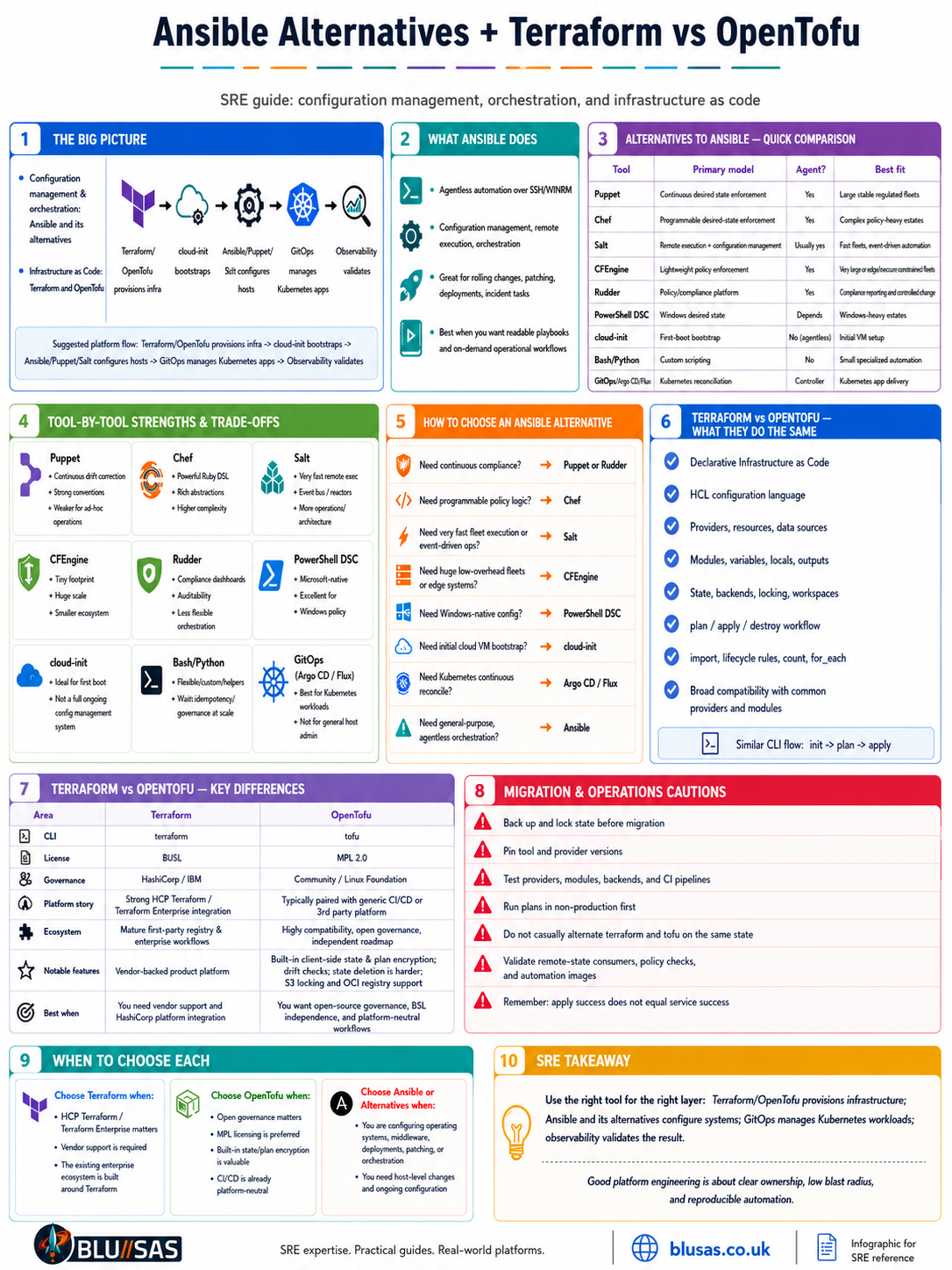
Alternatives to Ansible, and Terraform vs OpenTofu
These are two related but distinct questions:
- Ansible alternatives concern configuration management, orchestration, remote execution and host automation.
- Terraform and OpenTofu concern declarative Infrastructure as Code for provisioning and managing infrastructure resources.
They overlap at the edges, but they are not direct replacements for one another.
1. What Ansible actually replaces
Ansible commonly performs four functions:
- Configuration management
Install packages, manage files, users, services and operating-system settings. - Remote execution
Run commands or diagnostic tasks across fleets. - Orchestration
Coordinate rolling upgrades, load-balancer draining, database migrations and multi-system workflows. - Application and platform deployment
Deploy software, agents, systemd units, Kubernetes prerequisites and middleware.
No single alternative is automatically better at all four.
2. Main alternatives to Ansible
Quick comparison
| Tool | Primary model | Agent required? | Language | Strongest use case |
|---|---|---|---|---|
| Ansible | Push-oriented orchestration | Usually no | YAML/Jinja | General-purpose operations and orchestration |
| Puppet | Continuous desired-state enforcement | Usually yes | Puppet DSL | Large, long-lived regulated server fleets |
| Chef | Continuous desired-state enforcement | Usually yes | Ruby DSL | Complex programmable configuration policies |
| Salt | Remote execution plus desired state | Usually yes | YAML/Jinja/Python | Fast fleet execution and event-driven automation |
| CFEngine | Continuous lightweight enforcement | Yes | CFEngine policy language | Very large or resource-constrained fleets |
| Rudder | Policy/compliance platform | Yes | Web policy model plus techniques | Compliance, reporting and controlled change |
| PowerShell DSC | Desired-state enforcement | Depends on mode | PowerShell/MOF | Windows-heavy estates |
| cloud-init | First-boot configuration | No persistent agent | YAML | Initial VM bootstrap |
| Bash/Python | Procedural automation | No | Shell/Python | Small, specialised operational scripts |
| Kubernetes/GitOps | Reconciliation of cluster state | Controllers | YAML | Kubernetes workloads and platform resources |
3. Puppet
Puppet is the closest traditional configuration-management alternative to Ansible.
It uses a declarative language to describe a node’s desired state. Puppet agents normally retrieve a compiled catalogue from a central server and periodically enforce it. If a managed resource drifts, the agent can correct it automatically.
Example conceptually:
package { 'nginx':
  ensure => installed,
}

service { 'nginx':
  ensure  => running,
  enable  => true,
  require => Package['nginx'],
}
Strengths
- Continuous drift correction.
- Strong declarative desired-state model.
- Mature reporting and compliance capabilities.
- Suitable for large, stable, long-lived fleets.
- Good dependency modelling.
- Centralised policy compilation and enforcement.
- Strong fit for regulated server environments.
Weaknesses
- Agent and server infrastructure add operational overhead.
- Puppet DSL has a steeper learning curve than basic Ansible YAML.
- Less natural for ad hoc incident commands.
- Orchestration can feel less direct than an Ansible playbook.
- Catalogue compilation and environment management introduce additional components.
Puppet versus Ansible
Choose Puppet when the dominant requirement is:
Every server must continuously remain compliant with policy.
Choose Ansible when the dominant requirement is:
Run this controlled operational procedure across these systems now.
Ansible can enforce configuration, but typically when a playbook runs. Puppet is designed around repeated local convergence.
4. Chef Infra
Chef Infra represents infrastructure policy using a Ruby-based configuration language. Nodes normally run Chef Infra Client, contact Chef Infra Server, retrieve policies and cookbooks, and converge themselves toward the required state. Chef now also documents agentless execution over SSH.
Example:
package 'nginx' do
  action :install
end

service 'nginx' do
  action [:enable, :start]
end
Strengths
- Highly programmable configuration logic.
- Ruby DSL is powerful for complex abstractions.
- Mature cookbook and custom-resource model.
- Good continuous enforcement.
- Strong integration with compliance tooling.
- Suitable for sophisticated policy-heavy estates.
Weaknesses
- Higher complexity than Ansible.
- Ruby knowledge is often required.
- Chef Server, clients, cookbooks and Policyfiles increase operational burden.
- Complex recipes can become application code in their own right.
- Debugging compile and converge behaviour can require specialist knowledge.
Chef provides a why-run mode that predicts intended configuration actions without applying them, similar in purpose to dry-run or check modes.
Chef versus Ansible
Use Chef when configuration logic is sufficiently complex that a general programming DSL is advantageous.
Use Ansible when readability, simple adoption and direct orchestration are more important than deep programmability.
5. Salt
Salt combines:
- remote execution;
- configuration management;
- orchestration;
- event-driven automation.
Its standard architecture uses a Salt master and minion agents, although other execution models exist. Salt’s event bus and asynchronous execution model make it particularly effective for high-speed fleet operations.
Example state:
nginx:
  pkg.installed: []

  service.running:
    - enable: true
    - require:
      - pkg: nginx
Strengths
- Very fast remote execution.
- Event bus supports reactive automation.
- Strong targeting and inventory data through grains and pillars.
- Configuration management and command execution are integrated.
- Suitable for large fleets.
- Python extensibility.
- Strong for event-driven remediation.
Weaknesses
- Master/minion architecture is more complex than SSH-only Ansible.
- Security and key-management architecture must be operated carefully.
- States, pillars, grains, reactors and runners create a broader conceptual surface.
- Smaller mindshare and ecosystem than Ansible in many organisations.
- Operational troubleshooting can involve both the event bus and minion connectivity.
Salt versus Ansible
Salt is often the strongest alternative where the priority is:
- low-latency command execution;
- event-driven remediation;
- targeting tens of thousands of persistent nodes;
- maintaining an active control channel.
Ansible is usually simpler for intermittent orchestration and environments where installing agents is undesirable.
6. CFEngine
CFEngine is a mature, lightweight policy-based configuration-management system.
It uses local agents that repeatedly evaluate policy and converge the system toward the declared state.
Strengths
- Lightweight runtime.
- Strong scalability.
- Low resource consumption.
- Mature autonomous convergence model.
- Suitable for geographically distributed systems that may be temporarily disconnected.
- Strong fit for embedded, edge or very large fleets.
Weaknesses
- Less familiar policy language.
- Smaller community and ecosystem.
- Fewer engineers already know it.
- Less convenient for imperative orchestration.
- Can be harder to integrate into conventional YAML-based DevOps workflows.
CFEngine is worth considering where agent efficiency and autonomous local enforcement matter more than ease of adoption.
7. Rudder
Rudder is more compliance-oriented than Ansible.
It combines:
- desired-state configuration;
- policy management;
- compliance reporting;
- inventory;
- change control;
- graphical administration.
Strengths
- Strong compliance dashboards.
- Good auditability and policy reporting.
- Suitable for regulated organisations.
- Supports controlled delegation.
- Easier for non-developers to inspect than code-only systems.
- Useful for patching and baseline enforcement.
Weaknesses
- Less flexible for bespoke orchestration.
- Smaller ecosystem.
- More opinionated than Ansible.
- Custom automation may be less convenient.
- Platform administration is required.
Rudder is often more appropriate than Ansible when the primary question is:
Which systems comply with policy, and can I prove it?
8. PowerShell Desired State Configuration
PowerShell DSC is a declarative configuration mechanism particularly relevant to Windows environments.
It can manage:
- Windows features;
- registry settings;
- services;
- files;
- IIS;
- users;
- security configuration.
Example:
Configuration WebServer {
    Node localhost {
        WindowsFeature IIS {
            Name   = "Web-Server"
            Ensure = "Present"
        }
    }
}
Strengths
- Native alignment with Windows administration.
- PowerShell ecosystem integration.
- Strong access to Windows APIs.
- Suitable for Microsoft-heavy infrastructure.
- Can express desired-state resources directly.
Weaknesses
- Less attractive for heterogeneous Linux estates.
- DSC platform variants and execution models can be confusing.
- Cross-platform coverage is narrower than Ansible.
- Orchestration is not its primary strength.
For mixed Linux and Windows estates, Ansible may provide a simpler common control layer. For deep Windows policy, DSC can be more native.
9. cloud-init
cloud-init is not a full Ansible replacement. It is a specialised first-boot provisioning tool.
It commonly handles:
- initial users;
- SSH keys;
- package installation;
- hostname configuration;
- disk setup;
- initial scripts;
- repository configuration.
Example:
#cloud-config
packages:
  - curl
  - jq

users:
  - name: sre
    groups:
      - sudo
    ssh_authorized_keys:
      - ssh-ed25519 AAAA...
Strengths
- Ideal for initial cloud VM bootstrap.
- Supported by most major cloud images.
- No long-running management server required.
- Works naturally with Terraform-created instances.
Weaknesses
- Primarily executes during initial boot.
- Weak for ongoing drift correction.
- Difficult to rerun safely for complex changes.
- Limited orchestration and fleet management.
- Troubleshooting failed boot scripts can be awkward.
A common architecture is:
Terraform/OpenTofu creates VM
→ cloud-init establishes minimum bootstrap
→ Ansible performs full configuration
10. Bash and Python
Shell and Python scripts remain legitimate alternatives for narrow automation.
Strengths
- No new framework.
- Complete control over execution.
- Easy to embed in existing tooling.
- Excellent for small diagnostics or specialised API workflows.
- Python is appropriate for custom control logic and data processing.
Weaknesses
- Idempotency must be implemented manually.
- Inventory, concurrency and retries must be built.
- Error handling is often inconsistent.
- State reporting is limited.
- Scripts tend to grow into poorly structured configuration-management systems.
- Cross-platform handling becomes expensive.
Use scripts for:
- one well-defined operation;
- a local helper;
- an API integration;
- a diagnostic collector;
- a component invoked by a larger automation framework.
Do not casually build a replacement for Ansible using several thousand lines of Bash.
11. Kubernetes controllers and GitOps
For Kubernetes workloads, tools such as Argo CD and Flux are often better than Ansible.
They continuously reconcile declared Git state with cluster state.
Typical ownership:
Terraform/OpenTofu
    creates cloud and Kubernetes infrastructure

Ansible
    configures operating systems and bootstrap dependencies

GitOps controller
    continuously manages Kubernetes workloads
GitOps advantages
- Continuous reconciliation.
- Native Kubernetes resource model.
- Automatic drift detection.
- Git-based audit trail.
- Deployment health and rollback history.
- Better alignment with controllers and Helm.
Limitations
- Primarily Kubernetes-focused.
- Not appropriate for general host administration.
- Does not replace remote incident execution.
- Secret handling and multi-cluster control require design.
Using Ansible to repeatedly apply every Kubernetes manifest can conflict with the cluster’s own reconciliation model.
12. Selecting an Ansible alternative
Choose Puppet when
- continuous compliance is the priority;
- the fleet is large and stable;
- installing agents is acceptable;
- regulatory reporting matters;
- you want automatic drift correction.
Choose Chef when
- policies require extensive programmable logic;
- Ruby expertise exists;
- complex custom resources are important;
- an agent-based convergence model is acceptable.
Choose Salt when
- remote execution speed matters;
- event-driven automation is important;
- you manage a very large active fleet;
- persistent minion connectivity is acceptable.
Choose CFEngine when
- low agent overhead matters;
- nodes may be disconnected;
- scale and autonomous convergence dominate;
- the team can support its specialised policy model.
Choose Rudder when
- compliance evidence is central;
- administrative reporting matters;
- controlled policy enforcement is more important than arbitrary orchestration.
Choose PowerShell DSC when
- the estate is heavily Windows-based;
- Microsoft-native configuration is preferred.
Stay with Ansible when
- agentless SSH/WinRM access is attractive;
- playbook readability matters;
- rolling operational workflows are common;
- you need one tool across Linux, Windows, network devices and APIs;
- automation runs primarily on demand or through CI/AWX.
13. Terraform and OpenTofu: their shared origin
OpenTofu is a community-led fork of Terraform created following HashiCorp’s licensing change.
Terraform remains HashiCorp’s Infrastructure as Code product. HashiCorp changed future Terraform source releases from the Mozilla Public License to the Business Source License in 2023.
OpenTofu retains the same fundamental workflow and aims to preserve broad configuration compatibility with Terraform, although the projects now evolve independently. OpenTofu’s current migration guidance explicitly says most Terraform configurations work without modification, while recommending version-specific migration procedures.
14. What Terraform and OpenTofu do identically
At their core, both tools:
- use declarative Infrastructure as Code;
- consume HCL configuration;
- use providers to interact with cloud, SaaS and platform APIs;
- build dependency graphs;
- generate execution plans;
- create, update and destroy resources;
- maintain state;
- support local and remote backends;
- support modules;
- support variables, locals and outputs;
- support data sources;
- support
countandfor_each; - support imports;
- support lifecycle rules;
- support workspaces;
- support provider aliases;
- use
.terraform.lock.hcl; - work with most of the same provider ecosystem;
- use broadly equivalent CLI workflows.
Typical commands:
terraform init
terraform plan
terraform apply
and:
tofu init
tofu plan
tofu apply
Terraform officially describes providers as plugins that interact with cloud platforms, SaaS systems and other APIs. OpenTofu uses the same basic provider model and state-to-resource mapping architecture.
15. Side-by-side comparison
| Area | Terraform | OpenTofu |
|---|---|---|
| Core purpose | Declarative infrastructure provisioning | Declarative infrastructure provisioning |
| Configuration language | HCL | HCL-compatible |
| CLI | terraform | tofu |
| State model | Terraform state | Broadly compatible state model |
| Provider protocol | Terraform provider ecosystem | Uses the same general provider ecosystem |
| Modules | Terraform Registry and other sources | Registry and other module sources |
| Licence | Business Source License for current source releases | Open-source MPL 2.0 |
| Governance | HashiCorp/IBM product governance | Community project under Linux Foundation stewardship |
| Managed platform | HCP Terraform | No direct identical first-party equivalent |
| Enterprise product | HCP Terraform and Terraform Enterprise | Relies on third-party platforms and integrations |
| Native client-side state encryption | Not equivalent in the standard CLI | Built-in OpenTofu state and plan encryption |
| OpenTofu-specific files | Not applicable | Supports .tofu override files |
| Feature direction | HashiCorp product roadmap | Independent community roadmap |
| Compatibility | Native reference implementation | High compatibility, but not permanent identity |
16. Licensing difference
Terraform
Current Terraform source releases are under HashiCorp’s Business Source License.
The BSL permits many normal uses, including broad internal use, but includes restrictions related to offering products or services that compete with HashiCorp’s commercial offerings. The exact legal interpretation depends on the proposed use, so organisations building commercial IaC services should review the licence carefully.
For an ordinary SRE team using Terraform internally to deploy its own systems, the licensing change commonly has little immediate operational effect.
OpenTofu
OpenTofu uses the Mozilla Public License 2.0 and positions itself as a fully open-source continuation.
This matters most to:
- vendors embedding the engine;
- organisations with open-source procurement requirements;
- companies building products around IaC;
- teams concerned about future licence changes;
- users wanting neutral governance.
For most internal platform teams, the technical and ecosystem differences may be more important than the abstract licence label.
17. Governance difference
Terraform is developed as a HashiCorp product, now within IBM.
That provides:
- a unified commercial roadmap;
- first-party enterprise support;
- HCP Terraform integration;
- Terraform Enterprise;
- formal commercial account management.
OpenTofu has community governance rather than single-vendor product governance.
That provides:
- an open contribution model;
- less dependence on one commercial owner;
- public project decision-making;
- an explicit open-source continuity objective.
The trade-off is not simply “corporate versus community.”
It is:
Vendor-integrated product and support ecosystem
versus
neutral open-source governance and portability
18. State compatibility
OpenTofu’s migration documentation aims to make movement from compatible Terraform versions straightforward, but it recommends following version-specific upgrade paths and creating a tested recovery plan first.
Do not assume that you can indefinitely alternate between:
terraform apply
tofu apply
terraform apply
tofu apply
against the same state.
Why this becomes unsafe:
- state metadata may evolve;
- new language features may be engine-specific;
- provider lock behaviour can differ;
- backend functionality can diverge;
- one tool may write constructs the other does not understand;
- version support windows may not align.
A migration should be treated as a controlled platform change:
- Back up state.
- Lock all applies.
- Pin tool and provider versions.
- Review the applicable migration guide.
- Run an initialisation without applying.
- Generate a plan.
- Expect zero or fully understood changes.
- Test in a non-production state first.
- Change CI images and documentation.
- Prevent the old CLI from applying afterward.
19. Provider compatibility
Both tools generally use Terraform-compatible providers.
This is one of the main reasons OpenTofu adoption can be comparatively easy: providers are external plugins rather than being built directly into the CLI.
However, provider compatibility does not guarantee that every surrounding service is identical.
Potential differences include:
- registry discovery;
- credentials;
- provider mirroring;
- signature and verification behaviour;
- proprietary platform integrations;
- provider installation workflows;
- future protocol extensions.
For common public-cloud providers, the practical experience is usually very similar.
For unusual internal providers or tightly integrated enterprise workflows, test explicitly.
20. Module compatibility
Most ordinary Terraform modules can also be consumed by OpenTofu.
Common constructs remain similar:
module "network" {
  source = "./modules/network"

  cidr_block = "10.20.0.0/16"
}
Divergence begins when modules use engine-specific features.
OpenTofu introduced .tofu files so a module can provide OpenTofu-specific configuration while retaining a corresponding .tf version for Terraform compatibility.
This is useful, but it is also evidence that the two languages are no longer guaranteed to remain identical forever.
21. OpenTofu state and plan encryption
One of OpenTofu’s notable differences is built-in client-side encryption for state and plan data.
OpenTofu can encrypt data before it is written to a local or remote backend and supports several key-provider approaches.
Conceptually:
terraform {
  encryption {
    key_provider "pbkdf2" "state_key" {
      passphrase = var.state_passphrase
    }

    method "aes_gcm" "state_method" {
      keys = key_provider.pbkdf2.state_key
    }

    state {
      method = method.aes_gcm.state_method
    }
  }
}
This differs from relying only on backend-side encryption such as:
- S3 server-side encryption;
- encrypted disks;
- encrypted database storage;
- bucket-managed KMS.
With client-side encryption, the backend receives encrypted Terraform/OpenTofu payload data.
Operational consequences
You must protect:
- encryption keys;
- key-provider configuration;
- recovery keys;
- migration metadata.
Losing a state-encryption key can be equivalent to losing the state.
Encrypted cross-state consumption also requires careful coordination. OpenTofu explicitly warns that sharing encrypted remote state between projects requires compatible encryption metadata and keys.
22. Backend and locking differences
Both tools support familiar remote-backend patterns.
OpenTofu has also added features such as native S3 state locking in newer releases, reducing reliance on a separate locking table for that backend pattern.
Backend details matter because the backend is not merely storage. It may provide:
- locking;
- encryption;
- versioning;
- workspace isolation;
- authentication;
- remote execution integration.
Before switching, validate the exact backend rather than assuming that all backend arguments behave identically.
23. Registry and ecosystem differences
Terraform has a mature first-party registry and direct integration with HashiCorp’s commercial platform.
OpenTofu supports its own registry ecosystem and continues to expand module and provider distribution mechanisms. Recent OpenTofu documentation describes additions such as OCI registry support.
Terraform’s ecosystem advantages include:
- longstanding documentation;
- broad vendor testing;
- many enterprise examples;
- first-party HCP workflows;
- commercial support.
OpenTofu’s ecosystem advantages include:
- open governance;
- community-driven additions;
- less concern about BSL implications;
- growing compatibility tooling;
- ability to innovate independently.
24. Terraform’s managed-platform advantage
The biggest practical difference is not the local CLI.
It is the surrounding Terraform product platform.
HCP Terraform and Terraform Enterprise provide capabilities such as:
- remote runs;
- workspace management;
- policy enforcement;
- private registries;
- identity integration;
- approvals;
- variable management;
- audit logs;
- agents;
- drift workflows;
- cost and governance integrations.
OpenTofu is an engine rather than a complete direct replacement for every HashiCorp commercial service.
An OpenTofu platform normally combines the CLI with one of:
- GitHub Actions;
- GitLab CI;
- Jenkins;
- Spacelift;
- env0;
- Scalr;
- Terrateam;
- Atlantis;
- another compatible orchestration platform.
Therefore, compare:
Terraform CLI versus OpenTofu CLIseparately from:
HCP Terraform/Terraform Enterprise
versus
an OpenTofu-compatible platform stack
25. Testing
Terraform includes a native test framework capable of creating short-lived resources and testing assertions without affecting the configuration’s existing state.
OpenTofu also supports testing and has been developing its testing and validation behaviour independently.
Both can be integrated with:
- formatting checks;
- validation;
- static analysis;
- policy tests;
- security scanners;
- module tests;
- ephemeral integration environments.
Do not assume a sophisticated Terraform test suite will run unchanged under OpenTofu. Test framework compatibility should be included in migration verification.
26. Feature divergence
The two projects began from nearly the same codebase, but they are now separate products.
OpenTofu has introduced features such as:
- native client-side state and plan encryption;
.tofuoverride files;- early evaluation of variables and locals in additional contexts;
- native S3 locking;
- OCI registry support;
- experimental OpenTelemetry tracing.
Terraform continues to develop features aligned with:
- HCP Terraform;
- Terraform Enterprise;
- HashiCorp’s provider and module ecosystem;
- its own language and testing roadmap.
Compatibility remains high, but “fork” does not mean “permanent drop-in binary with a different name.”
27. Choosing Terraform
Choose Terraform when:
- your organisation already uses HCP Terraform or Terraform Enterprise;
- vendor support is required;
- HashiCorp integration is strategically important;
- enterprise procurement prefers a single supported product;
- existing pipelines depend on proprietary Terraform platform functions;
- BSL restrictions do not affect your use case;
- third-party products explicitly certify Terraform but not OpenTofu.
Terraform is particularly compelling when the surrounding HashiCorp platform matters more than CLI openness.
28. Choosing OpenTofu
Choose OpenTofu when:
- an OSI-style open-source licence is required;
- neutral governance matters;
- you want to avoid future single-vendor licensing risk;
- built-in client-side state encryption is useful;
- your workflows already run through generic CI/CD;
- the modules and providers you need are verified compatible;
- you are building a commercial platform that may be affected by Terraform’s BSL conditions;
- the team wants independent open-source feature development.
OpenTofu is particularly attractive for self-managed, Git-based platform engineering workflows.
29. Reasons not to migrate immediately
Do not migrate solely because OpenTofu is open source.
First evaluate:
- current Terraform version;
- state format;
- backends;
- private providers;
- private modules;
- HCP Terraform dependencies;
- Sentinel policies;
- variable sets;
- run tasks;
- remote agents;
- state sharing;
- CI tooling;
- provider mirrors;
- test framework;
- commercial support obligations.
A migration that saves nothing operationally but creates uncertainty is not automatically beneficial.
30. Reasons to migrate
A migration becomes more compelling when:
- the organisation requires MPL-compatible tooling;
- BSL legal review creates product risk;
- Terraform Enterprise features are not being used;
- CI is already platform-neutral;
- state encryption is required at the client side;
- all critical providers and modules have been tested;
- neutral governance is a strategic requirement;
- toolchain independence is valuable.
31. SRE recommendation
For a conventional internal SRE or platform team, both Terraform and OpenTofu are technically credible.
A sensible default decision model is:
Need HCP Terraform or Terraform Enterprise?
    Yes → Terraform is usually simpler.

Need fully open governance or BSL independence?
    Yes → OpenTofu is usually stronger.

Need built-in client-side state encryption?
    OpenTofu has a clear advantage.

Already have mature Terraform pipelines with no licensing concern?
    Migration may provide limited immediate value.

Starting a platform-neutral IaC stack from scratch?
    Evaluate OpenTofu first, but verify provider and platform support.
The decisive issue is usually not whether terraform plan and tofu plan look similar.
It is which ecosystem you want to commit to:
Terraform offers a tightly integrated commercial platform. OpenTofu offers an openly governed compatible engine with independent features and less vendor dependence.