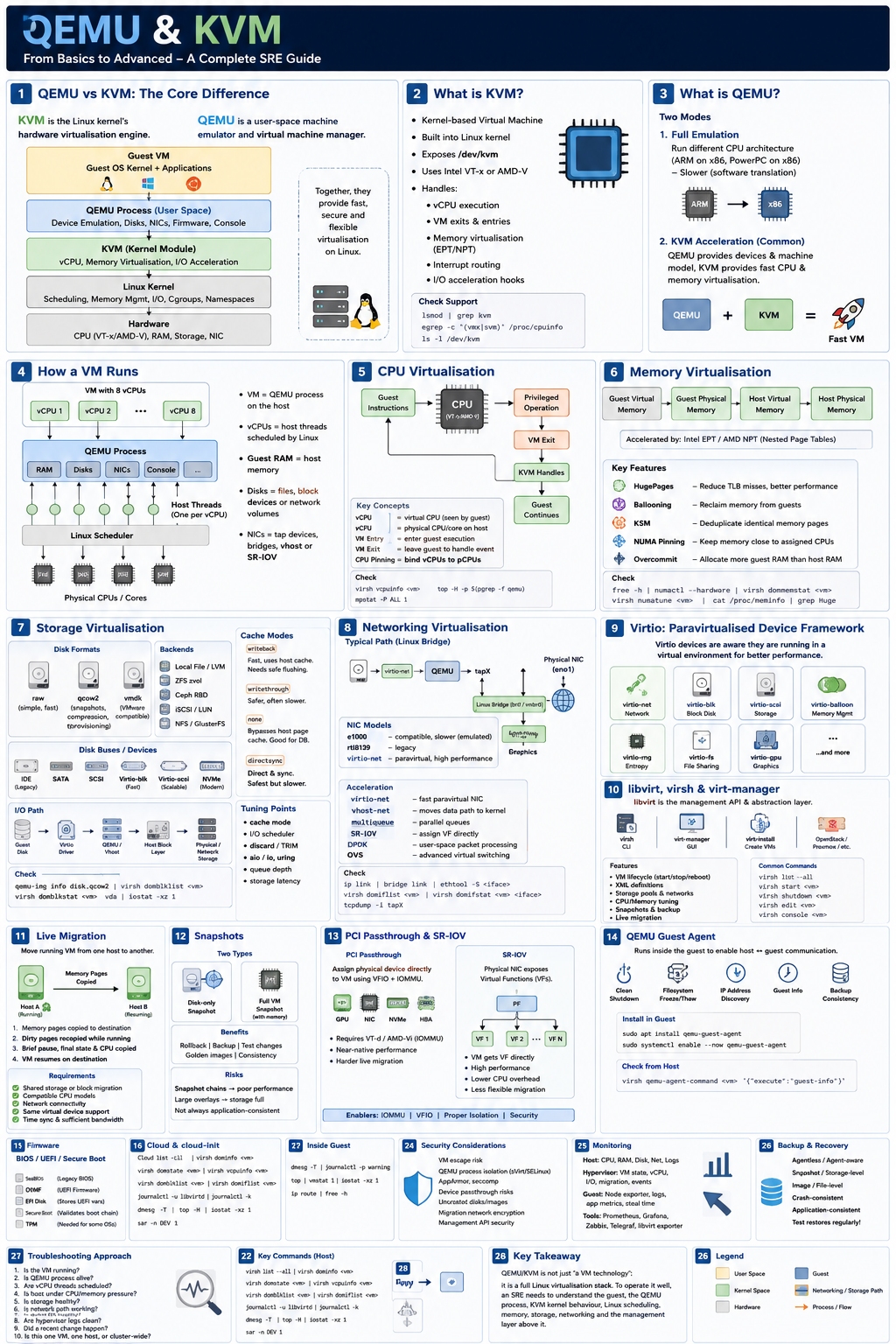
QEMU vs KVM: the core distinction
KVM is the Linux kernel’s hardware-virtualisation engine.
QEMU is a user-space machine emulator and virtual machine manager.
Together, they form the common Linux virtualisation stack:
Guest VM
  └── Guest OS kernel + apps
        ↓
QEMU process in user space
        ↓
KVM kernel module
        ↓
CPU hardware virtualisation: Intel VT-x / AMD-V
        ↓
Physical host hardware
The simplest interview answer:
KVM provides near-native CPU virtualisation inside the Linux kernel. QEMU provides the virtual machine process, emulated devices, virtual disks, network interfaces, firmware, and management layer. When QEMU uses KVM acceleration, you get fast hardware-assisted VMs instead of slow full emulation.
1. What is KVM?
KVM stands for Kernel-based Virtual Machine.
It turns the Linux kernel into a type-1 hypervisor-like platform by exposing hardware virtualisation features through /dev/kvm.
Main kernel modules:
kvm
kvm_intel   # Intel CPUs
kvm_amd     # AMD CPUs
Check support:
lsmod | grep kvm
egrep -c '(vmx|svm)' /proc/cpuinfo
ls -l /dev/kvm
CPU flags:
vmx = Intel VT-x
svm = AMD-V
KVM handles:
vCPU execution
VM exits
memory virtualisation
interrupt routing
hardware-assisted page tables
I/O acceleration hooks
KVM does not by itself provide a full VM with disks, NICs, BIOS, console, etc. That is where QEMU comes in.
2. What is QEMU?
QEMU stands for Quick Emulator.
It can run in two main modes:
1. Full emulation
QEMU can emulate a completely different CPU architecture.
Example:
Run ARM guest on x86 host
Run PowerPC guest on x86 host
This is flexible but slower because CPU instructions are translated in software.
2. Hardware-accelerated virtualisation with KVM
This is the common server/cloud use case:
qemu-system-x86_64 -enable-kvm ...Here:
QEMU = VM process, device model, disks, NICs, firmware
KVM = fast CPU and memory virtualisation
This gives near-native performance.
3. Why are QEMU and KVM used together?
Because they solve different parts of the VM problem.
| Layer | Responsibility |
|---|---|
| QEMU | Creates the VM process, emulates hardware, handles disks, NICs, display, firmware |
| KVM | Runs guest CPU instructions directly on physical CPU |
| Linux kernel | Scheduling, memory management, I/O, cgroups, namespaces |
| libvirt | Higher-level VM management API |
| virt-manager / virsh / OpenStack Nova / Proxmox | Operational control plane |
Interview phrase:
QEMU is the device model and VM runtime. KVM is the acceleration layer in the Linux kernel. libvirt is commonly used as the management abstraction above them.
4. Type 1 vs Type 2 hypervisor question
This often comes up.
Traditional classification:
Type 1: Hypervisor runs directly on hardware
Examples: VMware ESXi, Hyper-V, Xen

Type 2: Hypervisor runs on top of a host OS
Examples: VirtualBox, VMware Workstation
KVM is slightly special.
KVM is part of the Linux kernel, so Linux itself becomes the hypervisor layer. In practice, KVM behaves like a type-1 hypervisor architecture, even though it uses a general-purpose Linux OS as the host.
Good interview answer:
KVM is often described as a type-1 hypervisor because the virtualisation logic is in the Linux kernel and runs directly with kernel privileges. QEMU runs in user space as the device model, but CPU virtualisation is handled by KVM in the kernel.
5. What happens when a VM runs?
A VM is usually just a QEMU process on the host.
Example:
ps aux | grep qemuYou may see:
qemu-system-x86_64 -name vm1 -m 8192 -smp 4 ...Inside that process:
vCPUs are host threads
guest RAM is host memory
virtual disks are files, block devices, or network volumes
virtual NICs connect to tap devices, bridges, vhost, or SR-IOV
Each vCPU maps to a host thread scheduled by the Linux scheduler.
So if a VM has 8 vCPUs, the host usually has multiple QEMU threads representing those vCPUs.
6. CPU virtualisation
Without KVM, QEMU must emulate CPU instructions.
With KVM:
Most guest CPU instructions run directly on the physical CPU.
Privileged/sensitive operations trap into KVM.
KVM handles the VM exit and returns control to the guest.
Important concepts:
VM entry  = entering guest execution
VM exit   = leaving guest execution to handle privileged event
vCPU      = virtual CPU exposed to guest
pCPU      = physical CPU/core/thread on host
CPU pinning = binding vCPUs to specific host CPUs
Performance considerations:
overcommitting vCPUs can cause CPU steal
bad NUMA placement hurts latency
wrong CPU model can limit performance or migration
nested virtualisation adds overhead
Useful commands:
virsh vcpuinfo <vm>
virsh domstats <vm>
top -H -p $(pgrep -f qemu)
mpstat -P ALL 1
7. Memory virtualisation
A guest thinks it has physical RAM, but that memory is backed by host memory.
Memory path:
Guest virtual memory
  ↓
Guest physical memory
  ↓
Host virtual memory
  ↓
Host physical memory
Modern CPUs accelerate this using:
Intel EPT
AMD NPT/RVI
These are nested page table technologies.
Important memory features:
| Feature | Purpose |
|---|---|
| HugePages | Reduce TLB misses, improve performance |
| Ballooning | Dynamically reclaim memory from guests |
| KSM | Deduplicate identical memory pages |
| NUMA pinning | Keep VM memory close to assigned CPUs |
| Memory overcommit | Allocate more guest RAM than physical host RAM |
Senior SRE concern:
Memory overcommit can be dangerous. If the host starts swapping, VM performance can collapse badly.
Useful commands:
free -h
numactl --hardware
virsh dommemstat <vm>
virsh numatune <vm>
cat /proc/meminfo | grep Huge
8. Storage virtualisation
QEMU presents virtual disks to the guest.
Common disk formats:
raw     = simple, fast, less metadata
qcow2   = snapshots, compression, thin provisioning
vmdk    = VMware-compatible
Common backends:
local file
LVM volume
ZFS zvol
Ceph RBD
iSCSI LUN
NFS
GlusterFS
Virtual disk buses:
| Bus | Notes |
|---|---|
| IDE | Legacy, slow |
| SATA | Better compatibility |
| SCSI | Common enterprise choice |
| Virtio-blk | Fast paravirtual block device |
| Virtio-scsi | Scalable, supports many disks |
| NVMe emulation | Useful for modern guests |
For performance, virtio is usually preferred.
Example:
Guest disk → virtio driver → QEMU/vhost → host block layer → physical/network storageImportant tuning areas:
cache mode
I/O scheduler
discard/TRIM
aio/io_uring/native
queue depth
storage latency
snapshot overhead
Common cache modes:
| Mode | Meaning |
|---|---|
| writeback | Fast, uses host cache, needs safe flushing |
| writethrough | Safer, often slower |
| none | Bypasses host page cache, common for databases |
| directsync | Direct and synchronous, safest but slower |
Useful commands:
qemu-img info disk.qcow2
qemu-img convert -O raw disk.qcow2 disk.raw
virsh domblklist <vm>
virsh domblkstat <vm> vda
iostat -xz 1
9. Networking virtualisation
A VM gets a virtual NIC.
Common models:
e1000       = emulated Intel NIC, compatible but slower
rtl8139     = legacy
virtio-net  = paravirtual, high performance
Typical Linux bridge setup:
Guest eth0
  ↓
virtio-net
  ↓
QEMU
  ↓
tap interface
  ↓
Linux bridge: br0 / vmbr0
  ↓
physical NIC
  ↓
network
On Proxmox this often looks like:
VM NIC → tapXYZ → vmbr0 → eno1Performance acceleration:
| Technology | Purpose |
|---|---|
| virtio-net | Faster paravirtual NIC |
| vhost-net | Moves packet handling into kernel |
| multiqueue | Parallel network queues |
| SR-IOV | Assign physical NIC virtual function directly |
| DPDK | User-space packet processing |
| OVS | Advanced virtual switching |
Useful commands:
ip link
bridge link
brctl show
ethtool -S <iface>
virsh domiflist <vm>
virsh domifstat <vm> <iface>
tcpdump -i tapX
10. Virtio: key interview topic
Virtio is the paravirtualised device framework used by KVM/QEMU.
Instead of pretending to be old physical hardware, virtio exposes efficient virtual devices to the guest.
Examples:
virtio-net      network
virtio-blk      block disk
virtio-scsi     SCSI storage
virtio-balloon  memory ballooning
virtio-rng      entropy
virtio-fs       file sharing
virtio-gpu      graphics
Interview answer:
Virtio improves VM performance by using drivers that are aware they are running in a virtualised environment, reducing expensive hardware emulation overhead.
11. libvirt, virsh and virt-manager
Most admins do not manually run long qemu-system-x86_64 commands.
They use libvirt.
libvirt provides:
VM lifecycle management
XML definitions
storage pools
network definitions
CPU/memory tuning
snapshots
migration
Common tools:
virsh list --all
virsh start <vm>
virsh shutdown <vm>
virsh destroy <vm>
virsh edit <vm>
virsh console <vm>
virt-install
virt-manager
VM definitions are stored as XML.
Example concepts inside XML:
memory
vcpu
cpu model
disk devices
network interfaces
boot firmware
NUMA tuning
features
12. Live migration
Live migration moves a running VM from one host to another.
High-level process:
1. VM runs on source host
2. Memory pages copied to destination
3. Dirty pages are recopied while VM continues running
4. VM briefly pauses
5. Final CPU/device state copied
6. VM resumes on destination
Requirements:
shared storage or block migration
compatible CPU models
network connectivity between hosts
same virtual device support
time sync
sufficient bandwidth
Problem areas:
high memory dirty rate
CPU incompatibility
storage latency
network packet loss
device passthrough
huge VMs with large RAM
Interview phrase:
Live migration is mostly a memory-copy and state-synchronisation problem. The challenge is reducing downtime while the guest keeps dirtying memory pages.
13. Snapshots
There are two main snapshot types:
disk-only snapshot
full VM snapshot with memory state
With qcow2:
base image
  ↓
overlay image
  ↓
new writes go to overlay
Benefits:
rollback
backup consistency
testing changes
golden images
Risks:
snapshot chains reduce performance
large overlays can fill storage
crash-consistent is not always application-consistent
database workloads need quiescing
Senior answer:
Snapshots are not backups unless they are exported, retained safely, and tested. For databases, application-aware quiescing or backup tooling is required.
14. PCI passthrough and SR-IOV
For high performance, you can bypass much of QEMU’s device emulation.
PCI passthrough
Assign a physical device directly to a VM.
Examples:
GPU passthrough
NIC passthrough
NVMe passthrough
HBA passthrough
Requires:
IOMMU
Intel VT-d or AMD-Vi
VFIO driver
proper IOMMU grouping
SR-IOV
A physical NIC exposes multiple Virtual Functions.
Physical Function: PF
Virtual Function: VF
VM gets a VF directly.
Benefit:
near bare-metal network performance
lower CPU overhead
lower latency
Trade-off:
less flexible live migration
hardware dependency
more operational complexity
15. Nested virtualisation
Nested virtualisation means running a hypervisor inside a VM.
Example:
KVM host
  ↓
VM running Proxmox/OpenStack/Kubernetes lab
  ↓
Nested VMs inside that VM
Enable/check:
cat /sys/module/kvm_intel/parameters/nested
cat /sys/module/kvm_amd/parameters/nested
Use cases:
homelabs
CI testing
OpenStack development
Kubernetes-in-VM environments
training
Trade-offs:
performance overhead
more complex debugging
some CPU features may not pass through
16. QEMU Guest Agent
The QEMU Guest Agent runs inside the guest and allows the host to ask the guest for information or perform controlled actions.
Useful for:
clean shutdown
filesystem freeze/thaw
IP address discovery
guest info
backup consistency
password reset in some platforms
Install in guest:
sudo apt install qemu-guest-agent
sudo systemctl enable --now qemu-guest-agent
Check from host:
virsh qemu-agent-command <vm> '{"execute":"guest-info"}'In Proxmox, this is commonly enabled per VM.
17. Firmware: BIOS, UEFI, Secure Boot
QEMU can boot guests using:
SeaBIOS
OVMF / UEFI
Modern OSes often use UEFI.
Important concepts:
OVMF = open-source UEFI firmware for VMs
EFI disk = stores UEFI variables
Secure Boot = validates boot chain
TPM = needed for some OS requirements, e.g. Windows 11
18. Cloud images and cloud-init
In cloud and SRE environments, VMs are often created from images.
Common image type:
Ubuntu cloud image
RHEL cloud image
Debian cloud image
Rocky/Alma cloud image
Cloud-init configures:
hostname
SSH keys
users
network
packages
first boot scripts
metadata
This is how OpenStack, Proxmox templates, Terraform/libvirt and many platforms provision VMs.
19. QEMU/KVM in OpenStack
In OpenStack, the compute service is Nova.
Typical stack:
OpenStack Nova
  ↓
libvirt driver
  ↓
QEMU
  ↓
KVM
  ↓
Linux host
Other services:
| Service | Role |
|---|---|
| Glance | VM images |
| Cinder | block storage |
| Neutron | networking |
| Placement | resource inventory |
| Keystone | identity |
Senior SRE answer:
In OpenStack, Nova usually schedules instances onto compute nodes, then talks to libvirt, which launches QEMU processes using KVM acceleration. Neutron wires the virtual NICs, and Cinder/Glance provide storage and images.
20. QEMU/KVM in Proxmox
Proxmox VE is built heavily around:
QEMU/KVM for VMs
LXC for containers
Corosync for clustering
pveproxy/pvedaemon for management
storage plugins for ZFS, LVM, Ceph, NFS, etc.
A Proxmox VM is still fundamentally a QEMU/KVM VM.
Useful Proxmox commands:
qm list
qm config <vmid>
qm start <vmid>
qm stop <vmid>
qm monitor <vmid>
qm guest cmd <vmid> network-get-interfaces
21. Containers vs VMs
A senior SRE should explain this clearly.
| Area | VM | Container |
|---|---|---|
| Isolation | Stronger, separate kernel | Shares host kernel |
| Boot | Full OS boot | Process start |
| Overhead | Higher | Lower |
| Kernel | Guest has own kernel | Uses host kernel |
| Security boundary | Stronger | Weaker by default |
| Use case | Multi-tenant, different OS/kernel, strong isolation | App packaging, fast scaling |
Key phrase:
A VM virtualises hardware. A container virtualises the operating system environment.
22. Common performance problems
CPU steal
Guest sees slow CPU because host is overcommitted.
Inside guest:
top
mpstat 1
Look for %steal.
Bad storage latency
Symptoms:
high iowait
slow database
VM appears frozen
timeouts
filesystem errors
Check:
iostat -xz 1
virsh domblkstat <vm>
dmesg
Network packet drops
Check:
ip -s link
ethtool -S
dropwatch
tcpdump
NUMA mismatch
Problem:
vCPU on NUMA node 0
memory allocated on NUMA node 1
Result:
higher latency
lower throughput
poor database/HPC performance
Check:
numactl --hardware
numastat
virsh numatune <vm>
Host swapping
Very bad for VMs.
Check:
swapon --show
vmstat 1
free -h
23. Troubleshooting methodology
For an SRE interview, use a layered approach.
1. Is the VM running?
2. Is QEMU process alive?
3. Are vCPU threads scheduled?
4. Is host under CPU/memory pressure?
5. Is storage healthy?
6. Is network path working?
7. Is guest OS healthy?
8. Are hypervisor logs clean?
9. Did a recent change happen?
10. Is this one VM, one host, or cluster-wide?
Useful commands:
virsh list --all
virsh dominfo <vm>
virsh domstate <vm>
virsh vcpuinfo <vm>
virsh domblklist <vm>
virsh domiflist <vm>
journalctl -u libvirtd
journalctl -k
dmesg -T
top -H
iostat -xz 1
sar -n DEV 1
Inside guest:
dmesg -T
journalctl -p warning
top
vmstat 1
iostat -xz 1
ip route
24. Security considerations
Important areas:
VM escape risk
QEMU process isolation
sVirt / SELinux confinement
AppArmor profiles
seccomp
device passthrough risk
untrusted disk images
snapshot/data leakage
management API security
migration network encryption
Good senior answer:
The hypervisor is a strong isolation boundary, but not perfect. QEMU is a large user-space device model, so hardening, patching, least privilege, SELinux/AppArmor, and careful device exposure matter.
25. Backup and recovery
VM backups can be:
agentless
agent-aware
snapshot-based
storage-level
image-level
file-level
application-aware
Important distinction:
crash-consistent backup
application-consistent backup
For databases:
use database-native backup
or freeze filesystem carefully
or coordinate snapshots with application hooks
Never assume a VM snapshot equals a safe database backup.
26. Monitoring QEMU/KVM
Monitor at three levels:
Host level
CPU usage
load average
memory
swap
disk latency
network throughput
packet drops
kernel logs
Hypervisor level
VM state
vCPU usage
block I/O
network I/O
migration status
QEMU crashes
libvirt events
Guest level
node exporter
logs
application metrics
disk usage
iowait
steal time
service health
Useful exporters/tools:
node_exporter
libvirt_exporter
collectd
Telegraf
Prometheus
Grafana
Zabbix
Proxmox exporter
OpenStack exporters
Key metric:
CPU steal time is one of the most important guest-visible indicators of host contention.27. Advanced concepts a senior SRE should know
VM exits
A VM exit happens when the guest must leave hardware-assisted execution so the host can handle something privileged.
Examples:
I/O instruction
page fault
interrupt
CPUID
MSR access
device emulation
halt
Too many VM exits reduce performance.
Virtio reduces this by avoiding expensive emulation.
NUMA awareness
For large VMs, NUMA matters.
Bad:
VM vCPUs spread randomly
memory allocated remotely
storage/network interrupts on wrong NUMA node
Better:
pin vCPUs
pin memory
align NIC/storage IRQs
respect NUMA topology
Useful for:
databases
HPC
AI workloads
low-latency services
network appliances
CPU models
Common options:
host-passthrough
host-model
named CPU model
Trade-off:
| Option | Benefit | Risk |
|---|---|---|
| host-passthrough | Best performance/features | Harder migration |
| host-model | Balanced | Still host-dependent |
| named model | Better migration compatibility | Fewer CPU features |
For clusters, CPU compatibility matters for live migration.
HugePages
HugePages reduce page table overhead.
Common sizes:
2 MB
1 GB
Useful for:
databases
NFV
HPC
large-memory VMs
low-latency workloads
Trade-off:
less flexible memory allocation
requires planning
can complicate ballooning
vhost
vhost-net moves virtio network data plane handling from QEMU user space into the kernel.
Benefit:
lower latency
less context switching
higher throughput
VFIO
VFIO securely exposes devices to user space for passthrough.
Used for:
GPU passthrough
NIC passthrough
NVMe passthrough
Requires IOMMU isolation.
28. Example interview answer: “Explain QEMU/KVM”
A strong answer:
KVM is the Linux kernel module that exposes hardware virtualisation using Intel VT-x or AMD-V. It lets guest CPU instructions run directly on the host CPU with hardware isolation. QEMU is the user-space VM process that provides the machine model: virtual disks, NICs, firmware, console, and device emulation. In normal Linux virtualisation, QEMU runs with
-enable-kvm, so KVM handles fast CPU execution while QEMU handles the device model. Above that, libvirt is often used to manage VM lifecycle, networking, storage, XML definitions and migration. Performance depends heavily on virtio drivers, storage latency, CPU overcommit, NUMA placement, HugePages and network acceleration such as vhost-net or SR-IOV.
29. Common interview questions and answers
Q: Is QEMU a hypervisor?
Better answer:
QEMU by itself is an emulator and virtualiser. With KVM acceleration, it becomes part of the hypervisor stack. KVM is the kernel virtualisation component; QEMU is the user-space device model.
Q: Is KVM type 1 or type 2?
KVM is commonly considered type 1-like because virtualisation runs in the Linux kernel with hardware support. QEMU runs in user space, but KVM itself is in the kernel.
Q: Why use virtio?
Virtio avoids slow emulated hardware by using paravirtual drivers designed for virtual environments. This improves disk, network, memory ballooning and entropy performance.
Q: What causes poor VM performance?
CPU overcommit
high steal time
host swapping
slow storage
bad cache mode
snapshot chains
NUMA mismatch
emulated devices instead of virtio
network drops
no vhost/multiqueue
Q: How would you troubleshoot a slow VM?
Answer structure:
Check guest symptoms: CPU, iowait, steal, memory, disk, network
Check host contention: CPU ready/steal equivalent, memory/swap, disk latency
Check hypervisor: QEMU process, libvirt state, block/network stats
Check storage backend
Check network bridge/tap/vhost path
Check recent changes
Compare with other VMs on same host
Migrate or evacuate if host-specific
Q: What is the difference between qcow2 and raw?
Raw is simpler and usually faster with less metadata overhead. qcow2 supports snapshots, thin provisioning, compression and backing files, but can have more overhead, especially with long snapshot chains.
Q: What is CPU steal?
CPU steal is time where the guest wanted to run but the hypervisor did not schedule it on a physical CPU. It usually indicates host CPU contention or vCPU overcommit.
Q: Why is host swapping bad?
Guest memory already contains its own memory management. If the host swaps VM memory, the guest has no direct awareness and performance can collapse unpredictably.
Q: What is PCI passthrough?
PCI passthrough assigns a physical device directly to a VM using VFIO and IOMMU. It gives near-native performance but reduces portability and complicates live migration.
30. Senior SRE summary
A senior SRE should be able to say:
QEMU creates and runs the VM process.
KVM accelerates CPU and memory virtualisation in the Linux kernel.
Virtio provides high-performance paravirtual devices.
libvirt manages QEMU/KVM operationally.
VM performance depends on CPU scheduling, memory pressure, NUMA, storage latency, network path and device model.
Troubleshooting requires looking at guest, QEMU process, host kernel, storage backend and network path together.
Best final interview line:
QEMU/KVM is not just “a VM technology”; it is a full Linux virtualisation stack. To operate it well, an SRE needs to understand the guest, the QEMU process, KVM kernel behaviour, Linux scheduling, memory management, storage I/O, virtual networking and the management layer above it.
Troubleshooting QEMU and KVM Problems in OpenStack & K8s Clusters
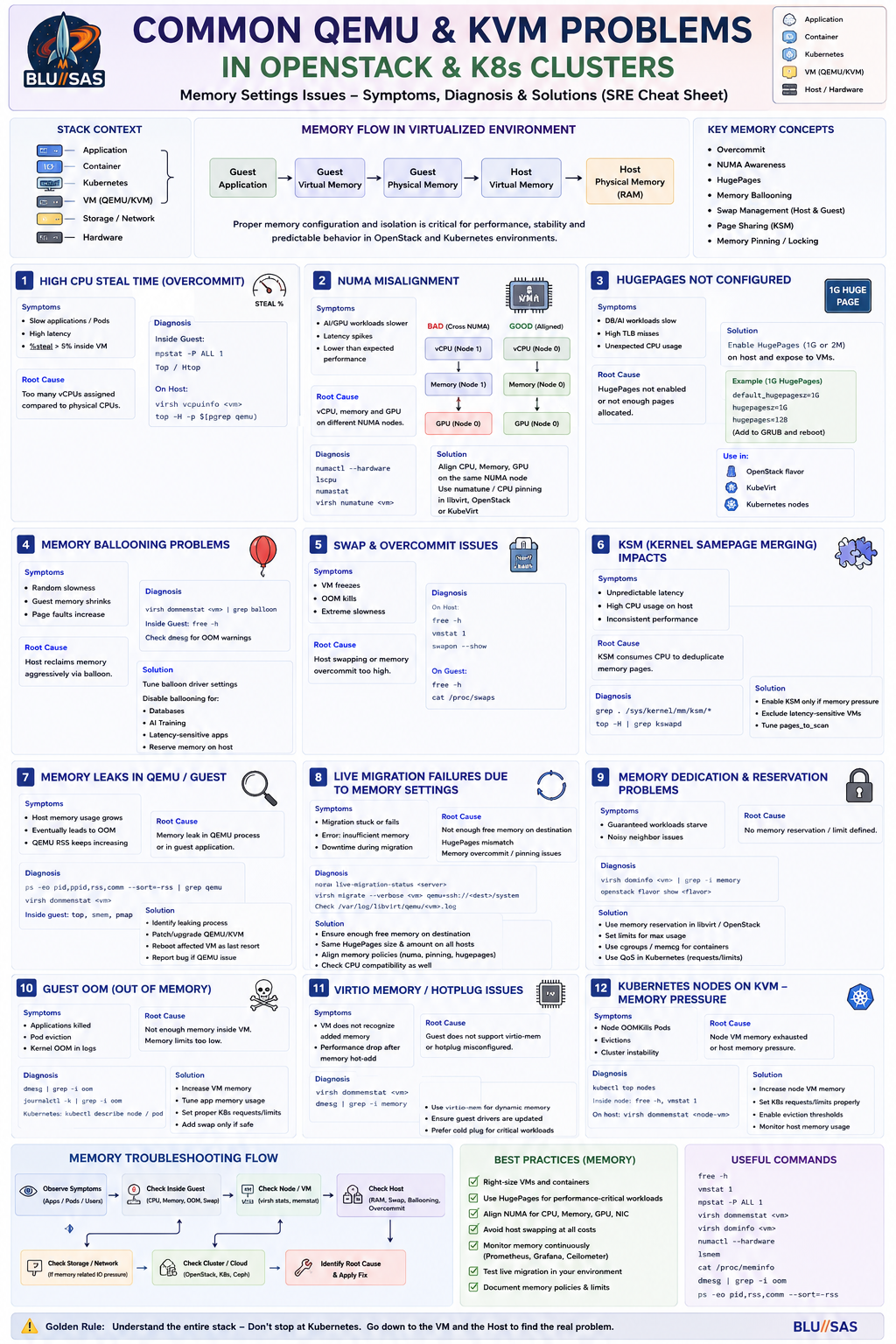
This is one of the most valuable areas for a Senior SRE, Platform Engineer, Cloud Engineer, or AI Infrastructure Engineer.
Interviewers rarely care whether you know every QEMU command.
They care whether you can troubleshoot:
Application
 ↓
Container
 ↓
Kubernetes
 ↓
VM
 ↓
QEMU/KVM
 ↓
Storage
 ↓
Network
 ↓
Hardware
and determine where the fault lies.
1. High CPU Steal Time
Symptoms
Inside VM:
top
htop
mpstat -P ALL 1
shows:
%steal > 5%Users report:
Slow applications
Slow builds
Slow AI training
High latency
Root Cause
Host CPU oversubscribed.
Example:
Physical Host
64 CPUs

VMs configured:
120 vCPUs
All guests compete for CPU.
Diagnosis
Inside Guest:
top
mpstat
Host:
virsh vcpuinfo vm1
top -H -p $(pgrep qemu)
Check:
ps -ef | grep qemuSolution
Reduce:
CPU overcommitUse:
CPU pinning
NUMA pinning
Dedicated CPU pools
OpenStack:
cpu_allocation_ratioshould be reviewed.
2. NUMA Misalignment
Very common in AI/HPC.
Symptoms
GPU workloads slower than expected.
Training slower.
Latency spikes.
Example
Bad:
GPU on NUMA Node 0

vCPUs on NUMA Node 1

Memory on NUMA Node 1
Every GPU operation crosses CPU sockets.
Diagnosis
Host:
numactl --hardware
lscpu
numastat
VM:
virsh numatune vm1OpenStack:
openstack flavor showSolution
Align:
CPU
Memory
GPU
NIC
to same NUMA node.
3. HugePages Not Configured
Extremely common.
Symptoms
Databases slow.
AI workloads underperform.
Unexpected TLB misses.
Diagnosis
Host:
cat /proc/meminfo | grep HugeExample:
HugePages_Total: 0Solution
Configure:
default_hugepagesz=1G
hugepagesz=1G
hugepages=128
Reboot.
Expose through:
OpenStack flavor
Kubelet
KubeVirt
4. Storage Latency
Most common real-world issue.
Symptoms
VM “looks hung”
Database stalls
Pods timeout
Slow boot
Diagnosis
Guest:
iostat -xz 1Host:
iostat -xz 1Look for:
await
svctm
util
Storage backend:
Ceph
NFS
iSCSI
Longhorn
Typical Root Cause
Ceph OSD degraded.
Example:
ceph -sreturns:
HEALTH_WARNSolution
Repair storage.
Not the VM.
This is a common SRE mistake.
5. Ceph Network Saturation
Very common in OpenStack.
Symptoms
VMs freeze.
Nova instances slow.
Volume attachment slow.
Diagnosis
ceph -siftopethtool -SRoot Cause
Storage traffic sharing:
Production Network
Storage Network
Solution
Separate:
Storage VLAN
Storage NIC
Storage Fabric
6. Live Migration Failures
OpenStack classic.
Symptoms
Migration stuck
Migration aborted
Root Causes
CPU incompatibility
Intel Ice Lake
Intel Cascade Lake
mixed cluster.
Insufficient bandwidth
HugePages
SR-IOV
GPU passthrough
Diagnosis
virsh migrateLogs:
journalctl -u libvirtdOpenStack:
nova-compute.logSolution
Use:
CPU models
host-model
host-passthrough carefully
7. QEMU Process Consuming Massive CPU
Symptoms
Host:
topshows:
qemu-system-x86_64at:
600%Root Causes
Emulated NIC
e1000instead of:
virtio-netEmulated storage
IDEinstead of:
virtio-scsiSolution
Use:
VirtIO everywhere8. GPU Passthrough Failure
Very common in AI infrastructure.
Symptoms
Inside VM:
nvidia-smireturns:
No devices foundDiagnosis
Host:
lspcidmesg | grep iommufind /sys/kernel/iommu_groupsRoot Causes
VT-d disabled
IOMMU disabled
VFIO not loaded
Device bound to host driver
Solution
Enable:
VT-d
AMD-Vi
VFIO
Bind GPU:
vfio-pci9. SR-IOV Failure
Common in AI clusters.
Symptoms
VM network slow.
RDMA unavailable.
Diagnosis
ip linklspciibstatRoot Causes
VF not assigned
VF driver mismatch
RoCE config broken
Solution
Validate:
PF
VF
RDMA
RoCE
end-to-end.
10. OpenStack Nova Scheduling Failure
Very common.
Symptoms
No valid host foundDiagnosis
openstack server createfails.
Check:
nova-scheduler.logCommon Causes
Not enough RAM
HugePages exhausted
GPU unavailable
NUMA conflict
Host aggregates
Solution
Inspect:
Placement API
Nova scheduler
Flavor requirements
11. K8s Nodes Running on KVM
Common cloud architecture.
Symptoms
Pods slow.
Cluster unstable.
Root Cause
Underlying VM issue.
Diagnosis
Don’t stop at Kubernetes.
Check:
Pod
Node
VM
Host
Storage
Example
kubectl top nodesshows:
100% CPUBut:
topinside node VM:
50% stealProblem is KVM host.
Not Kubernetes.
12. CNI Performance Problems
Especially:
- Calico
- Cilium
- OVN
Symptoms
Packet loss
High latency
Root Cause
Virtual NIC bottleneck.
Example:
veth
virtio-net
bridge
OVS
stack.
Diagnosis
ethtool -Siperf3cilium connectivity testSolution
Enable:
multiqueue
vhost-net
SR-IOV
DPDK
where appropriate.
13. Time Drift
Often overlooked.
Symptoms
TLS failures
Authentication failures
Raft instability
Etcd issues
Diagnosis
timedatectl
chronyc sources
Root Cause
Guest clock drift.
Solution
Use:
Chrony
PTP
NTP
everywhere.
14. Memory Ballooning Problems
Symptoms
Random guest slowdown.
Diagnosis
virsh dommemstatGuest:
free -hRoot Cause
Host reclaiming memory aggressively.
Solution
Disable ballooning for:
Databases
AI training
Latency-sensitive workloads
15. Ceph + OpenStack + KVM Nightmare Scenario
One of the most realistic incidents.
Symptoms
VMs frozen
Pods failing
Databases timing out
Everyone blames:
OpenStack
Kubernetes
Investigation
Guest:
iostatHost:
iostatCeph:
ceph -sShows:
OSD down
PG degraded
Recovery storm
Root Cause
Storage backend overloaded.
Resolution
Repair OSD
Throttle recovery
Rebalance
Restore replication
VMs recover automatically.
What Senior SRE Interviewers Really Want
They want to hear that you understand the fault domains:
Application
 ↓
Container
 ↓
Kubernetes
 ↓
VM
 ↓
QEMU
 ↓
KVM
 ↓
Storage
 ↓
Network
 ↓
Hardware
and that you can systematically eliminate each layer.
For AI/OpenStack/Kubernetes environments, the most common and highest-value troubleshooting areas are:
| Rank | Problem |
|---|---|
| 1 | Storage latency (Ceph, Longhorn, SAN) |
| 2 | CPU steal / overcommit |
| 3 | NUMA misalignment |
| 4 | HugePages missing |
| 5 | GPU passthrough issues |
| 6 | SR-IOV / RDMA failures |
| 7 | Nova scheduling failures |
| 8 | Live migration failures |
| 9 | VirtIO misconfiguration |
| 10 | Time synchronization issues |
These are exactly the sorts of issues senior SREs supporting OpenStack, Kubernetes, Slurm, AI/HPC, GPU clouds, and hyperscale infrastructure are expected to troubleshoot confidently.