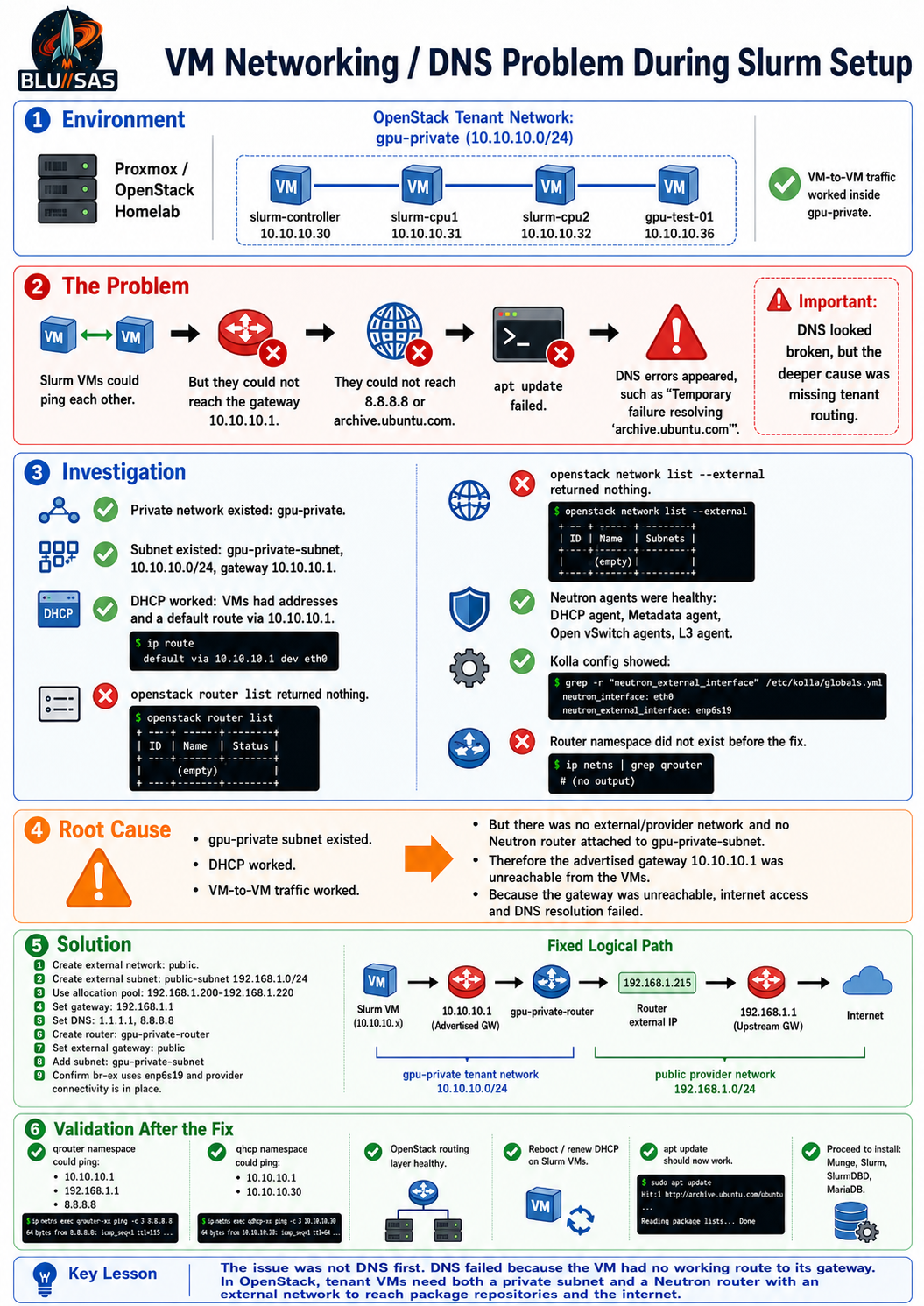
Issue
While preparing the OpenStack tenant VMs for Slurm, the Slurm nodes could reach each other on the private tenant network, but they could not reach the default gateway, DNS, or the internet.
From slurm-controller, VM-to-VM traffic worked:
ping -c 2 slurm-cpu1
ping -c 2 slurm-cpu2
But external routing failed:
ping -c 2 10.10.10.1
ping -c 2 8.8.8.8
ping -c 2 archive.ubuntu.com
The VM had a DHCP-provided address and default route:
10.10.10.30/24
default via 10.10.10.1
but the gateway was unreachable:
From 10.10.10.30 Destination Host UnreachableThis caused apt update to fail:
Temporary failure resolving 'archive.ubuntu.com'
Temporary failure resolving 'security.ubuntu.com'
As a result, the Slurm packages could not be installed:
Unable to locate package munge
Unable to locate package slurm-wlm
Unable to locate package slurmdbd
Unable to locate package mariadb-server
The root cause was: the gpu-private tenant network existed, DHCP worked, and VM-to-VM connectivity worked, but there was no Neutron router and no external/provider network.
Investigation
The private network was confirmed as:
gpu-private
Network ID: 54829687-5a62-4d95-a7d0-42f3e30f7dbf
Subnet: gpu-private-subnet
CIDR: 10.10.10.0/24
Gateway: 10.10.10.1
DNS: 1.1.1.1
The subnet advertised 10.10.10.1 as the default gateway, but:
openstack router listreturned nothing.
That meant no router interface existed at 10.10.10.1.
The OpenStack network agent state was then checked. Neutron was healthy:
DHCP agent              alive
Metadata agent          alive
Open vSwitch agents     alive
L3 agent                alive
neutron_l3_agent        healthy
neutron_server          healthy
The Kolla config also showed a valid external interface:
network_interface: eth0
neutron_external_interface: enp6s19
The enp6s19 interface had no IP address, which is appropriate for a Neutron external/provider interface. The missing part was not Kolla services; it was the OpenStack tenant/external network configuration.
Solution
The external provider network was created:
openstack network create public \
  --external \
  --provider-network-type flat \
  --provider-physical-network physnet1
Then the external subnet was created on the homelab LAN:
openstack subnet create public-subnet \
  --network public \
  --subnet-range 192.168.1.0/24 \
  --allocation-pool start=192.168.1.200,end=192.168.1.220 \
  --gateway 192.168.1.1 \
  --dns-nameserver 1.1.1.1 \
  --dns-nameserver 8.8.8.8 \
  --no-dhcp
This created the external network public and allocated the router external address from the safe pool. In the final state, the router received:
External router IP: 192.168.1.215The Neutron router was then created:
openstack router create gpu-private-routerThe router was given an external gateway:
openstack router set \
  --external-gateway public \
  gpu-private-router
The private Slurm subnet was attached:
openstack router add subnet \
  gpu-private-router \
  gpu-private-subnet
After this, OpenStack created the router namespace:
qrouter-80a7cf7d-711f-4329-ad33-bb793a05756fand the DHCP namespace already existed:
qdhcp-54829687-5a62-4d95-a7d0-42f3e30f7dbfThe router namespace showed the correct internal and external interfaces:
qg-d385ebd7-5a  192.168.1.215/24
qr-fe08d65d-ab  10.10.10.1/24
default via 192.168.1.1
The OVS bridge mapping was also confirmed. br-ex had the external physical interface attached:
Bridge br-ex
  Port enp6s19
  Port phy-br-ex
This confirmed that the Neutron external provider bridge was correctly connected to the LAN.
Validation
The router namespace could reach all required networks:
sudo ip netns exec qrouter-$ROUTER_ID ping -c 2 10.10.10.1
sudo ip netns exec qrouter-$ROUTER_ID ping -c 2 192.168.1.1
sudo ip netns exec qrouter-$ROUTER_ID ping -c 2 8.8.8.8
Results:
10.10.10.1    reachable
192.168.1.1   reachable
8.8.8.8       reachable
The DHCP namespace could also reach both the private gateway and the Slurm controller:
sudo ip netns exec qdhcp-54829687-5a62-4d95-a7d0-42f3e30f7dbf ping -c 2 10.10.10.1
sudo ip netns exec qdhcp-54829687-5a62-4d95-a7d0-42f3e30f7dbf ping -c 2 10.10.10.30
Results:
10.10.10.1    reachable
10.10.10.30   reachable
At that point, the OpenStack routing layer was fixed. The remaining step was to reboot or renew DHCP on the Slurm VMs so they picked up clean routing and resolver state, then rerun:
sudo apt clean
sudo apt update
Final root cause
The problem was not initially DNS.
DNS failed because the VM had no working path to its gateway or the internet. The deeper issue was:
gpu-private subnet existed
DHCP worked
VM-to-VM traffic worked
but no external provider network existed
and no Neutron router was attached to gpu-private-subnet
After creating:
public external network
public-subnet
gpu-private-router
router external gateway
router interface to gpu-private-subnet
the private Slurm VMs gained a valid route:
10.10.10.0/24 → 10.10.10.1 → Neutron router → 192.168.1.215 → 192.168.1.1 → internetThat restored the path needed for DNS, apt update, and the subsequent Munge/Slurm package installation.