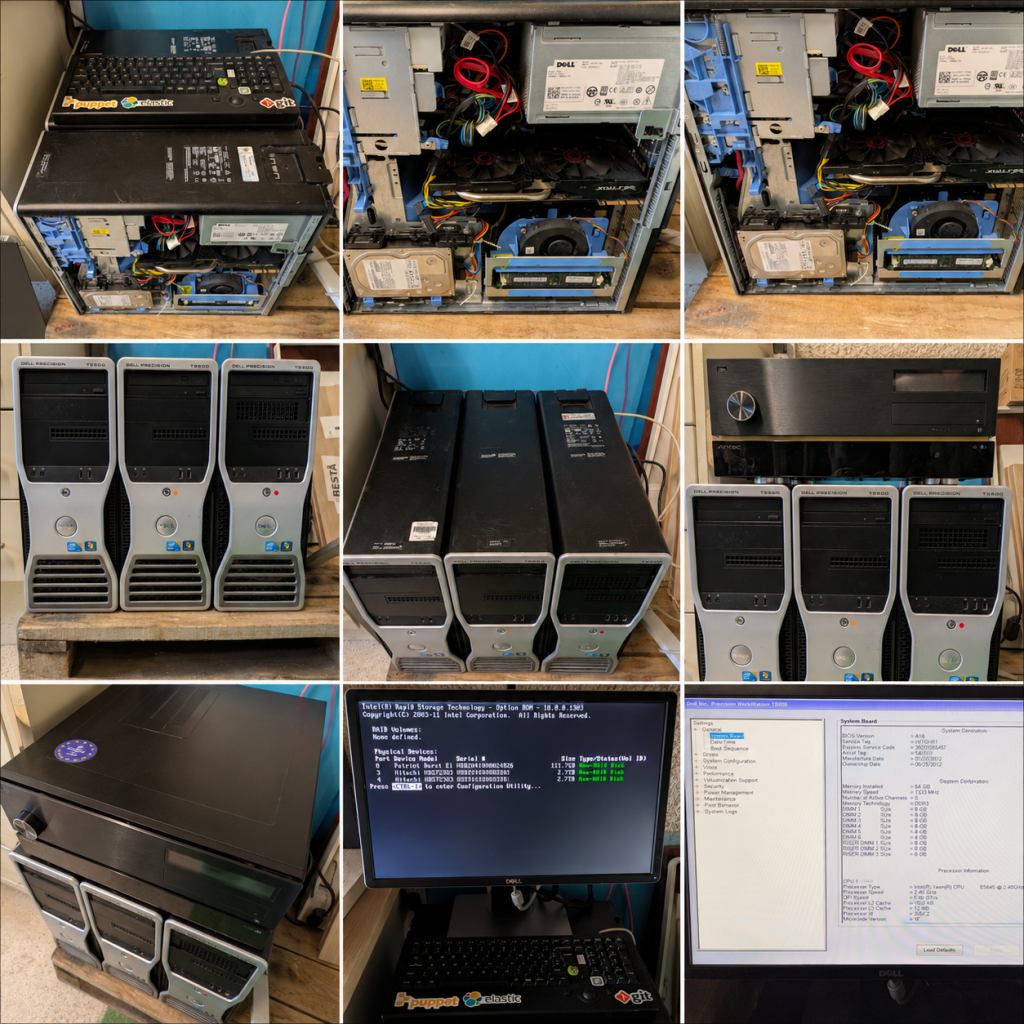
I have been setting up my homelab using 3 x Dell T5500 workstations – each equipt with 72GB (70GB) RAM and 2 x 3TB (2.7TB) HDD.
What I Would Build
+--------------------------------------------------+
|                Proxmox Cluster                   |
+--------------------------------------------------+

 Node 1                Node 2                Node 3
 T5500                 T5500                 T5500

 OpenStack Ctrl        OpenStack Compute     OpenStack Compute
 Ceph MON/MGR          Ceph OSD              Ceph OSD

 ---------------- OpenStack ----------------

          Nova
          Neutron
          Keystone
          Glance
          Cinder

 ---------------- Ceph ----------------

          RBD
          CephFS
          RGW

 ---------------- Kubernetes ----------------

          Cilium
          Longhorn
          MinIO
          LGTM

 ---------------- Slurm ----------------

          slurmctld
          slurmd
          slurmdbd

 ---------------- Observability ----------------

          Grafana
          Mimir
          Loki
          Tempo
          OTel
Phase 1 (Week 1)
Deploy OpenStack Properly
This should be your primary focus.
You already know Kubernetes reasonably well.
OpenStack is where your biggest learning gap is.
Learn:
Keystone
Identity
Questions to answer:
- How are projects created?
- How are users authenticated?
- How do service accounts work?
Nova
Compute
Understand:
- Scheduler
- Placement
- Cells v2
Questions:
- Why did a VM land on a specific host?
- Why did scheduling fail?
- How does live migration work?
Neutron
Most people struggle here.
Learn:
- Provider Networks
- Tenant Networks
- OVS
- VXLAN
Questions:
- Why can’t a VM reach the internet?
- Why can VM A not reach VM B?
Cinder
Learn:
- Volumes
- Snapshots
- Backends
Glance
Learn:
- Image lifecycle
- Backing store
Week 1 Deliverable
Deploy:
Kolla-Ansible
or
OpenStack-Ansible
Personally I’d choose:
Kolla-Ansible
because:
- easier deployment
- closer to modern production
- containerised services
Phase 2 (Week 2)
Build Ceph Underneath OpenStack
This is likely more important than OpenStack itself.
Many organisations hire OpenStack engineers but actually need:
Ceph engineers
Build:
MONs
MGRs
OSDs
Ceph Dashboard
RBD
CephFS
RGW
Learn:
RADOS
CRUSH Maps
PGs
Recovery
Rebalancing
Break it deliberately.
Questions:
- What happens when an OSD dies?
- What happens when a node dies?
- What happens when a MON disappears?
Week 2 Deliverable
Run:
ceph -s
ceph osd tree
ceph health detail
and fully understand every line.
Phase 3 (Week 3)
OpenStack + Ceph Integration
This is where it gets interesting.
Configure:
Glance → Ceph
Cinder → Ceph
Nova → Ceph
Understand:
VM boot flow
Glance
  ↓
RBD image
  ↓
Nova
  ↓
QEMU
  ↓
Ceph RBD
Questions:
- How does boot-from-volume work?
- Where are VM disks stored?
- How are snapshots implemented?
Phase 4 (Week 3)
Learn Slurm
This is probably the second-highest value area after OpenStack/Ceph.
You previously planned:
slurm-controller
192.168.1.60

slurm-cpu1
192.168.1.61

slurm-cpu2
192.168.1.62
I would build exactly that.
Deploy:
slurmctld
slurmdbd
MariaDB
slurmd nodes
Learn:
sinfo
squeue
scontrol
sacct
Run:
MPI jobs
CPU jobs
Array jobs
If possible:
Pass through your GTX970
and learn:
GRES
GPU scheduling
Phase 5 (Week 4)
OpenStack + Slurm
This is the interesting bit.
Build:
OpenStack
    ↓
Terraform
    ↓
VMs
    ↓
Slurm
    ↓
Jobs
Provision Slurm nodes automatically.
Learn:
- Auto-scaling compute nodes
- Ephemeral workers
- HPC bursting
This is much closer to AI cloud reality.
Phase 6 (Week 4)
Observability of Everything
You already know LGTM well.
Instead of learning Grafana itself, learn:
What to monitor
Monitor OpenStack:
- Keystone
- Nova
- Neutron
- RabbitMQ
- MariaDB
Monitor Ceph:
- OSD latency
- PG state
- Recovery
- Client I/O
Monitor Slurm:
- Job queue depth
- Node utilisation
- GPU utilisation
Monitor Infrastructure:
- CPU
- Memory
- Storage
- Network
What Would Impress Me Most?
If I were your future technical lead and saw your homelab, the most impressive project would be:
Proxmox
   ↓
Ceph
   ↓
OpenStack
   ↓
Terraform
   ↓
Kubernetes Cluster
   ↓
Slurm Cluster
   ↓
LGTM + OpenTelemetry
with:
- Infrastructure deployed by Ansible
- OpenStack provisioned by Kolla-Ansible
- Ceph providing storage
- Kubernetes running workloads
- Slurm running HPC jobs
- Grafana providing observability
That single platform teaches:
- KVM/QEMU
- OpenStack internals
- Ceph internals
- Neutron networking
- Terraform
- Kubernetes
- Slurm
- HPC scheduling
- AI infrastructure architecture
- Observability
all in one integrated environment.
For the next 3–4 weeks, I would allocate effort roughly as:
| Area | Focus |
|---|---|
| OpenStack | 40% |
| Ceph | 30% |
| Slurm | 20% |
| AI/HPC concepts | 5% |
| Observability | 5% |
The reason is simple: your existing experience already covers Kubernetes, LGTM, OpenTelemetry, Linux, automation, and SRE practices. The largest gaps before day one are OpenStack internals, Ceph operations, and Slurm scheduling. Those are the areas most likely to let you make an immediate impact.
What I Would Build
+--------------------------------------------------+
|                Proxmox Cluster                   |
+--------------------------------------------------+

 Node 1                Node 2                Node 3
 T5500                 T5500                 T5500

 OpenStack Ctrl        OpenStack Compute     OpenStack Compute
 Ceph MON/MGR          Ceph OSD              Ceph OSD

 ---------------- OpenStack ----------------

          Nova
          Neutron
          Keystone
          Glance
          Cinder

 ---------------- Ceph ----------------

          RBD
          CephFS
          RGW

 ---------------- Kubernetes ----------------

          Cilium
          Longhorn
          MinIO
          LGTM

 ---------------- Slurm ----------------

          slurmctld
          slurmd
          slurmdbd

 ---------------- Observability ----------------

          Grafana
          Mimir
          Loki
          Tempo
          OTel
Phase 1 (Week 1)
Deploy OpenStack Properly
This should be your primary focus.
You already know Kubernetes reasonably well.
OpenStack is where your biggest learning gap is.
Learn:
Keystone
Identity
Questions to answer:
- How are projects created?
- How are users authenticated?
- How do service accounts work?
Nova
Compute
Understand:
- Scheduler
- Placement
- Cells v2
Questions:
- Why did a VM land on a specific host?
- Why did scheduling fail?
- How does live migration work?
Neutron
Most people struggle here.
Learn:
- Provider Networks
- Tenant Networks
- OVS
- VXLAN
Questions:
- Why can’t a VM reach the internet?
- Why can VM A not reach VM B?
Cinder
Learn:
- Volumes
- Snapshots
- Backends
Glance
Learn:
- Image lifecycle
- Backing store
Week 1 Deliverable
Deploy:
Kolla-Ansible
or
OpenStack-Ansible
Personally I’d choose:
Kolla-Ansible
because:
- easier deployment
- closer to modern production
- containerised services
Phase 2 (Week 2)
Build Ceph Underneath OpenStack
This is likely more important than OpenStack itself.
Many organisations hire OpenStack engineers but actually need:
Ceph engineers
Build:
MONs
MGRs
OSDs
Ceph Dashboard
RBD
CephFS
RGW
Learn:
RADOS
CRUSH Maps
PGs
Recovery
Rebalancing
Break it deliberately.
Questions:
- What happens when an OSD dies?
- What happens when a node dies?
- What happens when a MON disappears?
Week 2 Deliverable
Run:
ceph -s
ceph osd tree
ceph health detail
and fully understand every line.
Phase 3 (Week 3)
OpenStack + Ceph Integration
This is where it gets interesting.
Configure:
Glance → Ceph
Cinder → Ceph
Nova → Ceph
Understand:
VM boot flow
Glance
  ↓
RBD image
  ↓
Nova
  ↓
QEMU
  ↓
Ceph RBD
Questions:
- How does boot-from-volume work?
- Where are VM disks stored?
- How are snapshots implemented?
Phase 4 (Week 3)
Learn Slurm
This is probably the second-highest value area after OpenStack/Ceph.
You previously planned:
slurm-controller
192.168.1.60

slurm-cpu1
192.168.1.61

slurm-cpu2
192.168.1.62
I would build exactly that.
Deploy:
slurmctld
slurmdbd
MariaDB
slurmd nodes
Learn:
sinfo
squeue
scontrol
sacct
Run:
MPI jobs
CPU jobs
Array jobs
If possible:
Pass through your GTX970
and learn:
GRES
GPU scheduling
Phase 5 (Week 4)
OpenStack + Slurm
This is the interesting bit.
Build:
OpenStack
    ↓
Terraform
    ↓
VMs
    ↓
Slurm
    ↓
Jobs
Provision Slurm nodes automatically.
Learn:
- Auto-scaling compute nodes
- Ephemeral workers
- HPC bursting
This is much closer to AI cloud reality.
Phase 6 (Week 4)
Observability of Everything
You already know LGTM well.
Instead of learning Grafana itself, learn:
What to monitor
Monitor OpenStack:
- Keystone
- Nova
- Neutron
- RabbitMQ
- MariaDB
Monitor Ceph:
- OSD latency
- PG state
- Recovery
- Client I/O
Monitor Slurm:
- Job queue depth
- Node utilisation
- GPU utilisation
Monitor Infrastructure:
- CPU
- Memory
- Storage
- Network
What Would Impress Me Most?
If I were your future technical lead and saw your homelab, the most impressive project would be:
Proxmox
   ↓
Ceph
   ↓
OpenStack
   ↓
Terraform
   ↓
Kubernetes Cluster
   ↓
Slurm Cluster
   ↓
LGTM + OpenTelemetry
with:
- Infrastructure deployed by Ansible
- OpenStack provisioned by Kolla-Ansible
- Ceph providing storage
- Kubernetes running workloads
- Slurm running HPC jobs
- Grafana providing observability
That single platform teaches:
- KVM/QEMU
- OpenStack internals
- Ceph internals
- Neutron networking
- Terraform
- Kubernetes
- Slurm
- HPC scheduling
- AI infrastructure architecture
- Observability
all in one integrated environment.
For the next 3–4 weeks, I would allocate effort roughly as:
| Area | Focus |
|---|---|
| OpenStack | 40% |
| Ceph | 30% |
| Slurm | 20% |
| AI/HPC concepts | 5% |
| Observability | 5% |
The reason is simple: your existing experience already covers Kubernetes, LGTM, OpenTelemetry, Linux, automation, and SRE practices. The largest gaps before day one are OpenStack internals, Ceph operations, and Slurm scheduling. Those are the areas most likely to let you make an immediate impact.
The addition of GPU Pass-Through: Configure & Test is exactly the right enhancement.
On your hardware, GPU pass-through is arguably more valuable than spending another week on observability because it bridges all three domains you’re trying to learn:
- OpenStack
- Slurm
- AI/HPC workloads
The GPU section should ideally include:
Configure
- Enable VT-d / IOMMU in BIOS
- Configure Proxmox PCI Passthrough
- Verify IOMMU groups
- Bind GPU to
vfio-pci - Create GPU-enabled VM
- Install NVIDIA drivers
- Configure Huge Pages
- Configure CPU pinning (optional)
Test
nvidia-smi- CUDA Toolkit
- CUDA Samples
- PyTorch GPU detection
- TensorFlow GPU detection
- GPU stress testing
- DCGM exporter
- NVIDIA exporter
OpenStack Extension
After basic passthrough works:
GPU
 ↓
Proxmox VM
 ↓
OpenStack Nova
 ↓
PCI Passthrough
 ↓
GPU-enabled Instance
Learn:
- Nova PCI aliases
- Nova flavor extra specs
- GPU scheduling
- Placement service
- GPU inventory reporting
Slurm Extension
GPU VM
 ↓
slurmd
 ↓
GRES
 ↓
GPU Jobs
Learn:
- gres.conf
- slurm.conf GPU resources
- GPU partitions
- GPU accounting
Commands:
sinfo
scontrol show node
srun --gres=gpu:1 nvidia-smi
AI Workload Validation
Run at least:
PyTorch
import torch
print(torch.cuda.is_available())
print(torch.cuda.get_device_name(0))
TensorFlow
import tensorflow as tf
print(tf.config.list_physical_devices('GPU'))
LLM Inference
- Ollama
- vLLM
- llama.cpp
Distributed Training
- PyTorch DDP
- NCCL tests
If I were refining the infographic further, I would actually move the GPU pass-through box into its own Week 3.5 milestone between:
Week 3
OpenStack + Ceph
      ↓
GPU Pass-Through
      ↓
Slurm
      ↓
OpenStack + Slurm
      ↓
Observability
because GPU enablement is the point where the homelab transitions from a cloud platform into an AI/HPC platform.
For your specific goal of becoming productive quickly in a Cloud OpenStack/Kubernetes/AI-HPC role, the most valuable end-state for the lab would be:
Proxmox
   ↓
Ceph
   ↓
OpenStack
   ↓
GPU Passthrough
   ↓
Terraform
   ↓
Slurm
   ↓
PyTorch Workloads
   ↓
OpenTelemetry
   ↓
Grafana LGTM
Once you can provision a VM from OpenStack, attach a GPU, register it with Slurm, run a PyTorch workload, and observe the entire stack through Grafana, you’ll have touched almost every major layer of a modern AI infrastructure platform.