Goal: turn the unused storage in each Dell T5500 into a shared storage cluster that Proxmox, OpenStack, Kubernetes, and Slurm can later consume.
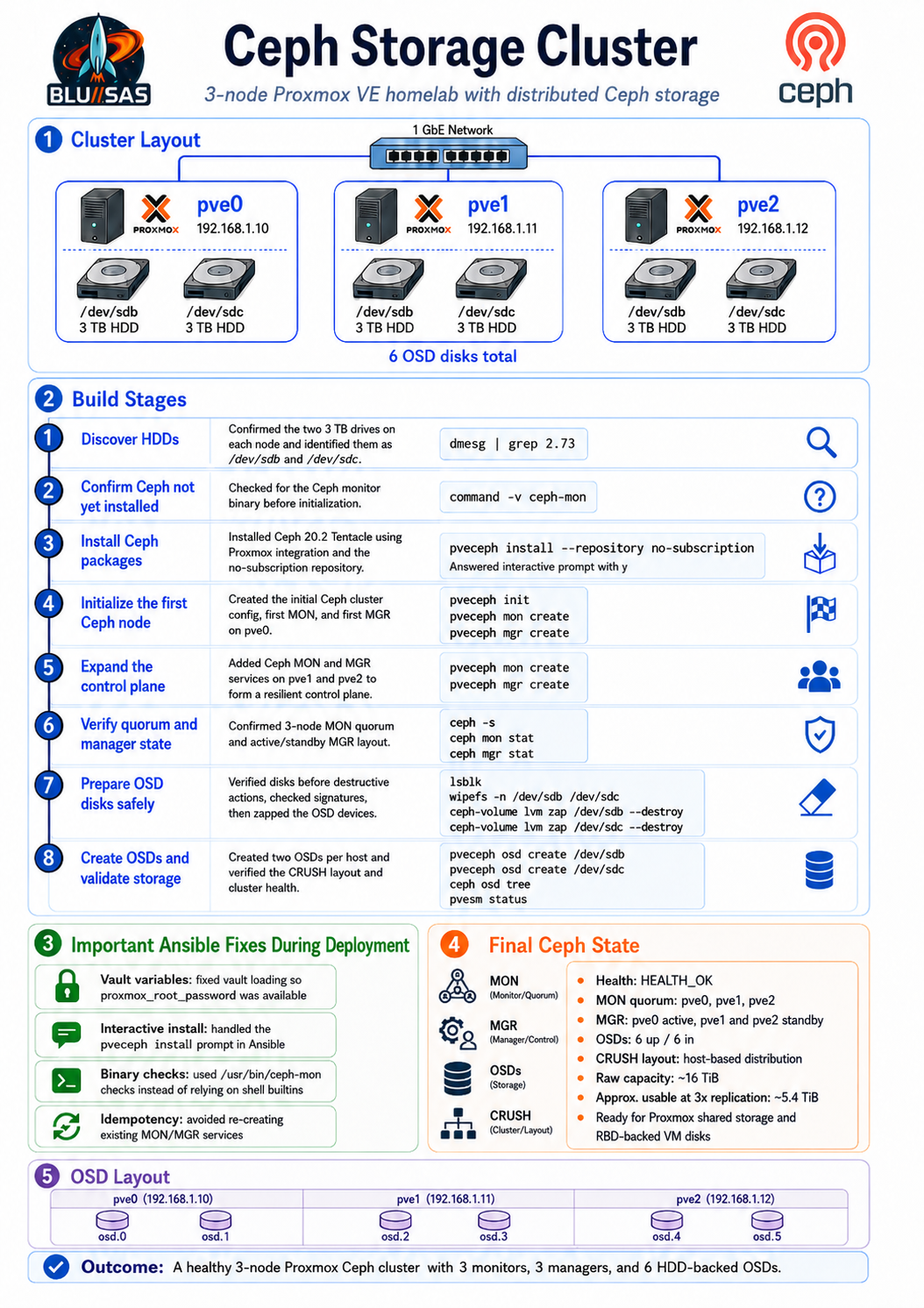
Target design:
pve01 ─ Ceph MON + MGR + OSD
pve02 ─ Ceph MON + MGR + OSD
pve03 ─ Ceph MON + MGR + OSD
Use Ceph for:
VM disks        → Ceph RBD
OpenStack Cinder → Ceph RBD
Glance images   → Ceph RBD
Kubernetes PVs  → Ceph CSI later
Shared files    → CephFS later
Object storage  → RGW later
1. Pre-check every node
Run on all three Proxmox nodes:
hostname
ip -br addr
lsblk
pveversion
timedatectl
Check that:
pve01 / pve02 / pve03 can resolve each other
time is synced
cluster quorum is healthy
the intended Ceph disks are unused
Check cluster:
pvecm statusYou want:
Quorum: Yes
Nodes: 3
2. Decide the Ceph network
Because you only have one NIC per node, keep it simple first.
Use your existing Proxmox management network initially.
Example:
pve01 192.168.1.10
pve02 192.168.1.11
pve03 192.168.1.12
Later, if you add VLANs or a second NIC, you can separate:
public_network  = client / VM / OpenStack access
cluster_network = OSD replication / recovery traffic
For now:
Ceph public network = 192.168.1.0/24
Ceph cluster network = same network
Not ideal for production, but fine for learning.
3. Install Ceph from Proxmox UI or CLI
Option A — Proxmox UI
On each node:
Datacenter
  → Node
  → Ceph
  → Install Ceph
Use the same version on all nodes.
Then initialise Ceph on the first node.
Option B — CLI
On each node:
pveceph installThen initialise Ceph on pve01:
pveceph init --network 192.168.1.0/24Then create MONs:
pveceph mon createRun this on each node:
pveceph mon createThen create managers:
pveceph mgr createAgain, run on each node.
Verify:
ceph -s
ceph mon stat
ceph mgr stat
4. Prepare disks for OSDs
List disks:
lsblk -o NAME,SIZE,TYPE,FSTYPE,MOUNTPOINTExample:
sda  150G  Proxmox OS
sdb  2.5T  empty disk for Ceph OSD
Important: do not use the Proxmox OS disk as an OSD unless you deliberately partitioned it for that.
Wipe the intended Ceph disk:
wipefs -a /dev/sdb
sgdisk --zap-all /dev/sdb
Then create one OSD per node:
pveceph osd create /dev/sdbRepeat on pve01, pve02, and pve03.
Verify:
ceph osd tree
ceph -s
You want to see:
3 osds: 3 up, 3 in5. Create a Ceph pool for VM disks
Create an RBD pool:
ceph osd pool create vm-rbd 32
ceph osd pool application enable vm-rbd rbd
rbd pool init vm-rbd
For a small 3-node lab, 32 PGs is fine to start.
Add it to Proxmox storage:
pvesm add rbd ceph-vm-rbd \
  --pool vm-rbd \
  --content images,rootdir \
  --krbd 0
Check:
pvesm statusYou should see ceph-vm-rbd.
6. Test VM storage on Ceph
Create or clone a small VM and place its disk on:
ceph-vm-rbdThen test live migration:
qm migrate <vmid> pve02 --onlineIf the VM disk is on Ceph, migration should not require copying the disk.
That is one of the main reasons Ceph is valuable.
7. Create CephFS later, not immediately
Do RBD first.
After RBD works, add CephFS.
Create metadata servers:
pveceph mds createCreate CephFS:
pveceph fs create cephfsAdd to Proxmox storage:
pvesm add cephfs cephfs \
  --content iso,backup,snippets
Use CephFS for:
ISO images
container templates
backups
shared files
snippets
Use RBD for:
VM disks
OpenStack Cinder volumes
Glance images
8. Learn the important Ceph commands
Run these repeatedly until you understand them:
ceph -s
ceph health detail
ceph osd tree
ceph osd df
ceph df
ceph mon stat
ceph mgr stat
ceph pg stat
ceph pg dump_stuck
For OSD detail:
ceph osd metadata
ceph osd perf
For pools:
ceph osd pool ls detail
rbd ls vm-rbd
rbd du vm-rbd
9. Break it deliberately
This is where the real learning happens.
Safely test:
systemctl stop ceph-osd@0
ceph -s
systemctl start ceph-osd@0
Observe:
HEALTH_WARN
OSD down
PG degraded
recovery starts
HEALTH_OK returns
Then test node-level failure:
Shutdown pve03
Watch ceph -s
Restart pve03
Watch recovery
Do not panic when Ceph shows warnings. Learn what they mean.
10. What healthy looks like
A healthy 3-node lab should show roughly:
cluster:
  health: HEALTH_OK

services:
  mon: 3 daemons, quorum pve01,pve02,pve03
  mgr: pve01(active), standbys: pve02,pve03
  osd: 3 osds: 3 up, 3 in

data:
  pools: 1 pools
  pgs: active+clean
11. Key concepts to understand
Focus on these:
MON    = cluster map and quorum
MGR    = metrics, dashboard, management modules
OSD    = stores the actual data
Pool   = logical storage namespace
PG     = placement group
CRUSH  = decides where data lives
RBD    = block devices for VMs
CephFS = shared filesystem
RGW    = S3-compatible object storage
The biggest one is CRUSH.
CRUSH determines where replicas are placed. In your 3-node lab, you want data spread across different hosts, not multiple copies on the same host.
Recommended order
Do not try to configure everything at once.
Use this sequence:
1. Install Ceph packages
2. Create MONs
3. Create MGRs
4. Add one OSD per node
5. Confirm HEALTH_OK
6. Create RBD pool
7. Add RBD to Proxmox
8. Put VM disk on Ceph
9. Test live migration
10. Break and recover one OSD
11. Add CephFS
12. Later integrate with OpenStack
For your homelab, the first real success milestone is:
A VM running on pve01 with its disk on Ceph RBD,
live migrated to pve02 without copying the disk.
That proves the Proxmox + Ceph foundation is working.
Reality and Actions
Current hardware
| Host | HDD1 | HDD2 | Total Raw |
|---|---|---|---|
| pve0 | 3 TB | 3 TB | 6 TB |
| pve1 | 3 TB | 3 TB | 6 TB |
| pve2 | 3 TB | 3 TB | 6 TB |
Total:
- 6 OSDs
- 18 TB raw
- Approximately 6 TB usable with a replication factor of 3.
That may sound wasteful, but it is exactly what you want to learn with. Three-way replication means the cluster can survive the loss of an entire node while keeping data available.
Recommended layout
I would dedicate all six HDDs exclusively to Ceph.
Do not put ZFS on them.
Keep:
- Proxmox OS on your boot SSD
- Ceph on the six HDDs
pve0
 ├── OS SSD
 ├── sdb → OSD 0
 └── sdc → OSD 1

pve1
 ├── OS SSD
 ├── sdb → OSD 2
 └── sdc → OSD 3

pve2
 ├── OS SSD
 ├── sdb → OSD 4
 └── sdc → OSD 5
Phase 1
Install Ceph everywhere
Since you’ve already invested in Ansible, make this another role:
roles/
    ceph_install/
    ceph_cluster/
    ceph_osd/
    ceph_pools/
Tasks:
Install Ceph
↓

Create monitors

↓

Create manager

↓

Deploy OSDs

↓

Create pool

↓

Add storage to Proxmox
Phase 2
Create MONs
One monitor per node.
pve0  MON
pve1  MON
pve2  MON
Never run only one monitor.
Phase 3
Managers
pve0 mgr active

pve1 mgr standby

pve2 mgr standby
Automatic failover.
Phase 4
OSDs
Each HDD becomes an OSD.
pve0

sdb → osd.0

sdc → osd.1

--------------------

pve1

sdb → osd.2

sdc → osd.3

--------------------

pve2

sdb → osd.4

sdc → osd.5
Total
6 OSDsPhase 5
Failure domains
Very important.
Choose
hostnot
osdThis means replicas are stored on different servers.
Replica 1

pve0

Replica 2

pve1

Replica 3

pve2
instead of
Replica 1

sdb

Replica 2

sdc

Same machine
Phase 6
Replication
Use
size = 3

min_size = 2
This is the standard recommendation for a three-node cluster.
Phase 7
Pools
Initially I’d create only three pools.
rbd-vm

RBD images

-------------------

rbd-ct

Container images

-------------------

backup

Optional later
Phase 8
Storage
After Ceph is healthy
Datacenter
Storage

↓

Add

↓

RBD
Then migrate VMs onto Ceph.
Phase 9
Networking
This is the biggest decision.
Option A
Single network
192.168.1.x

VM traffic

Cluster traffic

Ceph traffic

Migration
Perfectly acceptable for a homelab.
Option B
Two networks
vmbr0

LAN

192.168.1.x

---------------------

vmbr1

Ceph backend

10.10.10.x
Better performance.
Option C (my recommendation)
Since you’re building this to learn OpenStack and AI infrastructure, use:
vmbr0

Management

192.168.1.x

------------------

vmbr1

Storage

10.10.10.x

------------------

vmbr2

Migration

10.20.20.x
Exactly how many production clusters are designed.
Phase 10
CRUSH
Later we’ll customise CRUSH.
Initially
host

↓

osd
is sufficient.
Later you can experiment with
rack

↓

host

↓

osd
Performance expectations
With spinning disks:
- Around 150–200 MB/s per disk sequential throughput.
- Aggregate cluster throughput can reach roughly 800–1000 MB/s for large sequential reads/writes.
- Random I/O and latency will be the limiting factors, especially for VM boot disks.
If you later add a small enterprise NVMe SSD (for example, one per node), you can use it for RocksDB/WAL or metadata acceleration in BlueStore, which significantly improves random performance while keeping the bulk data on HDDs.
Suggested Ansible roles
I would structure the Ceph automation as follows:
roles/
├── ceph_install
│   ├── tasks
│   ├── handlers
│   └── defaults
│
├── ceph_bootstrap
│
├── ceph_mon
│
├── ceph_mgr
│
├── ceph_osd
│
├── ceph_crush
│
├── ceph_pools
│
├── ceph_storage
│
├── ceph_dashboard
│
├── ceph_health
│
└── ceph_cleanup
This mirrors how you’d automate a real production deployment and makes each stage independently repeatable and testable.
My recommendation
Rather than using the Proxmox GUI to create Ceph, I’d automate the entire deployment with Ansible. That approach aligns well with your goal of becoming proficient with OpenStack and modern infrastructure automation, and it gives you an idempotent build process that can recreate the cluster from scratch whenever you need to test or recover.
Ansible playbooks and roles generated, downloaded, and run in as recommended:
Recommended command sequence
Use --ask-vault-pass for all runs:
ansible-playbook -i inventory.ini ceph-site.yml --tags ceph_preflight --ask-vault-passThen:
ansible-playbook -i inventory.ini ceph-site.yml --tags ceph_install --ask-vault-passansible-playbook -i inventory.ini ceph-site.yml --tags ceph_init,ceph_services --ask-vault-passansible-playbook -i inventory.ini ceph-site.yml --tags ceph_osd --ask-vault-passansible-playbook -i inventory.ini ceph-site.yml --tags ceph_pools,ceph_storage --ask-vault-passansible-playbook -i inventory.ini ceph-verify.yml --ask-vault-passActions
Cluster target
You built a 3-node Proxmox/Ceph cluster:
pve0  192.168.1.10  2 x 3 TB HDDs
pve1  192.168.1.11  2 x 3 TB HDDs
pve2  192.168.1.12  2 x 3 TB HDDs
Ceph result:
MONs: pve0, pve1, pve2
MGRs: pve0 active, pve1/pve2 standby
OSDs: 6 total, 6 up, 6 in
Health: HEALTH_OK
Raw capacity: ~16 TiB shown by Ceph
Usable replicated capacity: roughly one third, about 5.4 TiB with size=3
1. Confirm the 3 TB HDDs existed on each host
You checked the kernel logs on each Proxmox node:
dmesg | grep 2.73Example output:
[sdb] 5860533168 512-byte logical blocks: (3.00 TB/2.73 TiB)
[sdc] 5860533168 512-byte logical blocks: (3.00 TB/2.73 TiB)
Purpose:
Confirmed each Proxmox host had two 3 TB HDDs.
Identified them as /dev/sdb and /dev/sdc.
Established these would become Ceph OSD disks.
Important result:
pve0: /dev/sdb, /dev/sdc
pve1: /dev/sdb, /dev/sdc
pve2: /dev/sdb, /dev/sdc
2. Confirm Ceph was not yet installed
You checked for the Ceph monitor binary:
ansible -i inventory.ini proxmox -b -m shell \
  -a 'command -v ceph-mon || echo MISSING' \
  --ask-vault-pass
Output:
pve0: MISSING
pve1: MISSING
pve2: MISSING
Purpose:
Verified that the Ceph monitor service binary was not installed.
Confirmed that pveceph mon create could not work yet.
This explained the earlier failure:
binary not installed: /usr/bin/ceph-mon3. Install Ceph through Proxmox integration
You ran:
pveceph install --repository no-subscriptionIt prompted:
This will install Ceph 20.2 Tentacle - continue (y/N)?You answered:
yPurpose:
Installed the Proxmox-integrated Ceph packages.
Enabled the no-subscription Ceph repository.
Installed Ceph 20.2 Tentacle packages, including ceph-mon, ceph-mgr, ceph-osd, ceph-volume and ceph-common.
In Ansible, the role had to be fixed because pveceph install was interactive. The corrected task used:
- name: Install Ceph through Proxmox integration
  ansible.builtin.shell: |
    set -o pipefail
    printf 'y\n' | pveceph install --repository no-subscription
  args:
    executable: /bin/bash
  register: pveceph_install_result
  changed_when: true
  when: not ceph_mon_check.stat.exists
  environment:
    DEBIAN_FRONTEND: noninteractive
    APT_LISTCHANGES_FRONTEND: none
Purpose:
Automatically answered the Proxmox Ceph repository confirmation prompt.
Allowed the install stage to run non-interactively from Ansible.
4. Fix the install role’s Ceph binary checks
The first check used:
ansible.builtin.command: command -v ceph-monThat failed because command -v is a shell builtin, not an executable binary.
The corrected check used stat:
- name: Check whether ceph-mon exists
  ansible.builtin.stat:
    path: /usr/bin/ceph-mon
  register: ceph_mon_check
And later:
- name: Check ceph-mon binary exists after install
  ansible.builtin.stat:
    path: /usr/bin/ceph-mon
  register: ceph_mon_binary

- name: Fail if ceph-mon is still missing
  ansible.builtin.fail:
    msg: "ceph-mon is still missing. Ceph monitor package was not installed correctly."
  when: not ceph_mon_binary.stat.exists
Purpose:
Made the install role idempotent and reliable.
Checked the actual binary path instead of relying on shell builtins.
Prevented the Ceph init stage from running unless Ceph was truly installed.
5. Verify Ceph binaries existed
You used:
ansible -i inventory.ini proxmox -b -m shell \
  -a 'command -v ceph-mon && ceph --version' \
  --ask-vault-pass
Purpose:
Confirmed that /usr/bin/ceph-mon existed on all three hosts.
Confirmed the installed Ceph version.
Expected output:
/usr/bin/ceph-mon
ceph version 20.2...
6. Initialize the Ceph cluster on pve0
The playbook then ran the init role on pve0.
Core command:
pveceph initPurpose:
Created the initial Ceph cluster configuration.
Generated /etc/pve/ceph.conf.
Set up the cluster FSID.
Prepared Proxmox’s Ceph integration.
Then the first monitor was created:
pveceph mon createPurpose:
Created the first Ceph MON on pve0.
Started the initial Ceph quorum with one monitor.
Allowed ceph -s to work for the first time.
Then the first manager was created:
pveceph mgr createPurpose:
Created the first Ceph Manager daemon on pve0.
Enabled Ceph management services.
Allowed the cluster to report full status, health, and service metadata.
You hit this idempotency issue:
ceph manager directory '/var/lib/ceph/mgr/ceph-pve0' already existsThat meant the manager had already been created. The role was fixed to check:
/var/lib/ceph/mgr/ceph-pve0before trying to recreate it.
7. Confirm initial Ceph state
You ran:
ansible -i inventory.ini pve0 -b -m shell \
  -a 'ceph -s' \
  --ask-vault-pass
Output showed:
mon: 1 daemons, quorum pve0
mgr: pve0(active)
osd: 0 osds
health: HEALTH_WARN
OSD count 0 < osd_pool_default_size 3
Purpose:
Confirmed Ceph was alive.
Confirmed pve0 had the first MON and active MGR.
Confirmed the warning was only because no OSD disks existed yet.
At this point, Ceph control-plane initialization was successful.
8. Add MON and MGR services on pve1 and pve2
You ran the Ceph services stage:
ansible-playbook -i inventory.ini ceph-site.yml \
  --tags ceph_services \
  --ask-vault-pass
The role ran commands equivalent to:
pveceph mon create
pveceph mgr create
on pve1 and pve2.
Purpose:
Added a Ceph Monitor to each Proxmox host.
Added standby Ceph Manager daemons to pve1 and pve2.
Created a resilient 3-MON quorum.
Allowed manager failover if pve0 fails.
9. Verify 3-node MON quorum and MGR standby
You ran:
ansible -i inventory.ini pve0 -b -m shell \
  -a 'ceph -s && echo && ceph mon stat && echo && ceph mgr stat' \
  --ask-vault-pass
Output:
mon: 3 daemons, quorum pve0,pve1,pve2
mgr: pve0(active), standbys: pve1, pve2
osd: 0 osds
ceph mon stat showed:
pve0=[v2:192.168.1.10:3300/0,v1:192.168.1.10:6789/0]
pve1=[v2:192.168.1.11:3300/0,v1:192.168.1.11:6789/0]
pve2=[v2:192.168.1.12:3300/0,v1:192.168.1.12:6789/0]
ceph mgr stat showed:
{
  "available": true,
  "active_name": "pve0",
  "num_standby": 2
}
Purpose:
Verified the Ceph monitor quorum was healthy.
Verified all three monitor nodes were participating.
Verified one active manager and two standby managers.
Confirmed the control plane was correctly distributed before adding storage.
10. Check candidate OSD disks
Before wiping disks, the safe commands were:
ansible -i inventory.ini proxmox -b -m shell \
  -a 'lsblk -o NAME,SIZE,TYPE,FSTYPE,MOUNTPOINTS,MODEL,SERIAL' \
  --ask-vault-pass
And:
ansible -i inventory.ini proxmox -b -m shell \
  -a 'wipefs -n /dev/sdb /dev/sdc || true' \
  --ask-vault-pass
Purpose:
Confirmed /dev/sdb and /dev/sdc were the intended 3 TB HDDs.
Checked they were not mounted.
Checked whether they had existing filesystem, LVM, ZFS or partition signatures.
Prevented accidental destruction of OS disks or wrong devices.
This was the critical destructive safety gate.
11. Enable OSD disk destruction safety flag
In your Ceph variables file:
ceph_osd_devices:
  - /dev/sdb
  - /dev/sdc

ceph_allow_destroy: true
Purpose:
Explicitly allowed the playbook to wipe /dev/sdb and /dev/sdc.
Prevented accidental OSD creation unless you deliberately enabled destruction.
This is important because ceph-volume lvm zap --destroy and pveceph osd create are destructive.
12. Create six Ceph OSDs
You ran:
ansible-playbook -i inventory.ini ceph-site.yml \
  --tags ceph_osd \
  --ask-vault-pass
The role performed operations equivalent to:
ceph-volume lvm zap /dev/sdb --destroy
ceph-volume lvm zap /dev/sdc --destroy
pveceph osd create /dev/sdb
pveceph osd create /dev/sdc
on each node.
Purpose:
Destroyed old signatures on /dev/sdb and /dev/sdc.
Prepared each disk as a Ceph BlueStore OSD.
Created two OSDs per host.
Added six OSDs into the Ceph CRUSH map.
Started the ceph-osd services.
Marked the OSDs up and in.
Resulting layout:
pve0:
  osd.0  /dev/sdb
  osd.1  /dev/sdc

pve1:
  osd.2  /dev/sdb
  osd.3  /dev/sdc

pve2:
  osd.4  /dev/sdb
  osd.5  /dev/sdc
13. Verify OSD health and CRUSH tree
You ran:
ansible -i inventory.ini pve0 -b -m shell \
  -a 'ceph -s && echo && ceph osd tree' \
  --ask-vault-pass
Output:
health: HEALTH_OK

mon: 3 daemons, quorum pve0,pve1,pve2
mgr: pve0(active), standbys: pve1, pve2
osd: 6 osds: 6 up, 6 in
OSD tree:
root default
 ├── host pve0
 │   ├── osd.0 hdd 2.72899 up
 │   └── osd.1 hdd 2.72899 up
 ├── host pve1
 │   ├── osd.2 hdd 2.72899 up
 │   └── osd.3 hdd 2.72899 up
 └── host pve2
     ├── osd.4 hdd 2.72899 up
     └── osd.5 hdd 2.72899 up
Purpose:
Confirmed all six OSDs were available.
Confirmed the OSDs were distributed evenly across the three Proxmox hosts.
Confirmed the CRUSH hierarchy uses host-level placement.
Confirmed the cluster was healthy after adding storage.
14. Pool creation state
Your final ceph -s showed:
pools: 1 pools, 1 pgs
objects: 2 objects
usage: 162 MiB used
That means one pool already exists. It may have been created by the playbook or by Proxmox/Ceph integration.
The next inspection commands were:
ansible -i inventory.ini pve0 -b -m shell \
  -a 'ceph osd pool ls detail' \
  --ask-vault-pass
Purpose:
Show the existing pool name.
Show pool size, min_size, PG count, autoscale mode and application metadata.
And:
ansible -i inventory.ini pve0 -b -m shell \
  -a 'pvesm status' \
  --ask-vault-pass
Purpose:
Show whether Proxmox already has an RBD storage backend configured.15. Recommended pool configuration
For this 3-node cluster, the recommended settings are:
size = 3
min_size = 2
failure domain = host
application = rbd
Commands discussed:
ceph config set global osd_pool_default_size 3
ceph config set global osd_pool_default_min_size 2
Purpose:
Set the default replication factor to 3.
Allow degraded operation with 2 replicas available.
Match the three-node failure-domain layout.
For a VM RBD pool:
pveceph pool create ceph-vm --size 3 --min_size 2 --application rbdPurpose:
Create a Ceph pool suitable for Proxmox VM disks and container root disks.Then:
ceph osd pool application enable ceph-vm rbd --yes-i-really-mean-itPurpose:
Ensure Ceph marks the pool as an RBD pool.
Allows RBD clients and Proxmox storage integration to use it correctly.
16. Add Ceph RBD storage to Proxmox
Command discussed:
pvesm add rbd ceph-vm \
  --pool ceph-vm \
  --content images,rootdir \
  --krbd 0
Purpose:
Adds the Ceph pool as Proxmox shared storage.
Allows VM disks to be created on Ceph RBD.
Allows container root disks to be stored on Ceph RBD.
Makes the storage visible cluster-wide in the Proxmox GUI.
Verification:
pvesm statusPurpose:
Confirms the Proxmox storage backend exists and is active.17. Final health check
The final cluster health command:
ansible -i inventory.ini pve0 -b -m shell \
  -a 'ceph -s && echo && ceph osd tree' \
  --ask-vault-pass
Confirmed:
HEALTH_OK
3 MONs
1 active MGR + 2 standby MGRs
6 OSDs up
6 OSDs in
16 TiB raw capacity
host-level CRUSH layout
This is the correct end state for the Ceph storage layer.
End-to-end stage summary
Stage 1: Disk discovery
  Confirmed /dev/sdb and /dev/sdc were 3 TB HDDs on all nodes.

Stage 2: Ceph package check
  Verified ceph-mon was missing.

Stage 3: Ceph package installation
  Installed Ceph 20.2 Tentacle through pveceph no-subscription repository.

Stage 4: Init pve0
  Created the initial Ceph cluster, first MON, and first MGR.

Stage 5: Control-plane expansion
  Added MON and MGR services on pve1 and pve2.

Stage 6: Quorum verification
  Confirmed 3-node monitor quorum and manager standby failover.

Stage 7: Disk safety checks
  Checked /dev/sdb and /dev/sdc before destructive OSD creation.

Stage 8: OSD creation
  Created 6 total OSDs, 2 per host.

Stage 9: CRUSH verification
  Confirmed host-level OSD placement across pve0, pve1, and pve2.

Stage 10: Pool/storage configuration
  Created or prepared RBD pool and Proxmox storage integration.

Stage 11: Final validation
  Confirmed HEALTH_OK with 6 OSDs up/in.
Your Ceph cluster is now correctly built for a 3-node Proxmox homelab: replicated, quorum-safe, and ready for RBD-backed VM storage.