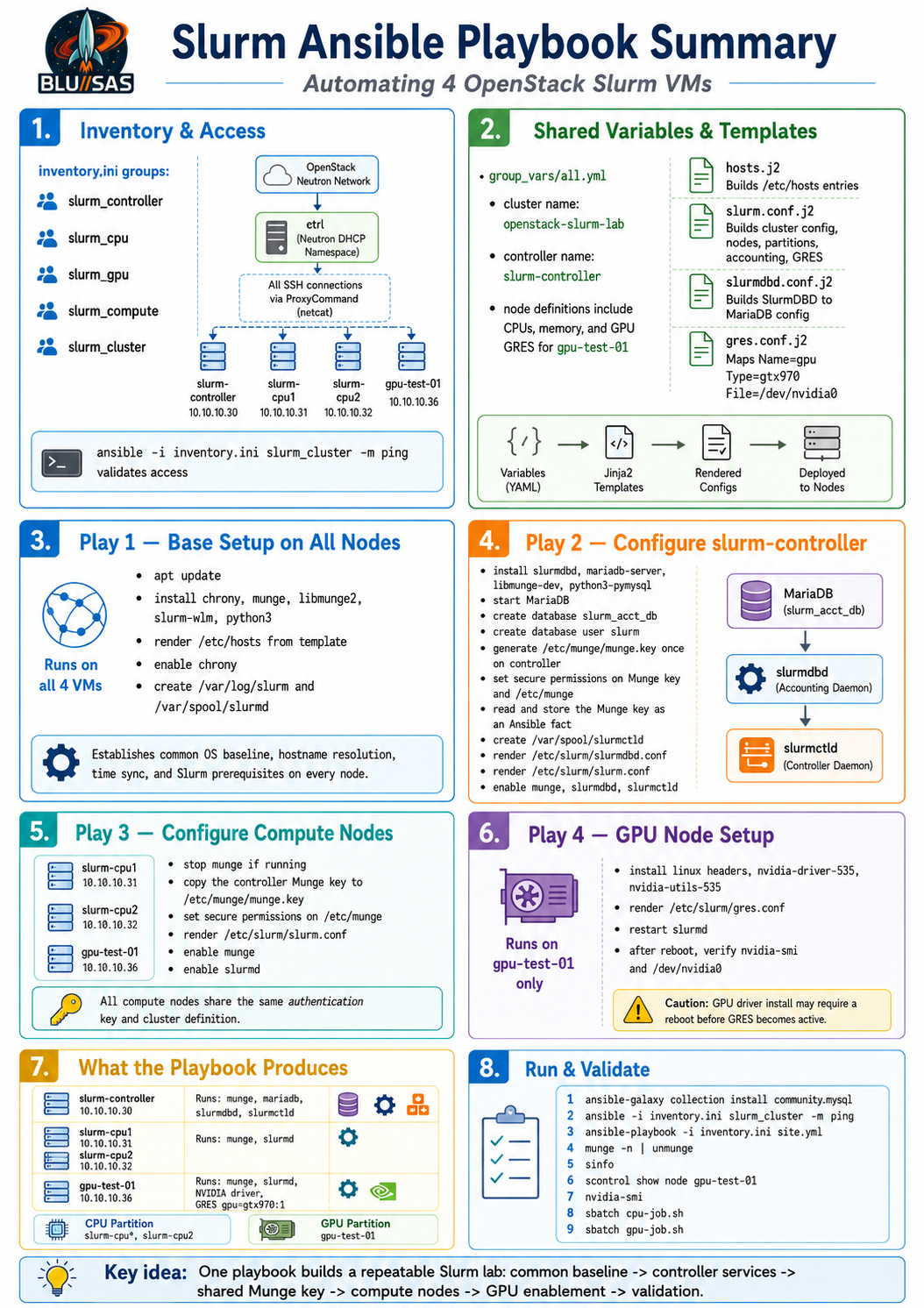
Ansible is the right way to install and configure all 4 Slurm VMs because you need identical baseline configuration across the cluster, plus role-specific configuration for:
slurm-controller  10.10.10.30  controller + slurmdbd + MariaDB + munge key source
slurm-cpu1        10.10.10.31  compute node
slurm-cpu2        10.10.10.32  compute node
gpu-test-01       10.10.10.36  compute node + NVIDIA driver + Slurm GRES
The only special part in your OpenStack setup is SSH access. Because the VMs are on the private tenant network, Ansible should connect through the DHCP namespace on ctrl:
sudo ip netns exec qdhcp-54829687-5a62-4d95-a7d0-42f3e30f7dbf ssh ...Ansible can use that through ansible_ssh_common_args.
Recommended Ansible layout
Create a directory on ctrl:
mkdir -p ~/ansible-slurm/{group_vars,templates,files}
cd ~/ansible-slurm
Suggested files:
~/ansible-slurm/
├── inventory.ini
├── site.yml
├── group_vars/
│   └── all.yml
└── templates/
    ├── hosts.j2
    ├── slurm.conf.j2
    ├── slurmdbd.conf.j2
    └── gres.conf.j2
inventory.ini
Use this from ctrl:
[slurm_controller]
slurm-controller ansible_host=10.10.10.30

[slurm_cpu]
slurm-cpu1 ansible_host=10.10.10.31
slurm-cpu2 ansible_host=10.10.10.32

[slurm_gpu]
gpu-test-01 ansible_host=10.10.10.36

[slurm_compute:children]
slurm_cpu
slurm_gpu

[slurm_cluster:children]
slurm_controller
slurm_compute

[slurm_cluster:vars]
ansible_user=ubuntu
ansible_ssh_private_key_file=/home/sont/.ssh/id_ed25519_kolla
ansible_ssh_common_args='-o StrictHostKeyChecking=no -o UserKnownHostsFile=/dev/null -o ProxyCommand="sudo ip netns exec qdhcp-54829687-5a62-4d95-a7d0-42f3e30f7dbf nc %h %p"'
You may need netcat-openbsd on ctrl for the nc proxy command:
sudo apt install -y netcat-openbsdTest Ansible connectivity:
ansible -i inventory.ini slurm_cluster -m pingExpected:
slurm-controller | SUCCESS
slurm-cpu1       | SUCCESS
slurm-cpu2       | SUCCESS
gpu-test-01      | SUCCESS
group_vars/all.yml
slurm_cluster_name: openstack-slurm-lab

slurm_controller_name: slurm-controller

slurm_nodes:
  - name: slurm-cpu1
    ip: 10.10.10.31
    cpus: 4
    memory: 7900
    gres: ""
  - name: slurm-cpu2
    ip: 10.10.10.32
    cpus: 4
    memory: 7900
    gres: ""
  - name: gpu-test-01
    ip: 10.10.10.36
    cpus: 4
    memory: 7900
    gres: "gpu:gtx970:1"

slurm_hosts:
  - { ip: "10.10.10.30", name: "slurm-controller" }
  - { ip: "10.10.10.31", name: "slurm-cpu1" }
  - { ip: "10.10.10.32", name: "slurm-cpu2" }
  - { ip: "10.10.10.36", name: "gpu-test-01 slurm-gpu1" }

slurm_db_name: slurm_acct_db
slurm_db_user: slurm
slurm_db_password: ChangeThisStrongPassword

nvidia_driver_package: nvidia-driver-535
nvidia_utils_package: nvidia-utils-535
Later, move slurm_db_password into Ansible Vault.
templates/hosts.j2
127.0.0.1 localhost

{% for host in slurm_hosts %}
{{ host.ip }} {{ host.name }}
{% endfor %}

::1 localhost ip6-localhost ip6-loopback
ff02::1 ip6-allnodes
ff02::2 ip6-allrouters
templates/slurm.conf.j2
ClusterName={{ slurm_cluster_name }}
SlurmctldHost={{ slurm_controller_name }}

SlurmUser=slurm
AuthType=auth/munge
CryptoType=crypto/munge

StateSaveLocation=/var/spool/slurmctld
SlurmdSpoolDir=/var/spool/slurmd

SwitchType=switch/none
MpiDefault=none
ProctrackType=proctrack/cgroup
TaskPlugin=task/affinity,task/cgroup

SchedulerType=sched/backfill
SelectType=select/cons_tres
SelectTypeParameters=CR_Core_Memory

AccountingStorageType=accounting_storage/slurmdbd
AccountingStorageHost={{ slurm_controller_name }}
AccountingStoragePort=6819
JobAcctGatherType=jobacct_gather/linux

GresTypes=gpu

SlurmctldPort=6817
SlurmdPort=6818

SlurmctldLogFile=/var/log/slurm/slurmctld.log
SlurmdLogFile=/var/log/slurm/slurmd.log
SlurmctldPidFile=/run/slurmctld.pid
SlurmdPidFile=/run/slurmd.pid

ReturnToService=2
InactiveLimit=0
KillWait=30
Waittime=0

{% for node in slurm_nodes %}
NodeName={{ node.name }} CPUs={{ node.cpus }} RealMemory={{ node.memory }}{% if node.gres %} Gres={{ node.gres }}{% endif %} State=UNKNOWN
{% endfor %}

PartitionName=cpu Nodes=slurm-cpu1,slurm-cpu2 Default=YES MaxTime=INFINITE State=UP
PartitionName=gpu Nodes=gpu-test-01 MaxTime=INFINITE State=UP
templates/slurmdbd.conf.j2
AuthType=auth/munge
DbdHost={{ slurm_controller_name }}
DbdPort=6819
SlurmUser=slurm
DebugLevel=info

StorageType=accounting_storage/mysql
StorageHost=localhost
StoragePort=3306
StorageUser={{ slurm_db_user }}
StoragePass={{ slurm_db_password }}
StorageLoc={{ slurm_db_name }}

LogFile=/var/log/slurm/slurmdbd.log
PidFile=/run/slurmdbd.pid
templates/gres.conf.j2
Name=gpu Type=gtx970 File=/dev/nvidia0site.yml
---
- name: Configure base Slurm packages on all nodes
  hosts: slurm_cluster
  become: true
  tasks:
    - name: Update apt cache
      ansible.builtin.apt:
        update_cache: true
        cache_valid_time: 3600

    - name: Install common packages
      ansible.builtin.apt:
        name:
          - chrony
          - munge
          - libmunge2
          - slurm-wlm
          - python3
        state: present

    - name: Configure /etc/hosts
      ansible.builtin.template:
        src: hosts.j2
        dest: /etc/hosts
        owner: root
        group: root
        mode: "0644"

    - name: Enable chrony
      ansible.builtin.service:
        name: chrony
        state: started
        enabled: true

    - name: Create Slurm log directory
      ansible.builtin.file:
        path: /var/log/slurm
        state: directory
        owner: slurm
        group: slurm
        mode: "0755"

    - name: Create slurmd spool directory
      ansible.builtin.file:
        path: /var/spool/slurmd
        state: directory
        owner: slurm
        group: slurm
        mode: "0755"


- name: Configure Slurm controller
  hosts: slurm_controller
  become: true
  tasks:
    - name: Install controller packages
      ansible.builtin.apt:
        name:
          - slurmdbd
          - mariadb-server
          - libmunge-dev
        state: present

    - name: Ensure MariaDB is running
      ansible.builtin.service:
        name: mariadb
        state: started
        enabled: true

    - name: Install PyMySQL for Ansible MySQL modules
      ansible.builtin.apt:
        name: python3-pymysql
        state: present

    - name: Create Slurm accounting database
      community.mysql.mysql_db:
        name: "{{ slurm_db_name }}"
        state: present
        login_unix_socket: /run/mysqld/mysqld.sock

    - name: Create Slurm database user
      community.mysql.mysql_user:
        name: "{{ slurm_db_user }}"
        password: "{{ slurm_db_password }}"
        priv: "{{ slurm_db_name }}.*:ALL"
        host: localhost
        state: present
        login_unix_socket: /run/mysqld/mysqld.sock

    - name: Stop munge before key generation
      ansible.builtin.service:
        name: munge
        state: stopped
      failed_when: false

    - name: Generate Munge key if missing
      ansible.builtin.command: create-munge-key -f
      args:
        creates: /etc/munge/munge.key

    - name: Set Munge key permissions
      ansible.builtin.file:
        path: /etc/munge/munge.key
        owner: munge
        group: munge
        mode: "0400"

    - name: Set Munge directory permissions
      ansible.builtin.file:
        path: /etc/munge
        owner: munge
        group: munge
        mode: "0700"

    - name: Read Munge key from controller
      ansible.builtin.slurp:
        src: /etc/munge/munge.key
      register: munge_key_data

    - name: Store Munge key as delegated fact
      ansible.builtin.set_fact:
        cluster_munge_key: "{{ munge_key_data.content }}"

    - name: Create slurmctld spool directory
      ansible.builtin.file:
        path: /var/spool/slurmctld
        state: directory
        owner: slurm
        group: slurm
        mode: "0755"

    - name: Configure slurmdbd.conf
      ansible.builtin.template:
        src: slurmdbd.conf.j2
        dest: /etc/slurm/slurmdbd.conf
        owner: slurm
        group: slurm
        mode: "0600"

    - name: Configure slurm.conf
      ansible.builtin.template:
        src: slurm.conf.j2
        dest: /etc/slurm/slurm.conf
        owner: slurm
        group: slurm
        mode: "0644"

    - name: Enable Munge
      ansible.builtin.service:
        name: munge
        state: started
        enabled: true

    - name: Enable slurmdbd
      ansible.builtin.service:
        name: slurmdbd
        state: started
        enabled: true

    - name: Enable slurmctld
      ansible.builtin.service:
        name: slurmctld
        state: started
        enabled: true


- name: Distribute Munge key and Slurm config to compute nodes
  hosts: slurm_compute
  become: true
  tasks:
    - name: Stop Munge before replacing key
      ansible.builtin.service:
        name: munge
        state: stopped
      failed_when: false

    - name: Install Munge key from controller
      ansible.builtin.copy:
        content: "{{ hostvars['slurm-controller']['cluster_munge_key'] | b64decode }}"
        dest: /etc/munge/munge.key
        owner: munge
        group: munge
        mode: "0400"

    - name: Set Munge directory permissions
      ansible.builtin.file:
        path: /etc/munge
        owner: munge
        group: munge
        mode: "0700"

    - name: Configure slurm.conf
      ansible.builtin.template:
        src: slurm.conf.j2
        dest: /etc/slurm/slurm.conf
        owner: slurm
        group: slurm
        mode: "0644"

    - name: Enable Munge
      ansible.builtin.service:
        name: munge
        state: started
        enabled: true

    - name: Enable slurmd
      ansible.builtin.service:
        name: slurmd
        state: started
        enabled: true


- name: Configure NVIDIA and Slurm GRES on GPU node
  hosts: slurm_gpu
  become: true
  tasks:
    - name: Install NVIDIA driver packages
      ansible.builtin.apt:
        name:
          - "linux-headers-{{ ansible_kernel }}"
          - "{{ nvidia_driver_package }}"
          - "{{ nvidia_utils_package }}"
        state: present

    - name: Configure Slurm GRES
      ansible.builtin.template:
        src: gres.conf.j2
        dest: /etc/slurm/gres.conf
        owner: slurm
        group: slurm
        mode: "0644"

    - name: Reboot GPU node if NVIDIA devices are missing
      ansible.builtin.reboot:
        reboot_timeout: 600
      when: ansible_facts['devices'] is defined

    - name: Restart slurmd after GRES configuration
      ansible.builtin.service:
        name: slurmd
        state: restarted
        enabled: true
Required collection for MariaDB tasks
Install the MySQL collection on ctrl:
ansible-galaxy collection install community.mysqlRun the playbook
From ctrl:
cd ~/ansible-slurm

ansible -i inventory.ini slurm_cluster -m ping

ansible-playbook -i inventory.ini site.yml
Post-install validation
From slurm-controller:
munge -n | unmungeExpected:
STATUS: SuccessThen:
sinfo
sinfo -Nel
scontrol show node slurm-cpu1
scontrol show node slurm-cpu2
scontrol show node gpu-test-01
On gpu-test-01:
nvidia-smi
ls -l /dev/nvidia*
From slurm-controller, submit a CPU test:
cat > cpu-job.sh <<'EOF'
#!/bin/bash
#SBATCH --job-name=cpu-test
#SBATCH --partition=cpu
#SBATCH --nodes=1
#SBATCH --ntasks=1
#SBATCH --time=00:02:00
#SBATCH --output=cpu-test-%j.out

hostname
sleep 10
EOF

sbatch cpu-job.sh
squeue
cat cpu-test-*.out
GPU test:
cat > gpu-job.sh <<'EOF'
#!/bin/bash
#SBATCH --job-name=gpu-test
#SBATCH --partition=gpu
#SBATCH --nodes=1
#SBATCH --gres=gpu:1
#SBATCH --time=00:05:00
#SBATCH --output=gpu-test-%j.out

hostname
nvidia-smi
EOF

sbatch gpu-job.sh
squeue
cat gpu-test-*.out
Important note
Before running the full Ansible build, make sure all VMs can now do:
ping -c 2 10.10.10.1
ping -c 2 8.8.8.8
ping -c 2 archive.ubuntu.com
sudo apt update
Your OpenStack router fix should make this work now. Once package access is healthy, Ansible can reliably install and configure all 4 Slurm VMs end-to-end.
Detail of Slurm Playbook
1. Inventory: how Ansible reaches the VMs
The inventory.ini defines the four machines and groups them by role:
[slurm_controller]
slurm-controller ansible_host=10.10.10.30

[slurm_cpu]
slurm-cpu1 ansible_host=10.10.10.31
slurm-cpu2 ansible_host=10.10.10.32

[slurm_gpu]
gpu-test-01 ansible_host=10.10.10.36
Then it creates group relationships:
[slurm_compute:children]
slurm_cpu
slurm_gpu

[slurm_cluster:children]
slurm_controller
slurm_compute
So:
slurm_cluster  = all 4 VMs
slurm_compute  = slurm-cpu1, slurm-cpu2, gpu-test-01
slurm_gpu      = gpu-test-01 only
The important OpenStack-specific part is this SSH setting:
ansible_ssh_common_args='-o StrictHostKeyChecking=no -o UserKnownHostsFile=/dev/null -o ProxyCommand="sudo ip netns exec qdhcp-54829687-5a62-4d95-a7d0-42f3e30f7dbf nc %h %p"'That tells Ansible:
To reach 10.10.10.x tenant VMs, enter the Neutron DHCP namespace on ctrl first,
then use nc to proxy the SSH connection to the private VM IP.
This is equivalent to the manual SSH command you were using:
sudo ip netns exec qdhcp-54829687-5a62-4d95-a7d0-42f3e30f7dbf \
  ssh -i /home/sont/.ssh/id_ed25519_kolla ubuntu@10.10.10.30
but wrapped into Ansible.
Before the playbook, you should test:
ansible -i inventory.ini slurm_cluster -m pingThat verifies SSH, the private key, the namespace proxy, and Python availability on the VMs.
2. Variables: what cluster it builds
The file group_vars/all.yml defines the cluster model.
Cluster name:
slurm_cluster_name: openstack-slurm-labController name:
slurm_controller_name: slurm-controllerNode definitions:
slurm_nodes:
  - name: slurm-cpu1
    ip: 10.10.10.31
    cpus: 4
    memory: 7900
    gres: ""
  - name: slurm-cpu2
    ip: 10.10.10.32
    cpus: 4
    memory: 7900
    gres: ""
  - name: gpu-test-01
    ip: 10.10.10.36
    cpus: 4
    memory: 7900
    gres: "gpu:gtx970:1"
This is used to generate slurm.conf.
The CPU nodes get ordinary Slurm node entries. The GPU node gets:
Gres=gpu:gtx970:1which tells Slurm:
gpu-test-01 has one generic resource of type GPU, specifically a GTX 970.The hosts file entries are also variable-driven:
slurm_hosts:
  - { ip: "10.10.10.30", name: "slurm-controller" }
  - { ip: "10.10.10.31", name: "slurm-cpu1" }
  - { ip: "10.10.10.32", name: "slurm-cpu2" }
  - { ip: "10.10.10.36", name: "gpu-test-01 slurm-gpu1" }
That means all nodes get consistent local name resolution without depending on external DNS.
The MariaDB settings are also here:
slurm_db_name: slurm_acct_db
slurm_db_user: slurm
slurm_db_password: ChangeThisStrongPassword
For production, this password should be changed and moved into Ansible Vault.
The GPU driver selection is here:
nvidia_driver_package: nvidia-driver-535
nvidia_utils_package: nvidia-utils-535
Phase 1: Configure base Slurm packages on all nodes
The first play is:
- name: Configure base Slurm packages on all nodes
  hosts: slurm_cluster
  become: true
This runs on all four VMs.
Step 1.1 — Update apt cache
- name: Update apt cache
  ansible.builtin.apt:
    update_cache: true
    cache_valid_time: 3600
This is equivalent to:
sudo apt updateThe cache_valid_time: 3600 means Ansible will not keep refreshing apt repeatedly if the cache was updated within the last hour.
This step depends on the OpenStack router/DNS fix you completed. If the VMs still cannot reach archive.ubuntu.com, the playbook will fail here.
Step 1.2 — Install common packages
- name: Install common packages
  ansible.builtin.apt:
    name:
      - chrony
      - munge
      - libmunge2
      - slurm-wlm
      - python3
    state: present
This installs the baseline packages on all Slurm machines.
Package purpose:
chrony      time synchronisation
munge       Slurm authentication service
libmunge2   Munge runtime library
slurm-wlm   Slurm workload manager daemons and commands
python3     required by Ansible modules on the remote host
Munge is critical. Slurm uses Munge to authenticate communication between the controller and compute nodes. If the Munge key differs between nodes, Slurm nodes will not trust each other.
Step 1.3 — Configure /etc/hosts
- name: Configure /etc/hosts
  ansible.builtin.template:
    src: hosts.j2
    dest: /etc/hosts
    owner: root
    group: root
    mode: "0644"
This renders templates/hosts.j2 onto every VM.
The template creates entries like:
10.10.10.30 slurm-controller
10.10.10.31 slurm-cpu1
10.10.10.32 slurm-cpu2
10.10.10.36 gpu-test-01 slurm-gpu1
This matters because Slurm configuration refers to node names, not just IP addresses.
For example:
SlurmctldHost=slurm-controller
NodeName=slurm-cpu1
NodeName=gpu-test-01
If those names do not resolve consistently on every VM, Slurm daemons will fail to register or communicate.
Step 1.4 — Enable Chrony
- name: Enable chrony
  ansible.builtin.service:
    name: chrony
    state: started
    enabled: true
This starts and enables time sync.
Equivalent:
sudo systemctl enable --now chronyTime sync is important because Munge tokens are time-sensitive. If one node’s clock drifts too far from the others, Munge authentication can fail.
Step 1.5 — Create Slurm log directory
- name: Create Slurm log directory
  ansible.builtin.file:
    path: /var/log/slurm
    state: directory
    owner: slurm
    group: slurm
    mode: "0755"
This prepares:
/var/log/slurmSlurm controller and compute daemons write logs here:
/var/log/slurm/slurmctld.log
/var/log/slurm/slurmd.log
/var/log/slurm/slurmdbd.log
The owner is slurm:slurm so the Slurm daemons can write to it.
Step 1.6 — Create compute spool directory
- name: Create slurmd spool directory
  ansible.builtin.file:
    path: /var/spool/slurmd
    state: directory
    owner: slurm
    group: slurm
    mode: "0755"
This creates the local spool directory used by slurmd on compute nodes.
The path corresponds to this setting in slurm.conf:
SlurmdSpoolDir=/var/spool/slurmdPhase 2: Configure the Slurm controller
The second play is:
- name: Configure Slurm controller
  hosts: slurm_controller
  become: true
This runs only on:
slurm-controllerThis VM becomes the control plane for the cluster.
Step 2.1 — Install controller-specific packages
- name: Install controller packages
  ansible.builtin.apt:
    name:
      - slurmdbd
      - mariadb-server
      - libmunge-dev
      - python3-pymysql
    state: present
Package purpose:
slurmdbd        Slurm database daemon for accounting
mariadb-server  local SQL database for accounting data
libmunge-dev    provides create-munge-key on Ubuntu
python3-pymysql Ansible dependency for MySQL/MariaDB modules
The controller runs:
slurmctld  = Slurm controller daemon
slurmdbd   = Slurm database daemon
mariadb    = accounting database
munge      = authentication service
Step 2.2 — Start MariaDB
- name: Ensure MariaDB is running
  ansible.builtin.service:
    name: mariadb
    state: started
    enabled: true
Equivalent:
sudo systemctl enable --now mariadbSlurmDBD needs MariaDB running before it can initialise or use the accounting database.
Step 2.3 — Create the Slurm accounting database
- name: Create Slurm accounting database
  community.mysql.mysql_db:
    name: "{{ slurm_db_name }}"
    state: present
    login_unix_socket: /run/mysqld/mysqld.sock
This creates:
slurm_acct_dbIt uses the local MariaDB Unix socket:
/run/mysqld/mysqld.sockThis avoids needing a MariaDB root password over TCP.
Equivalent SQL:
CREATE DATABASE slurm_acct_db;Step 2.4 — Create the Slurm database user
- name: Create Slurm database user
  community.mysql.mysql_user:
    name: "{{ slurm_db_user }}"
    password: "{{ slurm_db_password }}"
    priv: "{{ slurm_db_name }}.*:ALL"
    host: localhost
    state: present
    login_unix_socket: /run/mysqld/mysqld.sock
This creates the MariaDB user:
user:     slurm
password: ChangeThisStrongPassword
database: slurm_acct_db
host:     localhost
Equivalent SQL:
CREATE USER 'slurm'@'localhost' IDENTIFIED BY 'ChangeThisStrongPassword';
GRANT ALL PRIVILEGES ON slurm_acct_db.* TO 'slurm'@'localhost';
FLUSH PRIVILEGES;
This user is what slurmdbd uses to write accounting records.
Step 2.5 — Stop Munge before generating key
- name: Stop munge before key generation
  ansible.builtin.service:
    name: munge
    state: stopped
  failed_when: false
This stops the Munge service before generating or managing the key.
failed_when: false means the task will not fail if Munge is not running yet.
Step 2.6 — Generate the Munge key
- name: Generate Munge key if missing
  ansible.builtin.command: create-munge-key -f
  args:
    creates: /etc/munge/munge.key
This creates:
/etc/munge/munge.keyThe creates: guard is important. It means:
Only run create-munge-key if /etc/munge/munge.key does not already exist.So the playbook is idempotent and will not keep replacing the key on every run.
The controller becomes the source of truth for the cluster-wide Munge key.
Step 2.7 — Set Munge key permissions
- name: Set Munge key permissions
  ansible.builtin.file:
    path: /etc/munge/munge.key
    owner: munge
    group: munge
    mode: "0400"
Correct permissions are essential:
owner: munge
group: munge
mode: 0400
Munge is deliberately strict. If the key is readable by the wrong users, Munge may refuse to start.
Step 2.8 — Set Munge directory permissions
- name: Set Munge directory permissions
  ansible.builtin.file:
    path: /etc/munge
    owner: munge
    group: munge
    mode: "0700"
This secures the directory holding the key.
Step 2.9 — Read the Munge key from the controller
- name: Read Munge key from controller
  ansible.builtin.slurp:
    src: /etc/munge/munge.key
  register: munge_key_data
slurp reads a file from the remote machine and returns it base64-encoded.
So this task reads the controller’s Munge key and stores it in:
munge_key_data.contentStep 2.10 — Store the Munge key as an Ansible fact
- name: Store Munge key as delegated fact
  ansible.builtin.set_fact:
    cluster_munge_key: "{{ munge_key_data.content }}"
This stores the base64-encoded key as:
hostvars['slurm-controller']['cluster_munge_key']Later, the compute nodes pull this key from the controller’s host variables.
This is how the playbook distributes one identical Munge key to every node.
Step 2.11 — Create Slurm controller spool directory
- name: Create slurmctld spool directory
  ansible.builtin.file:
    path: /var/spool/slurmctld
    state: directory
    owner: slurm
    group: slurm
    mode: "0755"
This prepares the controller state directory.
It matches this line in slurm.conf:
StateSaveLocation=/var/spool/slurmctldslurmctld stores state here, including job and node state.
Step 2.12 — Render slurmdbd.conf
- name: Configure slurmdbd.conf
  ansible.builtin.template:
    src: slurmdbd.conf.j2
    dest: /etc/slurm/slurmdbd.conf
    owner: slurm
    group: slurm
    mode: "0600"
This creates:
/etc/slurm/slurmdbd.conffrom:
templates/slurmdbd.conf.j2The rendered file contains:
AuthType=auth/munge
DbdHost=slurm-controller
DbdPort=6819

StorageType=accounting_storage/mysql
StorageHost=localhost
StoragePort=3306
StorageUser=slurm
StoragePass=ChangeThisStrongPassword
StorageLoc=slurm_acct_db
This tells slurmdbd:
Use Munge for authentication.
Listen as the Slurm database daemon.
Store accounting data in local MariaDB.
Use the slurm_acct_db database.
The mode is 0600 because the file contains the database password.
Step 2.13 — Render slurm.conf on the controller
- name: Configure slurm.conf
  ansible.builtin.template:
    src: slurm.conf.j2
    dest: /etc/slurm/slurm.conf
    owner: slurm
    group: slurm
    mode: "0644"
This creates the main Slurm config.
Important rendered values:
ClusterName=openstack-slurm-lab
SlurmctldHost=slurm-controller
AuthType=auth/munge
CryptoType=crypto/munge
SchedulerType=sched/backfill
SelectType=select/cons_tres
AccountingStorageType=accounting_storage/slurmdbd
AccountingStorageHost=slurm-controller
GresTypes=gpu
It defines the nodes:
NodeName=slurm-cpu1 CPUs=4 RealMemory=7900 State=UNKNOWN
NodeName=slurm-cpu2 CPUs=4 RealMemory=7900 State=UNKNOWN
NodeName=gpu-test-01 CPUs=4 RealMemory=7900 Gres=gpu:gtx970:1 State=UNKNOWN
It defines the partitions:
PartitionName=cpu Nodes=slurm-cpu1,slurm-cpu2 Default=YES MaxTime=INFINITE State=UP
PartitionName=gpu Nodes=gpu-test-01 MaxTime=INFINITE State=UP
This gives you two Slurm queues:
cpu  → slurm-cpu1 and slurm-cpu2
gpu  → gpu-test-01
Step 2.14 — Start Munge on the controller
- name: Enable Munge
  ansible.builtin.service:
    name: munge
    state: started
    enabled: true
Equivalent:
sudo systemctl enable --now mungeThis must work before Slurm daemons can authenticate.
Step 2.15 — Start SlurmDBD
- name: Enable slurmdbd
  ansible.builtin.service:
    name: slurmdbd
    state: started
    enabled: true
This starts the accounting daemon.
Startup order matters:
MariaDB first
Munge second
slurmdbd third
slurmctld after slurmdbd
The playbook follows that order.
Step 2.16 — Start Slurm controller daemon
- name: Enable slurmctld
  ansible.builtin.service:
    name: slurmctld
    state: started
    enabled: true
This starts the central Slurm scheduler/controller.
Equivalent:
sudo systemctl enable --now slurmctldAt this point, the controller is configured, but the compute nodes still need the shared Munge key and matching slurm.conf.
Phase 3: Configure compute nodes
The third play is:
- name: Distribute Munge key and Slurm config to compute nodes
  hosts: slurm_compute
  become: true
This runs on:
slurm-cpu1
slurm-cpu2
gpu-test-01
Step 3.1 — Stop Munge before replacing the key
- name: Stop Munge before replacing key
  ansible.builtin.service:
    name: munge
    state: stopped
  failed_when: false
This safely stops Munge so the key can be replaced.
Again, failed_when: false prevents failure if Munge was not running yet.
Step 3.2 — Copy the controller’s Munge key to compute nodes
- name: Install Munge key from controller
  ansible.builtin.copy:
    content: "{{ hostvars['slurm-controller']['cluster_munge_key'] | b64decode }}"
    dest: /etc/munge/munge.key
    owner: munge
    group: munge
    mode: "0400"
This is one of the most important tasks in the whole playbook.
It takes the base64-encoded key previously read from slurm-controller, decodes it, and writes it to every compute node as:
/etc/munge/munge.keyNow all nodes share the exact same Munge secret.
That allows commands like this to work across nodes:
munge -n | ssh slurm-controller unmungeExpected result:
STATUS: SuccessStep 3.3 — Secure the Munge directory
- name: Set Munge directory permissions
  ansible.builtin.file:
    path: /etc/munge
    owner: munge
    group: munge
    mode: "0700"
Again, this ensures Munge accepts the key and starts cleanly.
Step 3.4 — Render slurm.conf on compute nodes
- name: Configure slurm.conf
  ansible.builtin.template:
    src: slurm.conf.j2
    dest: /etc/slurm/slurm.conf
    owner: slurm
    group: slurm
    mode: "0644"
Every node receives the same cluster definition.
This is important. The controller and compute nodes must agree on:
cluster name
controller hostname
node names
partitions
ports
GRES types
accounting host
Step 3.5 — Start Munge on compute nodes
- name: Enable Munge
  ansible.builtin.service:
    name: munge
    state: started
    enabled: true
This starts authentication on the compute nodes.
Step 3.6 — Start slurmd on compute nodes
- name: Enable slurmd
  ansible.builtin.service:
    name: slurmd
    state: started
    enabled: true
This starts the Slurm worker daemon.
slurmd registers the node with slurmctld.
After this succeeds, the controller should start seeing the nodes:
sinfo
sinfo -Nel
The nodes may initially show as UNKNOWN, DOWN, or DRAIN until resumed or until any config mismatch is fixed.
Phase 4: Configure the GPU node
The fourth play is:
- name: Configure NVIDIA and Slurm GRES on GPU node
  hosts: slurm_gpu
  become: true
This runs only on:
gpu-test-01Step 4.1 — Install NVIDIA driver packages
- name: Install NVIDIA driver packages
  ansible.builtin.apt:
    name:
      - "linux-headers-{{ ansible_kernel }}"
      - "{{ nvidia_driver_package }}"
      - "{{ nvidia_utils_package }}"
    state: present
This installs:
linux-headers-<current kernel>
nvidia-driver-535
nvidia-utils-535
The kernel headers are needed so DKMS can build the NVIDIA kernel module for the running Ubuntu kernel.
nvidia-driver-535 provides the actual kernel driver.
nvidia-utils-535 provides tools such as:
nvidia-smiBefore this, your VM showed:
lspci saw the GTX 970
nvidia-smi was missing
/dev/nvidia* did not exist
That means PCI passthrough worked, but the guest NVIDIA driver was not installed. This play fixes that.
Important: after installing the NVIDIA driver, the VM usually needs a reboot before /dev/nvidia0 appears. The current playbook does not force a reboot. If nvidia-smi still fails after the playbook, reboot gpu-test-01.
Step 4.2 — Configure Slurm GRES
- name: Configure Slurm GRES
  ansible.builtin.template:
    src: gres.conf.j2
    dest: /etc/slurm/gres.conf
    owner: slurm
    group: slurm
    mode: "0644"
This writes:
/etc/slurm/gres.conffrom:
templates/gres.conf.j2The content is:
Name=gpu Type=gtx970 File=/dev/nvidia0This maps Slurm’s abstract GPU resource to the actual Linux device:
/dev/nvidia0This must match the slurm.conf node definition:
NodeName=gpu-test-01 ... Gres=gpu:gtx970:1Together, these two files mean:
Slurm controller: gpu-test-01 has one GTX 970 GPU.
GPU node: that GPU is exposed as /dev/nvidia0.
Step 4.3 — Restart slurmd on the GPU node
- name: Restart slurmd after GRES configuration
  ansible.builtin.service:
    name: slurmd
    state: restarted
    enabled: true
This reloads Slurm’s compute daemon so it sees the new gres.conf.
After this, gpu-test-01 should advertise a GPU to Slurm.
Validation from the controller:
sinfo -o "%20N %10T %10c %10m %20G"
scontrol show node gpu-test-01 | grep -i gres
Expected:
gpu-test-01 idle 4 7900 gpu:gtx970:1What the templates generate
hosts.j2
Creates consistent host resolution:
127.0.0.1 localhost

10.10.10.30 slurm-controller
10.10.10.31 slurm-cpu1
10.10.10.32 slurm-cpu2
10.10.10.36 gpu-test-01 slurm-gpu1

::1 localhost ip6-localhost ip6-loopback
ff02::1 ip6-allnodes
ff02::2 ip6-allrouters
This prevents Slurm from relying on external DNS.
slurm.conf.j2
Defines the Slurm cluster.
Major sections:
Cluster identity:
  ClusterName=openstack-slurm-lab
  SlurmctldHost=slurm-controller

Security:
  AuthType=auth/munge
  CryptoType=crypto/munge

Scheduling:
  SchedulerType=sched/backfill
  SelectType=select/cons_tres
  SelectTypeParameters=CR_Core_Memory

Accounting:
  AccountingStorageType=accounting_storage/slurmdbd
  AccountingStorageHost=slurm-controller

GPU support:
  GresTypes=gpu

Nodes:
  slurm-cpu1
  slurm-cpu2
  gpu-test-01

Partitions:
  cpu
  gpu
slurmdbd.conf.j2
Defines how SlurmDBD talks to MariaDB:
StorageType=accounting_storage/mysql
StorageHost=localhost
StorageUser=slurm
StoragePass=ChangeThisStrongPassword
StorageLoc=slurm_acct_db
It is installed as mode 0600 because it contains a database password.
gres.conf.j2
Defines the GPU device on the GPU node:
Name=gpu Type=gtx970 File=/dev/nvidia0Expected final state
After a successful run, the services should look like this.
On slurm-controller:
munge       running
mariadb     running
slurmdbd    running
slurmctld   running
On slurm-cpu1 and slurm-cpu2:
munge       running
slurmd      running
On gpu-test-01:
munge       running
slurmd      running
nvidia      driver loaded
/dev/nvidia0 exists
nvidia-smi works
Slurm partitions:
cpu partition:
  slurm-cpu1
  slurm-cpu2

gpu partition:
  gpu-test-01
How to run it
From ctrl:
cd /mnt/data/ansible-slurmor wherever you unzip it:
cd ~/ansible-slurmInstall prerequisites:
source /opt/kolla-venv/bin/activate
sudo apt install -y ansible netcat-openbsd
ansible-galaxy collection install community.mysql
Test connectivity:
ansible -i inventory.ini slurm_cluster -m pingRun the playbook:
ansible-playbook -i inventory.ini site.ymlHow to validate after it runs
On slurm-controller:
munge -n | unmungeExpected:
STATUS: SuccessCheck Slurm:
sinfo
sinfo -Nel
scontrol show node slurm-cpu1
scontrol show node slurm-cpu2
scontrol show node gpu-test-01
Check accounting:
sacctmgr show cluster
sacctmgr show account
sacctmgr show user
On gpu-test-01:
lspci | grep -i nvidia
nvidia-smi
ls -l /dev/nvidia*
Submit CPU job:
cat > cpu-job.sh <<'EOF'
#!/bin/bash
#SBATCH --job-name=cpu-test
#SBATCH --partition=cpu
#SBATCH --nodes=1
#SBATCH --ntasks=1
#SBATCH --time=00:02:00
#SBATCH --output=cpu-test-%j.out

hostname
sleep 10
EOF

sbatch cpu-job.sh
squeue
cat cpu-test-*.out
Submit GPU job:
cat > gpu-job.sh <<'EOF'
#!/bin/bash
#SBATCH --job-name=gpu-test
#SBATCH --partition=gpu
#SBATCH --nodes=1
#SBATCH --gres=gpu:1
#SBATCH --time=00:05:00
#SBATCH --output=gpu-test-%j.out

hostname
nvidia-smi
EOF

sbatch gpu-job.sh
squeue
cat gpu-test-*.out
One important improvement I would make
The current playbook installs the NVIDIA driver, but it does not automatically reboot the GPU node afterward.
For NVIDIA on Ubuntu, a reboot is commonly required before this works:
nvidia-smi
ls -l /dev/nvidia*
So after running the playbook, manually reboot the GPU VM if needed:
openstack server reboot gpu-test-01Then recheck:
nvidia-smi
ls -l /dev/nvidia*
A better next version of the playbook would add a conditional reboot after NVIDIA driver installation and then verify nvidia-smi.