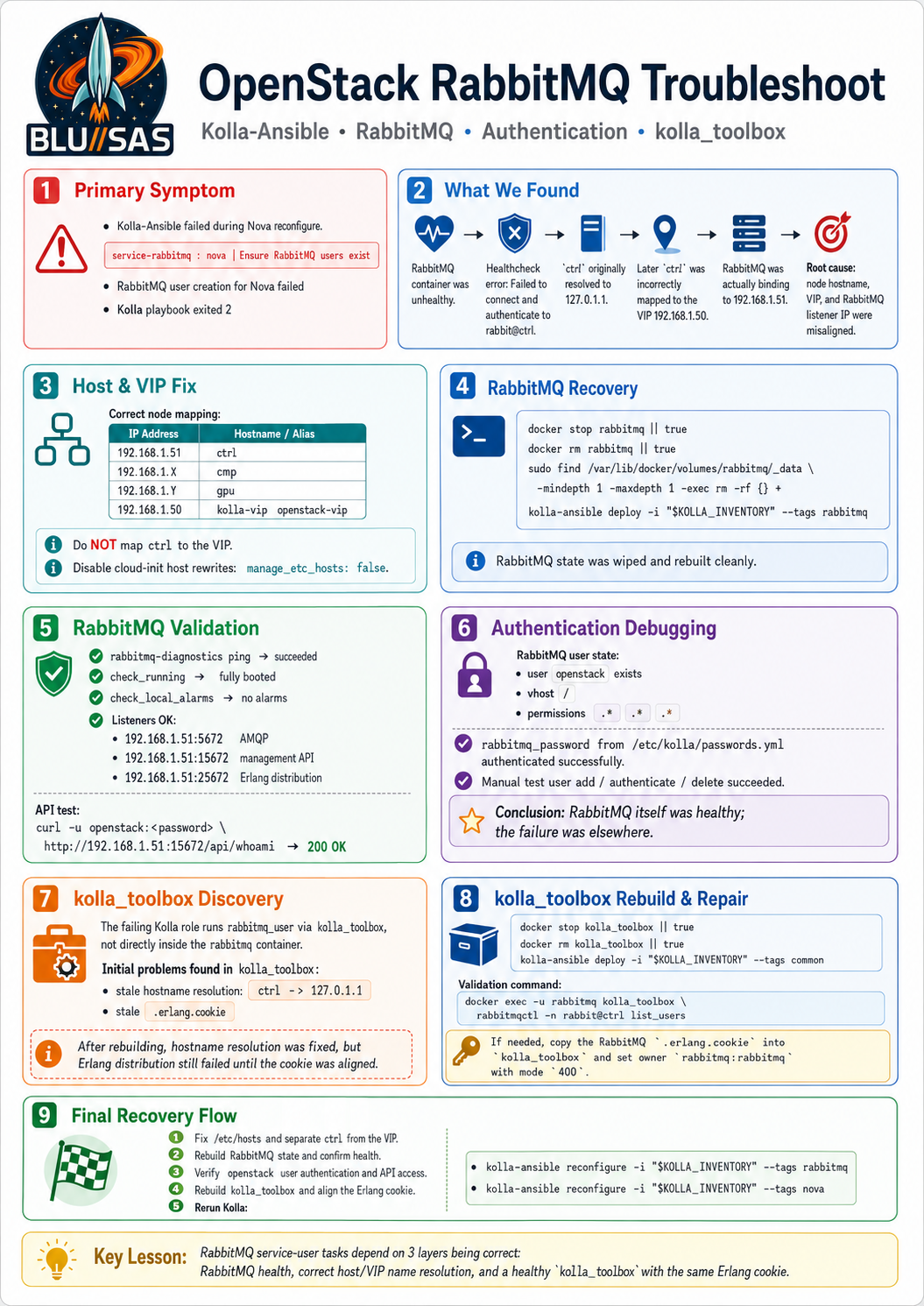
RabbitMQ troubleshooting summary
The RabbitMQ issue started while you were reconfiguring Nova for GPU passthrough. The Kolla-Ansible Nova reconfigure failed at:
TASK [service-rabbitmq : nova | Ensure RabbitMQ users exist]That told us the problem was not Nova GPU passthrough directly. Nova was failing because Kolla could not reliably talk to RabbitMQ to create or verify the service users.
1. Initial symptom: RabbitMQ container was running but unhealthy
You checked the RabbitMQ container:
docker ps --format 'table {{.Names}}\t{{.Status}}\t{{.Ports}}' | grep -Ei 'rabbit|NAME'Result:
rabbitmq Up ... (unhealthy)Then you inspected the healthcheck:
docker inspect rabbitmq --format '{{json .State.Health}}' | python3 -m json.toolThe healthcheck repeatedly failed with:
Failed to connect and authenticate to rabbit@ctrl in 5000 msThat established the real failure domain: RabbitMQ CLI could not contact/authenticate to the Erlang node rabbit@ctrl.
2. RabbitMQ diagnostics showed Erlang node connection failure
You ran:
docker exec rabbitmq rabbitmq-diagnostics statusThe diagnostics showed:
attempted to contact: [rabbit@ctrl]

rabbit@ctrl:
  * connected to epmd (port 4369) on ctrl
  * epmd reports node 'rabbit' uses port 25672
  * can't establish TCP connection to the target node, reason: econnrefused
This was important because it proved:
epmd on 4369 was reachable
RabbitMQ advertised node traffic on 25672
The CLI could not connect to 25672
So the issue was not simply “container down”. It was RabbitMQ node reachability / hostname / binding / state.
3. First root cause found: bad /etc/hosts
You checked hostname resolution inside the container and on the host:
docker exec rabbitmq getent hosts ctrl
docker exec rabbitmq cat /etc/hosts

hostname
hostname -f
getent hosts ctrl
cat /etc/hosts
Both the container and host showed:
127.0.1.1 ctrl ctrlThat was the first major problem. RabbitMQ was running as:
rabbit@ctrlbut ctrl resolved to loopback. That breaks RabbitMQ’s Erlang distribution traffic because RabbitMQ node names are tied to hostname resolution. The file also showed cloud-init was managing /etc/hosts, meaning manual edits could be overwritten.
Expected fix
ctrl, cmp, and gpu should resolve to their real management IPs, not loopback.
The expected model was initially:
ctrl -> real controller IP
cmp  -> real compute IP
gpu  -> real GPU compute IP
You asked for an Ansible playbook, and the intended fix was to:
disable cloud-init host-file rewriting
remove bad 127.0.1.1 mappings
write explicit OpenStack node mappings
validate getent hosts output
Core validation command:
ansible -i "$KOLLA_INVENTORY" all -m shell -a '
echo HOST=$(hostname);
echo FQDN=$(hostname -f || true);
echo CTRL=$(getent hosts ctrl);
echo CMP=$(getent hosts cmp);
echo GPU=$(getent hosts gpu);
'
4. Kolla-Ansible command ordering issue
While trying to stop/redeploy services, this command failed:
kolla-ansible -i "$KOLLA_INVENTORY" stop --tags nova,neutron,glance,placementand also this form failed:
kolla-ansible -i "$KOLLA_INVENTORY" --tags rabbitmq deployYour installed Kolla-Ansible wrapper required this command shape instead:
kolla-ansible <command> -i "$KOLLA_INVENTORY" --tags <tags>Correct examples:
kolla-ansible deploy -i "$KOLLA_INVENTORY" --tags rabbitmq
kolla-ansible reconfigure -i "$KOLLA_INVENTORY" --tags nova
kolla-ansible stop -i "$KOLLA_INVENTORY" --tags nova,neutron,glance,placement
This was a tooling/CLI syntax issue, not a RabbitMQ issue, but it affected the recovery workflow.
5. RabbitMQ state reset was attempted
Because RabbitMQ remained unhealthy after hostname repair attempts, we moved to a homelab-safe RabbitMQ state reset.
First, you identified the real RabbitMQ data mount:
docker inspect rabbitmq --format '{{range .Mounts}}{{println .Type .Name .Source "->" .Destination}}{{end}}'Result:
volume rabbitmq /var/lib/docker/volumes/rabbitmq/_data -> /var/lib/rabbitmq
volume kolla_logs /var/lib/docker/volumes/kolla_logs/_data -> /var/log/kolla
So the actual persistent RabbitMQ state path was:
/var/lib/docker/volumes/rabbitmq/_dataThe clean reset approach was:
docker stop rabbitmq || true
docker rm rabbitmq || true

BACKUP_DIR="$HOME/rabbitmq-backup-$(date +%F-%H%M)"
mkdir -p "$BACKUP_DIR"

sudo tar czf "$BACKUP_DIR/rabbitmq-volume-before-wipe.tgz" \
  -C /var/lib/docker/volumes/rabbitmq/_data . 2>/dev/null || true

sudo find /var/lib/docker/volumes/rabbitmq/_data -mindepth 1 -maxdepth 1 -exec rm -rf {} +

sudo rm -rf /var/lib/docker/volumes/kolla_logs/_data/rabbitmq
sudo mkdir -p /var/lib/docker/volumes/kolla_logs/_data/rabbitmq

kolla-ansible deploy -i "$KOLLA_INVENTORY" --tags rabbitmq
Expected result
A fresh RabbitMQ should create a new .erlang.cookie, new mnesia, a new rabbit@ctrl database directory, and eventually become healthy.
Your fresh output did show new state being created:
.erlang.cookie
mnesia
rabbit@ctrl
rabbitmq.pid
and RabbitMQ logs showed a fresh node path with 0 record(s) recovered, meaning the old quorum queue state was no longer the main issue.
6. New problem found: IP mismatch between ctrl and RabbitMQ bind address
After the reset, you found this:
docker exec rabbitmq ss -tlnp | grep -E '4369|5672|15672|25672'The output showed:
LISTEN 192.168.1.51:25672
LISTEN 192.168.1.50:15672
LISTEN 0.0.0.0:4369
At the same time, getent hosts ctrl returned:
192.168.1.50 ctrlThat was the second key root cause. RabbitMQ was running as:
rabbit@ctrlbut the Erlang distribution listener was bound to:
192.168.1.51:25672while ctrl resolved to:
192.168.1.50So RabbitMQ CLI tried to reach rabbit@ctrl via 192.168.1.50:25672, but the Erlang distribution listener was actually on 192.168.1.51:25672.
7. Final diagnosis: VIP confused with host IP
You then inspected Kolla-generated RabbitMQ config:
docker exec rabbitmq cat /etc/rabbitmq/rabbitmq-env.conf
docker exec rabbitmq cat /etc/rabbitmq/rabbitmq.conf
docker exec rabbitmq cat /etc/rabbitmq/advanced.config

sudo grep -RniE '192\.168\.1\.51|192\.168\.1\.50|interface|listeners|distribution|node_ip|api_interface|network_interface|tunnel_interface' \
  /etc/kolla/rabbitmq /etc/kolla/globals.yml /etc/kolla/config 2>/dev/null
RabbitMQ config showed it was intentionally binding to 192.168.1.51:
ERL_EPMD_ADDRESS=192.168.1.51
listeners.tcp.1 = 192.168.1.51:5672
management.listener.ip = 192.168.1.51
inet_dist_use_interface = {192,168,1,51}
Meanwhile /etc/kolla/globals.yml showed:
network_interface: "eth0"
api_interface: "eth0"
kolla_internal_vip_address: "192.168.1.50"
kolla_external_vip_address: "192.168.1.50"
So the correct model is:
192.168.1.51 = ctrl host management/API interface
192.168.1.50 = Kolla VIP
The mistake was mapping ctrl to the VIP:
Wrong:
192.168.1.50 ctrl
The correct mapping should be:
Correct:
192.168.1.51 ctrl
192.168.1.50 kolla-vip openstack-vip
Final expected /etc/hosts model
On all OpenStack nodes:
127.0.0.1 localhost

192.168.1.51 ctrl
192.168.1.X  cmp
192.168.1.Y  gpu
192.168.1.50 kolla-vip openstack-vip

::1 localhost ip6-localhost ip6-loopback
ff02::1 ip6-allnodes
ff02::2 ip6-allrouters
Replace 192.168.1.X and 192.168.1.Y with the actual cmp and gpu management IPs.
The key rule:
Node hostname -> physical/VM node management IP
Kolla VIP     -> separate alias, not the node hostname
Final recovery command sequence
After fixing /etc/hosts so ctrl resolves to 192.168.1.51, recreate RabbitMQ so the container gets the corrected host mapping:
docker stop rabbitmq || true
docker rm rabbitmq || true

source /opt/kolla-venv/bin/activate
kolla-ansible deploy -i "$KOLLA_INVENTORY" --tags rabbitmq
Then verify:
docker exec rabbitmq getent hosts ctrl
docker exec rabbitmq ss -tlnp | grep -E '4369|5672|15672|25672'
docker exec rabbitmq rabbitmq-diagnostics ping
docker ps --format 'table {{.Names}}\t{{.Status}}' | grep rabbit
Expected:
docker exec rabbitmq getent hosts ctrl
192.168.1.51 ctrl
Expected listener alignment:
192.168.1.51:5672
192.168.1.51:15672
192.168.1.51:25672
Expected health:
Ping succeeded
rabbitmq   Up ... healthy
After RabbitMQ is healthy
Reconfigure RabbitMQ and the OpenStack services that depend on it:
source /opt/kolla-venv/bin/activate

kolla-ansible reconfigure -i "$KOLLA_INVENTORY" --tags rabbitmq
kolla-ansible reconfigure -i "$KOLLA_INVENTORY" --tags placement,glance,neutron,nova
Then validate:
docker ps --format 'table {{.Names}}\t{{.Status}}' | grep -Ei 'rabbit|nova|neutron|glance|placement'

source /etc/kolla/admin-openrc.sh
openstack compute service list
openstack network agent list
openstack image list
Root cause in one line
RabbitMQ failed because the node name rabbit@ctrl depended on ctrl resolving to the controller’s real management IP, but /etc/hosts first mapped ctrl to loopback and later mapped it to the Kolla VIP. The final fix is to map ctrl to 192.168.1.51, keep 192.168.1.50 as a VIP alias, recreate RabbitMQ, and then rerun Kolla service reconfiguration.
Authentication and kolla_toolbox Troubleshooting
Authentication issue and kolla_toolbox troubleshooting summary
After the RabbitMQ hostname, VIP, listener, and container health problems were fixed, the Kolla-Ansible Nova reconfigure still failed at:
TASK [service-rabbitmq : nova | Ensure RabbitMQ users exist]The task output was hidden because Kolla marks the result with no_log: true, so the failure had to be diagnosed indirectly.
1. RabbitMQ itself was proven healthy
You first confirmed the RabbitMQ container was no longer the problem.
Commands used:
docker ps --format 'table {{.Names}}\t{{.Status}}\t{{.Ports}}' | grep -Ei 'rabbit|NAME'

docker exec rabbitmq getent hosts ctrl
docker exec rabbitmq ss -tlnp | grep -E '4369|5672|15672|25672'
docker exec rabbitmq rabbitmq-diagnostics ping
docker exec rabbitmq rabbitmq-diagnostics listeners
docker exec rabbitmq rabbitmq-diagnostics check_running
docker exec rabbitmq rabbitmq-diagnostics check_local_alarms
Expected and observed good state:
rabbitmq   Up ... healthy
192.168.1.51 ctrl
Ping succeeded
RabbitMQ on node rabbit@ctrl is fully booted and running
Node rabbit@ctrl reported no local alarms
The important listener alignment was correct:
192.168.1.51:5672     AMQP
192.168.1.51:25672    Erlang distribution / RabbitMQ CLI
192.168.1.51:15672    RabbitMQ management API
This ruled out the earlier problems:
ctrl resolving to 127.0.1.1
ctrl resolving to the Kolla VIP
RabbitMQ binding to the wrong IP
RabbitMQ container unhealthy
RabbitMQ not fully booted
2. RabbitMQ user and vhost state was checked
You listed RabbitMQ users, vhosts, and permissions:
docker exec rabbitmq rabbitmqctl list_users
docker exec rabbitmq rabbitmqctl list_vhosts
docker exec rabbitmq rabbitmqctl list_permissions -p /
Observed state:
Listing users ...
user        tags
openstack   [administrator]

Listing vhosts ...
name
/

Listing permissions for vhost "/" ...
user        configure   write   read
openstack   .*          .*      .*
That showed RabbitMQ had the expected shared OpenStack messaging user:
openstackwith full permissions on the default vhost:
/3. RabbitMQ management API authentication was verified
Because Kolla often manages RabbitMQ users through the RabbitMQ API or CLI tooling, you tested the management API directly.
Without credentials:
curl -sS -i http://192.168.1.51:15672/api/overview | head -40Expected result:
HTTP/1.1 401 UnauthorizedThat was good. It meant the management API was reachable.
Then the stored Kolla RabbitMQ password was tested:
RABBIT_PASS="$(awk '/^rabbitmq_password:/ {print $2}' /etc/kolla/passwords.yml)"

docker exec rabbitmq rabbitmqctl authenticate_user openstack "$RABBIT_PASS"
Observed:
Authenticating user "openstack" ...
Success
Then API auth was tested:
curl -sS -u "openstack:${RABBIT_PASS}" \
  http://192.168.1.51:15672/api/whoami | python3 -m json.tool
Observed:
{
    "name": "openstack",
    "tags": [
        "administrator"
    ],
    "is_internal_user": true
}
You also tested both the VIP and host IP:
for ip in 192.168.1.50 192.168.1.51; do
  echo "=== Testing RabbitMQ API on $ip ==="
  curl -sS -i -u "openstack:${RABBIT_PASS}" "http://${ip}:15672/api/whoami" | head -20
done
Both returned:
HTTP/1.1 200 OKThat ruled out:
bad openstack RabbitMQ password
bad openstack RabbitMQ permissions
RabbitMQ management API unreachable
VIP/API access problem
4. Manual RabbitMQ user creation was tested
To prove RabbitMQ itself could create users and permissions, you ran a direct test:
docker exec rabbitmq rabbitmqctl add_user test_kolla_user testpassword123
docker exec rabbitmq rabbitmqctl set_permissions -p / test_kolla_user ".*" ".*" ".*"
docker exec rabbitmq rabbitmqctl authenticate_user test_kolla_user testpassword123
docker exec rabbitmq rabbitmqctl delete_user test_kolla_user
Observed:
Adding user "test_kolla_user" ...
Setting permissions for user "test_kolla_user" in vhost "/" ...
Authenticating user "test_kolla_user" ...
Success
Deleting user "test_kolla_user" ...
That proved RabbitMQ’s own user database and permission system were working. The continuing Kolla failure therefore had to be outside RabbitMQ itself.
5. The hidden Kolla task was inspected
You searched for the failing task:
grep -Rni "Ensure RabbitMQ users exist" /opt/kolla-venv/share/kolla-ansible/ansible/rolesIt was found here:
/opt/kolla-venv/share/kolla-ansible/ansible/roles/service-rabbitmq/tasks/main.ymlYou inspected the task:
TASK_FILE="$(grep -Rli "Ensure RabbitMQ users exist" /opt/kolla-venv/share/kolla-ansible/ansible/roles | head -1)"
echo "$TASK_FILE"
sed -n '1,220p' "$TASK_FILE"
The key part was:
- name: "{{ project_name }} | Ensure RabbitMQ users exist"
  kolla_toolbox:
    container_engine: "{{ kolla_container_engine }}"
    module_name: rabbitmq_user
    module_args:
      user: "{{ item.user }}"
      password: "{{ item.password }}"
      node: "rabbit@{{ hostvars[service_rabbitmq_delegate_host]['ansible_facts']['hostname'] }}"
      update_password: always
      vhost: "{{ item.vhost }}"
      configure_priv: ".*"
      read_priv: ".*"
      tags: "{{ item.tags | default([]) | join(',') }}"
      write_priv: ".*"
    user: rabbitmq
This was the key discovery.
The RabbitMQ user-management task was not being executed from inside the rabbitmq container. It was being executed by the kolla_toolbox container, as the rabbitmq user, using the rabbitmq_user Ansible module.
That changed the diagnosis.
The question became:
Can kolla_toolbox resolve ctrl correctly?
Can kolla_toolbox reach rabbit@ctrl?
Does kolla_toolbox have the same Erlang cookie as RabbitMQ?
6. kolla_toolbox was checked and found stale
You ran:
echo "=== kolla_toolbox container ==="
docker ps -a --format 'table {{.Names}}\t{{.Status}}' | grep -Ei 'toolbox|NAME'

echo "=== kolla_toolbox hostname resolution ==="
docker exec kolla_toolbox getent hosts ctrl || true
docker exec kolla_toolbox hostname || true
docker exec kolla_toolbox hostname -f || true

echo "=== rabbitmq user inside kolla_toolbox ==="
docker exec kolla_toolbox getent passwd rabbitmq || true
docker exec kolla_toolbox id rabbitmq || true

echo "=== rabbitmqctl from kolla_toolbox ==="
docker exec -u rabbitmq kolla_toolbox rabbitmqctl -n rabbit@ctrl list_users || true
Initial kolla_toolbox state showed:
kolla_toolbox   Up 5 hours
127.0.1.1       ctrl ctrl
So kolla_toolbox still had the old bad hostname mapping.
That explained the first failure mode from kolla_toolbox:
connected to epmd on ctrl
epmd reports node rabbit uses port 25672
can't establish TCP connection to the target node, reason: econnrefused
At that point, the issue was:
RabbitMQ container: ctrl -> 192.168.1.51
Host:               ctrl -> 192.168.1.51
kolla_toolbox:      ctrl -> 127.0.1.1
So Kolla’s RabbitMQ task was failing because kolla_toolbox had stale /etc/hosts data.
7. kolla_toolbox was rebuilt
The recommended repair was to remove and recreate kolla_toolbox:
source /opt/kolla-venv/bin/activate

docker stop kolla_toolbox || true
docker rm kolla_toolbox || true

kolla-ansible deploy -i "$KOLLA_INVENTORY" --tags common
After rebuilding, you tested again:
echo "=== kolla_toolbox resolution ==="
docker exec kolla_toolbox getent hosts ctrl
docker exec kolla_toolbox hostname
docker exec kolla_toolbox hostname -f

echo "=== kolla_toolbox rabbitmqctl test ==="
docker exec -u rabbitmq kolla_toolbox rabbitmqctl -n rabbit@ctrl list_users
The hostname issue was fixed:
192.168.1.51 ctrl
ctrl
ctrl
So rebuilding kolla_toolbox successfully fixed the stale host resolution.
8. Second kolla_toolbox issue: Erlang cookie mismatch
After the rebuild, the rabbitmqctl test from kolla_toolbox still failed, but the error changed:
TCP connection succeeded but Erlang distribution failed
suggestion: check if the Erlang cookie is identical
That was a major improvement.
It meant:
hostname resolution: fixed
TCP connectivity to RabbitMQ: fixed
Erlang authentication: still broken
The problem was now specifically the Erlang cookie.
RabbitMQ CLI tools authenticate to the RabbitMQ Erlang node using the .erlang.cookie. Since RabbitMQ had previously been wiped and recreated, it had a fresh cookie. kolla_toolbox still had a different cookie.
The earlier cookie check showed:
docker exec rabbitmq sh -c 'sha256sum /var/lib/rabbitmq/.erlang.cookie; ls -l /var/lib/rabbitmq/.erlang.cookie'
docker exec kolla_toolbox sh -c 'find / -name .erlang.cookie -type f -maxdepth 5 -exec ls -l {} \; -exec sha256sum {} \; 2>/dev/null'
RabbitMQ had:
/var/lib/rabbitmq/.erlang.cookieand kolla_toolbox also had:
/var/lib/rabbitmq/.erlang.cookiebut they did not match.
9. Cookie copy was attempted
You copied the cookie from RabbitMQ into kolla_toolbox:
docker cp rabbitmq:/var/lib/rabbitmq/.erlang.cookie /tmp/.erlang.cookie.rabbitmq

docker cp /tmp/.erlang.cookie.rabbitmq kolla_toolbox:/var/lib/rabbitmq/.erlang.cookie

docker exec kolla_toolbox chown rabbitmq:rabbitmq /var/lib/rabbitmq/.erlang.cookie
docker exec kolla_toolbox chmod 400 /var/lib/rabbitmq/.erlang.cookie
The copy itself succeeded:
Successfully copied 20B to /tmp/.erlang.cookie.rabbitmq
Successfully copied 20B to kolla_toolbox:/var/lib/rabbitmq/.erlang.cookie
But ownership and permission changes failed:
chown: Operation not permitted
chmod: Operation not permitted
Then a hash check from the default container user failed:
sha256sum: /var/lib/rabbitmq/.erlang.cookie: Permission deniedThat showed the file was present but the permissions/ownership still needed to be repaired as root inside the container.
10. Corrected cookie repair approach
The next repair step was to run the ownership and permission fix as root inside kolla_toolbox:
docker exec -u 0 kolla_toolbox sh -c '
  ls -la /var/lib/rabbitmq
  ls -l /var/lib/rabbitmq/.erlang.cookie || true
'
Then install the copied cookie with correct owner and mode:
docker cp rabbitmq:/var/lib/rabbitmq/.erlang.cookie /tmp/.erlang.cookie.rabbitmq

docker cp /tmp/.erlang.cookie.rabbitmq kolla_toolbox:/tmp/.erlang.cookie.rabbitmq

docker exec -u 0 kolla_toolbox sh -c '
  install -o rabbitmq -g rabbitmq -m 400 /tmp/.erlang.cookie.rabbitmq /var/lib/rabbitmq/.erlang.cookie
  rm -f /tmp/.erlang.cookie.rabbitmq
'
Expected cookie validation:
echo "=== rabbitmq cookie ==="
docker exec -u 0 rabbitmq sh -c '
  sha256sum /var/lib/rabbitmq/.erlang.cookie
  ls -l /var/lib/rabbitmq/.erlang.cookie
'

echo "=== kolla_toolbox cookie ==="
docker exec -u 0 kolla_toolbox sh -c '
  sha256sum /var/lib/rabbitmq/.erlang.cookie
  ls -l /var/lib/rabbitmq/.erlang.cookie
'
Expected result:
both SHA256 hashes match
both files owned by rabbitmq:rabbitmq
mode is 400 or equivalent
Then test as the same user Kolla uses:
docker exec -u rabbitmq kolla_toolbox sh -c '
  sha256sum /var/lib/rabbitmq/.erlang.cookie
  rabbitmqctl -n rabbit@ctrl list_users
'
Expected:
Listing users ...
user        tags
openstack   [administrator]
11. Final expected recovery step
Once kolla_toolbox can run:
docker exec -u rabbitmq kolla_toolbox rabbitmqctl -n rabbit@ctrl list_userssuccessfully, retry Nova:
source /opt/kolla-venv/bin/activate
kolla-ansible reconfigure -i "$KOLLA_INVENTORY" --tags nova
If Nova succeeds, the authentication and toolbox layers are fixed.
Root cause chain
The complete root cause chain was:
1. RabbitMQ was unhealthy because hostname/IP resolution was wrong.
2. ctrl first resolved to 127.0.1.1.
3. ctrl was then incorrectly mapped to the Kolla VIP, 192.168.1.50.
4. RabbitMQ actually needed ctrl to resolve to the real controller IP, 192.168.1.51.
5. RabbitMQ was reset and became healthy.
6. The openstack RabbitMQ user and password were valid.
7. Manual RabbitMQ user creation worked.
8. Kolla still failed because the RabbitMQ user task runs from kolla_toolbox.
9. kolla_toolbox was stale and still resolved ctrl to 127.0.1.1.
10. Rebuilding kolla_toolbox fixed hostname resolution.
11. kolla_toolbox then reached RabbitMQ over TCP but failed Erlang distribution auth.
12. Final issue: kolla_toolbox had the wrong Erlang cookie after RabbitMQ was recreated.
Key technical lesson
The Kolla-Ansible RabbitMQ user-management task depends on three layers being correct:
RabbitMQ container:
  - must be healthy
  - must listen on the correct IP
  - must have the expected openstack user/password

Host/container DNS:
  - ctrl must resolve to the real controller management IP
  - ctrl must not resolve to loopback
  - ctrl must not resolve to the Kolla VIP

kolla_toolbox:
  - must have current host resolution
  - must have rabbitmqctl available
  - must have the same /var/lib/rabbitmq/.erlang.cookie as the RabbitMQ node
The final actionable fix was:
rebuild kolla_toolbox to refresh /etc/hosts
copy/repair the RabbitMQ Erlang cookie inside kolla_toolbox
rerun kolla-ansible reconfigure --tags nova