Object storage is a way of storing data as objects rather than files (file storage) or blocks (block storage). It is designed to store very large amounts of unstructured data such as images, videos, backups, VM images, log files, AI datasets, and documents.
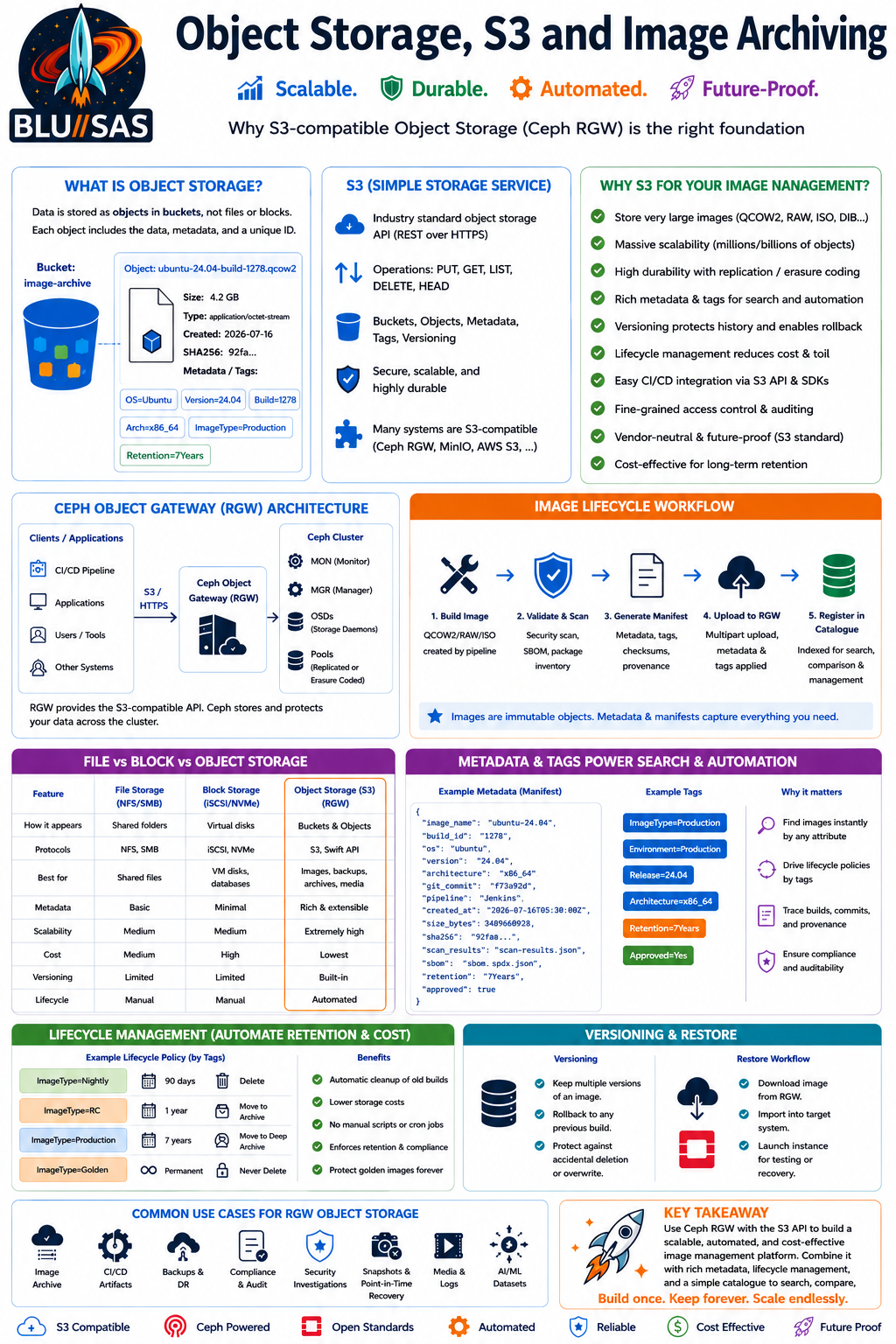
How it works
Instead of organising data into folders on a filesystem, object storage stores each item as an object containing:
- The data itself (the file)
- A globally unique identifier (object ID)
- Metadata (size, owner, creation date, tags, checksums, custom metadata)
Objects are stored inside buckets (sometimes called containers).
For example:
Bucket: vm-images

Object:
  ubuntu-24.04.qcow2
    Data: VM image
    Metadata:
      Version: 1.2
      Build: 2026-07-10
      Architecture: x86_64
      SHA256: ...
Why use object storage?
It excels when you need:
- Massive scalability (billions of objects)
- High durability
- Low-cost storage
- Easy access over HTTP(S)
- Rich metadata
- Geographic replication
- Versioning
It is not designed for low-latency databases or virtual machine disks.
Comparison
| Feature | Block Storage | File Storage | Object Storage |
|---|---|---|---|
| Appears as | Disk | Shared folder | API/Bucket |
| Protocols | iSCSI, NVMe | NFS, SMB | S3, Swift API |
| Best for | VM disks, databases | Shared files | Images, backups, archives |
| Metadata | Minimal | Basic | Extensive |
| Scalability | Medium | Medium | Extremely high |
| Cost | Highest | Medium | Lowest |
Common uses
- VM image repositories
- Backup archives
- Photo libraries
- AI datasets
- Log archives
- Software packages
- Media streaming
- Static website assets
APIs
Most modern systems expose an S3-compatible API, allowing applications to upload and download objects using simple HTTP requests.
Example:
PUT /bucket/image.qcow2
GET /bucket/image.qcow2
DELETE /bucket/image.qcow2
Popular object storage platforms
- Amazon S3 – the industry standard.
- MinIO – lightweight, self-hosted, Kubernetes-friendly.
- Ceph – scales from terabytes to exabytes.
- Cloudflare R2 – designed to reduce egress costs.
- OpenStack Swift – OpenStack’s native object storage service.
In OpenStack
There are two main storage services:
- OpenStack Cinder — persistent block storage volumes for virtual machines.
- OpenStack Swift — scalable object storage for files and archives.
For your OpenStack image archive work, object storage is often a strong fit because it provides:
- Cheap long-term storage
- Built-in redundancy
- Versioning of images
- Metadata for build numbers, Git commits, image type, OS version, etc.
- Lifecycle policies (for example, automatically deleting images after 5 years)
- Easy integration into CI/CD pipelines
For your Graphcore-style image archiving project, an S3-compatible solution such as MinIO (simple to deploy) or Ceph Object Gateway (enterprise-scale) would typically be a better choice than keeping archived images on a traditional filesystem. It would allow image pipelines to upload completed .qcow2, .raw, or disk image files directly into versioned buckets while storing searchable metadata alongside each object.
S3
S3 stands for Simple Storage Service. It is Amazon S3, the object storage service provided by Amazon Web Services. It is the most widely used object storage API in the industry, and many non-AWS storage systems implement an S3-compatible API.
Core concepts
- Bucket – a top-level container for storing objects.
- Object – a file plus its metadata.
- Key – the unique name of an object within a bucket.
- Metadata – information about the object, such as content type, creation time, tags, or custom fields.
For example:
Bucket: image-archive

Object Key:
production/ubuntu/24.04/build-128.qcow2

Metadata:
  Build: 128
  Git Commit: a1b2c3d
  Created: 2026-07-16
  SHA256: ...
How S3 works
Applications communicate with S3 over HTTPS using a REST API.
Typical operations include:
PUT– upload an object.GET– download an object.DELETE– remove an object.LIST– list objects in a bucket.HEAD– retrieve metadata without downloading the object.
Key features
- Virtually unlimited storage capacity.
- High durability (AWS advertises 99.999999999%—”11 nines”—durability for S3).
- Automatic replication within an AWS Region.
- Object versioning.
- Lifecycle rules to automatically move or delete data.
- Encryption at rest and in transit.
- Fine-grained access control using policies and IAM.
Storage classes
Different storage classes optimise for cost and access frequency:
| Storage Class | Best for |
|---|---|
| Standard | Frequently accessed data |
| Intelligent-Tiering | Automatically optimises costs based on access patterns |
| Standard-IA | Infrequently accessed files |
| One Zone-IA | Lower-cost storage in a single Availability Zone |
| Glacier Instant Retrieval | Archives needing fast retrieval |
| Glacier Flexible Retrieval | Long-term archives |
| Glacier Deep Archive | Lowest-cost, rarely accessed data |
S3-compatible storage
Many self-hosted products support the S3 API, allowing applications to work with them without code changes. Examples include:
- MinIO
- Ceph (via RADOS Gateway)
- OpenStack Swift (through compatibility layers in some deployments)
This is why “S3” often refers to the API as much as the AWS service itself.
Example upload
Using the AWS CLI:
aws s3 cp ubuntu-24.04.qcow2 s3://image-archive/production/ubuntu/24.04/The same command can often be used against a self-hosted S3-compatible service by specifying a custom endpoint.
Why S3 is relevant to your OpenStack image archive
For an image archive containing .qcow2, .raw, and other VM images, S3 offers several advantages:
- Each image becomes an immutable object.
- Metadata can capture build numbers, Git commits, OS versions, and image types.
- Buckets can be organised by project, release, or environment.
- Lifecycle policies can automatically transition old images to cheaper storage or delete them after a retention period.
- CI/CD pipelines can upload images directly after successful builds.
- Any S3-compatible implementation (such as MinIO or Ceph) can later replace or supplement AWS S3 without changing the pipeline logic, provided the application uses the standard S3 API.
Metadata
Metadata is simply data about the object, rather than the object’s contents. One of the biggest strengths of S3-compatible object storage is that every object can carry rich metadata, making it easy to search, identify, and automate workflows.
Types of metadata
1. System metadata
This is created and managed by the storage system.
Examples include:
- Object key (path/name)
- File size
- Creation date
- Last modified date
- ETag (checksum/hash)
- Storage class
- Content type (
image/jpeg,application/pdf, etc.) - Encryption status
Example:
Object: ubuntu-24.04.qcow2

Size: 4.2 GB
Created: 2026-07-16
Content-Type: application/octet-stream
ETag: "a92f3e..."
Storage Class: Standard
2. User-defined metadata
This is where object storage becomes especially powerful. Your application or CI/CD pipeline can attach any metadata you choose.
For an OpenStack image archive, you might add:
| Metadata Key | Example Value |
|---|---|
| project | cloud-platform |
| image_type | qcow2 |
| os | Ubuntu |
| version | 24.04 |
| build | 1278 |
| git_commit | f73a92d |
| pipeline | GitHub Actions |
| builder | image-builder-01 |
| architecture | x86_64 |
| hypervisor | KVM |
| environment | Production |
| owner | Platform Team |
| signed | true |
| retention | 7 years |
| sha256 | 92fa… |
Your application can then search or filter images based on these attributes.
3. Object tags
Tags are separate from metadata and are often used for management policies.
Examples:
Environment=ProductionDepartment=PlatformArchive=TrueRetention=LongTerm
Lifecycle rules can use tags to automate actions, such as deleting temporary images after 30 days while keeping production images for seven years.
Example object
Bucket:
image-archive

Object:
ubuntu-24.04-server-build-1278.qcow2

Metadata

Project: OpenStack
Version: 24.04
Build: 1278
Git Commit: f73a92d
Pipeline: Jenkins
Architecture: x86_64
Created: 2026-07-16
Checksum: SHA256...
Retention: 7 years
How metadata is used
Instead of relying on filenames like:
ubuntu-final-v3-really-final.qcow2you can keep a clean object name and let the metadata describe the image:
production/ubuntu/24.04/image.qcow2Metadata:
Version = 24.04.2
Build = 1278
Release = Production
Git Commit = f73a92d
Pipeline = Nightly
This makes automation much simpler and avoids encoding lots of information into filenames.
Applying this to your image archive
For the OpenStack image archive you’ve been designing, metadata could capture:
- Image type (QCOW2, RAW, ISO, etc.)
- Operating system and version
- OpenStack release compatibility
- Image builder version (e.g. Diskimage Builder)
- Source Git repository and commit
- Build timestamp
- CI/CD pipeline and job ID
- Build status (Production, Testing, Experimental)
- Security scan results
- Digital signature status
- Checksum (SHA-256)
- Image size
- Compression type
- Required firmware (BIOS or UEFI)
- CPU architecture (x86_64, ARM64)
- Retention policy and expiry date
- Owner or team
- Related documentation or ticket IDs
With this approach, you can build a searchable image catalogue where users query by metadata—for example, “all Ubuntu 24.04 production images built after 1 June”, or “latest ARM64 image that passed security scanning”—without depending on complex directory structures or naming conventions. This is one of the reasons object storage is well suited to large, long-lived archives.
OpenStack Image Archive
For your OpenStack image archive, S3-compatible object storage is the best architectural choice because it aligns with the requirements of storing large, immutable image artefacts over long periods, while remaining scalable, cost-effective, and easy to integrate into CI/CD pipelines.
Why S3 is the right storage for your image archive
| Requirement | How S3 satisfies it |
|---|---|
| Large image files | Designed to store objects from a few bytes to multiple terabytes, making it ideal for QCOW2, RAW, ISO, and other image formats. |
| Long-term archival | Optimised for durable, low-cost storage with lifecycle management for long retention periods. |
| Scalability | Stores millions or billions of objects without requiring changes to directory structures or filesystem layouts. |
| Version history | Supports versioning, allowing multiple builds of the same image to be retained safely. |
| Rich metadata | Every image can include metadata such as OS version, build number, Git commit, architecture, OpenStack release, security scan results, checksum, and retention policy. |
| Immutable artefacts | Images are stored as complete objects rather than mutable files, reducing the risk of accidental modification or corruption. |
| Automation | CI/CD pipelines can upload images directly using the standard S3 API after a successful build, requiring no manual intervention. |
| Searchability | Metadata enables a catalogue to locate images by build, operating system, project, release, or other attributes instead of relying on filenames alone. |
| Data integrity | Objects are validated using checksums (ETag and optional SHA-256), ensuring archived images have not been corrupted. |
| High durability | Object storage platforms replicate data across disks or nodes, providing resilience against hardware failures. |
| Access control | Fine-grained permissions allow development, operations, and release teams to have different levels of access. |
| Future-proof | The S3 API is the de facto industry standard, making it easy to migrate between AWS S3, MinIO, Ceph, or other S3-compatible platforms. |
Why it is better than a traditional filesystem
A shared filesystem quickly becomes difficult to manage as an archive grows:
- Deep directory structures become cumbersome.
- Filenames must encode important information.
- Searching is limited.
- Scaling to hundreds of thousands of images becomes increasingly inefficient.
- Replication, lifecycle management, and integrity checking often require custom tooling.
S3 addresses these limitations by treating every image as a self-contained object with searchable metadata and built-in management capabilities.
Example archive workflow
Image Build Pipeline
        │
        ▼
Image Validation
        │
        ▼
Security Scan
        │
        ▼
Generate Metadata
        │
        ▼
Upload Image (.qcow2/.raw/.iso)
        │
        ▼
S3 Object Storage
        │
        ├── Image Object
        ├── Metadata
        ├── Version History
        ├── Checksums
        └── Lifecycle Policies
How this meets your OpenStack image archive requirements
For the image archive you’ve been designing, S3 enables you to:
- Archive production images automatically from the image build pipeline.
- Store all image formats (QCOW2, RAW, ISO, DIB outputs, cloud images, appliance images) in one scalable repository.
- Retain multiple historical versions without overwriting previous builds.
- Record comprehensive metadata for auditing, compliance, and traceability.
- Implement retention and cleanup policies without custom scripts.
- Restore archived images back into an OpenStack image service when required.
- Scale from a few hundred images today to many millions in the future with no architectural changes.
Recommendation
For a Graphcore-style private cloud environment, I would recommend S3-compatible object storage rather than AWS S3 itself. Specifically:
- MinIO – if simplicity, fast deployment, and Kubernetes integration are the priority.
- Ceph Object Gateway (RGW) – if you already use or plan to use Ceph for storage and need enterprise-scale distributed storage.
Both expose the standard S3 API, allowing your archive and CI/CD pipelines to remain portable while avoiding vendor lock-in. This gives you an archive that is scalable, resilient, metadata-rich, and straightforward to integrate with OpenStack image creation workflows.
Ceph Object Gateway
Ceph Object Gateway (RGW) is the object storage component of Ceph. It provides an S3-compatible API (and optionally a Swift-compatible API), allowing applications to store and retrieve objects from a Ceph cluster as if they were using Amazon S3.
Think of RGW as the front door to Ceph object storage.
How it fits into Ceph
                Applications
                     │
          S3 / HTTPS API Requests
                     │
         +-----------------------+
         |  Ceph Object Gateway  |
         |       (RGW)           |
         +-----------------------+
                     │
          RADOS Object Storage
                     │
      +-----------------------------+
      | OSDs | MONs | MGRs | Pools |
      +-----------------------------+
                     │
              Physical Disks
The application never talks directly to the storage disks. Instead:
- The application uploads an object using the S3 API.
- RGW authenticates the request.
- RGW stores the object in the Ceph cluster.
- Ceph automatically replicates or erasure-codes the data for resilience.
Components involved
RGW (Gateway)
- Presents the S3 API.
- Authenticates users.
- Manages buckets.
- Handles uploads and downloads.
- Stores metadata.
- Scales horizontally by adding more gateway instances.
MON (Monitors)
Maintain the cluster map and overall health.
MGR (Managers)
Provide monitoring, dashboards, and orchestration services.
OSD (Object Storage Daemons)
Store the actual object data on disks and handle replication or erasure coding.
What happens when you upload an image?
Suppose your CI pipeline builds:
ubuntu-24.04-build-1278.qcow2The pipeline sends:
PUT /image-archive/production/ubuntu/24.04/build-1278.qcow2with metadata such as:
Project = OpenStack
Version = 24.04
Build = 1278
Architecture = x86_64
Checksum = SHA256...
RGW receives the request and:
- Authenticates it.
- Creates the object.
- Stores the metadata.
- Splits the object into internal chunks if needed.
- Distributes those chunks across multiple OSDs.
- Returns success to the pipeline.
The pipeline does not need to know where the data is physically stored.
Why RGW is valuable for your image archive
For an OpenStack image archive, RGW offers several advantages:
- Stores very large QCOW2, RAW, ISO, and appliance images efficiently.
- Supports billions of objects.
- Provides high durability through replication or erasure coding.
- Uses the industry-standard S3 API, avoiding proprietary interfaces.
- Stores rich metadata alongside each image.
- Supports lifecycle management and quotas.
- Can scale simply by adding more gateway instances or storage nodes.
- Avoids vendor lock-in because it runs on your own infrastructure.
Typical deployment
A production deployment might look like:
                   Load Balancer
                         │
          ┌──────────────┴──────────────┐
          │                             │
       RGW Node 1                   RGW Node 2
          │                             │
          └──────────────┬──────────────┘
                         │
                 Ceph Storage Cluster
        ┌──────────────────────────────────┐
        │ MON │ MGR │ OSD │ OSD │ OSD │ OSD │
        └──────────────────────────────────┘
If one RGW node fails, another continues serving requests.
Integration with OpenStack
Ceph already integrates well with OpenStack:
- OpenStack Glance can store VM images in Ceph.
- OpenStack Cinder can use Ceph RBD for block volumes.
- OpenStack Nova boots instances from images stored in Ceph-backed services.
Adding RGW gives you an object storage endpoint that can be used for long-term archives, backups, CI/CD artefacts, and image repositories alongside those services.
Why RGW is a particularly good fit for your project
Your proposed image archive requires:
- Automatic uploads from build pipelines.
- Long-term retention of historical images.
- Version tracking.
- Metadata-rich storage.
- Scalability as the archive grows.
- Integration with OpenStack and Linux tooling.
- A self-hosted solution without dependence on a public cloud.
Ceph Object Gateway satisfies all of these while exposing the familiar S3 API. If your organisation already operates or plans to operate a Ceph cluster, RGW lets you build an enterprise-grade image archive without introducing a separate storage platform, making it a strong long-term choice for the architecture you’ve been designing.
What RGW already provides
RGW gives you standard S3 operations for:
- Creating buckets
- Uploading and downloading objects
- Multipart uploads for large images
- Listing objects and versions
- Retrieving object metadata
- Object versioning
- Lifecycle and retention rules
- Authentication and bucket policies
These functions are available through existing SDKs and tools rather than requiring you to write a storage API. Ceph RGW supports the basic S3 data-access model, including bucket and object operations.
Your pipeline can therefore use:
aws s3 cp image.qcow2 \
  s3://openstack-image-archive/ubuntu/24.04/build-1278.qcow2 \
  --endpoint-url https://rgw.example.internal
Or standard libraries such as:
- Python
boto3 - Go AWS SDK
- AWS CLI
s3cmd- Ansible S3 modules
1. Pipeline integration: small amount of code
The pipeline integration should be a reusable script, job template or service—not a large application.
It should perform the following sequence:
Build image
    ↓
Validate and scan image
    ↓
Generate manifest and checksum
    ↓
Upload image to RGW
    ↓
Upload manifest
    ↓
Verify uploaded checksum
    ↓
Register image in catalogue
    ↓
Optionally publish image to Glance
What the integration needs to do
The pipeline wrapper should:
- Generate a stable object key.
- Calculate SHA-256.
- Collect image metadata.
- Upload the image using multipart upload.
- Attach appropriate tags and selected metadata.
- Upload a full manifest alongside the image.
- verify the object exists and matches the expected size/checksum.
- Write the archive location back to the pipeline result.
- Optionally notify or update the catalogue.
A practical object structure would be:
openstack-image-archive/
└── production/
    └── ubuntu/
        └── 24.04/
            └── x86_64/
                └── build-1278/
                    ├── image.qcow2
                    ├── manifest.json
                    ├── image.qcow2.sha256
                    ├── packages.json
                    ├── sbom.spdx.json
                    └── scan-results.json
Example manifest
{
  "schema_version": "1.0",
  "image_name": "ubuntu-24.04",
  "build_id": "1278",
  "format": "qcow2",
  "architecture": "x86_64",
  "git_commit": "f73a92d",
  "pipeline_url": "https://ci.example/jobs/1278",
  "created_at": "2026-07-16T05:30:00Z",
  "virtual_size_bytes": 21474836480,
  "actual_size_bytes": 3489660928,
  "sha256": "92fa...",
  "packages_manifest": "packages.json",
  "sbom": "sbom.spdx.json",
  "scan_results": "scan-results.json",
  "glance_image_id": "optional-uuid"
}
Keep the full metadata in the manifest. S3 user-defined metadata is useful, but it is not an ideal substitute for a complete structured record because metadata fields are normally set at upload time and are awkward to update independently. S3-compatible storage also supports tags, which are better suited to lifecycle and access-policy decisions.
2. End-user comparison: RGW alone is insufficient
RGW can list objects and return metadata, but it does not understand the contents of a VM image.
It cannot natively tell users:
- Which packages changed
- Which kernel was added
- Which files changed
- Whether the image grew unexpectedly
- Which security vulnerabilities were introduced
- Which cloud-init settings changed
- Which build inputs changed
- Whether the partition layout changed
For that, you need a comparison layer.
Recommended architecture
                         ┌─────────────────────┐
                         │ Image build pipeline │
                         └──────────┬──────────┘
                                    │
                       upload image + manifest
                                    │
                                    ▼
                         ┌─────────────────────┐
                         │    Ceph RGW / S3    │
                         │ images and reports  │
                         └──────────┬──────────┘
                                    │ event or API call
                                    ▼
                         ┌─────────────────────┐
                         │ Archive catalogue   │
                         │ metadata database   │
                         └──────────┬──────────┘
                                    │
                         compare/search API
                                    │
                                    ▼
                         ┌─────────────────────┐
                         │ Web UI or CLI       │
                         │ browse and compare  │
                         └─────────────────────┘
Catalogue database
Use a small relational database, such as PostgreSQL, to index:
- Image identities
- Build versions
- Object keys and version IDs
- Operating system and architecture
- Creation times
- Checksums
- Package lists
- SBOM references
- Security results
- Glance image IDs
- Retention status
- Build provenance
Do not make S3 bucket listing the primary user search mechanism. Object storage is the source of truth for binary artefacts, while the catalogue database provides efficient querying and comparison.
What should actually be compared
A useful comparison should normally avoid byte-by-byte comparison of multi-gigabyte images. That tends to produce large, low-value results because filesystem ordering, timestamps and image allocation can change even when the functional image contents are similar.
Instead, compare generated manifests:
| Comparison area | Source |
|---|---|
| Build inputs | Pipeline manifest |
| Operating system | /etc/os-release extraction |
| Kernel | Package and boot metadata |
| Installed packages | dpkg-query or RPM inventory |
| Package versions | Package manifest |
| Filesystem size | qemu-img info |
| Partition layout | virt-filesystems or equivalent |
| Image properties | qemu-img info |
| Security findings | Scanner output |
| SBOM components | SPDX or CycloneDX document |
| Configuration files | Selected extracted files or hashes |
| Cloud-init configuration | Image inspection report |
| Firmware and boot mode | Image manifest |
| Glance properties | OpenStack metadata snapshot |
Example user comparison
Ubuntu 24.04 build 1277 → build 1278

Image size
  3.18 GB → 3.25 GB                    +70 MB

Kernel
  6.8.0-62-generic → 6.8.0-63-generic

Packages
  Added:      4
  Removed:    1
  Upgraded:  27

Security
  Critical:   1 → 0
  High:       7 → 3

Configuration
  /etc/ssh/sshd_config changed
  cloud-init datasource list changed

Build provenance
  Git commit: a1b2c3d → f73a92d
Minimum viable implementation
For the initial four-week archive project, I would avoid building a large portal.
Build only:
- One pipeline upload script or shared CI component
- A versioned JSON manifest schema
- Automatic package, image and security reports
- A PostgreSQL catalogue
- A small REST API
- A basic web page or CLI that lists images and compares two manifests
- A restore command that downloads an object and imports it into Glance
Glance already exposes image import workflows through its API and OpenStack client. The current client supports staged glance-direct imports and URI-based web-download where enabled, so the restore integration should call existing Glance APIs rather than reimplementing image ingestion.
What you should not build
Avoid creating:
- A proprietary object upload protocol
- A replacement for the S3 API
- A custom filesystem over RGW
- A full image inspection engine from scratch
- A frontend that downloads entire images merely to compare them
- A separate metadata service containing no durable manifest in the archive
Use existing tools such as qemu-img, libguestfs, virt-inspector, package managers, SBOM generators and vulnerability scanners, then store their outputs alongside the image.
Recommended decision
Your implementation should consist of three distinct layers:
- RGW as the immutable artefact store
- Pipeline tooling to produce and upload images plus manifests
- A lightweight catalogue and comparison interface
Therefore, the answer is:
- Pipeline integration: yes, but only a small wrapper around the standard S3 API.
- Storage interface: no; RGW already supplies it.
- End-user comparison: yes, because RGW stores objects but does not semantically compare VM images.
- Custom UI: optional initially; a CLI or simple catalogue page is enough for the first release.
What is lifecycle management?
A lifecycle policy is a set of rules that tells the object store what to do as objects age.
For example:
If image is older than 2 years
    ↓
Compress or move to archive storage

If image is older than 7 years
    ↓
Delete automatically

If object has tag "temporary"
    ↓
Delete after 30 days
The storage platform performs these actions automatically.
How this applies to your image archive
Suppose your retention policy is:
| Image Type | Retention |
|---|---|
| Production releases | 7 years |
| Nightly builds | 90 days |
| Release candidates | 1 year |
| Failed builds | 30 days |
| Security investigation images | Never delete |
Your pipeline can tag each uploaded image:
Retention = 7y
Environment = Production
or
Retention = 30d
Environment = Nightly
Lifecycle rules then act on those tags automatically.
Example lifecycle
Image built
      │
      ▼
Uploaded to RGW
      │
      ▼
Stored for 90 days
      │
      ▼
Notification sent (optional)
      │
      ▼
Deleted automatically
No administrator needs to intervene.
More than just deletion
Lifecycle management can also support:
Version cleanup
Keep:
- Latest 5 versions
- All production releases
- Delete superseded nightly builds
Temporary images
Automatically remove:
- Test builds
- CI artefacts
- Developer scratch images
Compliance
Some images may require retention for legal or audit purposes.
Example:
Tag:
Compliance = SOX
Lifecycle rules can prevent their deletion until the required retention period has elapsed.
Restore workflow
If an engineer needs an old image:
- Search the catalogue.
- Select the required version.
- Download it from RGW.
- Import it into OpenStack Glance.
- Launch an instance for investigation.
Because lifecycle policies preserve the required retention period, the image is available without manual archiving.
Lifecycle architecture
          Build Pipeline
                │
                ▼
      Upload Image + Metadata
                │
                ▼
        Ceph RGW / S3 Bucket
                │
      Lifecycle Policy Engine
      ┌─────────┼─────────┐
      │         │         │
      ▼         ▼         ▼
 Keep 90d   Keep 7y   Permanent
 Nightly   Production  Compliance
Should you write lifecycle code?
Generally, no.
Use RGW’s lifecycle engine for:
- Automatic expiry
- Retention periods
- Object deletion
- Version cleanup
- Tag-based policies
Your own application should only:
- Apply the correct metadata and tags when uploading.
- Update the catalogue if an object is removed (or periodically reconcile the catalogue with the bucket).
- Allow administrators to define or modify retention policies through configuration.
For your OpenStack image archive
I would make lifecycle management one of the core architectural features rather than treating it as an afterthought.
A sensible policy might be:
| Image Category | Lifecycle |
|---|---|
| Failed CI builds | Delete after 30 days |
| Nightly builds | Delete after 90 days |
| Development snapshots | Delete after 180 days |
| Release candidates | Retain for 1 year |
| Production releases | Retain for 7 years |
| Golden/base images | Never expire unless explicitly retired |
| Security investigation images | Legal hold / no automatic deletion |
This approach gives you a largely self-managing archive. Engineers simply upload images with the appropriate metadata and tags, and the storage platform enforces the retention policy automatically, reducing operational effort while ensuring storage capacity remains under control.
Golden images
This fits very well with an OpenStack image archive.
For example:
ubuntu-24.04-golden-v3.qcow2

Tags
-----
ImageType = Golden
Release = 24.04
Architecture = x86_64
Retention = Permanent
Approved = Yes
Your lifecycle rules would simply exclude objects tagged Retention=Permanent (or ImageType=Golden) from expiration.
Additional protection
For important images, you can go beyond lifecycle tags:
- Bucket policies can restrict who is allowed to delete objects.
- Object versioning protects against accidental overwrites or deletions by retaining previous versions.
- Object Lock (if supported and enabled in your S3-compatible implementation) can enforce retention periods or legal holds so that objects cannot be deleted, even by administrators, until the retention expires or the hold is removed.
Recommendation for your archive
I would use two layers of protection:
- Tags to classify images and drive lifecycle policies:
ImageType=GoldenRetention=PermanentApproved=Yes
- Access controls so that only a small group of administrators can change or delete golden images.
This gives you a flexible system where most images are managed automatically by lifecycle rules, while golden images remain protected until someone deliberately retires them.