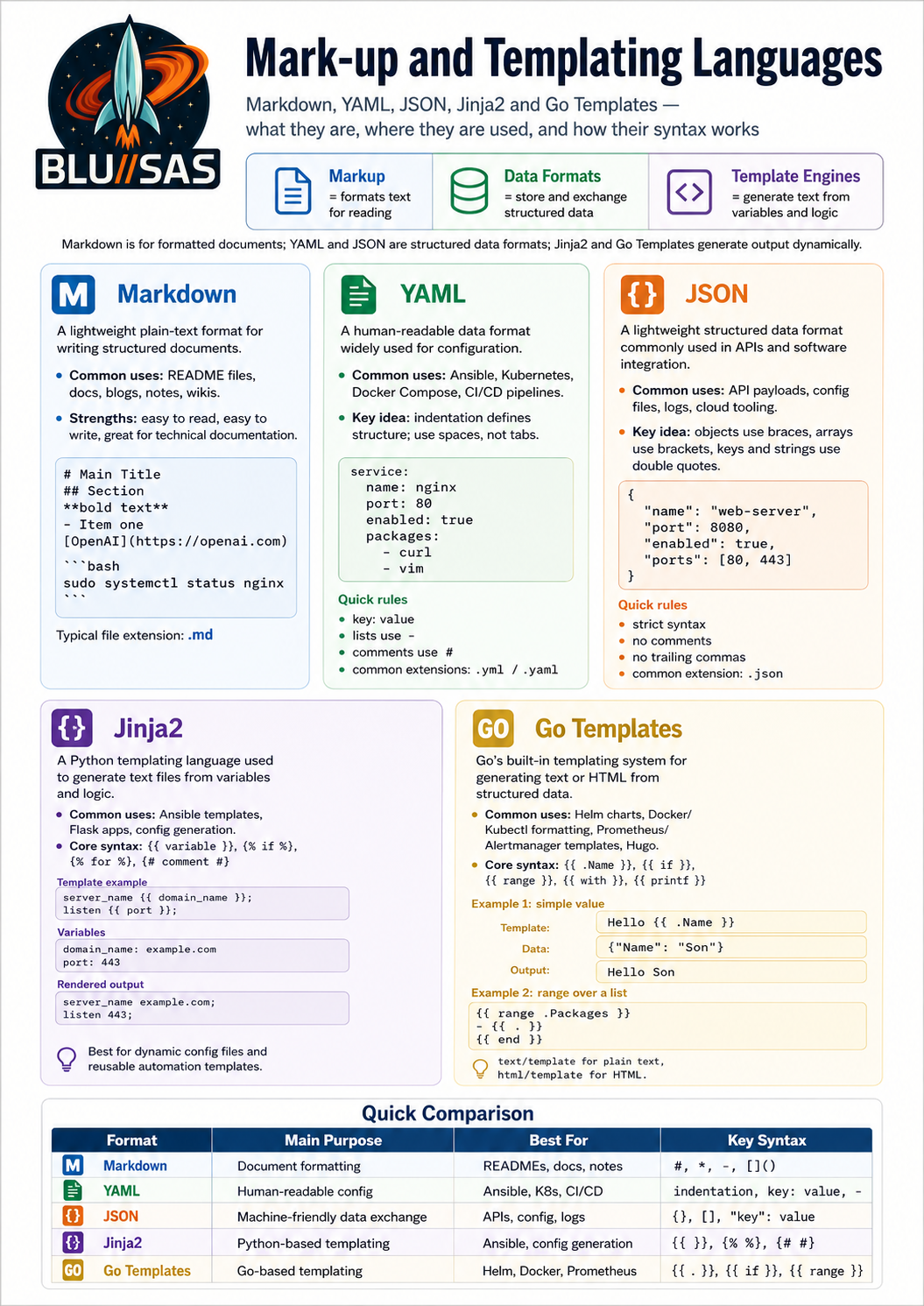
Markdown
Markdown is a lightweight text formatting format used to write structured documents using plain text. It is popular because it is easy to read before and after formatting.
You write simple symbols such as #, *, -, and backticks, and Markdown-aware tools convert them into formatted text such as headings, bold text, lists, code blocks, links, and tables.
Basic Markdown examples
Headings
# Main title
## Section title
### Subsection title
Rendered as:
Main title
Section title
Subsection title
Bold and italic
**bold text**
*italic text*
***bold and italic***
Rendered as:
bold text
italic text
bold and italic
Bullet lists
- Item one
- Item two
- Item three
Rendered as:
- Item one
- Item two
- Item three
Numbered lists
1. First step
2. Second step
3. Third step
Rendered as:
- First step
- Second step
- Third step
Links
[OpenAI](https://openai.com)Rendered as:
Images
This displays an image with alternative text.
Inline code
Use the `ls -la` command to list files.Rendered as:
Use the ls -la command to list files.
Code blocks
Use three backticks:
```bash
sudo systemctl status nginx
```
Rendered as:
sudo systemctl status nginxYou can specify the language after the first three backticks, such as:
```python
print("Hello")
---

### Blockquotes

```markdown
> This is a quoted section.
Rendered as:
This is a quoted section.
Tables
| Name | Role | Skill |
|---|---|---|
| Alice | SRE | Linux |
| Bob | Developer | Go |
| Carol | DBA | PostgreSQL |
Rendered as:
| Name | Role | Skill |
|---|---|---|
| Alice | SRE | Linux |
| Bob | Developer | Go |
| Carol | DBA | PostgreSQL |
Why Markdown is useful
Markdown is widely used for:
README.mdfiles in GitHub and GitLab- technical documentation
- blog posts
- project notes
- knowledge bases
- ChatGPT canon documents
- software runbooks
- changelogs
- wikis
- static websites
For example, a GitHub project usually has a file called:
README.mdThe .md extension means it is a Markdown file.
A simple Markdown document
# My Project

This project installs and configures a Linux monitoring stack.

## Features

- Prometheus metrics collection
- Grafana dashboards
- Loki log aggregation
- Tempo tracing

## Installation

Run the following command:

```bash
make install
Notes
This setup is designed for a homelab environment.
## Markdown versus HTML

Markdown is simpler than HTML.

Markdown:

```markdown
# Hello

This is **important**.
Equivalent HTML:
<h1>Hello</h1>

<p>This is <strong>important</strong>.</p>
Markdown is easier to write manually, while HTML gives more control over layout and styling.
Common Markdown file extensions
.md
.markdown
.mdown
The most common is:
.mdKey limitation
Markdown is mainly for structure and simple formatting. It is not a full design/layout system like Word, HTML/CSS, or desktop publishing software. Different platforms also support slightly different Markdown features. For example, GitHub Markdown supports tables and task lists, but another Markdown viewer might not render them the same way.
YAML
YAML, usually pronounced “yam-ul”, is a human-readable data format used for configuration files, infrastructure-as-code, CI/CD pipelines, Kubernetes manifests, Ansible playbooks, Docker Compose files, and many other DevOps/SRE tools.
YAML originally stood for Yet Another Markup Language, but it is now usually expanded as YAML Ain’t Markup Language, because it is mainly used to represent structured data, not documents.
What YAML is used for
YAML is commonly used for files such as:
docker-compose.yml
.gitlab-ci.yml
.github/workflows/build.yml
ansible-playbook.yml
kubernetes-deployment.yaml
prometheus.yml
It is popular because it is easier to read than JSON or XML for configuration.
For example, this YAML:
service:
  name: nginx
  port: 80
  enabled: true
represents a structured configuration object with three values.
Basic YAML structure
YAML is based on three main ideas:
key: valueExample:
name: web-server
port: 8080
enabled: true
This means:
| Key | Value |
|---|---|
name | web-server |
port | 8080 |
enabled | true |
Indentation matters
YAML uses indentation to show hierarchy.
server:
  name: web01
  ip: 192.168.1.10
  role: frontend
This means name, ip, and role belong under server.
Equivalent JSON:
{
  "server": {
    "name": "web01",
    "ip": "192.168.1.10",
    "role": "frontend"
  }
}
Use spaces, not tabs. Tabs usually break YAML parsing.
Lists
YAML lists use hyphens:
packages:
  - nginx
  - curl
  - vim
  - git
This means packages contains four items.
You can also have a list of objects:
users:
  - name: alice
    role: admin
  - name: bob
    role: developer
  - name: carol
    role: sre
Each - starts a new list item.
Nested objects
YAML is often used for nested configuration:
application:
  name: my-api
  version: 1.0.0
  database:
    host: db01.example.com
    port: 5432
    name: appdb
Here, database belongs inside application.
Strings
Simple strings do not always need quotes:
name: prometheus
environment: production
But quotes are useful when the value contains special characters:
url: "https://example.com/api/v1"
command: "echo hello && systemctl restart nginx"
version: "1.0"
Quoting "1.0" is useful because otherwise some parsers may treat it as a number.
Numbers, booleans, and nulls
YAML supports different value types:
replicas: 3
cpu_limit: 2.5
enabled: true
debug: false
description: null
Common types:
| YAML | Meaning |
|---|---|
3 | integer |
2.5 | decimal number |
true | boolean true |
false | boolean false |
null | empty value |
"3" | string, not a number |
Comments
Comments start with #:
# This is the application configuration
app:
  name: demo
  port: 8080 # Application listens on this port
Comments are ignored by the parser.
Multi-line strings
YAML has useful syntax for multi-line text.
Literal block: preserves line breaks
message: |
  Line one
  Line two
  Line three
This keeps the line breaks.
Useful for scripts:
script: |
  echo "Starting deployment"
  systemctl restart nginx
  systemctl status nginx
Folded block: folds lines into a paragraph
description: >
  This is a long description
  that will be folded into
  a single paragraph.
This becomes one paragraph instead of separate lines.
Example: Docker Compose YAML
services:
  web:
    image: nginx:latest
    ports:
      - "8080:80"
    restart: unless-stopped
This defines a service called web, using the nginx image, exposing port 8080 on the host to port 80 in the container.
Example: Ansible playbook
- name: Install nginx
  hosts: webservers
  become: true

  tasks:
    - name: Install nginx package
      ansible.builtin.package:
        name: nginx
        state: present

    - name: Start nginx service
      ansible.builtin.service:
        name: nginx
        state: started
        enabled: true
This tells Ansible to install and start nginx on hosts in the webservers group.
Example: Kubernetes Deployment
apiVersion: apps/v1
kind: Deployment
metadata:
  name: web-demo
spec:
  replicas: 3
  selector:
    matchLabels:
      app: web-demo
  template:
    metadata:
      labels:
        app: web-demo
    spec:
      containers:
        - name: nginx
          image: nginx:latest
          ports:
            - containerPort: 80
This defines a Kubernetes Deployment with three Nginx pods.
YAML versus JSON
YAML:
name: web
replicas: 3
ports:
  - 80
  - 443
JSON:
{
  "name": "web",
  "replicas": 3,
  "ports": [80, 443]
}
YAML is usually easier for humans to read and edit. JSON is stricter and often easier for machines to generate.
Common YAML mistakes
The biggest YAML problems are usually indentation-related.
Bad:
server:
name: web01
port: 80
Good:
server:
  name: web01
  port: 80
Another common mistake is mixing tabs and spaces. Use spaces only.
Also be careful with values like:
version: 1.0Some tools may treat that as a number. Safer:
version: "1.0"YAML file extensions
YAML files usually use either:
.yaml
.yml
Both are valid. For consistency, many teams choose one and use it everywhere.
Practical rule of thumb
For DevOps work, think of YAML as:
configuration data written in a readable tree structureThe most important things to remember are:
key: value
nested:
  key: value
list:
  - item1
  - item2
Once you understand indentation, key-value pairs, and lists, most YAML files become much easier to read.
JSON
JSON stands for JavaScript Object Notation. It is a lightweight data format used to store and exchange structured data between systems.
It is extremely common in APIs, configuration files, logs, web applications, automation tools, and cloud platforms.
A JSON file usually uses the extension:
.jsonBasic JSON example
{
  "name": "web-server",
  "port": 8080,
  "enabled": true
}
This describes an object with three fields:
| Key | Value | Type |
|---|---|---|
name | web-server | string |
port | 8080 | number |
enabled | true | boolean |
JSON objects
A JSON object is wrapped in curly braces:
{
  "hostname": "server01",
  "ip": "192.168.1.10",
  "role": "frontend"
}
Objects contain key-value pairs.
Important rule: in JSON, keys must be in double quotes.
Valid:
{
  "name": "nginx"
}
Invalid:
{
  name: "nginx"
}
JSON arrays
An array is a list of values. Arrays use square brackets:
{
  "packages": [
    "nginx",
    "curl",
    "vim",
    "git"
  ]
}
Arrays can contain strings, numbers, booleans, objects, or other arrays.
List of objects
This is very common in APIs and configuration files:
{
  "users": [
    {
      "name": "alice",
      "role": "admin"
    },
    {
      "name": "bob",
      "role": "developer"
    },
    {
      "name": "carol",
      "role": "sre"
    }
  ]
}
Here, users is an array, and each item in the array is an object.
JSON data types
JSON supports a small set of data types:
| Type | Example |
|---|---|
| string | "hello" |
| number | 42 |
| boolean | true or false |
| null | null |
| object | { "key": "value" } |
| array | [1, 2, 3] |
Example:
{
  "service": "prometheus",
  "replicas": 3,
  "cpu_limit": 2.5,
  "enabled": true,
  "description": null,
  "ports": [9090, 8080],
  "labels": {
    "app": "monitoring",
    "tier": "metrics"
  }
}
JSON strings
Strings must use double quotes:
{
  "message": "Hello world"
}
Single quotes are not valid JSON:
{
  'message': 'Hello world'
}
That may work in JavaScript, but it is not valid JSON.
Nested JSON
JSON can represent complex hierarchies:
{
  "application": {
    "name": "my-api",
    "version": "1.0.0",
    "database": {
      "host": "db01.example.com",
      "port": 5432,
      "name": "appdb"
    }
  }
}
This is similar to nested YAML, but JSON is stricter about punctuation.
JSON in APIs
JSON is one of the main formats used by REST APIs.
Example API response:
{
  "status": "ok",
  "data": {
    "id": 123,
    "username": "son",
    "email": "son@example.com"
  }
}
Example API request body:
{
  "username": "son",
  "password": "example-password"
}
Many tools send or receive JSON, including:
curl
jq
Python requests
JavaScript fetch
Terraform
Kubernetes APIs
AWS CLI
Azure CLI
GitHub API
GitLab API
JSON versus YAML
JSON:
{
  "name": "web",
  "replicas": 3,
  "ports": [80, 443]
}
YAML:
name: web
replicas: 3
ports:
  - 80
  - 443
JSON is stricter and more explicit. YAML is often easier for humans to write by hand.
JSON versus XML
JSON:
{
  "name": "web",
  "port": 80
}
XML:
<service>
  <name>web</name>
  <port>80</port>
</service>
JSON is generally shorter and easier to use in modern web APIs.
Common JSON mistakes
Missing comma
Invalid:
{
  "name": "nginx"
  "port": 80
}
Valid:
{
  "name": "nginx",
  "port": 80
}
Trailing comma
Invalid:
{
  "name": "nginx",
  "port": 80,
}
Valid:
{
  "name": "nginx",
  "port": 80
}
Single quotes
Invalid:
{
  'name': 'nginx'
}
Valid:
{
  "name": "nginx"
}
Comments
JSON does not support comments.
Invalid:
{
  // This is a comment
  "name": "nginx"
}
For comments, some tools use JSON-like formats such as JSONC, but standard JSON does not allow them.
Formatting JSON with jq
On Linux, jq is one of the most useful tools for reading and querying JSON.
Pretty-print JSON:
cat data.json | jqExtract a field:
cat data.json | jq '.name'Example:
{
  "name": "nginx",
  "port": 80,
  "enabled": true
}
Command:
jq '.port' service.jsonOutput:
80Extract from nested JSON:
jq '.application.database.host' config.jsonExtract array items:
jq '.users[].name' users.jsonPractical DevOps example
A Prometheus target list in JSON could look like this:
[
  {
    "targets": [
      "server01:9100",
      "server02:9100"
    ],
    "labels": {
      "job": "node",
      "environment": "production"
    }
  }
]
A tool can read this file and know which hosts to scrape and what labels to apply.
Practical rule of thumb
Think of JSON as:
structured data made from objects, arrays, and simple valuesThe most important syntax rules are:
{
  "key": "value",
  "list": [
    "item1",
    "item2"
  ],
  "nested": {
    "enabled": true
  }
}
Use JSON when systems need to exchange precise structured data, especially through APIs.
Jinja2
Jinja2 is a templating language for generating text files from variables, logic, and reusable templates.
It is heavily used in:
Ansible
Flask
Django-like Python web apps
SaltStack
Pelican/static site generators
configuration generation
HTML rendering
YAML/JSON/config file generation
In DevOps/SRE work, you will most often see Jinja2 inside Ansible templates.
What Jinja2 does
Jinja2 lets you write a template like this:
server_name {{ domain_name }};

listen {{ port }};
Then provide variable values:
domain_name: example.com
port: 443
The rendered output becomes:
server_name example.com;

listen 443;
So Jinja2 is useful when you need to generate config files dynamically.
Basic syntax
Jinja2 has three main kinds of syntax.
| Syntax | Purpose |
|---|---|
{{ variable }} | Print/output a variable |
{% logic %} | Control logic such as loops and if statements |
{# comment #} | Jinja2 comment |
Example:
Hello {{ name }}With:
name: SonOutput:
Hello SonVariables
A simple variable:
{{ hostname }}Example data:
hostname: web01Output:
web01Nested variables:
{{ server.name }}
{{ server.ip }}
{{ server.role }}
Example data:
server:
  name: web01
  ip: 192.168.1.10
  role: frontend
Output:
web01
192.168.1.10
frontend
Dictionary-style access also works:
{{ server["name"] }}
{{ server["ip"] }}
Filters
Filters transform values. They use the pipe character:
{{ variable | filter }}Examples:
{{ name | upper }}
{{ name | lower }}
{{ list_of_items | length }}
With:
name: Prometheus
list_of_items:
  - nginx
  - grafana
  - loki
Output:
PROMETHEUS
prometheus
3
Common filters:
| Filter | Example | Meaning |
|---|---|---|
upper | `{{ name | upper }}` |
lower | `{{ name | lower }}` |
default | `{{ port | default(80) }}` |
length | `{{ users | length }}` |
join | `{{ packages | join(“, “) }}` |
replace | `{{ name | replace(“-“, “_”) }}` |
Example:
listen {{ nginx_port | default(80) }};If nginx_port is not defined, output is:
listen 80;If statements
Jinja2 supports conditional logic:
{% if enable_tls %}
listen 443 ssl;
{% else %}
listen 80;
{% endif %}
With:
enable_tls: trueOutput:
listen 443 ssl;With:
enable_tls: falseOutput:
listen 80;You can also compare values:
{% if environment == "production" %}
log_level: warn
{% else %}
log_level: debug
{% endif %}
For loops
Loops are used to generate repeated sections.
{% for package in packages %}
- {{ package }}
{% endfor %}
With:
packages:
  - nginx
  - curl
  - vim
Output:
- nginx
- curl
- vim
Example for an Nginx upstream:
upstream backend {
{% for server in backend_servers %}
    server {{ server }};
{% endfor %}
}
With:
backend_servers:
  - 10.0.0.11:8080
  - 10.0.0.12:8080
  - 10.0.0.13:8080
Output:
upstream backend {
    server 10.0.0.11:8080;
    server 10.0.0.12:8080;
    server 10.0.0.13:8080;
}
Comments
Jinja2 comments use:
{# This is a Jinja2 comment #}They do not appear in the rendered output.
Example:
{# This section configures the web listener #}
listen {{ port }};
Output:
listen 80;Jinja2 in Ansible
In Ansible, Jinja2 is everywhere.
You use it in:
templates
variables
tasks
conditionals
loops
handlers
inventory
configuration files
Example Ansible variable substitution:
- name: Show hostname
  ansible.builtin.debug:
    msg: "This host is {{ inventory_hostname }}"
Example condition:
- name: Install production package
  ansible.builtin.package:
    name: nginx
    state: present
  when: environment == "production"
Example using a filter:
- name: Print package count
  ansible.builtin.debug:
    msg: "There are {{ packages | length }} packages to install"
Ansible template example
You might have a template file:
templates/nginx.conf.j2Contents:
server {
    listen {{ nginx_port | default(80) }};
    server_name {{ server_name }};

    location / {
        proxy_pass http://{{ backend_host }}:{{ backend_port }};
    }

    {% if enable_tls %}
    ssl_certificate {{ ssl_cert_path }};
    ssl_certificate_key {{ ssl_key_path }};
    {% endif %}
}
Then an Ansible task:
- name: Deploy nginx config
  ansible.builtin.template:
    src: nginx.conf.j2
    dest: /etc/nginx/conf.d/app.conf
    owner: root
    group: root
    mode: "0644"
  notify: Restart nginx
Variables:
nginx_port: 443
server_name: app.example.com
backend_host: 127.0.0.1
backend_port: 8080
enable_tls: true
ssl_cert_path: /etc/ssl/certs/app.crt
ssl_key_path: /etc/ssl/private/app.key
Rendered output:
server {
    listen 443;
    server_name app.example.com;

    location / {
        proxy_pass http://127.0.0.1:8080;
    }

    ssl_certificate /etc/ssl/certs/app.crt;
    ssl_certificate_key /etc/ssl/private/app.key;
}
Whitespace control
Jinja2 can remove unwanted spaces and blank lines using hyphens.
Normal:
{% if enabled %}
enabled = true
{% endif %}
Whitespace-controlled:
{%- if enabled %}
enabled = true
{%- endif %}
The - tells Jinja2 to trim whitespace around that block.
This is useful when generating strict config files where extra blank lines are unwanted.
Tests
Tests check what something is.
Example:
{% if variable is defined %}
Variable exists
{% endif %}
Useful tests:
| Test | Example |
|---|---|
defined | {% if myvar is defined %} |
undefined | {% if myvar is undefined %} |
number | {% if value is number %} |
string | {% if value is string %} |
iterable | {% if users is iterable %} |
In Ansible, this is very useful:
- name: Only run if proxy is defined
  ansible.builtin.debug:
    msg: "Proxy is {{ proxy_url }}"
  when: proxy_url is defined
Jinja2 versus YAML
YAML is a data format.
Jinja2 is a templating language.
They are often used together, especially in Ansible.
Plain YAML:
port: 8080YAML with Jinja2:
port: "{{ app_port }}"Ansible renders the Jinja2 expression before using the YAML value.
Jinja2 versus JSON
JSON describes structured data:
{
  "port": 8080
}
Jinja2 can generate JSON:
{
  "port": {{ app_port }},
  "enabled": {{ enabled | lower }}
}
But you need to be careful with quoting and booleans. In Ansible, it is often safer to use filters such as to_json or to_nice_json.
Example:
{{ config_object | to_nice_json }}Jinja2 versus Markdown
Markdown is for writing formatted documents.
Jinja2 can generate Markdown dynamically.
Example:
# Server Report

{% for host in hosts %}
## {{ host.name }}

- IP: {{ host.ip }}
- Role: {{ host.role }}
{% endfor %}
Output:
# Server Report

## web01

- IP: 10.0.0.11
- Role: frontend

## db01

- IP: 10.0.0.12
- Role: database
Common mistakes
Forgetting quotes in YAML
This can be risky:
port: {{ app_port }}Safer:
port: "{{ app_port }}"In Ansible YAML, quoting Jinja2 expressions is usually safer when the expression starts the value.
Confusing Jinja2 comments with YAML comments
YAML comment:
# This appears in the source file but is ignored by YAMLJinja2 comment:
{# This is removed during template rendering #}Undefined variables
This fails if app_port is not defined:
{{ app_port }}Safer:
{{ app_port | default(8080) }}Bad indentation when generating YAML
This can render invalid YAML:
services:
{% for service in services %}
- name: {{ service.name }}
  port: {{ service.port }}
{% endfor %}
Better:
services:
{% for service in services %}
  - name: {{ service.name }}
    port: {{ service.port }}
{% endfor %}
Rendered YAML needs correct indentation after Jinja2 has been processed.
Practical DevOps example
Template:
# {{ ansible_managed }}

global:
  scrape_interval: {{ prometheus_scrape_interval | default("15s") }}

scrape_configs:
{% for job in prometheus_jobs %}
  - job_name: "{{ job.name }}"
    static_configs:
      - targets:
{% for target in job.targets %}
          - "{{ target }}"
{% endfor %}
{% endfor %}
Variables:
prometheus_scrape_interval: 15s

prometheus_jobs:
  - name: node
    targets:
      - server01:9100
      - server02:9100

  - name: nginx
    targets:
      - web01:9113
Rendered output:
# Ansible managed

global:
  scrape_interval: 15s

scrape_configs:
  - job_name: "node"
    static_configs:
      - targets:
          - "server01:9100"
          - "server02:9100"
  - job_name: "nginx"
    static_configs:
      - targets:
          - "web01:9113"
Key idea
Think of Jinja2 as:
a way to generate files from templates and variablesThe essential syntax is:
{{ variable }}          # output a value

{% if condition %}      # conditional logic
{% endif %}

{% for item in list %}  # loop
{% endfor %}

{{ value | filter }}    # transform a value
For Ansible, Jinja2 is one of the most important things to learn because it lets you turn static playbooks into reusable automation.
Go Template
Go templates are Go’s built-in templating system for generating text output from structured data.
They are commonly used in:
Go CLI tools
Kubernetes tooling
Helm-style templating concepts
Prometheus alert templates
Grafana notification templates
Docker/Podman output formatting
Hugo static sites
configuration generation
HTML generation
YAML/JSON generation
The core Go packages are:
text/template
html/template
text/template is for plain text, config files, YAML, JSON, Markdown, shell scripts, and CLI output.
html/template is for HTML and includes automatic escaping to reduce cross-site scripting risks.
Basic idea
A Go template contains normal text plus template actions inside double curly braces:
Hello {{ .Name }}Given this data:
map[string]string{
    "Name": "Son",
}
The rendered output is:
Hello SonThe dot . means “the current data context”.
Simple Go example
package main

import (
	"os"
	"text/template"
)

type Server struct {
	Name string
	IP   string
	Role string
}

func main() {
	tmpl := `Server: {{ .Name }}
IP: {{ .IP }}
Role: {{ .Role }}
`

	data := Server{
		Name: "web01",
		IP:   "192.168.1.10",
		Role: "frontend",
	}

	t := template.Must(template.New("server").Parse(tmpl))
	t.Execute(os.Stdout, data)
}
Output:
Server: web01
IP: 192.168.1.10
Role: frontend
Basic syntax
| Syntax | Meaning |
|---|---|
{{ . }} | Print the current value |
{{ .Name }} | Print the Name field |
{{ if .Enabled }} | Conditional block |
{{ range .Items }} | Loop over a list/map/channel |
{{ template "name" . }} | Render another named template |
{{ define "name" }} | Define a reusable template block |
{{ with .Value }} | Change context if value is non-empty |
{{ $var := .Value }} | Create a variable |
{{/* comment */}} | Template comment |
The dot .
The dot is central to Go templates.
It means “the current object”.
Example:
{{ .Name }}
{{ .IP }}
If the current object is:
type Server struct {
	Name string
	IP   string
}
Then .Name and .IP access the struct fields.
With a map:
map[string]string{
    "Name": "web01",
    "IP": "192.168.1.10",
}
You can still use:
{{ .Name }}
{{ .IP }}
For keys that are awkward or contain punctuation, use index:
{{ index . "server-name" }}If statements
Go templates support conditionals:
{{ if .Enabled }}
service is enabled
{{ else }}
service is disabled
{{ end }}
Example data:
map[string]any{
    "Enabled": true,
}
Output:
service is enabledYou can also compare values using built-in comparison functions:
{{ if eq .Environment "production" }}
log_level: warn
{{ else }}
log_level: debug
{{ end }}
Common comparison functions:
| Function | Meaning |
|---|---|
eq | equal |
ne | not equal |
lt | less than |
le | less than or equal |
gt | greater than |
ge | greater than or equal |
Example:
{{ if ge .Replicas 3 }}
high availability enabled
{{ end }}
Ranges / loops
Use range to loop over slices, arrays, maps, or channels.
Packages:
{{ range .Packages }}
- {{ . }}
{{ end }}
Data:
map[string]any{
    "Packages": []string{"nginx", "curl", "vim"},
}
Output:
Packages:
- nginx
- curl
- vim
For a list of objects:
{{ range .Servers }}
server {{ .Name }} {{ .IP }} {{ .Role }}
{{ end }}
Data:
type Server struct {
	Name string
	IP   string
	Role string
}

servers := []Server{
	{Name: "web01", IP: "10.0.0.11", Role: "frontend"},
	{Name: "db01", IP: "10.0.0.12", Role: "database"},
}
Output:
server web01 10.0.0.11 frontend
server db01 10.0.0.12 database
Range with index
You can capture the index and value:
{{ range $index, $server := .Servers }}
{{ $index }}: {{ $server.Name }} - {{ $server.IP }}
{{ end }}
Output:
0: web01 - 10.0.0.11
1: db01 - 10.0.0.12
with
with changes the current context if the value exists and is non-empty.
{{ with .Database }}
database_host: {{ .Host }}
database_port: {{ .Port }}
{{ end }}
Data:
map[string]any{
    "Database": map[string]any{
        "Host": "db01.example.com",
        "Port": 5432,
    },
}
Inside the with block, . becomes .Database.
So this:
{{ with .Database }}
{{ .Host }}
{{ end }}
is equivalent to:
{{ .Database.Host }}but cleaner for larger nested sections.
Variables
You can create variables inside templates:
{{ $env := .Environment }}
environment: {{ $env }}
Variables are useful when the dot changes inside range or with.
Example:
{{ $cluster := .ClusterName }}

{{ range .Servers }}
server: {{ .Name }}
cluster: {{ $cluster }}
{{ end }}
Inside the range, . becomes the current server, but $cluster still keeps the outer value.
Root context with $
$ refers to the root data context.
This is useful inside loops.
Cluster: {{ .ClusterName }}

{{ range .Servers }}
server: {{ .Name }}
cluster: {{ $.ClusterName }}
{{ end }}
Inside range, . is the current server, but $ still points to the original top-level object.
Functions
Go templates support functions.
Built-in functions include:
{{ printf "%s:%d" .Host .Port }}
{{ len .Servers }}
{{ index .Labels "environment" }}
{{ eq .Environment "prod" }}
Common built-ins:
| Function | Example | Meaning |
|---|---|---|
printf | {{ printf "%s:%d" .Host .Port }} | Format text |
len | {{ len .Servers }} | Count items |
index | {{ index .Labels "app" }} | Access map/list item |
and | {{ if and .Enabled .TLS }} | Logical AND |
or | {{ if or .Debug .Verbose }} | Logical OR |
not | {{ if not .Disabled }} | Logical NOT |
eq | {{ if eq .Env "prod" }} | Equal comparison |
Pipelines
Go templates support pipelines using |.
{{ .Name | printf "server-%s" }}That passes .Name into the next function.
Another example:
{{ .Message | printf "%q" }}This prints the message as a quoted Go string.
Pipelines are similar in concept to Jinja2 filters, but the function style is more Go-like.
Custom functions
You can add your own functions from Go code.
package main

import (
	"os"
	"strings"
	"text/template"
)

func main() {
	funcs := template.FuncMap{
		"upper": strings.ToUpper,
	}

	tmpl := `Name: {{ upper .Name }}
`

	data := map[string]string{
		"Name": "prometheus",
	}

	t := template.Must(
		template.New("example").
			Funcs(funcs).
			Parse(tmpl),
	)

	t.Execute(os.Stdout, data)
}
Output:
Name: PROMETHEUSThis is how tools such as Helm, Prometheus, Hugo, and others extend Go templates with extra functions.
Whitespace control
Go templates can trim whitespace using hyphens.
Normal:
{{ if .Enabled }}
enabled: true
{{ end }}
Whitespace trimming:
{{- if .Enabled }}
enabled: true
{{- end }}
The - trims surrounding whitespace.
Common forms:
{{- .Name }}
{{ .Name -}}
{{- .Name -}}
Meaning:
| Syntax | Meaning |
|---|---|
{{- | Trim whitespace before the action |
-}} | Trim whitespace after the action |
{{- ... -}} | Trim whitespace on both sides |
This is especially useful when generating YAML or compact config files.
Comments
Go template comments look like this:
{{/* This is a comment */}}They do not appear in the rendered output.
Named templates
You can define reusable template blocks:
{{ define "server" }}
server {{ .Name }} {
  ip {{ .IP }}
}
{{ end }}

{{ range .Servers }}
{{ template "server" . }}
{{ end }}
This is useful when rendering repeated sections with the same format.
Template inheritance / composition
Go templates do not have inheritance exactly like some web templating engines, but they support composition through define, template, and block.
Example:
{{ define "base" }}
<html>
  <body>
    {{ template "content" . }}
  </body>
</html>
{{ end }}

{{ define "content" }}
<h1>{{ .Title }}</h1>
{{ end }}
This is common in web applications.
For HTML, use:
html/templaterather than:
text/templatetext/template versus html/template
text/template
Use for:
plain text
Markdown
YAML
JSON
TOML
INI
Nginx config
Prometheus config
shell scripts
CLI output
Example:
import "text/template"html/template
Use for HTML output:
import "html/template"It automatically escapes dangerous content.
Example:
<p>{{ .UserInput }}</p>If .UserInput contains:
<script>alert("bad")</script>html/template escapes it rather than injecting executable JavaScript.
This matters for web apps.
Go templates versus Jinja2
| Feature | Go templates | Jinja2 |
|---|---|---|
| Language ecosystem | Go | Python |
| Used by | Go tools, Helm, Prometheus, Hugo | Ansible, Flask, SaltStack |
| Variable output | {{ .Name }} | {{ name }} |
| Loop | {{ range .Items }}...{{ end }} | {% for item in items %}...{% endfor %} |
| Condition | {{ if .Enabled }}...{{ end }} | {% if enabled %}...{% endif %} |
| Filters/functions | {{ .Name | printf "%q" }} | {{ name | upper }} |
| Root context | $ | usually explicit variables |
| Comments | {{/* comment */}} | {# comment #} |
Jinja2 is usually more expressive and friendlier for hand-written automation templates.
Go templates are stricter, smaller, and tightly integrated with Go programs.
Go templates versus YAML
YAML is a data format.
Go templates generate text.
You can use Go templates to generate YAML:
apiVersion: v1
kind: ConfigMap
metadata:
  name: {{ .Name }}
data:
  app.conf: |
    port={{ .Port }}
    environment={{ .Environment }}
Rendered output:
apiVersion: v1
kind: ConfigMap
metadata:
  name: my-app
data:
  app.conf: |
    port=8080
    environment=production
The template itself is not YAML until after rendering.
Go templates in Docker and Podman
Docker uses Go templates for formatting command output.
Example:
docker ps --format '{{.Names}} {{.Image}} {{.Status}}'Example output:
nginx nginx:latest Up 2 hours
postgres postgres:16 Up 2 hours
Pretty table:
docker ps --format 'table {{.Names}}\t{{.Image}}\t{{.Ports}}'Inspect a field:
docker inspect --format '{{.NetworkSettings.IPAddress}}' container_nameGo templates in Kubernetes
kubectl can output Go templates:
kubectl get pods -o go-template='{{range .items}}{{.metadata.name}}{{"\n"}}{{end}}'This prints pod names.
Example for node names:
kubectl get nodes -o go-template='{{range .items}}{{.metadata.name}}{{"\n"}}{{end}}'However, for Kubernetes day-to-day querying, jsonpath or jq is often easier.
Go templates in Prometheus alerts
Prometheus Alertmanager-style templates use Go templating concepts.
Example alert annotation:
annotations:
  summary: "Instance {{ $labels.instance }} is down"
  description: "{{ $labels.instance }} of job {{ $labels.job }} has been down for more than 5 minutes."
Prometheus and Alertmanager add their own variables and functions, but the templating model is Go-template based.
Go templates in Helm
Helm templates are based on Go templates, heavily extended with functions from Sprig and Helm-specific objects.
Example:
apiVersion: apps/v1
kind: Deployment
metadata:
  name: {{ .Release.Name }}-app
spec:
  replicas: {{ .Values.replicaCount }}
Values file:
replicaCount: 3Rendered output:
apiVersion: apps/v1
kind: Deployment
metadata:
  name: demo-app
spec:
  replicas: 3
Helm adds objects such as:
{{ .Values }}
{{ .Release }}
{{ .Chart }}
{{ .Capabilities }}
So Helm templates are Go templates, but with a large extra function and object ecosystem.
Common mistakes
Forgetting the dot
Incorrect:
{{ Name }}Correct:
{{ .Name }}In Go templates, fields usually need the dot.
Losing the root context inside range
Problem:
{{ range .Servers }}
server: {{ .Name }}
cluster: {{ .ClusterName }}
{{ end }}
Inside the range, .ClusterName looks for ClusterName on the current server, not the top-level object.
Better:
{{ range .Servers }}
server: {{ .Name }}
cluster: {{ $.ClusterName }}
{{ end }}
Generating invalid YAML
Template:
services:
{{ range .Services }}
- name: {{ .Name }}
  port: {{ .Port }}
{{ end }}
Rendered output may be structurally poor or inconsistent.
Better:
services:
{{ range .Services }}
  - name: {{ .Name }}
    port: {{ .Port }}
{{ end }}
Always check the rendered output, not just the template source.
Forgetting to escape user content in HTML
For web HTML output, prefer:
html/templatenot:
text/templatePractical DevOps example: generating Prometheus config
Template:
global:
  scrape_interval: {{ .ScrapeInterval }}

scrape_configs:
{{ range .Jobs }}
  - job_name: "{{ .Name }}"
    static_configs:
      - targets:
{{ range .Targets }}
          - "{{ . }}"
{{ end }}
{{ end }}
Go data:
type Job struct {
	Name    string
	Targets []string
}

type Config struct {
	ScrapeInterval string
	Jobs           []Job
}

data := Config{
	ScrapeInterval: "15s",
	Jobs: []Job{
		{
			Name:    "node",
			Targets: []string{"server01:9100", "server02:9100"},
		},
		{
			Name:    "nginx",
			Targets: []string{"web01:9113"},
		},
	},
}
Rendered output:
global:
  scrape_interval: 15s

scrape_configs:
  - job_name: "node"
    static_configs:
      - targets:
          - "server01:9100"
          - "server02:9100"
  - job_name: "nginx"
    static_configs:
      - targets:
          - "web01:9113"
Key idea
Think of Go templates as:
a small template language built into Go for generating text from dataThe essential syntax is:
{{ .Name }}                 # print a field

{{ if .Enabled }}           # condition
{{ end }}

{{ range .Items }}          # loop
{{ end }}

{{ with .Database }}        # change context
{{ end }}

{{ $root := . }}            # variable

{{ printf "%s:%d" .Host .Port }}  # function
For SRE/DevOps work, Go templates are worth learning because they appear in Docker, Kubernetes tooling, Helm, Prometheus/Alertmanager, Grafana notifications, and many Go-based CLI tools.
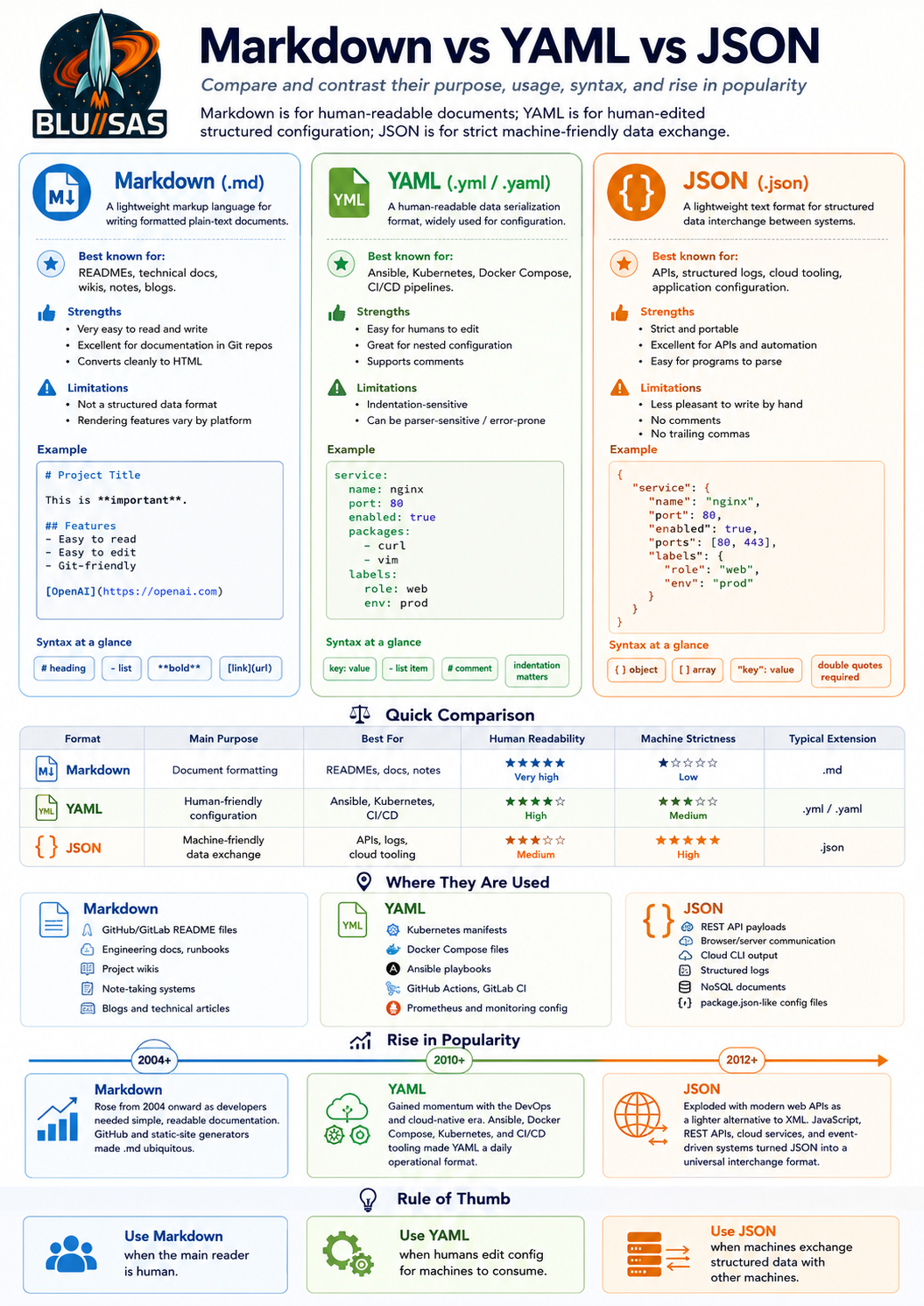
Markdown, YAML, and JSON are often discussed together because they are all plain-text formats, but they solve different problems.
Markdown is for documents. YAML and JSON are for data. YAML is optimized for humans editing configuration. JSON is optimized for machines exchanging structured data.
High-level comparison
| Format | Primary purpose | Human readability | Machine strictness | Common extension |
|---|---|---|---|---|
| Markdown | Writing formatted documents | Very high | Low/medium | .md |
| YAML | Human-friendly configuration/data | High | Medium | .yaml, .yml |
| JSON | Machine-friendly structured data exchange | Medium | High | .json |
Markdown
Markdown is a lightweight markup format for writing readable plain-text documents that can be converted into HTML and other output formats. John Gruber’s original description defines Markdown as both a plain-text formatting syntax and a Perl tool that converts it to valid HTML.
Example:
# Project Title

This is a **technical document**.

## Features

- Easy to read
- Easy to edit
- Works well in Git

```bash
sudo systemctl status nginx
Markdown is used for:

| Area | Examples |
|---|---|
| Software documentation | `README.md`, `CONTRIBUTING.md`, release notes |
| Git platforms | GitHub, GitLab, Bitbucket project pages |
| Static sites | Hugo, Jekyll, MkDocs, Docusaurus |
| Notes and wikis | Obsidian, Notion-like exports, internal engineering docs |
| AI workflows | Prompt libraries, canon documents, structured notes |

Its popularity rose because it was easy to learn, readable as raw text, Git-friendly, and close to how people already wrote plain-text emails and forum posts. The CommonMark project notes that Markdown was created in 2004 by John Gruber with Aaron Swartz, and that by 2014 there were dozens of implementations in many languages. :contentReference[oaicite:1]{index=1}

The trade-off is that Markdown is not a strict data format. Different renderers support different extensions: GitHub Flavored Markdown, CommonMark, Markdown Extra, Pandoc Markdown, and others. Tables, task lists, footnotes, front matter, and diagram syntax may work in one tool but not another.

## YAML

YAML is a human-readable data serialization format. In DevOps, it has become the default language of configuration because it can represent structured data without the visual noise of braces and quotes.

Example:

```yaml
service:
  name: nginx
  port: 80
  enabled: true
  packages:
    - curl
    - vim
YAML is used for:
| Area | Examples |
|---|---|
| Infrastructure automation | Ansible playbooks, SaltStack states |
| Containers | Docker Compose files |
| Kubernetes | Deployments, Services, ConfigMaps, Helm values |
| CI/CD | GitHub Actions, GitLab CI, Azure Pipelines |
| Observability | Prometheus config, Alertmanager config, Grafana provisioning |
| Static sites/docs | Markdown front matter |
Its popularity rose with infrastructure-as-code and cloud-native tooling. Kubernetes, Ansible, Docker Compose, GitHub Actions, and GitLab CI all made YAML a daily format for SREs, DevOps engineers, and platform engineers. YAML’s attraction is that it is easier to edit by hand than JSON for long configuration files.
The trade-off is that YAML can be surprisingly fragile. Indentation is semantic, tabs can break parsing, and implicit typing can produce unexpected results. For example, some YAML parsers historically treated values like yes, no, on, and off as booleans. YAML 1.2 focused on better JSON compatibility and removed several problematic implicit typing recommendations.
JSON
JSON is a lightweight, text-based, language-independent data interchange format derived from JavaScript syntax. RFC 8259 defines it as a portable representation for structured data. JSON.org similarly describes JSON as easy for humans to read and write, and easy for machines to parse and generate.
Example:
{
  "service": {
    "name": "nginx",
    "port": 80,
    "enabled": true,
    "packages": [
      "curl",
      "vim"
    ]
  }
}
JSON is used for:
| Area | Examples |
|---|---|
| Web APIs | REST responses, request bodies |
| Browser/server communication | JavaScript frontends calling backend services |
| Cloud tooling | AWS, Azure, GCP CLI/API responses |
| Logs/events | Structured application logs, telemetry events |
| Databases | MongoDB-style documents, PostgreSQL jsonb, Elasticsearch documents |
| Config files | package.json, tsconfig.json, composer.json |
JSON’s rise came from the web. It became the natural alternative to XML for browser/server communication because it was lighter, simpler, and mapped easily to JavaScript objects. Later it spread into APIs, cloud platforms, logging pipelines, NoSQL databases, and event-driven systems.
The trade-off is that JSON is strict. It does not allow comments, trailing commas, or unquoted keys. That strictness is annoying for humans editing config by hand, but excellent for APIs and machines.
Syntax comparison
The same data represented in each format looks very different.
Markdown: document-oriented
# Service

- Name: nginx
- Port: 80
- Enabled: true
This is readable documentation, but a program cannot reliably treat it as structured service data without extra parsing rules.
YAML: human-edited structure
service:
  name: nginx
  port: 80
  enabled: true
This is structured and still easy for a person to edit.
JSON: machine-oriented structure
{
  "service": {
    "name": "nginx",
    "port": 80,
    "enabled": true
  }
}
This is explicit, strict, and ideal for software interchange.
Why each became popular
| Format | Why it rose |
|---|---|
| Markdown | Developers needed simple, Git-friendly documentation that was readable before rendering. GitHub, GitLab, static site generators, and technical blogging made .md ubiquitous. |
| YAML | DevOps needed readable configuration for increasingly complex infrastructure. Ansible, Kubernetes, Docker Compose, and CI/CD systems pushed YAML into everyday engineering work. |
| JSON | Web applications needed a lightweight alternative to XML for APIs. JavaScript, REST APIs, cloud SDKs, logs, and NoSQL databases made JSON a universal exchange format. |
Stack Overflow’s 2025 Developer Survey is a useful popularity signal for Markdown specifically: it reports “Markdown File” among code documentation and collaboration tools, with Markdown continuing as the most admired sync tool for the third year. GitHub’s 2025 Octoverse also shows the broader context: developer activity and repository creation are at record levels, with 630 million total repositories and 121 million new repositories in 2025; that growth increases the importance of plain-text project metadata, documentation, config, and API formats.
Strengths and weaknesses
| Format | Strengths | Weaknesses |
|---|---|---|
| Markdown | Very easy to read; ideal for docs; works well in Git; low learning curve | Not strict data; renderer differences; limited layout control |
| YAML | Good for hand-written config; less noisy than JSON; supports comments; common in DevOps | Indentation-sensitive; parser/version quirks; can become messy at scale |
| JSON | Strict and portable; excellent for APIs; easy for machines; widely supported | No comments; verbose for humans; not pleasant for large hand-written config |
In SRE/DevOps terms
Use Markdown when you are writing:
README files
runbooks
architecture notes
incident reviews
project documentation
Use YAML when you are defining:
Ansible playbooks
Kubernetes manifests
Docker Compose files
CI/CD pipelines
Prometheus or Alertmanager config
Helm values
Use JSON when you are handling:
API payloads
structured logs
cloud CLI output
event data
application configuration consumed by software
machine-to-machine interchange
Rule of thumb
Use Markdown when the reader is primarily a human.
Use YAML when the editor is primarily a human but the consumer is a machine.
Use JSON when the producer and consumer are primarily machines.
In practice, modern engineering stacks use all three together: Markdown explains the system, YAML configures the system, and JSON moves data through the system.
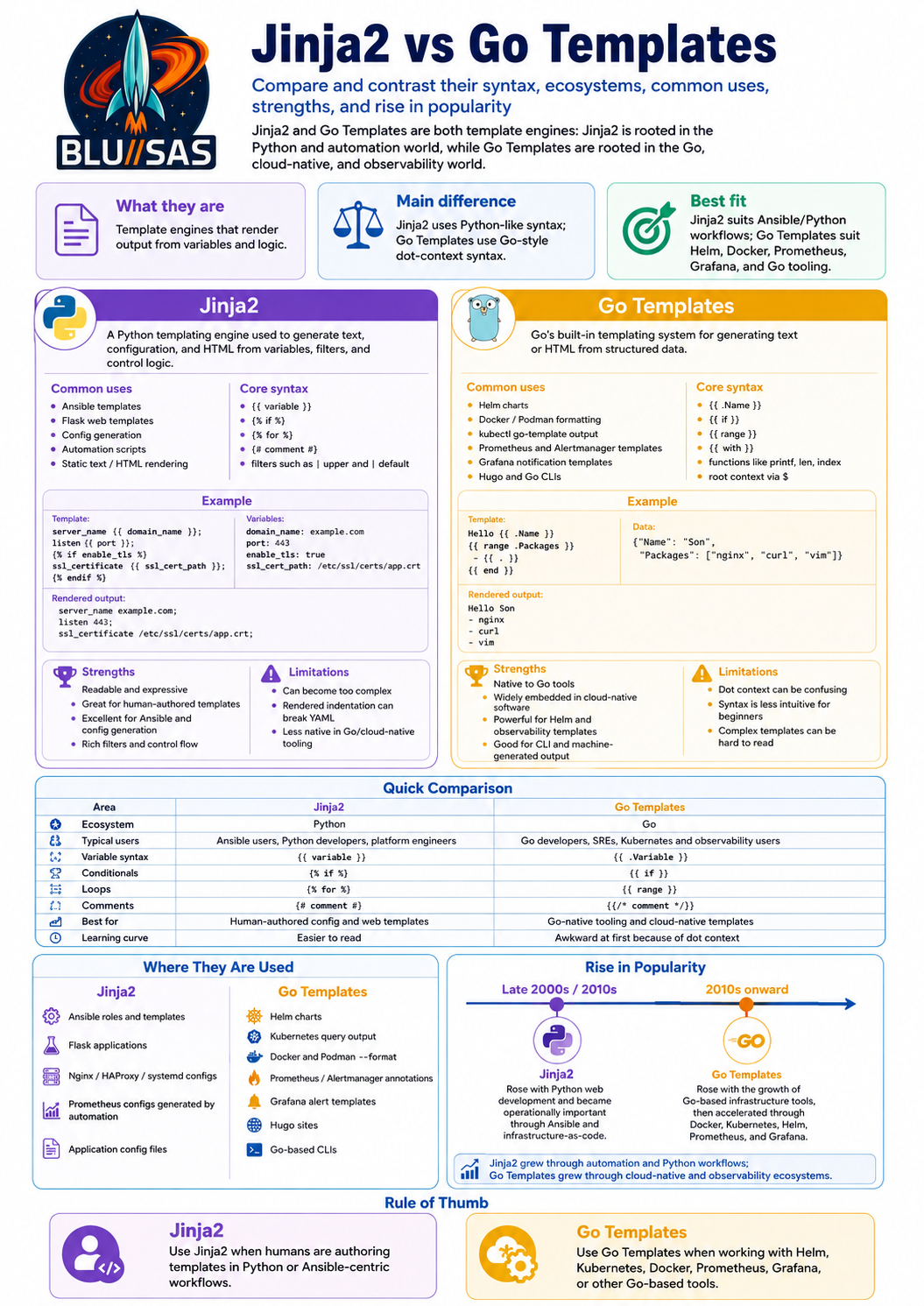
Jinja2 and Go Templates are both template engines: they take a template plus input data, then render output text. The difference is their ecosystem, syntax style, and typical operational use.
Jinja2 belongs mainly to the Python and automation world. Go Templates belong mainly to the Go, Kubernetes, cloud-native, and observability world.
High-level comparison
| Area | Jinja2 | Go Templates |
|---|---|---|
| Language ecosystem | Python | Go |
| Typical users | Python developers, Ansible users, platform engineers | Go developers, Kubernetes/Helm users, SREs |
| Main syntax style | Python-like | Go-like, dot-context based |
| Variable output | {{ variable }} | {{ .Variable }} |
| Logic blocks | {% if %}, {% for %} | {{ if }}, {{ range }} |
| Comments | {# comment #} | {{/* comment */}} |
| Best for | Human-authored templates, config generation, web templates | Go-native tooling, Helm charts, CLI formatting, alert templates |
| Learning curve | Usually easier | More awkward at first because of . and $ context |
| Common file extension | .j2 | varies: .tmpl, .gotmpl, Helm YAML templates |
What Jinja2 is
Jinja2, now usually just called Jinja, is a fast, expressive, extensible template engine for Python. Its syntax is designed to feel familiar to Python users, with variables, filters, tests, conditionals, loops, inheritance, and macros. The official Jinja documentation describes it as a template engine where placeholders allow code similar to Python syntax, then data is passed in to render the final document.
Basic Jinja2 example:
server_name {{ domain_name }};
listen {{ port }};

{% if enable_tls %}
ssl_certificate {{ ssl_cert_path }};
ssl_certificate_key {{ ssl_key_path }};
{% endif %}
With variables:
domain_name: example.com
port: 443
enable_tls: true
ssl_cert_path: /etc/ssl/certs/app.crt
ssl_key_path: /etc/ssl/private/app.key
Rendered output:
server_name example.com;
listen 443;

ssl_certificate /etc/ssl/certs/app.crt;
ssl_certificate_key /etc/ssl/private/app.key;
What Go Templates are
Go Templates are Go’s built-in templating system, provided mainly through the standard library packages:
text/template
html/template
text/template is used for plain text, config files, CLI output, YAML, JSON, Markdown, and scripts. html/template is used for HTML and includes contextual escaping to reduce injection risk. Hugo’s documentation summarizes this distinction: text/template generates textual output, while html/template generates HTML output safe against code injection.
Basic Go Template example:
server_name {{ .DomainName }};
listen {{ .Port }};

{{ if .EnableTLS }}
ssl_certificate {{ .SSLCertPath }};
ssl_certificate_key {{ .SSLKeyPath }};
{{ end }}
With data:
{
  "DomainName": "example.com",
  "Port": 443,
  "EnableTLS": true,
  "SSLCertPath": "/etc/ssl/certs/app.crt",
  "SSLKeyPath": "/etc/ssl/private/app.key"
}
Rendered output:
server_name example.com;
listen 443;

ssl_certificate /etc/ssl/certs/app.crt;
ssl_certificate_key /etc/ssl/private/app.key;
Syntax comparison
Variables
Jinja2:
{{ hostname }}
{{ server.ip }}
Go Templates:
{{ .Hostname }}
{{ .Server.IP }}
The key Go Template concept is the dot, .. It means “the current data context”. Inside loops and with blocks, the meaning of . changes.
Conditionals
Jinja2:
{% if environment == "production" %}
log_level: warn
{% else %}
log_level: debug
{% endif %}
Go Templates:
{{ if eq .Environment "production" }}
log_level: warn
{{ else }}
log_level: debug
{{ end }}
Jinja2 uses infix-style comparison: environment == "production".
Go Templates use functions: eq .Environment "production".
Loops
Jinja2:
{% for package in packages %}
- {{ package }}
{% endfor %}
Go Templates:
{{ range .Packages }}
- {{ . }}
{{ end }}
In Go Templates, inside range, . becomes the current item.
Filters and functions
Jinja2:
{{ name | upper }}
{{ packages | length }}
{{ port | default(80) }}
Go Templates:
{{ printf "%s:%d" .Host .Port }}
{{ len .Packages }}
{{ .Name | printf "service-%s" }}
Jinja2 filters are usually easier to read for non-programmers. Go Template functions are powerful but less intuitive until you understand pipelines and function calling.
Where Jinja2 is used
Jinja2 is widely used in:
| Area | Example |
|---|---|
| Python web apps | Flask templates |
| Automation | Ansible templates |
| Configuration generation | Nginx, Prometheus, systemd, app configs |
| Data engineering | dbt-style SQL templating patterns |
| Home automation | Home Assistant templates |
| Static/document generation | HTML, Markdown, YAML, text files |
Flask uses Jinja as its template engine by default, with autoescaping enabled for common HTML/XML-style template extensions. In infrastructure automation, Jinja2 became especially prominent through Ansible, where templates such as nginx.conf.j2, prometheus.yml.j2, and systemd.service.j2 are common operational patterns.
A typical Ansible task using Jinja2:
- name: Deploy nginx config
  ansible.builtin.template:
    src: nginx.conf.j2
    dest: /etc/nginx/conf.d/app.conf
    owner: root
    group: root
    mode: "0644"
  notify: Restart nginx
Template:
server {
    listen {{ nginx_port | default(80) }};
    server_name {{ server_name }};

    location / {
        proxy_pass http://{{ backend_host }}:{{ backend_port }};
    }
}
Where Go Templates are used
Go Templates are widely used in:
| Area | Example |
|---|---|
| Kubernetes packaging | Helm charts |
| Kubernetes querying | kubectl -o go-template |
| Containers | Docker/Podman --format output |
| Static sites | Hugo templates |
| Observability | Prometheus, Alertmanager, Grafana notification templates |
| Go applications | CLI output, config generation, HTML rendering |
| DevOps tooling | Many Go-written tools expose Go Template formatting |
Helm chart templates are based on Go Templates, with Helm-specific objects and extra functions. Helm’s chart template guide is explicitly focused on Helm’s template language. Prometheus also documents that its templating language for alert annotations, labels, and console pages is based on the Go templating system. Grafana’s alerting documentation similarly describes its notification and alert rule templating language as Go-template-based.
A typical Helm template:
apiVersion: apps/v1
kind: Deployment
metadata:
  name: {{ .Release.Name }}-app
spec:
  replicas: {{ .Values.replicaCount }}
  template:
    spec:
      containers:
        - name: {{ .Chart.Name }}
          image: "{{ .Values.image.repository }}:{{ .Values.image.tag }}"
A typical Docker formatting example:
docker ps --format 'table {{.Names}}\t{{.Image}}\t{{.Status}}'A typical Prometheus alert annotation:
annotations:
  summary: "Instance {{ $labels.instance }} is down"
  description: "{{ $labels.instance }} has been down for more than 5 minutes."
Rise in popularity
Jinja2’s popularity rose through the Python web and automation ecosystem. It was created in the late 2000s and became closely associated with Flask, which helped make it familiar to Python web developers. Its larger operational rise came from Ansible: as infrastructure-as-code became mainstream, Jinja2 became the standard way to generate host-specific configuration files from inventories, variables, and roles.
In practical terms, Jinja2 rose because it solved a very common problem:
same config pattern + different hosts/environments = generated configFor example:
nginx.conf.j2
prometheus.yml.j2
systemd.service.j2
haproxy.cfg.j2
app.env.j2
Go Templates rose through the Go tooling and cloud-native ecosystem. Go became a dominant implementation language for infrastructure tooling, including Docker, Kubernetes, Prometheus, Terraform-adjacent tools, Helm, Hugo, and many CLIs. As these tools exposed templating or output formatting, Go Templates became familiar to SREs and platform engineers even if they were not writing Go code directly.
Their popularity accelerated with Kubernetes and Helm. Helm charts made Go Templates central to packaging Kubernetes applications, while Prometheus, Alertmanager, Grafana, Docker, and kubectl reinforced Go-template-style rendering across daily operational workflows.
Strengths and weaknesses
| Format | Strengths | Weaknesses |
|---|---|---|
| Jinja2 | Readable syntax; Python-like expressions; strong filters; macros and inheritance; excellent for Ansible/config generation | Can generate invalid YAML if indentation is wrong; template logic can become too complex; not native to Go/cloud-native tools |
| Go Templates | Built into Go; widely embedded in cloud-native tools; powerful context model; safe HTML option via html/template; good for Helm and CLI formatting | Syntax is less friendly; dot context changes can confuse users; complex logic can become hard to read; function style is awkward for beginners |
Practical SRE comparison
Use Jinja2 when working with:
Ansible roles
host-specific Linux config files
Python/Flask apps
Nginx/HAProxy/systemd templates
Prometheus config generated by Ansible
environment-specific application config
Use Go Templates when working with:
Helm charts
Kubernetes manifest generation
Docker or Podman --format output
kubectl -o go-template
Prometheus/Alertmanager labels and annotations
Grafana notification templates
Hugo sites
Go-based CLIs
Key mental model
Jinja2:
Python-like template language for humans writing automation and web templates.Go Templates:
Go-native template language embedded into cloud-native tools and Go programs.Rule of thumb
Use Jinja2 when your workflow is Python/Ansible-centric and you want readable, expressive templates for configuration files.
Use Go Templates when your workflow is Kubernetes/Helm/Prometheus/Grafana/Docker-centric and you need to work with the templating system already built into those tools.
In modern platform engineering, the two often coexist: Jinja2 renders infrastructure config through Ansible, while Go Templates render Kubernetes, Helm, alerting, and CLI output.