Kolla-Ansible is the deployment automation layer for OpenStack. It uses Ansible to configure hosts and uses containers to run OpenStack services such as Keystone, Nova, Neutron, Glance, Cinder, Horizon, RabbitMQ, MariaDB, HAProxy and others.
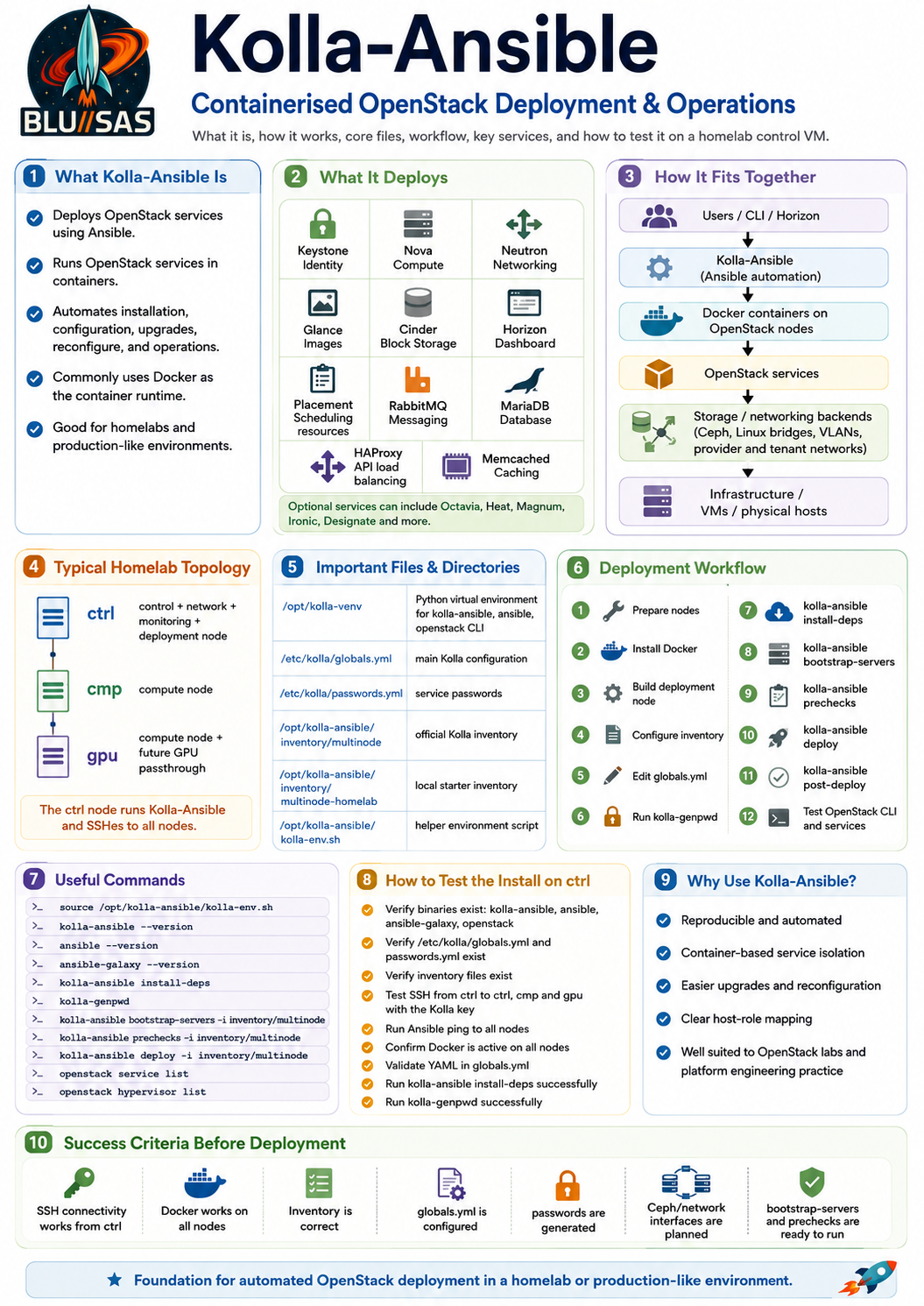
In your homelab, ctrl is now both:
OpenStack control node
Kolla-Ansible deployment node
That means ctrl will run the deployment tooling and SSH into:
ctrl  → control / network / monitoring
cmp   → compute
gpu   → compute / future GPU passthrough
Kolla-Ansible’s normal workflow is:
install Kolla-Ansible
copy globals.yml + passwords.yml
prepare inventory
install Galaxy dependencies
generate passwords
bootstrap servers
run prechecks
deploy OpenStack
post-deploy
test OpenStack CLI
The official quickstart recommends using a Python virtual environment for Kolla-Ansible to avoid conflicts with system Python packages, and it copies globals.yml and passwords.yml into /etc/kolla. It also uses kolla-ansible install-deps to install Ansible Galaxy requirements.
1. What Kolla-Ansible actually does
Kolla-Ansible is not OpenStack itself. It is the tool that deploys and manages OpenStack.
It handles:
Host preparation
Container runtime setup
OpenStack service configuration
Container image selection
Service deployment
Service restart/reconfigure
Password generation
HAProxy configuration
RabbitMQ setup
MariaDB setup
OpenStack API service deployment
Post-deployment admin credentials
Kolla-Ansible deploys OpenStack services as containers. So instead of installing nova-api, keystone, glance-api, neutron-server, etc. directly as system packages, it creates containerised services managed through Docker or Podman depending on the deployment configuration and release.
For your lab, that means later you should expect containers such as:
keystone
nova_api
nova_scheduler
nova_conductor
nova_compute
neutron_server
neutron_openvswitch_agent or ovn components
glance_api
cinder_api
cinder_scheduler
rabbitmq
mariadb
memcached
haproxy
horizon
The important mental model is:
Kolla-Ansible = installer / orchestrator
Docker        = container runtime
OpenStack     = cloud control plane running inside containers
Ceph          = storage backend
Proxmox       = physical/virtual lab substrate
2. Important Kolla-Ansible directories on ctrl
Your playbook created a layout like this:
/opt/kolla-venvThis is the Python virtual environment containing:
kolla-ansible
ansible
ansible-galaxy
openstack client
Python dependencies
Then:
/etc/kollaThis is the main configuration directory.
It should contain:
/etc/kolla/globals.yml
/etc/kolla/passwords.yml
globals.yml is the main Kolla-Ansible configuration file. The quickstart explicitly describes it as the main config file and notes that it is stored by default at /etc/kolla/globals.yml.
passwords.yml stores generated service passwords. The quickstart says the passwords are blank initially and can be filled using kolla-genpwd.
Then:
/opt/kolla-ansible/inventoryThis is where your copied inventories live:
all-in-one
multinode
multinode-homelab
The official multinode documentation says the inventory determines which services land on which hosts, and that IP addresses or hostnames must be added to key groups such as control, network, compute, monitoring, and storage.
Then:
/opt/kolla-ansible/kolla-env.shThis is your helper file so you can do:
source /opt/kolla-ansible/kolla-env.shand get:
kolla-ansible
openstack
ka
osc
in your shell path.
3. First test: log into ctrl
From your workstation:
ssh sont@192.168.1.51Confirm you are on the correct VM:
hostname
hostname -f
ip -br addr
Expected:
ctrlThen load your Kolla environment:
source /opt/kolla-ansible/kolla-env.shVerify the path:
echo $PATH
which kolla-ansible
which ansible
which ansible-playbook
which ansible-galaxy
which openstack
Expected examples:
/opt/kolla-venv/bin/kolla-ansible
/opt/kolla-venv/bin/ansible
/opt/kolla-venv/bin/ansible-playbook
/opt/kolla-venv/bin/ansible-galaxy
/opt/kolla-venv/bin/openstack
If which kolla-ansible does not point to /opt/kolla-venv/bin/kolla-ansible, your shell is not using the venv correctly.
4. Test Kolla-Ansible and Ansible versions
Run:
kolla-ansible --version
ansible --version
ansible-playbook --version
ansible-galaxy --version
openstack --version
You are looking for:
kolla-ansible works
ansible works
ansible-galaxy works
openstack client works
For the issue you hit earlier, pay special attention to:
ansible --versionThe first line should show a compatible Ansible core version for your installed Kolla-Ansible. Your earlier error said it expected Ansible between 2.15 and 2.16, so anything outside that range will fail install-deps.
Useful check:
/opt/kolla-venv/bin/python -m pip list | egrep 'kolla|ansible|openstack'5. Test that Kolla example files exist
Run:
ls -l /etc/kollaExpected:
globals.yml
passwords.yml
Then:
ls -l /opt/kolla-ansible/inventoryExpected:
all-in-one
multinode
multinode-homelab
Also check where Kolla installed its shared files:
find /opt/kolla-venv/share/kolla-ansible \
  \( -name globals.yml -o -name passwords.yml -o -name multinode -o -name all-in-one -o -name requirements.yml \) \
  -print
This should show the source examples copied from the Kolla-Ansible installation.
6. Test Ansible inventory from ctrl
You need to prove that the deployment node can interpret the Kolla inventory and reach the target hosts.
Start with your starter inventory:
ansible-inventory \
  -i /opt/kolla-ansible/inventory/multinode-homelab \
  --graph
You want to see groups like:
@control:
  |--ctrl
@network:
  |--ctrl
@compute:
  |--cmp
  |--gpu
@monitoring:
  |--ctrl
@storage:
  |--ctrl
  |--cmp
  |--gpu
@deployment:
  |--localhost
Then list hosts:
ansible \
  -i /opt/kolla-ansible/inventory/multinode-homelab \
  all \
  --list-hosts
Expected:
ctrl
cmp
gpu
localhost
For actual Kolla later, use the official multinode inventory after you have edited it properly. The starter multinode-homelab is good for verifying the idea, but the official multinode file contains many child groups that Kolla roles expect.
7. Test SSH from ctrl to all OpenStack nodes
Kolla-Ansible depends on SSH from the deployment node to the target nodes. The official multinode docs state that Ansible uses SSH from the deployment host to the target hosts.
On ctrl, test:
ssh -i ~/.ssh/id_ed25519_kolla sont@192.168.1.51 hostname
ssh -i ~/.ssh/id_ed25519_kolla sont@192.168.1.52 hostname
ssh -i ~/.ssh/id_ed25519_kolla sont@192.168.1.53 hostname
Expected:
ctrl
cmp
gpu
Then test with Ansible:
ansible \
  -i /opt/kolla-ansible/inventory/multinode-homelab \
  openstack \
  -m ping
This may fail if your starter inventory does not define an openstack group. In that case, test the explicit groups:
ansible \
  -i /opt/kolla-ansible/inventory/multinode-homelab \
  control,compute \
  -m ping
Expected:
ctrl | SUCCESS => {"ping": "pong"}
cmp  | SUCCESS => {"ping": "pong"}
gpu  | SUCCESS => {"ping": "pong"}
If this fails, run:
ansible \
  -i /opt/kolla-ansible/inventory/multinode-homelab \
  control,compute \
  -m ping \
  -vvv
The -vvv output will usually reveal whether it is an SSH key, sudo, hostname, Python, or inventory problem.
8. Test privilege escalation
Kolla-Ansible needs privilege escalation because it configures Docker, networking, kernel settings, config directories and host-level services.
Run:
ansible \
  -i /opt/kolla-ansible/inventory/multinode-homelab \
  control,compute \
  -m command \
  -a "whoami" \
  -b
Expected:
rootThen:
ansible \
  -i /opt/kolla-ansible/inventory/multinode-homelab \
  control,compute \
  -m command \
  -a "docker ps" \
  -b
Expected: successful output on all three nodes.
9. Test Docker on all nodes from ctrl
Run:
ansible \
  -i /opt/kolla-ansible/inventory/multinode-homelab \
  control,compute \
  -m shell \
  -a "hostname; docker --version; docker ps --format '{{.Names}}' | head" \
  -b
Expected:
Docker version ...No OpenStack containers exist yet, so an empty container list is fine.
Also check Docker daemon state:
ansible \
  -i /opt/kolla-ansible/inventory/multinode-homelab \
  control,compute \
  -m systemd \
  -a "name=docker state=started enabled=true" \
  -b
10. Test the Kolla requirements.yml
Your current blocker has been:
error: pathspec 'stable/2024.2' did not match any file(s) known to gitSo inspect the file before rerunning install-deps:
grep -n -A4 -B4 "ansible-collection-kolla" \
  /opt/kolla-venv/share/kolla-ansible/requirements.yml
If you still see:
version: stable/2024.2that is likely to fail in your current environment.
After applying the patch we discussed, test the Galaxy install directly:
PATH=/opt/kolla-venv/bin:$PATH \
VIRTUAL_ENV=/opt/kolla-venv \
HOME=/home/sont \
kolla-ansible install-deps
If it succeeds, verify collections:
ansible-galaxy collection list | grep -E 'kolla|openstack|community'You should see the Kolla collection and related dependencies.
11. Test kolla-genpwd
Once the install/dependency layer is working, test password generation.
First back up the password file:
sudo cp /etc/kolla/passwords.yml /etc/kolla/passwords.yml.bak.$(date +%F-%H%M%S)Then run:
kolla-genpwdCheck that passwords were populated:
grep -n "^[a-zA-Z0-9_].*: $" /etc/kolla/passwords.yml | headIf that returns nothing, good: it means the blank values were likely filled.
Better check:
grep -n "keystone_admin_password" /etc/kolla/passwords.yml
grep -n "database_password" /etc/kolla/passwords.yml
grep -n "rabbitmq_password" /etc/kolla/passwords.yml
Do not paste your real passwords.yml into chat.
12. Test globals.yml is editable and valid YAML
Before Phase 7.5/7.6, check the file exists and parses:
python3 - <<'PY'
import yaml
with open('/etc/kolla/globals.yml') as f:
    yaml.safe_load(f)
print("globals.yml parses as YAML")
PY
If python3-yaml is missing:
sudo apt install -y python3-yamlAlso inspect key values:
grep -nE "^(kolla_base_distro|network_interface|api_interface|neutron_external_interface|kolla_internal_vip_address|enable_horizon|enable_cinder|enable_ceph)" /etc/kolla/globals.ymlMost of these may still be commented out at this stage. That is fine. You are only testing that the file exists and is readable.
13. Dry-run style checks before real deployment
Once you have a proper Kolla inventory, run these from ctrl.
Check inventory resolution
ansible-inventory \
  -i /opt/kolla-ansible/inventory/multinode \
  --graph
Ping all Kolla hosts
ansible \
  -i /opt/kolla-ansible/inventory/multinode \
  all \
  -m ping
Check remote facts
ansible \
  -i /opt/kolla-ansible/inventory/multinode \
  all \
  -m setup \
  -a "filter=ansible_default_ipv4"
Check Docker
ansible \
  -i /opt/kolla-ansible/inventory/multinode \
  all \
  -m shell \
  -a "hostname; docker --version; systemctl is-active docker" \
  -b
14. Do not run these yet unless inventory and globals are ready
These are the next official deployment commands, but they belong to later stages:
kolla-ansible bootstrap-servers -i /opt/kolla-ansible/inventory/multinode
kolla-ansible prechecks -i /opt/kolla-ansible/inventory/multinode
kolla-ansible deploy -i /opt/kolla-ansible/inventory/multinode
kolla-ansible post-deploy
The quickstart’s deployment sequence is bootstrap-servers, then prechecks, then deploy; after deployment, post-deploy generates the OpenStack client configuration file.
At your current point, I would only run bootstrap-servers after:
multinode inventory is correct
globals.yml has correct interfaces
passwords.yml has been generated
SSH works from ctrl to ctrl/cmp/gpu
Docker works on ctrl/cmp/gpu
15. Useful health-check script to run on ctrl
Create this on ctrl:
cat > ~/test-kolla-install.sh <<'EOF'
#!/usr/bin/env bash
set -euo pipefail

source /opt/kolla-ansible/kolla-env.sh

echo "== Host =="
hostname
hostname -I

echo
echo "== Binaries =="
for b in kolla-ansible ansible ansible-playbook ansible-galaxy openstack; do
  echo -n "$b -> "
  command -v "$b"
done

echo
echo "== Versions =="
kolla-ansible --version
ansible --version | head -n 1
ansible-galaxy --version | head -n 1
openstack --version

echo
echo "== Kolla config files =="
ls -l /etc/kolla/globals.yml /etc/kolla/passwords.yml

echo
echo "== Kolla inventory files =="
ls -l /opt/kolla-ansible/inventory

echo
echo "== Kolla requirements =="
grep -n -A4 -B2 "ansible-collection-kolla" /opt/kolla-venv/share/kolla-ansible/requirements.yml || true

echo
echo "== Ansible inventory graph =="
ansible-inventory -i /opt/kolla-ansible/inventory/multinode-homelab --graph

echo
echo "== SSH ping test =="
ansible -i /opt/kolla-ansible/inventory/multinode-homelab control,compute -m ping

echo
echo "== Become/root test =="
ansible -i /opt/kolla-ansible/inventory/multinode-homelab control,compute -m command -a "whoami" -b

echo
echo "== Docker test =="
ansible -i /opt/kolla-ansible/inventory/multinode-homelab control,compute -m shell -a "hostname; docker --version; systemctl is-active docker" -b

echo
echo "Kolla-Ansible deployment node looks ready."
EOF

chmod +x ~/test-kolla-install.sh
Run:
~/test-kolla-install.shIf that passes, your ctrl VM is correctly prepared as a Kolla-Ansible deployment node.
The success criteria for Phase 7.4
You can consider Phase 7.4 complete when all of this is true:
/opt/kolla-venv/bin/kolla-ansible exists
/opt/kolla-venv/bin/ansible-galaxy exists
/etc/kolla/globals.yml exists
/etc/kolla/passwords.yml exists
/opt/kolla-ansible/inventory/multinode exists
/opt/kolla-ansible/inventory/multinode-homelab exists
kolla-ansible install-deps succeeds
kolla-genpwd succeeds
ctrl can SSH to ctrl/cmp/gpu using ~/.ssh/id_ed25519_kolla
Ansible ping from ctrl to ctrl/cmp/gpu succeeds
Ansible become/root test succeeds
Docker is active on ctrl/cmp/gpu
At that point you are ready for:
Phase 7.5 — Configure Kolla multinode inventory
Phase 7.6 — Configure globals.yml
Phase 7.7 — bootstrap-servers
Phase 7.8 — prechecks
Phase 7.9 — deploy
Kolla-Ansible Cheat Sheet
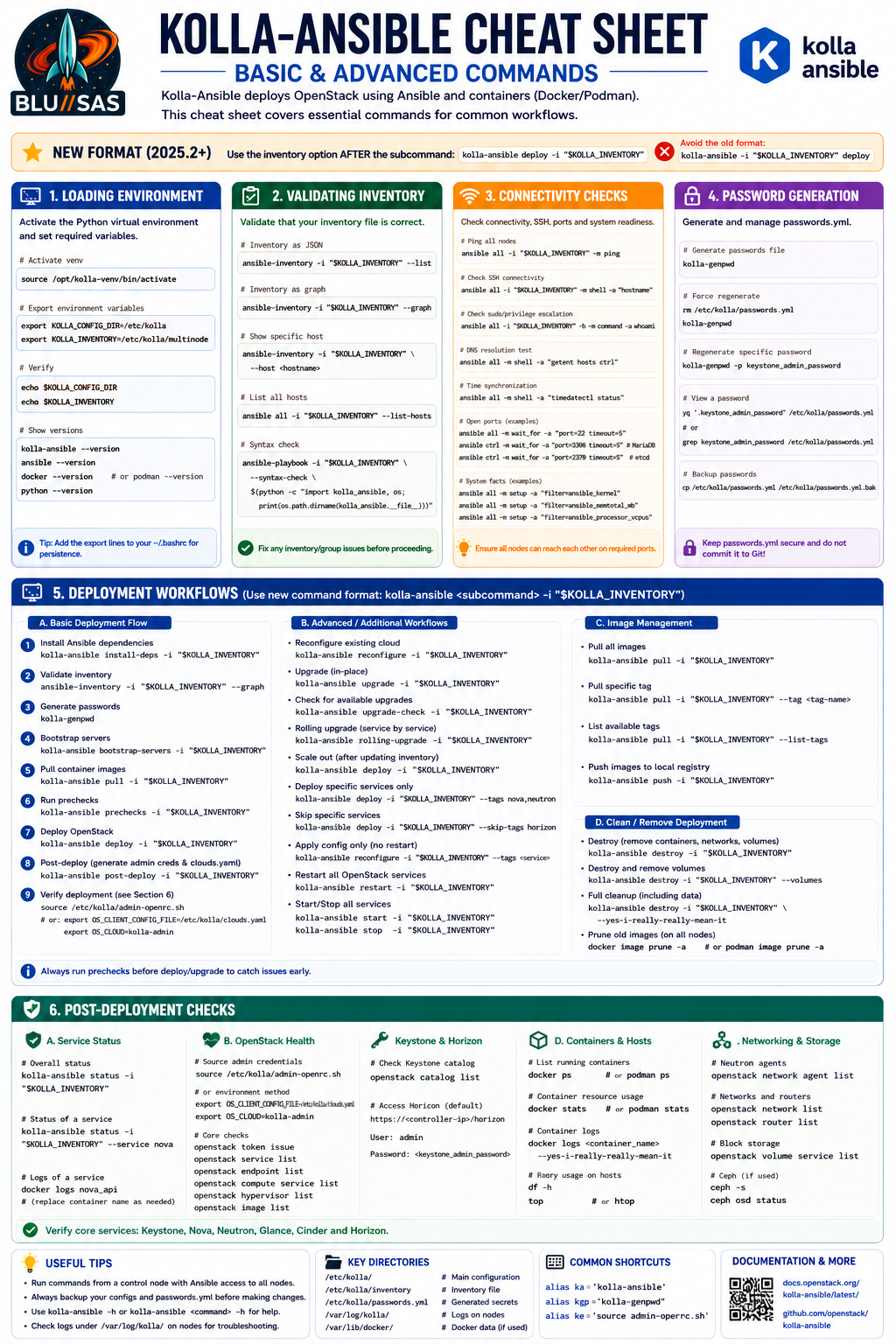
Kolla-Ansible Cheat Sheet (2025.2+)
Basic & Advanced Commands
The following reflects the newer Kolla-Ansible command syntax where the inventory option comes after the subcommand:
kolla-ansible <subcommand> -i "$KOLLA_INVENTORY"1. Loading Environment
Activate Python Virtual Environment
source /opt/kolla-venv/bin/activateExport Environment Variables
export KOLLA_CONFIG_DIR=/etc/kolla
export KOLLA_INVENTORY=/etc/kolla/multinode
Verify Environment
echo $KOLLA_CONFIG_DIR
echo $KOLLA_INVENTORY
Verify Software Versions
kolla-ansible --version
ansible --version
docker --version
or
podman --version2. Validating Inventory
Display Inventory
ansible-inventory -i "$KOLLA_INVENTORY" --listDisplay Inventory Graph
ansible-inventory -i "$KOLLA_INVENTORY" --graphDisplay Specific Host
ansible-inventory \
-i "$KOLLA_INVENTORY" \
--host ctrl
List Hosts
ansible all \
-i "$KOLLA_INVENTORY" \
--list-hosts
Syntax Check
ansible-playbook \
-i "$KOLLA_INVENTORY" \
--syntax-check playbook.yml
3. Connectivity Checks
Ping All Hosts
ansible all \
-i "$KOLLA_INVENTORY" \
-m ping
Verify SSH
ansible all \
-i "$KOLLA_INVENTORY" \
-m shell \
-a hostname
Verify Sudo Access
ansible all \
-i "$KOLLA_INVENTORY" \
-b \
-m command \
-a whoami
DNS Resolution
ansible all \
-i "$KOLLA_INVENTORY" \
-m shell \
-a "getent hosts ctrl"
Time Synchronization
ansible all \
-i "$KOLLA_INVENTORY" \
-m shell \
-a "timedatectl status"
SSH Port
ansible all \
-i "$KOLLA_INVENTORY" \
-m wait_for \
-a "port=22 timeout=5"
MariaDB Port
ansible ctrl \
-i "$KOLLA_INVENTORY" \
-m wait_for \
-a "port=3306 timeout=5"
etcd Port
ansible ctrl \
-i "$KOLLA_INVENTORY" \
-m wait_for \
-a "port=2379 timeout=5"
System Facts
Kernel
ansible all \
-i "$KOLLA_INVENTORY" \
-m setup \
-a "filter=ansible_kernel"
Memory
ansible all \
-i "$KOLLA_INVENTORY" \
-m setup \
-a "filter=ansible_memtotal_mb"
CPUs
ansible all \
-i "$KOLLA_INVENTORY" \
-m setup \
-a "filter=ansible_processor_vcpus"
4. Password Generation
Generate Passwords
kolla-genpwdForce Regenerate
rm /etc/kolla/passwords.yml

kolla-genpwd
Regenerate One Password
kolla-genpwd \
-p keystone_admin_password
Display Password
grep keystone_admin_password \
/etc/kolla/passwords.yml
or
yq '.keystone_admin_password' \
/etc/kolla/passwords.yml
Backup Password File
cp \
/etc/kolla/passwords.yml \
/etc/kolla/passwords.yml.bak
5. Deployment Workflows
A. Basic Deployment
Install Dependencies
kolla-ansible install-deps \
-i "$KOLLA_INVENTORY"
Validate Inventory
ansible-inventory \
-i "$KOLLA_INVENTORY" \
--graph
Generate Passwords
kolla-genpwdBootstrap Servers
kolla-ansible bootstrap-servers \
-i "$KOLLA_INVENTORY"
Pull Images
kolla-ansible pull \
-i "$KOLLA_INVENTORY"
Run Prechecks
kolla-ansible prechecks \
-i "$KOLLA_INVENTORY"
Deploy
kolla-ansible deploy \
-i "$KOLLA_INVENTORY"
Generate Admin Credentials
kolla-ansible post-deploy \
-i "$KOLLA_INVENTORY"
Validate Generated Configuration
kolla-ansible validate-config \
-i "$KOLLA_INVENTORY"
Load Credentials
source /etc/kolla/admin-openrc.shor
export OS_CLIENT_CONFIG_FILE=/etc/kolla/clouds.yaml
export OS_CLOUD=kolla-admin
B. Advanced Operations
Reconfigure
kolla-ansible reconfigure \
-i "$KOLLA_INVENTORY"
Upgrade
kolla-ansible upgrade \
-i "$KOLLA_INVENTORY"
Rolling Upgrade
kolla-ansible rolling-upgrade \
-i "$KOLLA_INVENTORY"
Upgrade Check
kolla-ansible upgrade-check \
-i "$KOLLA_INVENTORY"
Scale Out
(Update inventory first)
kolla-ansible deploy \
-i "$KOLLA_INVENTORY"
Deploy Selected Services
kolla-ansible deploy \
-i "$KOLLA_INVENTORY" \
--tags nova,neutron
Skip Services
kolla-ansible deploy \
-i "$KOLLA_INVENTORY" \
--skip-tags horizon
Restart Services
kolla-ansible restart \
-i "$KOLLA_INVENTORY"
Stop Services
kolla-ansible stop \
-i "$KOLLA_INVENTORY"
Start Services
kolla-ansible start \
-i "$KOLLA_INVENTORY"
C. Image Management
Pull Images
kolla-ansible pull \
-i "$KOLLA_INVENTORY"
Pull Specific Tag
kolla-ansible pull \
-i "$KOLLA_INVENTORY" \
--tag 2025.2
Push Images
kolla-ansible push \
-i "$KOLLA_INVENTORY"
D. Destroy Deployment
Remove Deployment
kolla-ansible destroy \
-i "$KOLLA_INVENTORY"
Destroy Everything
kolla-ansible destroy \
-i "$KOLLA_INVENTORY" \
--yes-i-really-really-mean-it
Remove Old Images
Docker
docker image prune -aPodman
podman image prune -a6. Post-Deployment Checks
Verify Authentication
openstack token issueList Services
openstack service listList Endpoints
openstack endpoint listCompute Services
openstack compute service listHypervisors
openstack hypervisor listImages
openstack image listNetworks
openstack network listRouters
openstack router listNeutron Agents
openstack network agent listVolume Services
openstack volume service listContainer Checks
Docker
docker psPodman
podman psContainer Status
docker statsContainer Logs
docker logs nova_api

docker logs neutron_server

docker logs keystone

docker logs glance_api

docker logs horizon
Container Health
docker inspect \
--format='{{.State.Health.Status}}' \
keystone
Host Health
Disk
df -hMemory
free -hCPU
topor
htopComplete Deployment Workflow
source /opt/kolla-venv/bin/activate

export KOLLA_CONFIG_DIR=/etc/kolla
export KOLLA_INVENTORY=/etc/kolla/multinode

kolla-ansible install-deps -i "$KOLLA_INVENTORY"

ansible-inventory -i "$KOLLA_INVENTORY" --graph

ansible all -i "$KOLLA_INVENTORY" -m ping

kolla-genpwd

kolla-ansible bootstrap-servers -i "$KOLLA_INVENTORY"

kolla-ansible pull -i "$KOLLA_INVENTORY"

kolla-ansible prechecks -i "$KOLLA_INVENTORY"

kolla-ansible deploy -i "$KOLLA_INVENTORY"

kolla-ansible post-deploy -i "$KOLLA_INVENTORY"

kolla-ansible validate-config -i "$KOLLA_INVENTORY"

source /etc/kolla/admin-openrc.sh

openstack token issue
openstack service list
openstack endpoint list
openstack compute service list
openstack hypervisor list
openstack network agent list
This ordering matches the current Kolla-Ansible deployment workflow for the 2025.2 (Flamingo) release and newer, incorporating the install-deps, post-deploy, and validate-config stages as well as the preferred subcommand-first CLI syntax.