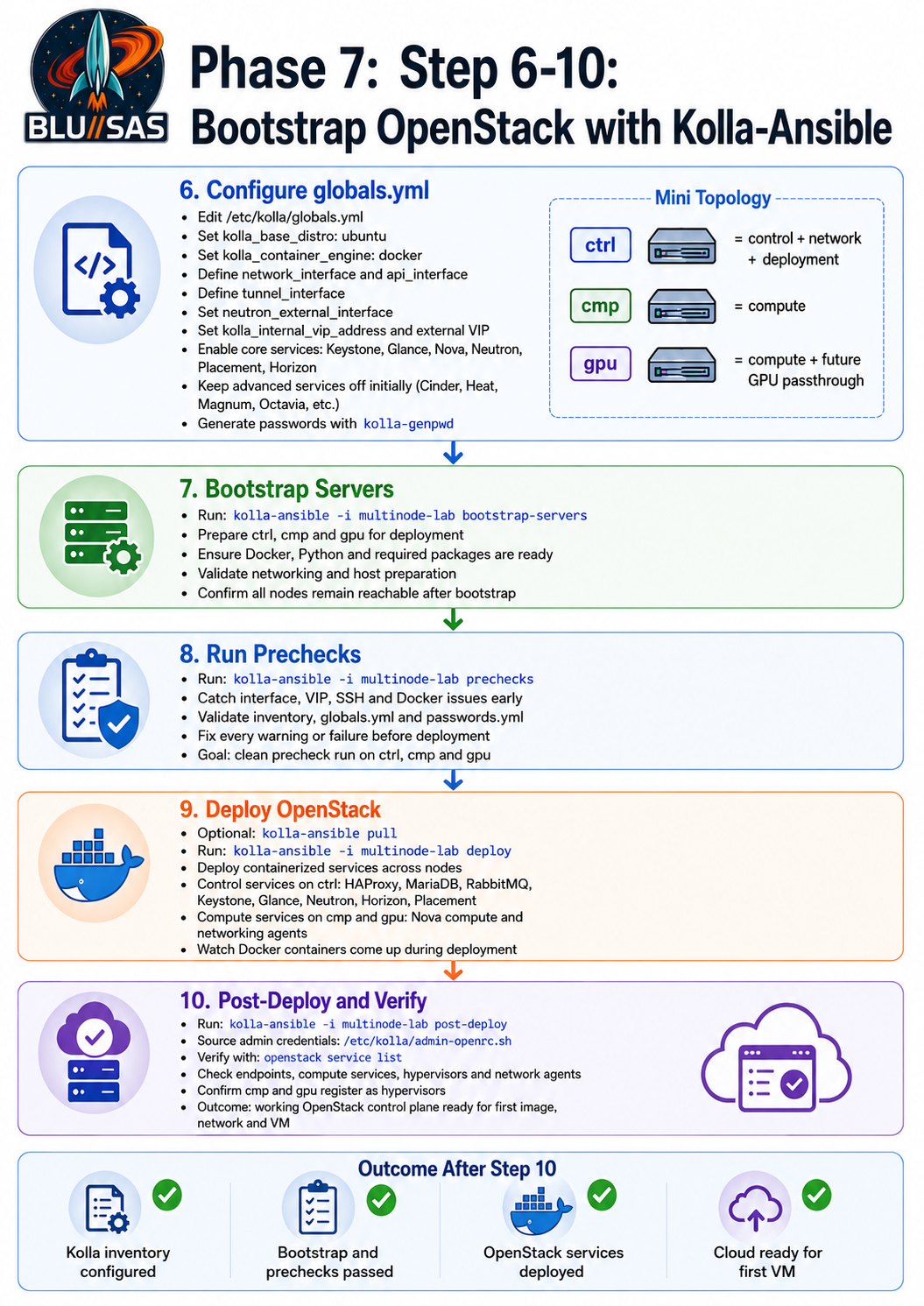
Phase 7.6 — Configure /etc/kolla/globals.yml
7.6.1 Back up the original file
On ctrl:
sudo cp /etc/kolla/globals.yml /etc/kolla/globals.yml.original.$(date +%F-%H%M%S)7.6.2 Choose your Kolla VIP
Pick an unused IP on your management LAN.
Recommended:
192.168.1.60Test that it is unused:
ping -c 2 192.168.1.60You want no replies.
If arping is available:
sudo arping -D -I <management_interface> 192.168.1.60Example:
sudo arping -D -I ens18 192.168.1.60If there is no duplicate response, it is safe to use.
7.6.3 Identify interface names
Run on ctrl:
ip -br addrExample:
ens18  UP  192.168.1.51/24
ens19  UP
For this example:
Management/API interface: ens18
External/Neutron interface: ens19
Also confirm cmp and gpu use the same management interface name:
ansible -i /opt/kolla-ansible/inventory/multinode-lab compute \
  -m shell \
  -a "hostname; ip -br addr" \
  -b
If all three VMs were created from the same Ubuntu template, the management interface is probably the same name everywhere.
7.6.4 Write a minimal first-deploy globals.yml
This is a deliberately conservative first deployment. It enables the core OpenStack services and leaves Ceph/Cinder/GPU integration for the next stage.
Replace ens18 and ens19 with your real interface names.
sudo tee /etc/kolla/globals.yml > /dev/null <<'EOF'
---
###############################################################################
# Kolla-Ansible Homelab globals.yml
# Topology:
#   ctrl = control + network + monitoring + deployment
#   cmp  = compute
#   gpu  = compute, future GPU passthrough
###############################################################################

# Base image settings
kolla_base_distro: "ubuntu"
kolla_install_type: "binary"

# Container runtime
kolla_container_engine: "docker"

# OpenStack release is normally derived from the installed kolla-ansible version.
# Leave unset unless you know you need to pin it.
# openstack_release: "2024.2"

###############################################################################
# Networking
###############################################################################

# Main management/API interface.
# This must be the interface with 192.168.1.51/52/53 on ctrl/cmp/gpu.
network_interface: "ens18"
api_interface: "ens18"

# For the first homelab deployment, keep tunnels on the management interface.
# Later you can move this to a dedicated tenant/tunnel interface.
tunnel_interface: "ens18"

# Neutron external/provider interface.
# This should exist on ctrl and should NOT have an IP address.
neutron_external_interface: "ens19"

# Kolla internal API VIP.
# Must be unused on your management subnet.
kolla_internal_vip_address: "192.168.1.60"

# For this homelab, use the same VIP internally and externally.
kolla_external_vip_address: "192.168.1.60"

###############################################################################
# Neutron
###############################################################################

neutron_plugin_agent: "openvswitch"
neutron_tenant_network_types: "vxlan"

###############################################################################
# Core OpenStack services for first deployment
###############################################################################

enable_haproxy: "yes"
enable_keystone: "yes"
enable_glance: "yes"
enable_nova: "yes"
enable_neutron: "yes"
enable_placement: "yes"
enable_horizon: "yes"

###############################################################################
# Keep these OFF for the first deploy.
# Enable later after the core cloud works.
###############################################################################

enable_cinder: "no"
enable_cinder_backup: "no"

enable_heat: "no"
enable_magnum: "no"
enable_octavia: "no"
enable_designate: "no"
enable_ironic: "no"
enable_barbican: "no"

###############################################################################
# Logging / monitoring
###############################################################################

enable_prometheus: "no"
enable_grafana: "no"

###############################################################################
# Region
###############################################################################

openstack_region_name: "RegionOne"
EOF
Now validate YAML syntax:
python3 - <<'PY'
import yaml
with open('/etc/kolla/globals.yml') as f:
    yaml.safe_load(f)
print("globals.yml parses OK")
PY
If Python says No module named yaml:
sudo apt install -y python3-yamlThen retry the Python validation.
7.6.5 Generate passwords
Back up the current password file:
sudo cp /etc/kolla/passwords.yml /etc/kolla/passwords.yml.original.$(date +%F-%H%M%S)Generate passwords:
kolla-genpwdCheck a few values exist:
grep -n "keystone_admin_password" /etc/kolla/passwords.yml
grep -n "database_password" /etc/kolla/passwords.yml
grep -n "rabbitmq_password" /etc/kolla/passwords.yml
Do not paste passwords.yml into chat or commit it to a public Git repository.
7.6.6 Final Phase 7.6 verification
Run:
grep -nE "^(kolla_base_distro|kolla_install_type|kolla_container_engine|network_interface|api_interface|tunnel_interface|neutron_external_interface|kolla_internal_vip_address|kolla_external_vip_address|neutron_plugin_agent|enable_cinder|enable_horizon)" /etc/kolla/globals.ymlExpected example:
kolla_base_distro: "ubuntu"
kolla_install_type: "binary"
kolla_container_engine: "docker"
network_interface: "ens18"
api_interface: "ens18"
tunnel_interface: "ens18"
neutron_external_interface: "ens19"
kolla_internal_vip_address: "192.168.1.60"
kolla_external_vip_address: "192.168.1.60"
neutron_plugin_agent: "openvswitch"
enable_horizon: "yes"
enable_cinder: "no"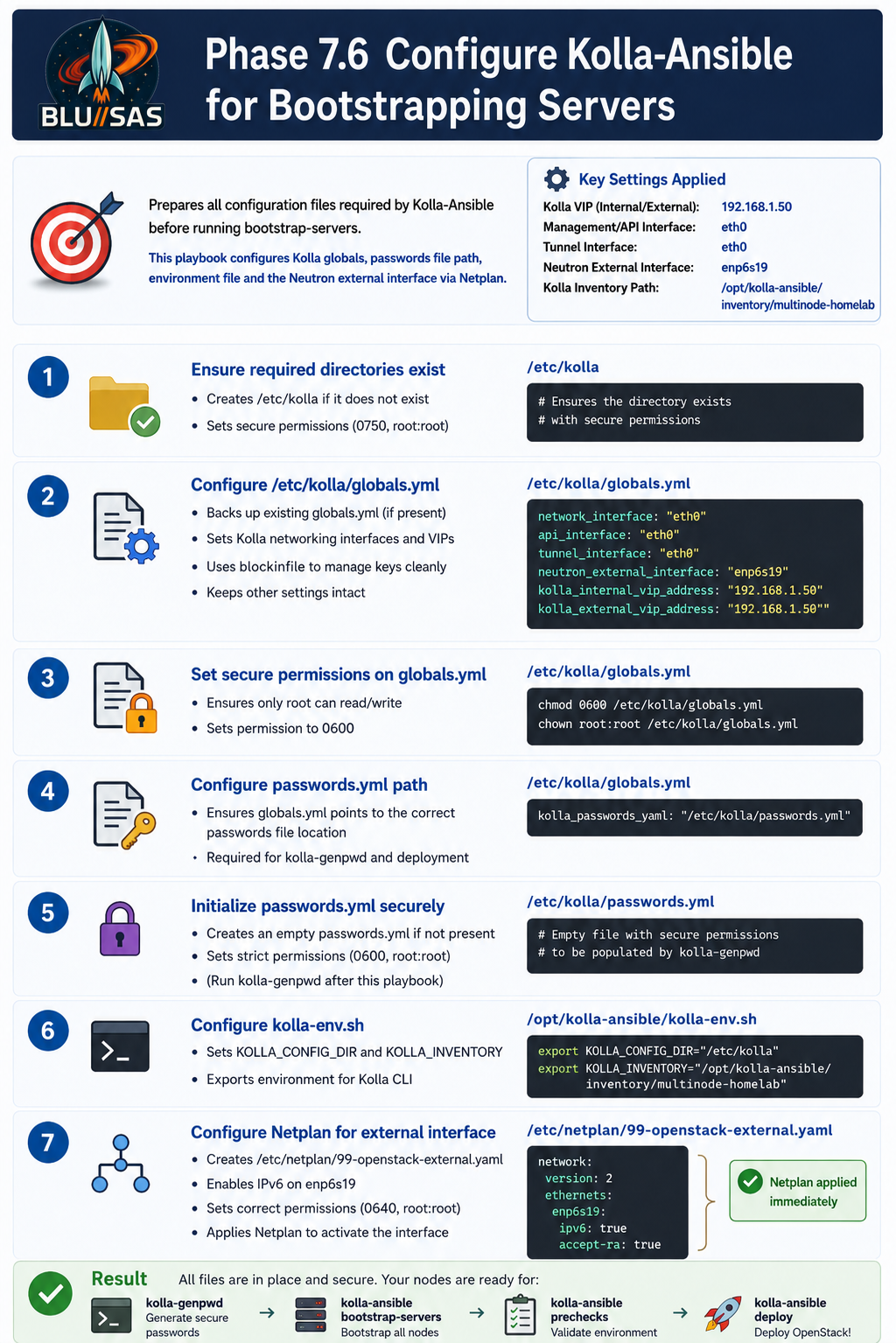
Phase 7.7 — Run bootstrap-servers
bootstrap-servers prepares target hosts for Kolla deployment. In the official quickstart flow, this comes before prechecks and deploy.
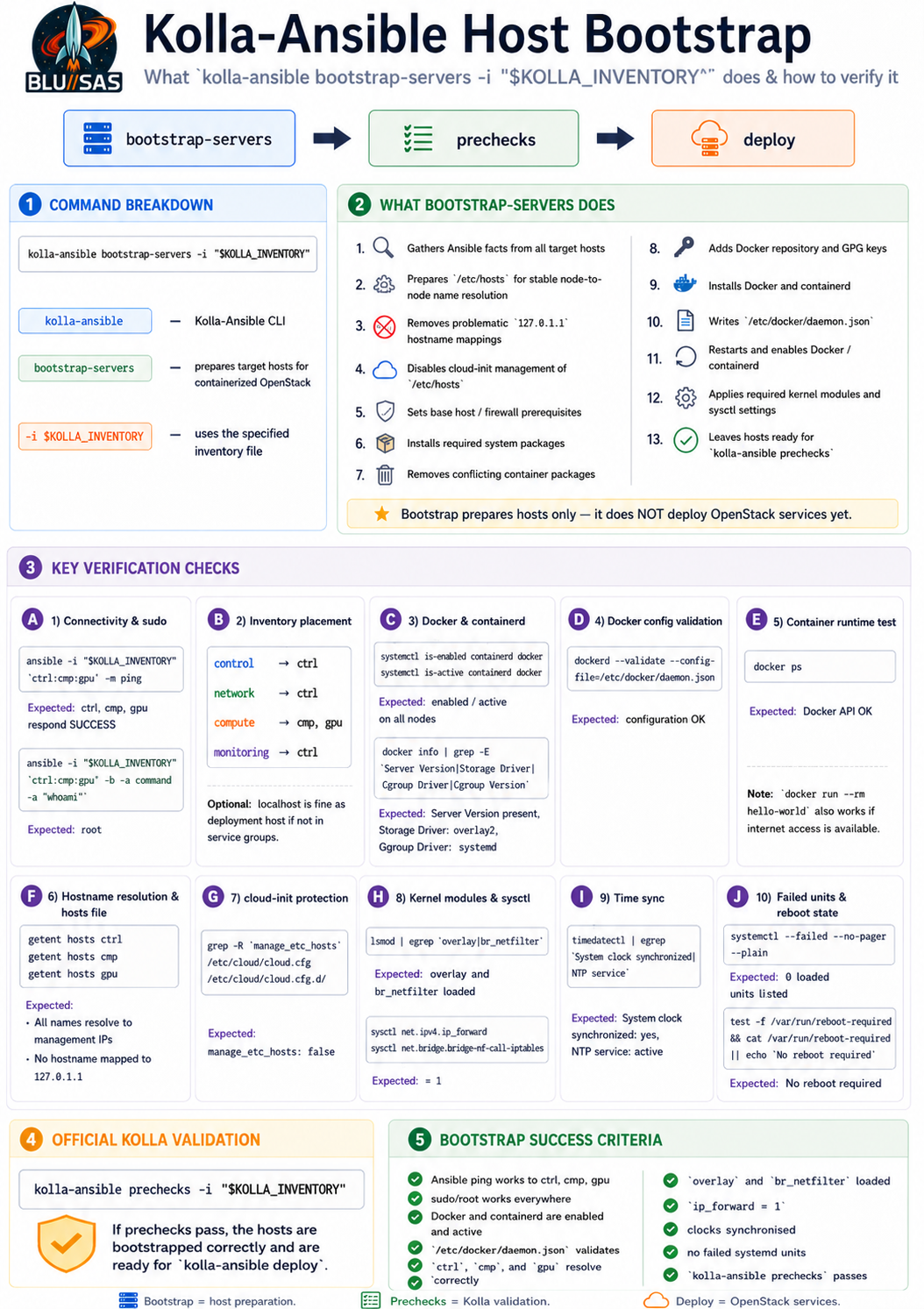
From ctrl:
source /opt/kolla-ansible/kolla-env.sh

export KOLLA_INVENTORY=/opt/kolla-ansible/inventory/multinode-lab
Run bootstrap:
kolla-ansible bootstrap-servers -i "$KOLLA_INVENTORY"This step prepares the nodes for containerised OpenStack services.
7.7.1 Verify after bootstrap
Check Ansible still works:
ansible -i "$KOLLA_INVENTORY" control,compute -m pingCheck Docker:
ansible -i "$KOLLA_INVENTORY" control,compute \
  -m shell \
  -a "hostname; docker --version; systemctl is-active docker" \
  -b
Check Python:
ansible -i "$KOLLA_INVENTORY" control,compute \
  -m shell \
  -a "hostname; python3 --version" \
  -b
Check networking:
ansible -i "$KOLLA_INVENTORY" control,compute \
  -m shell \
  -a "hostname; ip -br addr; ip route" \
  -b
Checkpoint:
Do not proceed until bootstrap-servers completes successfully.Phase 7.8 — Run prechecks
prechecks validates that the hosts and configuration are ready before deployment. The troubleshooting docs note that deployment failures often happen during evaluation, and the precheck feature exists to catch misconfigured environments before deployment.
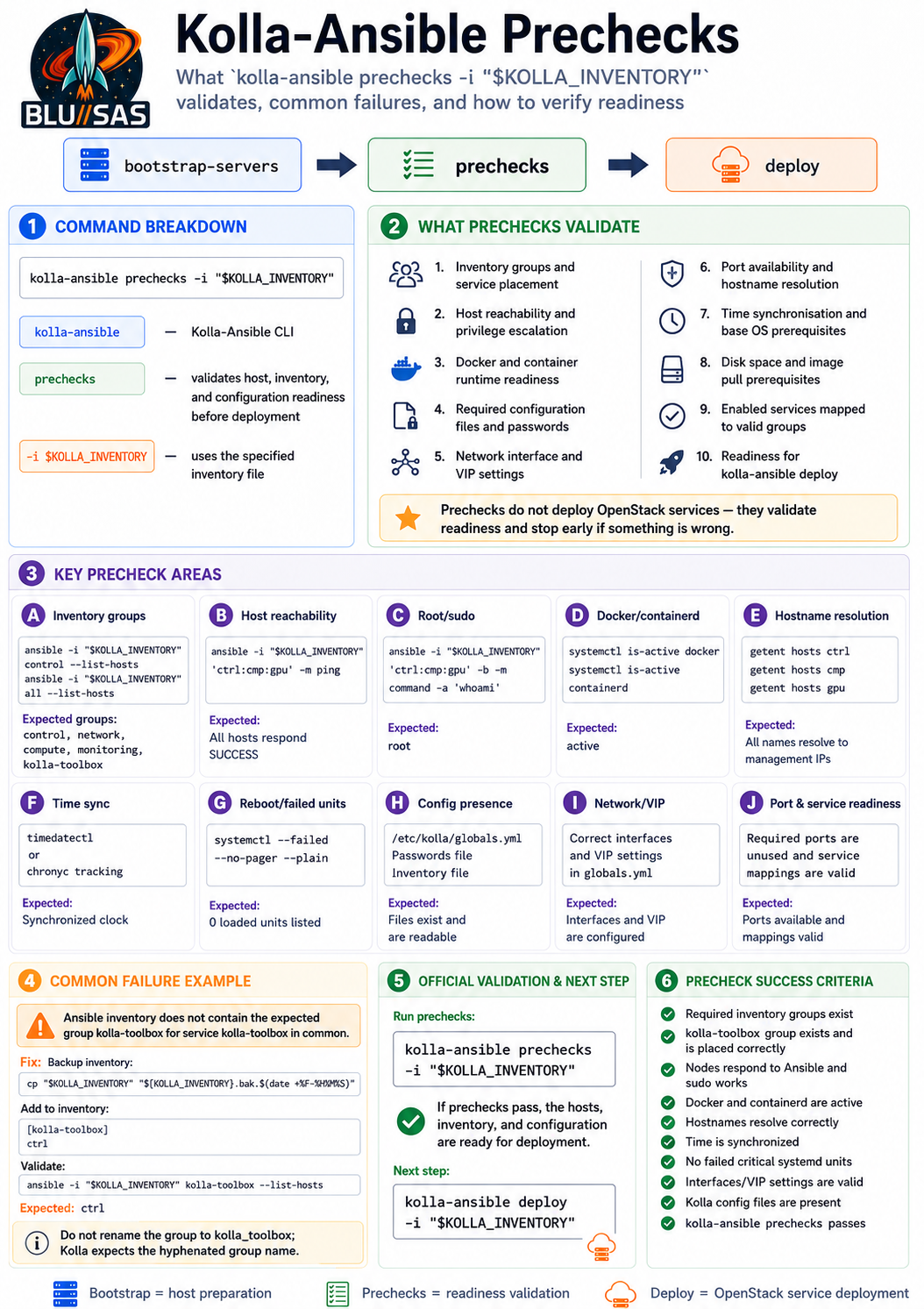
Run:
kolla-ansible prechecks -i "$KOLLA_INVENTORY"This is the most important gate before deploy.
7.8.1 Common precheck failures and what they mean
Interface not found
Example:
Interface ens19 not foundFix:
ip -br addrThen correct:
neutron_external_interface: "<actual-interface-name>"in:
/etc/kolla/globals.ymlVIP already in use
Example:
VIP 192.168.1.60 is already usedPick another unused IP:
kolla_internal_vip_address: "192.168.1.61"
kolla_external_vip_address: "192.168.1.61"
Then rerun:
kolla-ansible -i "$KOLLA_INVENTORY" prechecksDocker not running
Check:
ansible -i "$KOLLA_INVENTORY" all -m shell -a "systemctl status docker --no-pager" -bRestart:
ansible -i "$KOLLA_INVENTORY" all -m systemd -a "name=docker state=started enabled=true" -bPasswords not generated
Run:
kolla-genpwdThen rerun prechecks.
SSH or sudo failure
Run:
ansible -i "$KOLLA_INVENTORY" all -m ping
ansible -i "$KOLLA_INVENTORY" all -m command -a "whoami" -b
Both must work.
7.8.2 Precheck success criterion
You want:
PLAY RECAP
ctrl  failed=0
cmp   failed=0
gpu   failed=0
Do not run deploy until prechecks passes cleanly.
Phase 7.9 — Deploy OpenStack
Once prechecks pass, deploy.
Optional but recommended: pull images first. This separates image download problems from deployment problems.
kolla-ansible pull -i "$KOLLA_INVENTORY"Then deploy:
kolla-ansible deploy -i "$KOLLA_INVENTORY"This will start deploying the OpenStack control plane containers. Expect it to take some time.
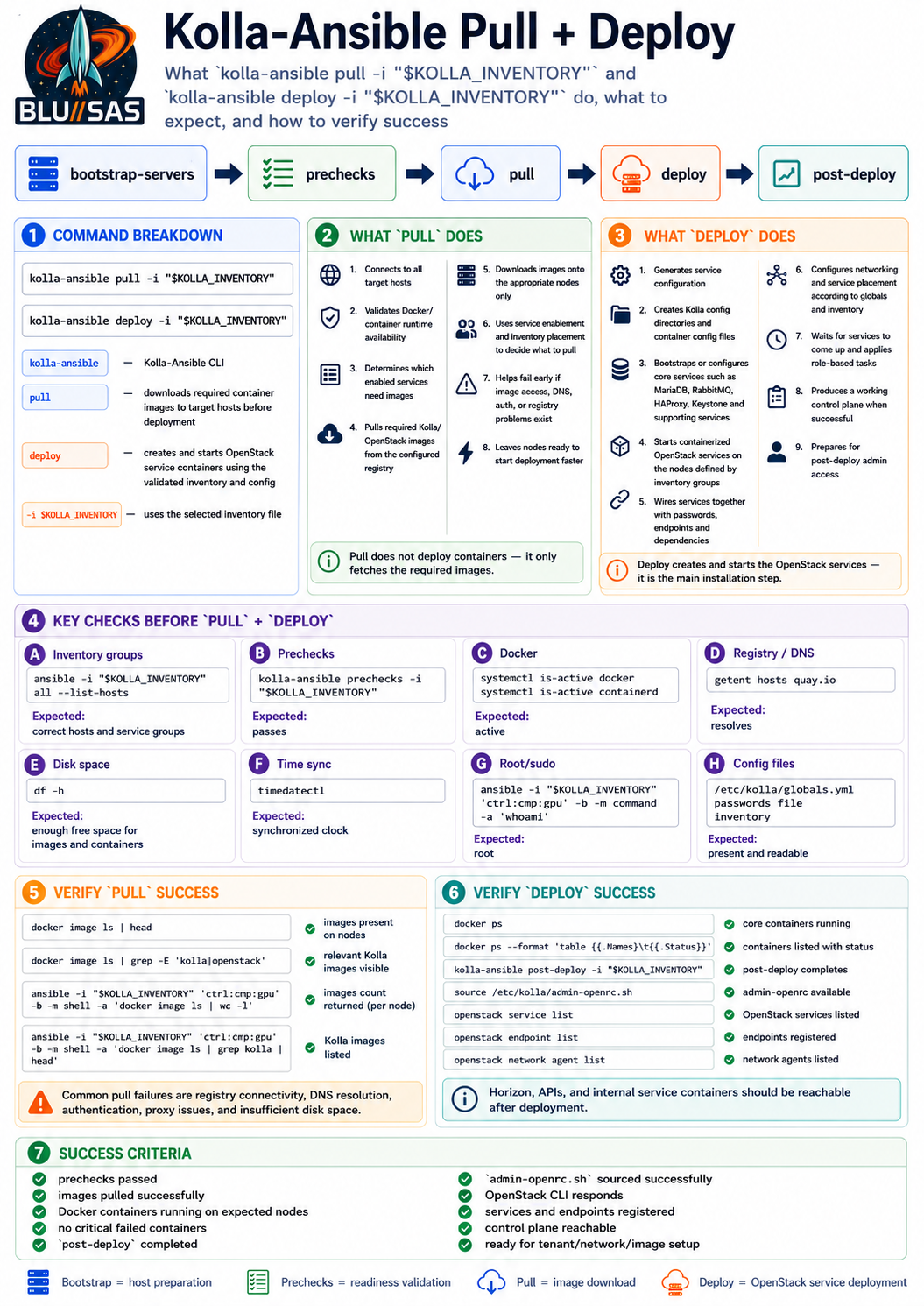
7.9.1 Watch containers during deployment
In another SSH session to ctrl:
watch -n 2 'docker ps --format "table {{.Names}}\t{{.Status}}" | head -40'On cmp:
ssh sont@192.168.1.52
watch -n 2 'docker ps --format "table {{.Names}}\t{{.Status}}"'
On gpu:
ssh sont@192.168.1.53
watch -n 2 'docker ps --format "table {{.Names}}\t{{.Status}}"'
You should start seeing containers for services such as:
mariadb
rabbitmq
memcached
haproxy
keystone
glance
nova
neutron
placement
horizon
7.9.2 After deployment: run post-deploy
After deploy finishes successfully:
kolla-ansible post-deploy -i "$KOLLA_INVENTORY"The official quickstart places post-deploy after the deployment stage to create OpenStack client access configuration.
Then source the admin credentials:
source /etc/kolla/admin-openrc.shIf that file does not exist, locate it:
find /etc/kolla -name '*openrc*' -o -name 'clouds.yaml'7.9.3 Verify OpenStack services
Run:
openstack service listExpected services include:
keystone
glance
nova
neutron
placement
Check endpoints:
openstack endpoint listCheck compute services:
openstack compute service listCheck hypervisors:
openstack hypervisor listExpected hypervisors:
cmp
gpu
Check network agents:
openstack network agent listCheck images:
openstack image listIt may be empty. That is fine at this stage.
7.9.4 Verify Docker containers on all nodes
From ctrl:
ansible -i "$KOLLA_INVENTORY" control,compute \
  -m shell \
  -a "hostname; docker ps --format '{{.Names}} {{.Status}}' | sort" \
  -b
You should see many containers on ctrl, and Nova/Neutron-related containers on cmp and gpu.
Critical Nested Virtualisation Check
Because your OpenStack compute nodes are themselves VMs running on Proxmox, cmp and gpu need nested virtualisation working.
Run:
ansible -i "$KOLLA_INVENTORY" compute \
  -m shell \
  -a "hostname; egrep -c '(vmx|svm)' /proc/cpuinfo; ls -l /dev/kvm || true" \
  -b
Expected:
/proc/cpuinfo count > 0
/dev/kvm exists
If /dev/kvm is missing, set CPU type to host on the Proxmox VM definitions for cmp and gpu, then reboot them:
# On pve2 for cmp VM 1211
qm set 1211 --cpu host
qm reboot 1211

# On pve0 for gpu VM 1212
qm set 1212 --cpu host
qm reboot 1212
Then rerun the nested virtualisation check.
End-of-Phase Success Criteria
Phase 7.5 to 7.9 is complete when all of this works:
Inventory:
  ansible-inventory --graph shows ctrl, cmp, gpu in correct groups

Connectivity:
  Ansible ping from ctrl to all nodes works
  Ansible become/root test works

globals.yml:
  management interface is correct
  neutron external interface is correct
  Kolla VIP is unused and configured
  passwords.yml has generated values

bootstrap:
  kolla-ansible bootstrap-servers succeeds

prechecks:
  kolla-ansible prechecks succeeds with failed=0

deploy:
  kolla-ansible deploy succeeds

post-deploy:
  admin-openrc.sh exists
  openstack service list works
  openstack endpoint list works
  openstack compute service list works
  openstack hypervisor list shows cmp and gpu
At that point your homelab has a working OpenStack control plane, and the next logical phase is to create the first image, flavor, provider network, tenant network, router, floating IP, and test VM.
OpenStack Homelab Deploy Summary
Final Deployment State
The final kolla-ansible deploy completed successfully.
PLAY RECAP
cmp        ok=66   changed=36   unreachable=0   failed=0
ctrl       ok=265  changed=16   unreachable=0   failed=0
gpu        ok=60   changed=36   unreachable=0   failed=0
localhost  ok=4    changed=0    unreachable=0   failed=0
This confirms that Kolla-Ansible successfully deployed OpenStack services across:
ctrl  192.168.1.51  control / network / API / dashboard
cmp   192.168.1.52  compute
gpu   192.168.1.53  compute / future GPU node
What Worked Without Major Attention
1. Base VM Connectivity
The three OpenStack VMs were reachable from the deployment node.
ctrl  reachable
cmp   reachable
gpu   reachable
Ansible SSH worked after the host keys were accepted.
ansible -i "$KOLLA_INVENTORY" openstack -m pingResult:
ctrl SUCCESS
cmp  SUCCESS
gpu  SUCCESS
2. Passwordless Become / Root Escalation
Kolla-Ansible required root privileges on all target nodes.
ansible -i "$KOLLA_INVENTORY" openstack -m command -a "whoami" -bResult:
ctrl root
cmp  root
gpu  root
This worked correctly and did not require additional sudo fixes.
3. Docker Runtime
Docker was installed, enabled, and active on all nodes.
Docker version 29.1.3
systemctl is-active docker = active
This was required because your Kolla deployment uses:
kolla_container_engine: "docker"Docker itself was not the cause of the deployment failures.
4. Nested Virtualisation
The compute nodes had KVM available.
cmp:
  vmx/svm count: 32
  /dev/kvm exists

gpu:
  vmx/svm count: 16
  /dev/kvm exists
This confirmed that nested virtualisation was working, so this setting was valid:
nova_compute_virt_type: "kvm"You did not need to fall back to:
nova_compute_virt_type: "qemu"5. Management and External Interfaces
The final interface layout was correct.
ctrl:
  eth0      192.168.1.51/24
  enp6s19   UP, no IP address

cmp:
  eth0      192.168.1.52/24

gpu:
  eth0      192.168.1.53/24
The correct Kolla network settings were:
network_interface: "eth0"
api_interface: "eth0"
tunnel_interface: "eth0"
neutron_external_interface: "enp6s19"

kolla_internal_vip_address: "192.168.1.50"
kolla_external_vip_address: "192.168.1.50"
The second interface initially appeared as enp6s19, not eth1, which was important.
Failures, Reasons, and Fixes
Failure 1 — Wrong Kolla-Ansible Command Order
Symptom
Commands like this failed:
kolla-ansible -i "$KOLLA_INVENTORY" pullError:
kolla-ansible: '-i /opt/kolla-ansible/inventory/multinode-homelab pull' is not a kolla-ansible commandReason
Your installed kolla-ansible CLI expects the command first, then the inventory option.
Fix
Use:
kolla-ansible <command> -i "$KOLLA_INVENTORY"Correct examples:
kolla-ansible bootstrap-servers -i "$KOLLA_INVENTORY"
kolla-ansible prechecks -i "$KOLLA_INVENTORY"
kolla-ansible pull -i "$KOLLA_INVENTORY"
kolla-ansible deploy -i "$KOLLA_INVENTORY"
kolla-ansible post-deploy -i "$KOLLA_INVENTORY"
Failure 2 — Wrong Inventory Path
Symptom
Kolla tried to contact sample hosts:
control01
control02
control03
network01
network02
compute01
storage01
monitoring01
Error:
Could not resolve hostname control01
Could not resolve hostname compute01
Reason
$KOLLA_INVENTORY was still pointing at the stock inventory:
/opt/kolla-ansible/inventory/multinodeinstead of your homelab inventory:
/opt/kolla-ansible/inventory/multinode-homelabFix
Explicitly set:
export KOLLA_INVENTORY=/opt/kolla-ansible/inventory/multinode-homelabThen validate:
ansible -i "$KOLLA_INVENTORY" all --list-hostsExpected:
localhost
ctrl
cmp
gpu
Failure 3 — Minimal Inventory Did Not Have baremetal
Symptom
bootstrap-servers appeared to succeed but did not actually bootstrap anything useful.
Output included:
Could not match supplied host pattern, ignoring: baremetal
PLAY [Apply role baremetal]
skipping: no hosts matched
Reason
The inventory had basic groups such as:
[control]
[network]
[compute]
[monitoring]
but it did not include the Kolla-required group hierarchy:
[baremetal:children]
control
network
compute
storage
monitoring
Kolla uses baremetal as the host group for server preparation.
Fix
Base the homelab inventory on the official Kolla multinode inventory, then patch in the real hosts.
Required result:
@baremetal:
  @control:
    ctrl
  @network:
    ctrl
  @compute:
    cmp
    gpu
  @monitoring:
    ctrl
Validation:
ansible -i "$KOLLA_INVENTORY" baremetal --list-hostsExpected:
ctrl
cmp
gpu
Failure 4 — Missing kolla-logs Group
Symptom
Deploy failed with:
'dict object' has no attribute 'kolla-logs'The failing task was:
TASK [common : Creating log volume]Reason
Kolla expected this group:
[kolla-logs]or:
[kolla-logs:children]but your inventory did not define it.
Kolla uses this group to decide which hosts should get the shared kolla_logs Docker volume.
Fix
Add:
[kolla-logs:children]
baremetal
Why this was needed:
ctrl, cmp, and gpu all need Kolla log volume support.Failure 5 — Horizon Bootstrap Failed with No module named MySQLdb
Symptom
Horizon failed during bootstrap:
TASK [horizon : Running Horizon bootstrap container]
ModuleNotFoundError: No module named 'MySQLdb'
django.core.exceptions.ImproperlyConfigured: Error loading MySQLdb module.
Did you install mysqlclient?
Reason
Horizon attempted to use a database-backed configuration, which required the Python MySQL client inside the Horizon container.
The problematic setting was:
horizon_backend_database: "yes"Fix
Changed to:
horizon_backend_database: "no"Why this was needed:
For the first homelab deployment, Horizon does not need database-backed sessions/configuration.
Disabling this avoided the missing MySQLdb/mysqlclient dependency path.
Horizon later came up healthy:
horizon Up healthyFailure 6 — Compute Nodes Did Not Get Nova/Neutron Containers
Symptom
On cmp and gpu, only Open vSwitch containers were present:
openvswitch_vswitchd
openvswitch_db
Missing containers:
nova_compute
nova_libvirt
nova_ssh
neutron_openvswitch_agent
Reason
The generic [compute] group existed, but not all Kolla service groups were correctly mapped to it.
Kolla needs groups such as:
[nova-compute:children]
[nova-libvirt:children]
[nova-ssh:children]
[neutron-openvswitch-agent:children]
to point at the compute nodes.
Fix
Added service group mappings:
[nova-compute:children]
compute

[nova-libvirt:children]
compute

[nova-ssh:children]
compute

[neutron-openvswitch-agent:children]
compute
network

[neutron-dhcp-agent:children]
network

[neutron-l3-agent:children]
network

[neutron-metadata-agent:children]
network

[openvswitch:children]
network
compute
Why this was needed:
The generic compute group tells Ansible where compute nodes are.
The Kolla service groups tell Kolla which containers to place on those nodes.
After this, Nova and Neutron compute-side services deployed correctly.
Failure 7 — kolla_toolbox Missing on Compute Nodes
Symptom
Deploy failed during Open vSwitch configuration:
TASK [openvswitch : Set system-id, hostname and hw-offload]
failed: [cmp]
failed: [gpu]
msg: kolla_toolbox container is not running.
Reason
kolla-toolbox was only assigned to ctrl.
Inventory showed:
@kolla-toolbox:
  ctrl
But Open vSwitch tasks on cmp and gpu needed kolla_toolbox locally.
Fix
Expanded kolla-toolbox to all baremetal hosts:
[kolla-toolbox:children]
baremetal
Why this was needed:
Kolla uses kolla_toolbox to run containerised Ansible/OpenStack helper operations.
Because OVS configuration ran on compute nodes, cmp and gpu also needed kolla_toolbox.
After this fix, kolla_toolbox appeared on cmp and gpu.
Final Successful Container State
Controller Node — ctrl
The control plane came up successfully.
horizon                     healthy
neutron_metadata_agent      healthy
neutron_l3_agent            healthy
neutron_dhcp_agent          healthy
neutron_openvswitch_agent   healthy
neutron_server              healthy
nova_novncproxy             healthy
nova_conductor              healthy
nova_api                    healthy
nova_scheduler              healthy
openvswitch_vswitchd        healthy
openvswitch_db              healthy
placement_api               healthy
glance_api                  healthy
keystone                    healthy
keystone_fernet             healthy
keystone_ssh                healthy
rabbitmq                    healthy
memcached                   healthy
mariadb                     healthy
keepalived                  running
proxysql                    healthy
haproxy                     healthy
cron                        running
kolla_toolbox               running
fluentd                     running
This means the following core OpenStack control services are now running:
Keystone
Glance
Placement
Nova API / scheduler / conductor / console proxy
Neutron server / L3 / DHCP / metadata / OVS agent
Horizon
MariaDB
RabbitMQ
Memcached
HAProxy
Keepalived
ProxySQL
Fluentd
Compute Node — cmp
neutron_openvswitch_agent   healthy
nova_compute                healthy
nova_libvirt                healthy
nova_ssh                    healthy
kolla_toolbox               running
openvswitch_vswitchd        healthy
openvswitch_db              healthy
cron                        running
fluentd                     running
This means cmp is successfully acting as a Nova compute node.
Compute/GPU Node — gpu
neutron_openvswitch_agent   healthy
nova_compute                healthy
nova_libvirt                healthy
nova_ssh                    healthy
kolla_toolbox               running
openvswitch_vswitchd        healthy
openvswitch_db              healthy
cron                        running
fluentd                     running
This means gpu is also successfully acting as a Nova compute node, ready for future GPU passthrough work.
Key Final Inventory Lessons
The most important lesson is that a Kolla inventory must not only define physical role groups like:
[control]
[network]
[compute]
[monitoring]
It must also define Kolla service placement groups such as:
[baremetal:children]
[kolla-logs:children]
[kolla-toolbox:children]
[nova-compute:children]
[nova-libvirt:children]
[nova-ssh:children]
[neutron-openvswitch-agent:children]
[openvswitch:children]
Your final working principle was:
Role groups describe the node purpose.
Service groups describe which containers Kolla deploys where.
Key Final Commands
source /opt/kolla-ansible/kolla-env.sh

export KOLLA_INVENTORY=/opt/kolla-ansible/inventory/multinode-homelab

ansible -i "$KOLLA_INVENTORY" baremetal --list-hosts

ansible -i "$KOLLA_INVENTORY" baremetal -m ping

ansible -i "$KOLLA_INVENTORY" baremetal -m command -a "whoami" -b

kolla-ansible bootstrap-servers -i "$KOLLA_INVENTORY"

kolla-ansible prechecks -i "$KOLLA_INVENTORY"

kolla-ansible pull -i "$KOLLA_INVENTORY"

kolla-ansible deploy -i "$KOLLA_INVENTORY"

kolla-ansible post-deploy -i "$KOLLA_INVENTORY"
Remember the required command order:
kolla-ansible <command> -i "$KOLLA_INVENTORY"not:
kolla-ansible -i "$KOLLA_INVENTORY" <command>Current Status
Your Kolla-Ansible OpenStack deployment is now successfully running.
Control plane: healthy on ctrl
Compute plane: healthy on cmp and gpu
Networking agents: healthy
Nova compute: healthy
Libvirt: healthy
Horizon: healthy
Core API services: healthy
Next logical step:
Run post-deploy, source admin-openrc.sh, then create:
1. image
2. flavor
3. provider network
4. tenant network
5. router
6. security group rules
7. test instance
Check Outputs
sont@ctrl:/opt/kolla-ansible/inventory$ sudo cp /etc/kolla/admin-openrc.sh .
sont@ctrl:/opt/kolla-ansible/inventory$ sudo chown sont:sont admin-openrc.sh
sont@ctrl:/opt/kolla-ansible/inventory$ source admin-openrc.sh
sont@ctrl:/opt/kolla-ansible/inventory$ openstack service list
+----------------------------------+-----------+-----------+
| ID                               | Name      | Type      |
+----------------------------------+-----------+-----------+
| 4fba4097a217483886c5aa0e269ac2a9 | placement | placement |
| ab459901f2514af1880ec3d1fb5f3387 | nova      | compute   |
| ce07267e880c47f0ab214dbfffa55837 | glance    | image     |
| df584e166b2c4844b056d13440a4281a | keystone  | identity  |
| f8a5ca68ae3b4a3ea3795bddd6208459 | neutron   | network   |
+----------------------------------+-----------+-----------+
sont@ctrl:/opt/kolla-ansible/inventory$ openstack endpoint list
+----------------------------+-----------+--------------+--------------+---------+-----------+----------------------------+
| ID                         | Region    | Service Name | Service Type | Enabled | Interface | URL                        |
+----------------------------+-----------+--------------+--------------+---------+-----------+----------------------------+
| 224541dce37e407eb778facf59 | RegionOne | neutron      | network      | True    | internal  | http://192.168.1.50:9696   |
| d44d05                     |           |              |              |         |           |                            |
| 258f717194d04d97a187933a8b | RegionOne | nova         | compute      | True    | public    | http://192.168.1.50:8774/v |
| 18eab2                     |           |              |              |         |           | 2.1                        |
| 26e8dfd1b659471bbbd355acfd | RegionOne | keystone     | identity     | True    | public    | http://192.168.1.50:5000   |
| 1aa590                     |           |              |              |         |           |                            |
| 936e3da929f1485e86eea8e921 | RegionOne | placement    | placement    | True    | internal  | http://192.168.1.50:8780   |
| f06af6                     |           |              |              |         |           |                            |
| 96c275bbfa4b428b951dba7d0a | RegionOne | nova         | compute      | True    | internal  | http://192.168.1.50:8774/v |
| 787393                     |           |              |              |         |           | 2.1                        |
| 9aa846ceb971403c9b19b34716 | RegionOne | keystone     | identity     | True    | internal  | http://192.168.1.50:5000   |
| 9175d0                     |           |              |              |         |           |                            |
| a257e3b78a4e419ca6fbf6d86c | RegionOne | neutron      | network      | True    | public    | http://192.168.1.50:9696   |
| ef66eb                     |           |              |              |         |           |                            |
| a4a8771f830a4d018a46066a5f | RegionOne | placement    | placement    | True    | public    | http://192.168.1.50:8780   |
| 9d575e                     |           |              |              |         |           |                            |
| a89e7109da3b408cb352ec0482 | RegionOne | glance       | image        | True    | internal  | http://192.168.1.50:9292   |
| eac9ec                     |           |              |              |         |           |                            |
| d67c2e7ccdff4585be5e356356 | RegionOne | glance       | image        | True    | public    | http://192.168.1.50:9292   |
| 415a1a                     |           |              |              |         |           |                            |
+----------------------------+-----------+--------------+--------------+---------+-----------+----------------------------+
sont@ctrl:/opt/kolla-ansible/inventory$ openstack compute service list
+--------------------------------------+----------------+------+----------+---------+-------+----------------------------+
| ID                                   | Binary         | Host | Zone     | Status  | State | Updated At                 |
+--------------------------------------+----------------+------+----------+---------+-------+----------------------------+
| 624752eb-ef96-4182-bd3a-187da0c80480 | nova-scheduler | ctrl | internal | enabled | up    | 2026-06-26T12:12:58.000000 |
| 4399d86f-ecc1-411e-ae98-7dfe407a0e40 | nova-conductor | ctrl | internal | enabled | up    | 2026-06-26T12:12:59.000000 |
| ad6e00f5-b243-4bee-a1f6-fa213b510e27 | nova-compute   | cmp  | nova     | enabled | up    | 2026-06-26T12:13:01.000000 |
| d78376b1-a8d1-4f67-a42c-d0f50546f1b6 | nova-compute   | gpu  | nova     | enabled | up    | 2026-06-26T12:13:00.000000 |
+--------------------------------------+----------------+------+----------+---------+-------+----------------------------+
sont@ctrl:/opt/kolla-ansible/inventory$ openstack hypervisor list
+--------------------------------------+---------------------+-----------------+--------------+-------+
| ID                                   | Hypervisor Hostname | Hypervisor Type | Host IP      | State |
+--------------------------------------+---------------------+-----------------+--------------+-------+
| c5d4fbce-a5d8-4f65-be4b-6959d8c89261 | cmp                 | QEMU            | 192.168.1.52 | up    |
| 1ca9b9f1-39f9-4496-bb9e-8b5651c5233e | gpu                 | QEMU            | 192.168.1.53 | up    |
+--------------------------------------+---------------------+-----------------+--------------+-------+
sont@ctrl:/opt/kolla-ansible/inventory$ openstack network agent list
+-----------------------+--------------------+------+-------------------+-------+-------+--------------------------+
| ID                    | Agent Type         | Host | Availability Zone | Alive | State | Binary                   |
+-----------------------+--------------------+------+-------------------+-------+-------+--------------------------+
| 2c2a4dcb-f9ba-4cef-   | DHCP agent         | ctrl | nova              | :-)   | UP    | neutron-dhcp-agent       |
| bb58-7d77f09ac24d     |                    |      |                   |       |       |                          |
| 37447271-637b-47db-   | Metadata agent     | ctrl | None              | :-)   | UP    | neutron-metadata-agent   |
| 942f-787710605c84     |                    |      |                   |       |       |                          |
| 4391c2b2-99e2-442f-   | Open vSwitch agent | ctrl | None              | :-)   | UP    | neutron-openvswitch-     |
| ab59-fedbe06c8002     |                    |      |                   |       |       | agent                    |
| 76cb0360-46b2-4ce3-   | Open vSwitch agent | gpu  | None              | :-)   | UP    | neutron-openvswitch-     |
| a7c0-1e21273e128a     |                    |      |                   |       |       | agent                    |
| a8012c92-422a-409f-   | L3 agent           | ctrl | nova              | :-)   | UP    | neutron-l3-agent         |
| bf21-6d1554415bba     |                    |      |                   |       |       |                          |
| d9aede9f-634a-421c-   | Open vSwitch agent | cmp  | None              | :-)   | UP    | neutron-openvswitch-     |
| 9389-701233ea9564     |                    |      |                   |       |       | agent                    |
+-----------------------+--------------------+------+-------------------+-------+-------+--------------------------+
sont@ctrl:/opt/kolla-ansible/inventory$ openstack image list

sont@ctrl:/opt/kolla-ansible/inventory$ ansible -i "$KOLLA_INVENTORY" control,compute \
  -m shell \
  -a "hostname; docker ps | sort" \
  -b
[WARNING]: Invalid characters were found in group names but not replaced, use -vvvv to see details
ctrl | CHANGED | rc=0 >>
ctrl
0253a7dca318   quay.io/openstack.kolla/glance-api:2024.2-ubuntu-noble                  "dumb-init --single-…"   2 hours ago         Up 2 hours (healthy)                   glance_api
066667ca6242   quay.io/openstack.kolla/neutron-openvswitch-agent:2024.2-ubuntu-noble   "dumb-init --single-…"   2 hours ago         Up 2 hours (healthy)                   neutron_openvswitch_agent
11197c3cd2c6   quay.io/openstack.kolla/neutron-server:2024.2-ubuntu-noble              "dumb-init --single-…"   2 hours ago         Up 2 hours (healthy)                   neutron_server
1ae4b40eea11   quay.io/openstack.kolla/fluentd:2024.2-ubuntu-noble                     "dumb-init --single-…"   2 hours ago         Up 2 hours                             fluentd
20c1319bf778   quay.io/openstack.kolla/keepalived:2024.2-ubuntu-noble                  "dumb-init --single-…"   2 hours ago         Up 2 hours                             keepalived
278c38f1ef10   quay.io/openstack.kolla/cron:2024.2-ubuntu-noble                        "dumb-init --single-…"   2 hours ago         Up 2 hours                             cron
31501f4c1668   quay.io/openstack.kolla/keystone-fernet:2024.2-ubuntu-noble             "dumb-init --single-…"   2 hours ago         Up 2 hours (healthy)                   keystone_fernet
47a81912bccd   quay.io/openstack.kolla/keystone:2024.2-ubuntu-noble                    "dumb-init --single-…"   2 hours ago         Up 2 hours (healthy)                   keystone
4ab911daad43   quay.io/openstack.kolla/keystone-ssh:2024.2-ubuntu-noble                "dumb-init --single-…"   2 hours ago         Up 2 hours (healthy)                   keystone_ssh
539dbeec18fd   quay.io/openstack.kolla/neutron-dhcp-agent:2024.2-ubuntu-noble          "dumb-init --single-…"   2 hours ago         Up 2 hours (healthy)                   neutron_dhcp_agent
5eb699a78275   quay.io/openstack.kolla/mariadb-server:2024.2-ubuntu-noble              "dumb-init -- kolla_…"   2 hours ago         Up 2 hours (healthy)                   mariadb
716d386b4b09   quay.io/openstack.kolla/openvswitch-db-server:2024.2-ubuntu-noble       "dumb-init --single-…"   2 hours ago         Up 2 hours (healthy)                   openvswitch_db
776b0ef13c84   quay.io/openstack.kolla/nova-api:2024.2-ubuntu-noble                    "dumb-init --single-…"   2 hours ago         Up 2 hours (healthy)                   nova_api
821425b7ebe0   quay.io/openstack.kolla/kolla-toolbox:2024.2-ubuntu-noble               "dumb-init --single-…"   2 hours ago         Up 2 hours                             kolla_toolbox
923f903a1c09   quay.io/openstack.kolla/openvswitch-vswitchd:2024.2-ubuntu-noble        "dumb-init --single-…"   2 hours ago         Up 2 hours (healthy)                   openvswitch_vswitchd
CONTAINER ID   IMAGE                                                                   COMMAND                  CREATED             STATUS                       PORTS     NAMES
b0e27d552502   quay.io/openstack.kolla/neutron-l3-agent:2024.2-ubuntu-noble            "dumb-init --single-…"   2 hours ago         Up 2 hours (healthy)                   neutron_l3_agent
b2ec4e48b2a3   quay.io/openstack.kolla/neutron-metadata-agent:2024.2-ubuntu-noble      "dumb-init --single-…"   2 hours ago         Up 2 hours (healthy)                   neutron_metadata_agent
b5c8d10c923a   quay.io/openstack.kolla/proxysql:2024.2-ubuntu-noble                    "dumb-init --single-…"   2 hours ago         Up 2 hours (healthy)                   proxysql
beb8d087dda0   quay.io/openstack.kolla/nova-scheduler:2024.2-ubuntu-noble              "dumb-init --single-…"   2 hours ago         Up 2 hours (healthy)                   nova_scheduler
c860a2b26390   quay.io/openstack.kolla/haproxy:2024.2-ubuntu-noble                     "dumb-init --single-…"   2 hours ago         Up 2 hours (healthy)                   haproxy
ca9a63e5aae7   quay.io/openstack.kolla/nova-conductor:2024.2-ubuntu-noble              "dumb-init --single-…"   2 hours ago         Up 2 hours (healthy)                   nova_conductor
caac94838353   quay.io/openstack.kolla/placement-api:2024.2-ubuntu-noble               "dumb-init --single-…"   2 hours ago         Up 2 hours (healthy)                   placement_api
d784ebe7f75f   quay.io/openstack.kolla/nova-novncproxy:2024.2-ubuntu-noble             "dumb-init --single-…"   2 hours ago         Up 2 hours (healthy)                   nova_novncproxy
d92465942b9f   quay.io/openstack.kolla/rabbitmq:2024.2-ubuntu-noble                    "dumb-init --single-…"   2 hours ago         Up 2 hours (healthy)                   rabbitmq
da0ee0b76aa1   quay.io/openstack.kolla/memcached:2024.2-ubuntu-noble                   "dumb-init --single-…"   2 hours ago         Up 2 hours (healthy)                   memcached
e52fef080cf6   quay.io/openstack.kolla/horizon:2024.2-ubuntu-noble                     "dumb-init --single-…"   About an hour ago   Up About an hour (healthy)             horizon
gpu | CHANGED | rc=0 >>
gpu
01c2c9fd63b7   quay.io/openstack.kolla/openvswitch-vswitchd:2024.2-ubuntu-noble        "dumb-init --single-…"   2 hours ago      Up 23 minutes (healthy)             openvswitch_vswitchd
1f3874d02aee   quay.io/openstack.kolla/neutron-openvswitch-agent:2024.2-ubuntu-noble   "dumb-init --single-…"   18 minutes ago   Up 18 minutes (healthy)             neutron_openvswitch_agent
30c7feebb229   quay.io/openstack.kolla/fluentd:2024.2-ubuntu-noble                     "dumb-init --single-…"   2 hours ago      Up 30 minutes                       fluentd
335046b7df5b   quay.io/openstack.kolla/cron:2024.2-ubuntu-noble                        "dumb-init --single-…"   2 hours ago      Up 28 minutes                       cron
8d885c065cfd   quay.io/openstack.kolla/kolla-toolbox:2024.2-ubuntu-noble               "dumb-init --single-…"   28 minutes ago   Up 28 minutes                       kolla_toolbox
CONTAINER ID   IMAGE                                                                   COMMAND                  CREATED          STATUS                    PORTS     NAMES
a0c3bc35325c   quay.io/openstack.kolla/nova-compute:2024.2-ubuntu-noble                "dumb-init --single-…"   20 minutes ago   Up 20 minutes (healthy)             nova_compute
bd4e06eb19e7   quay.io/openstack.kolla/openvswitch-db-server:2024.2-ubuntu-noble       "dumb-init --single-…"   2 hours ago      Up 2 hours (healthy)                openvswitch_db
f6b7232e2700   quay.io/openstack.kolla/nova-libvirt:2024.2-ubuntu-noble                "dumb-init --single-…"   20 minutes ago   Up 20 minutes (healthy)             nova_libvirt
fe0b5f799aa1   quay.io/openstack.kolla/nova-ssh:2024.2-ubuntu-noble                    "dumb-init --single-…"   21 minutes ago   Up 20 minutes (healthy)             nova_ssh
cmp | CHANGED | rc=0 >>
cmp
01e5e8229632   quay.io/openstack.kolla/kolla-toolbox:2024.2-ubuntu-noble               "dumb-init --single-…"   28 minutes ago   Up 28 minutes                       kolla_toolbox
1c73108c806f   quay.io/openstack.kolla/fluentd:2024.2-ubuntu-noble                     "dumb-init --single-…"   2 hours ago      Up 30 minutes                       fluentd
1eddc69e5173   quay.io/openstack.kolla/nova-compute:2024.2-ubuntu-noble                "dumb-init --single-…"   20 minutes ago   Up 20 minutes (healthy)             nova_compute
2025b00b5127   quay.io/openstack.kolla/nova-ssh:2024.2-ubuntu-noble                    "dumb-init --single-…"   21 minutes ago   Up 20 minutes (healthy)             nova_ssh
49d129bf5ff0   quay.io/openstack.kolla/neutron-openvswitch-agent:2024.2-ubuntu-noble   "dumb-init --single-…"   18 minutes ago   Up 18 minutes (healthy)             neutron_openvswitch_agent
5d3435797022   quay.io/openstack.kolla/cron:2024.2-ubuntu-noble                        "dumb-init --single-…"   2 hours ago      Up 28 minutes                       cron
7cf1e34e5bdb   quay.io/openstack.kolla/openvswitch-db-server:2024.2-ubuntu-noble       "dumb-init --single-…"   2 hours ago      Up 2 hours (healthy)                openvswitch_db
CONTAINER ID   IMAGE                                                                   COMMAND                  CREATED          STATUS                    PORTS     NAMES
a03df63feba4   quay.io/openstack.kolla/nova-libvirt:2024.2-ubuntu-noble                "dumb-init --single-…"   20 minutes ago   Up 20 minutes (healthy)             nova_libvirt
e221e25c79a5   quay.io/openstack.kolla/openvswitch-vswitchd:2024.2-ubuntu-noble        "dumb-init --single-…"   2 hours ago      Up 23 minutes (healthy)             openvswitch_vswitchd