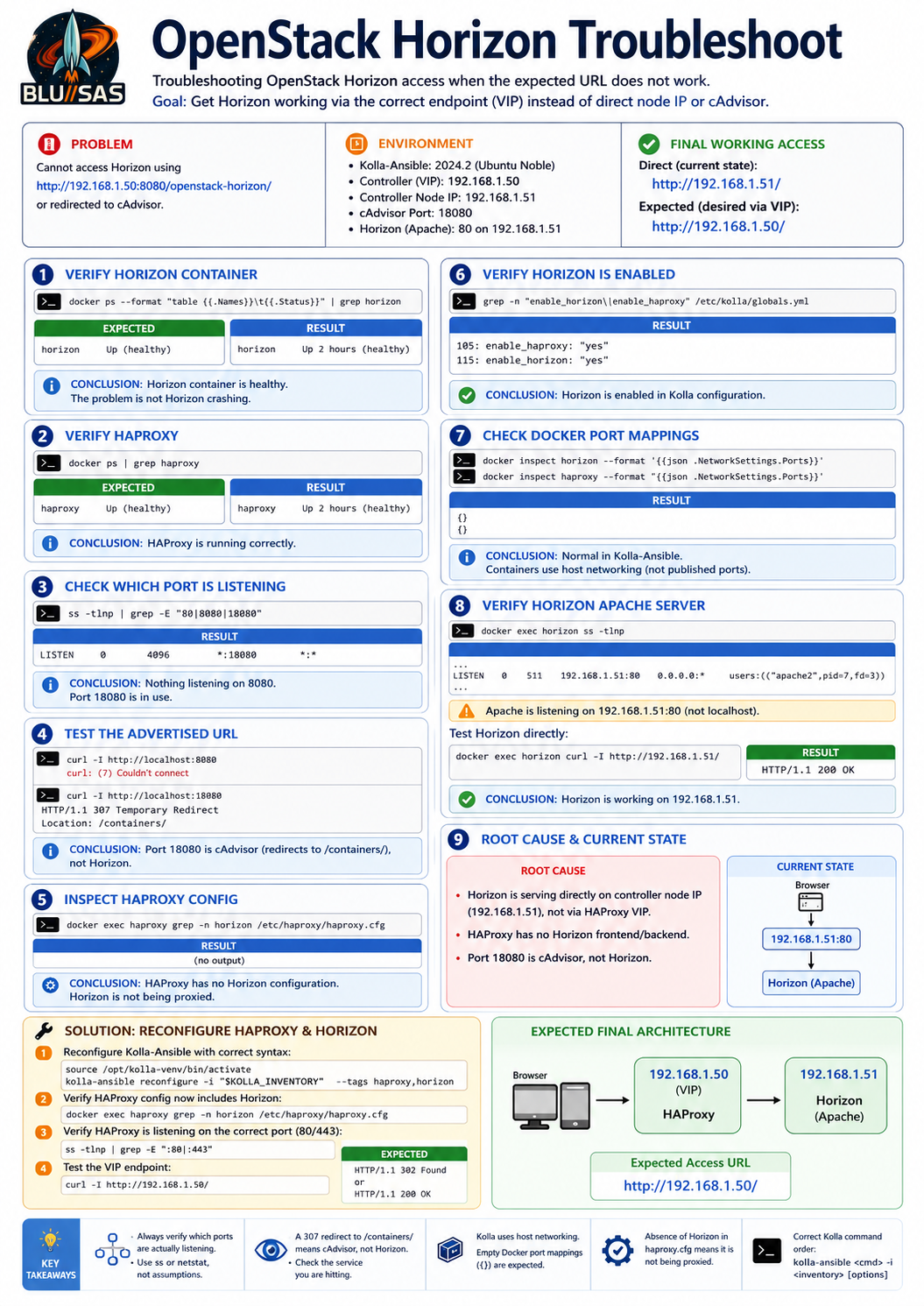
Troubleshooting OpenStack Horizon (Kolla-Ansible 2024.2)
Problem
After a successful Kolla-Ansible deployment, Horizon could not be reached using the expected URL:
http://192.168.1.50:8080/openstack-horizon/Instead the browser either failed to connect or was redirected to cAdvisor.
Step 1 — Verify the Horizon container
First confirm Horizon is running.
docker ps --format "table {{.Names}}\t{{.Status}}" | grep horizonExpected
horizon Up (healthy)Result
horizon Up 2 hours (healthy)Conclusion
- Horizon container is healthy.
- The problem is not Horizon crashing.
Step 2 — Verify HAProxy
docker ps | grep haproxyExpected
haproxy Up (healthy)Result
haproxy Up 2 hours (healthy)Conclusion
HAProxy is running correctly.
Step 3 — Determine which port is actually listening
Instead of assuming Horizon is exposed on 8080, inspect listening sockets.
ss -tlnp | grep -E "80|8080|18080"Result
*:18080 LISTENNo service was listening on
*:8080Conclusion
Port 8080 was never serving Horizon.
Step 4 — Test the advertised URL
curl -I http://localhost:8080Result
curl: (7) Couldn't connectTesting
curl -I http://localhost:18080returned
HTTP/1.1 307 Temporary Redirect
Location: /containers/
Opening
http://192.168.1.50:18080displayed
cAdvisor
instead of Horizon.
Conclusion
Port 18080 belongs to cAdvisor, not Horizon.
Step 5 — Inspect HAProxy configuration
Check whether HAProxy contains a Horizon frontend/backend.
docker exec haproxy grep -n horizon /etc/haproxy/haproxy.cfgExpected
Configuration entries similar to
frontend horizon
backend horizon
Result
No output.
Conclusion
HAProxy has no Horizon configuration.
Step 6 — Verify Horizon is enabled
grep -n "enable_horizon\|enable_haproxy" /etc/kolla/globals.ymlResult
enable_haproxy: "yes"
enable_horizon: "yes"
Conclusion
Horizon is enabled in Kolla configuration.
Step 7 — Check Docker port mappings
docker inspect horizon --format '{{json .NetworkSettings.Ports}}'

docker inspect haproxy --format '{{json .NetworkSettings.Ports}}'
Result
{}for both containers.
Explanation
This is normal in Kolla-Ansible.
Kolla containers typically use
network_mode: hostrather than Docker port publishing.
Step 8 — Verify Horizon’s Apache server
Initial attempt
docker exec horizon curl -I http://localhost/failed.
Reason:
Apache is not bound to localhost.
Inspect listening ports.
docker exec horizon ss -tlnpResult
192.168.1.51:80
apache2
Apache was listening only on
192.168.1.51not
127.0.0.1Therefore test using
docker exec horizon curl -I http://192.168.1.51/or simply browse to
http://192.168.1.51/Result
OpenStack Horizon login page displayed successfully.
Step 9 — Determine the actual Horizon URL
Successful login page
http://192.168.1.51/Therefore
Current deployment
192.168.1.51:80
        │
        ▼
    Horizon
NOT
192.168.1.50:8080/openstack-horizon/Root Cause
The deployment completed successfully.
The issue was that
- Horizon is serving directly from the controller IP
192.168.1.51- HAProxy is not currently proxying Horizon through the VIP
192.168.1.50- Port 18080 belongs to cAdvisor, leading to confusion.
Expected Architecture
Ideally
Browser
     │
     ▼
192.168.1.50 (VIP)
     │
 HAProxy
     │
     ▼
192.168.1.51
 Horizon
Current state
Browser
     │
     ▼
192.168.1.51
 Horizon
Next Diagnostic Steps
1. Check generated HAProxy configuration
docker exec haproxy grep -n -A20 -B5 horizon /etc/haproxy/haproxy.cfgExpected
frontend horizon
backend horizon
If absent, HAProxy was not configured for Horizon.
2. Search generated Kolla configuration
grep -R "horizon" /etc/kolla/Verify that Horizon configuration has been generated correctly.
3. Reconfigure HAProxy and Horizon
If configuration is missing, regenerate it using the correct Kolla-Ansible syntax:
source /opt/kolla-venv/bin/activate

kolla-ansible reconfigure -i "$KOLLA_INVENTORY" --tags haproxy,horizon
After completion verify again:
docker exec haproxy grep -n horizon /etc/haproxy/haproxy.cfg4. Test the VIP
Finally verify that the VIP serves Horizon:
curl -I http://192.168.1.50/Expected
HTTP/1.1 302 Foundor
HTTP/1.1 200 OKand the browser should display:
http://192.168.1.50/instead of requiring direct access to:
http://192.168.1.51/Key Lessons Learned
- A healthy Docker container does not guarantee the service is externally reachable.
- Always verify which ports are actually listening with
ss -tlnp. - A
307redirect to/containers/indicated the request was reaching cAdvisor, not Horizon. - Kolla-Ansible commonly uses host networking, so empty Docker port mappings (
{}) are expected. curl localhostmay fail if Apache is bound only to a specific interface; inspect bind addresses withss.- The absence of Horizon entries in
haproxy.cfgis a strong indicator that HAProxy is not proxying the Horizon service. - When using Kolla-Ansible, the correct command format is:
kolla-ansible <subcommand> -i "$KOLLA_INVENTORY" [options]For example:
kolla-ansible reconfigure -i "$KOLLA_INVENTORY" --tags haproxy,horizonrather than placing the -i option before the subcommand.