OpenStack — technical deep dive
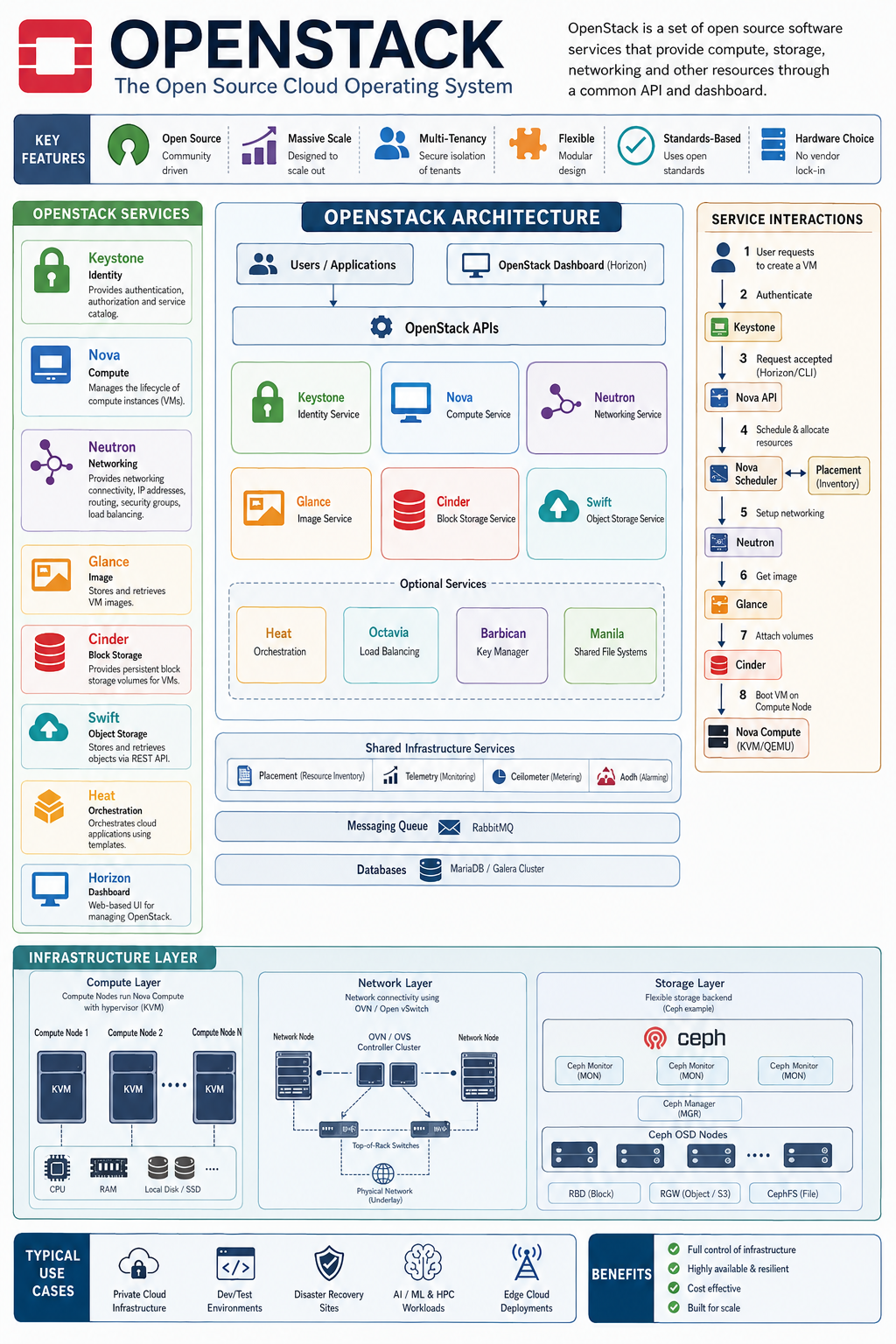
OpenStack is an open-source Infrastructure-as-a-Service (IaaS) platform. Technically, it is better thought of as a collection of distributed control-plane services and APIs that orchestrate compute, networking, storage, identity and images, rather than as a single hypervisor or monolithic cloud product.
A useful mental model is:
OpenStack is a distributed control plane that turns pools of compute, network and storage resources into an API-driven cloud.
The major architectural layers are:
                    OpenStack APIs
                         │
          ┌──────────────┼──────────────┐
          │              │              │
       Keystone        Nova           Neutron
       Identity       Compute         Network
          │              │              │
          └──────────────┼──────────────┘
                         │
              OpenStack Control Plane
                         │
       ┌─────────────────┼─────────────────┐
       │                 │                 │
     Glance           Cinder             Heat
     Images           Volumes          Orchestration
       │                 │
       └─────────────────┼─────────────────┘
                         │
              Infrastructure layer
                         │
        ┌────────────────┼────────────────┐
        │                │                │
     KVM/QEMU          OVN/OVS           Ceph
     Compute           Networking       Storage
1. Core OpenStack services
The most important services are:
| Service | Codename | Responsibility |
|---|---|---|
| Keystone | Identity | Authentication, authorisation, tokens |
| Nova | Compute | VM lifecycle and scheduling |
| Neutron | Networking | Networks, subnets, routers, ports, IPs |
| Glance | Image | VM image catalogue/storage interface |
| Cinder | Block Storage | Persistent VM volumes |
| Placement | Placement | Tracks resource inventory and allocation |
| Horizon | Dashboard | Web UI |
| Heat | Orchestration | Infrastructure-as-code/orchestration |
| Swift | Object Storage | OpenStack-native object storage |
| Octavia | Load Balancer | LBaaS |
| Barbican | Key Manager | Secrets/keys |
| Ironic | Bare Metal | Physical server provisioning |
| Manila | Shared File System | File shares |
| Telemetry services | Various | Metrics/events/monitoring |
In a modern deployment, you don’t necessarily run all of these.
A typical private cloud might use:
Keystone
Nova
Neutron
Glance
Cinder
Placement
Horizon
Octavia
with Ceph providing much of the storage infrastructure.
2. Keystone — identity
Keystone is effectively the authentication and authorisation authority for OpenStack.
A client might authenticate:
User
 │
 │ username/password/application credential
 ▼
Keystone
 │
 │ token
 ▼
OpenStack service APIs
Keystone deals with concepts such as:
Domain
 └── Project
      ├── User
      ├── Role
      └── Resource
For example:
Domain: company

Project: AI-research

Users:
    alice
    bob

Roles:
    member
    admin
A user doesn’t simply get “access to OpenStack”.
They receive a token representing an authenticated identity and its authorised scope.
For example:
POST /v3/auth/tokensThe resulting token can then be used against Nova, Neutron, Glance, Cinder, etc.
3. Nova — the compute service
OpenStack Nova is responsible for VM lifecycle.
It does things like:
create VM
delete VM
reboot VM
resize VM
migrate VM
attach volume
allocate resources
But Nova doesn’t directly perform all of these operations itself.
Its architecture is distributed.
A simplified version:
                 nova-api
                    │
                    ▼
              nova-conductor
                    │
                    ▼
              nova-scheduler
                    │
                    ▼
             Placement API
                    │
             ┌──────┴──────┐
             │             │
        Compute node 1  Compute node 2
             │             │
         nova-compute   nova-compute
             │             │
          libvirt       libvirt
             │             │
           QEMU/KVM     QEMU/KVM
nova-api
Provides the REST API.
For example:
POST /serversessentially means:
Create me a VM with these properties.
4. Nova scheduler
The scheduler determines where the VM should run.
Suppose you have:
compute01
    128 CPUs
    512 GB RAM

compute02
    256 CPUs
    1 TB RAM

gpu01
    128 CPUs
    512 GB RAM
    8 × NVIDIA GPUs
A VM request might be:
flavor:
    vCPU: 32
    RAM: 128 GB

extra_specs:
    accelerator: GPU
Nova scheduler queries Placement.
Placement knows resource inventories and allocations.
It can therefore determine:
compute01 → unsuitable
compute02 → unsuitable
gpu01     → suitable
Then Nova sends the build request to gpu01.
5. Placement
Placement is particularly important in modern OpenStack architecture.
It tracks:
Resource Providers
    │
    ├── VCPU
    ├── MEMORY_MB
    ├── DISK_GB
    ├── PCI devices
    └── custom resources
For example:
Resource Provider: gpu01

VCPU:
    inventory = 128

MEMORY_MB:
    inventory = 524288

CUSTOM_NVIDIA_GPU:
    inventory = 8
This is much more sophisticated than simply asking:
“Which server has enough RAM?”
OpenStack can model resource traits, inventories and allocations.
This becomes extremely important for AI/HPC infrastructure.
6. Nova Compute
Once the scheduler has selected a host:
nova-compute
      │
      ▼
libvirt
      │
      ▼
QEMU
      │
      ▼
KVM
      │
      ▼
CPU
RAM
NIC
Disk
The VM is ultimately a QEMU process using KVM acceleration.
For example:
/usr/bin/qemu-system-x86_64with resources such as:
-vcpu
-m 32768
-drive ...
-netdev ...
Nova abstracts this away from the user.
7. Neutron — networking
OpenStack Neutron is one of the more technically complex parts of OpenStack.
It provides abstractions such as:
Network
Subnet
Port
Router
Security Group
Floating IP
For example:
                  Internet
                      │
                 External Net
                      │
                Floating IP
                      │
                 Neutron Router
                      │
              ┌───────┴───────┐
              │               │
          Private Net      Private Net
              │
        ┌─────┴─────┐
        │           │
       VM1         VM2
A VM may have:
eth0
10.10.1.20
while the outside world sees:
203.0.113.50Neutron performs the networking necessary to connect those two worlds.
8. Neutron architecture
Traditionally:
neutron-server
      │
      ├── ML2
      │
      ├── DHCP agent
      │
      ├── L3 agent
      │
      └── metadata agent
The ML2 (Modular Layer 2) plugin provides an abstraction layer between Neutron and the actual network implementation.
Common mechanisms include:
Open vSwitch
Linux bridge
OVN
Modern OpenStack deployments increasingly use:
ML2/OVN
where OVN — Open Virtual Network provides the virtual networking control plane.
9. OVN
With OVN, the architecture becomes approximately:
Neutron
   │
   ▼
ML2/OVN
   │
   ▼
OVN Northbound DB
   │
   ▼
OVN Southbound DB
   │
   ▼
OVN controllers
   │
   ▼
Open vSwitch
   │
   ▼
Linux networking
OVN then programs the dataplane.
This distinction is important:
Control plane
Neutron
OVN
Databases
APIs
Schedulers
Data plane
Open vSwitch
Linux kernel
VXLAN/Geneve
Physical NICs
OpenStack’s control plane can therefore be relatively slow while the actual packet forwarding happens at much higher speed in the dataplane.
10. Tenant networking
OpenStack commonly uses overlay networks.
For example:
VM1
10.1.0.10
 │
 ▼
OVS
 │
 │ Geneve/VXLAN
 ▼
Physical network
 │
 ▼
OVS
 │
 ▼
VM2
10.1.0.20
The physical network doesn’t necessarily need to know about every tenant subnet.
It transports the overlay.
This allows thousands of tenant networks to coexist over the same physical infrastructure.
11. Security groups
Security groups provide stateful filtering.
For example:
web-security-group

Ingress:
    TCP 22    from 10.0.0.0/8
    TCP 443   from 0.0.0.0/0

Egress:
    allow all
These rules are implemented in the networking dataplane.
Depending on the architecture, this can involve:
OVS flows
iptables
nftables
OVN ACLs
12. Glance — images
OpenStack Glance provides the image service.
A typical image:
Ubuntu 24.04
    │
    ├── qcow2
    ├── size
    ├── checksum
    ├── architecture
    └── metadata
Glance itself doesn’t necessarily need to store the actual image locally.
The architecture can be:
Glance
   │
   ▼
Ceph RBD
or:
Glance
   │
   ▼
S3 / Swift
or filesystem-backed storage.
This is particularly useful when using Ceph.
13. Cinder — block storage
OpenStack Cinder provides persistent block devices.
Conceptually:
VM
 │
 │ /dev/vdb
 ▼
Cinder volume
 │
 ▼
Storage backend
For Ceph:
VM
 │
 ▼
Cinder
 │
 ▼
RBD
 │
 ▼
Ceph
 │
 ├── OSD
 ├── OSD
 ├── OSD
 └── OSD
The VM might see:
/dev/vda
/dev/vdb
while OpenStack sees:
volume-7c2...14. Ceph + OpenStack
This is one of the most important OpenStack architectures.
A mature private cloud can look like:
                    OpenStack
                        │
          ┌─────────────┼─────────────┐
          │             │             │
        Glance        Cinder         Nova
          │             │             │
          └─────────────┼─────────────┘
                        │
                       RBD
                        │
                   ┌────┴────┐
                   │  Ceph   │
                   └────┬────┘
                        │
             ┌──────────┼──────────┐
             │          │          │
            OSD        OSD        OSD
Ceph can provide:
RBD  → block storage
RGW  → object/S3 storage
CephFS → filesystem
This means one storage platform can underpin multiple OpenStack services.
15. VM creation — end-to-end
This is where OpenStack becomes particularly interesting.
Imagine:
openstack server create \
    --image ubuntu \
    --flavor m4.large \
    --network private \
    web01
Conceptually:
Step 1 — Authentication
Client
  │
  ▼
Keystone
  │
  ▼
Token
Step 2 — API request
Client
  │
  ▼
Nova API
Step 3 — Validate request
Nova checks:
image
flavor
project
network
quotas
Step 4 — Scheduling
Nova asks Placement:
Who can satisfy:

4 vCPU
8 GB RAM
20 GB disk
network requirements
?
Step 5 — Select compute host
compute03Step 6 — Network preparation
Neutron/OVN creates:
port
MAC address
IP address
security rules
network attachment
Step 7 — Image
Nova obtains the image through Glance.
Possibly:
Glance → Ceph RBDStep 8 — VM creation
On compute03:
nova-compute
     │
     ▼
libvirt
     │
     ▼
QEMU/KVM
Step 9 — Networking
The VM gets:
eth0
10.10.20.15
Step 10 — Metadata
The VM can access:
169.254.169.254to obtain instance metadata/cloud-init information.
Step 11 — cloud-init
Cloud-init configures:
hostname
SSH keys
users
network
packages
Result:
VM running16. The OpenStack message bus
Another critical piece is the internal messaging infrastructure.
OpenStack services communicate asynchronously.
Historically this is commonly:
RabbitMQFor example:
nova-api
    │
    ▼
RabbitMQ
    │
    ├── nova-scheduler
    ├── nova-conductor
    └── nova-compute
This decouples services.
Instead of:
nova-api ─────────────── nova-computeyou get:
nova-api
    │
    ▼
Message broker
    │
    ▼
nova-compute
That provides resilience and scalability.
17. Databases
OpenStack services generally have their own databases/schema.
For example:
Nova DB
Neutron DB
Keystone DB
Cinder DB
Glance DB
Typically:
MariaDB / Galeramight be used in a highly available deployment.
Architecture:
             MariaDB Galera
          ┌──────┬──────┬──────┐
          │      │      │      │
        DB01   DB02   DB03
Galera provides synchronous multi-primary replication.
18. High availability
A production OpenStack control plane cannot depend on one API node.
Instead:
                    VIP
                     │
                  HAProxy
               ┌─────┴─────┐
               │           │
            ctrl01       ctrl02
               │           │
            services     services
               │           │
               └─────┬─────┘
                     │
                 ctrl03
Common components include:
HAProxy
Keepalived
MariaDB Galera
RabbitMQ
Memcached
For example:
             10.0.0.100
                 VIP
                  │
              HAProxy
          ┌───────┼───────┐
          │       │       │
        ctrl01  ctrl02  ctrl03
The VIP provides a stable endpoint.
19. Kolla-Ansible
This is particularly relevant to the OpenStack environment you’ve been working with.
Kolla-Ansible deploys OpenStack services primarily as containers and uses Ansible for orchestration.
Instead of installing:
nova
neutron
keystone
glance
...
directly onto the OS, Kolla gives you:
Docker/Podman
   │
   ├── keystone
   ├── nova-api
   ├── nova-scheduler
   ├── nova-conductor
   ├── neutron-server
   ├── glance-api
   ├── cinder-api
   ├── mariadb
   ├── rabbitmq
   └── haproxy
Ansible controls deployment/configuration.
This makes Kolla particularly useful for repeatable private-cloud deployments.
20. OpenStack vs Kubernetes
This distinction is important.
OpenStack primarily manages:
Infrastructure
     │
     ├── VM
     ├── network
     ├── storage
     └── bare metal
Kubernetes manages:
Applications
     │
     ├── Pods
     ├── Deployments
     ├── Services
     └── Containers
A very common architecture is:
              OpenStack
                  │
          ┌───────┴───────┐
          │               │
       VM compute       VM compute
          │
       Kubernetes
          │
    ┌─────┼─────┐
    │     │     │
   Pod   Pod   Pod
OpenStack provides the infrastructure.
Kubernetes consumes it.
21. OpenStack for AI/HPC
This is where OpenStack becomes particularly interesting for your current cloud-engineering context.
Imagine:
OpenStack
    │
    ├── CPU compute
    │
    ├── GPU compute
    │
    ├── high-speed network
    │
    ├── NVMe
    │
    └── Ceph
GPU resources can be exposed through:
PCI passthrough
SR-IOV
MIG
mediated devices
Nova/Placement can represent GPU resources.
For example:
CUSTOM_NVIDIA_A100 = 8Then a workload requests:
resources:
    VCPU=16
    MEMORY_MB=131072
    CUSTOM_NVIDIA_A100=2
Placement finds a suitable host.
That’s essentially resource scheduling for infrastructure, analogous to Kubernetes scheduling but at the cloud-resource level.
22. Observability
For a serious OpenStack deployment, you need to observe multiple layers.
OpenStack
Nova
Neutron
Cinder
Glance
Keystone
Placement
Infrastructure
CPU
RAM
disk
network
GPU
Hypervisor
libvirt
QEMU
KVM
Networking
OVN
OVS
Geneve
physical NICs
Storage
Ceph
OSDs
MONs
MGRs
RBD
Messaging
RabbitMQDatabases
MariaDB
Galera
A useful observability architecture is:
OpenStack
   │
   ├── exporters
   │
   ├── logs
   │
   └── OpenTelemetry
          │
          ▼
       Collector
          │
     ┌────┼────┐
     ▼    ▼    ▼
  Mimir  Loki Tempo
     │    │    │
     └────┼────┘
          ▼
       Grafana
That gives you:
Metrics + Logs + Traces = MELT
23. The most important conceptual distinction
If you’re learning OpenStack at Staff Cloud Engineer level, I would focus less on memorising service names and more on understanding the following chain:
             USER/API
                 │
                 ▼
             Keystone
                 │
                 ▼
              Nova API
                 │
                 ▼
             Scheduler
                 │
                 ▼
             Placement
                 │
                 ▼
          Compute selection
                 │
                 ▼
           nova-compute
                 │
              libvirt
                 │
             QEMU/KVM
                 │
                 ▼
               VM
                 │
        ┌────────┴────────┐
        ▼                 ▼
     Neutron            Cinder
        │                 │
      OVN/OVS            Ceph
        │                 │
      Network             RBD
If you can explain that architecture and troubleshoot it from API → scheduler → placement → compute → network → storage, you’re operating at a substantially deeper level than someone who merely knows how to deploy OpenStack.
For your current work, I’d prioritise these five areas
- Nova + Placement — understand scheduling and resource providers deeply.
- Neutron + OVN/OVS — understand the actual packet path from VM → physical network.
- Ceph integration — understand RBD, Cinder, Glance and Nova interactions.
- Kolla-Ansible architecture — understand how the control plane is deployed and operated.
- Failure analysis — be able to trace a failed VM creation across Keystone → Nova → Placement → Neutron → Glance/Cinder → libvirt.
The Kayobe Deployment Tool
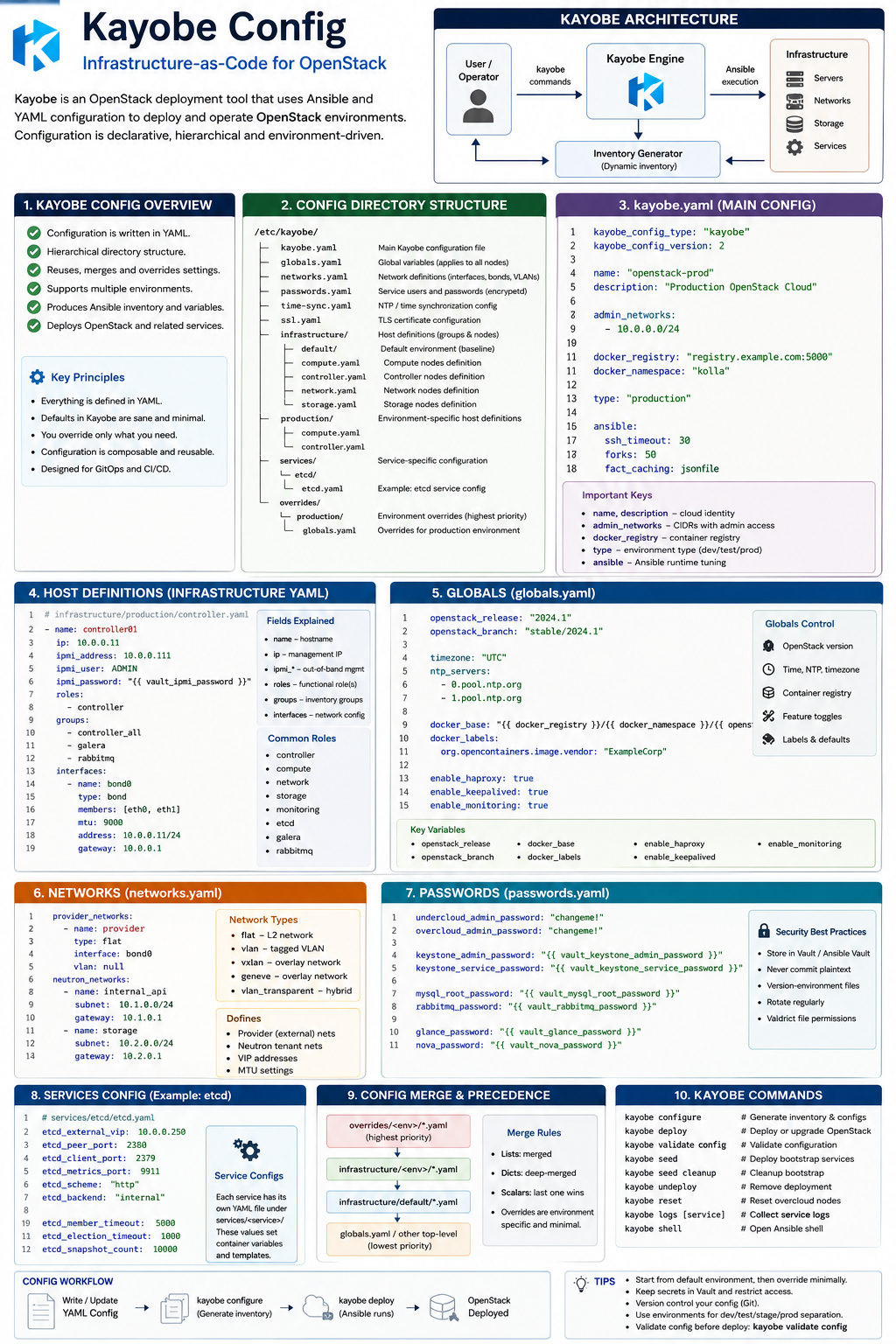
StackHPC Kayobe configuration
1. What StackHPC Kayobe Config actually is
The easiest way to understand it is:
                    Git repository
                         │
                         ▼
             stackhpc-kayobe-config
                         │
        ┌────────────────┼────────────────┐
        │                │                │
        ▼                ▼                ▼
     Kayobe           Kolla-Ansible     Custom
     config             config         playbooks
        │                │                │
        └────────────────┼────────────────┘
                         ▼
                     Ansible
                         │
          ┌──────────────┼──────────────┐
          ▼              ▼              ▼
       Bare metal      OS/network    Containers
       provisioning    config        OpenStack
          │                              │
        Bifrost                       Kolla
          │                              │
          └──────────────┬───────────────┘
                         ▼
                    OpenStack cloud
StackHPC effectively builds an opinionated platform engineering layer on top of Kayobe/Kolla-Ansible.
The underlying stack is:
Bifrost
   ↓
Kayobe
   ↓
Kolla-Ansible
   ↓
OpenStack containers
with StackHPC adding configuration and automation around that stack. The repository explicitly identifies Bifrost for hardware provisioning, Kolla for container images, Kolla-Ansible for deployment, and Kayobe for host/network configuration and orchestration.
2. The most important thing: it is configuration composition
This is where StackHPC’s repository differs from a simple globals.yml.
Think of the configuration as several layers:
                         Highest specificity
                                ▲
                                │
                    Environment-specific
                                │
                    ┌───────────┴───────────┐
                    │                       │
             environment/              mixins/
                    │                       │
                    └───────────┬───────────┘
                                │
                         Site configuration
                                │
                    ┌───────────┴───────────┐
                    │                       │
                inventory/             *.yml
                    │                       │
                    └───────────┬───────────┘
                                │
                     StackHPC base config
                                │
                    ┌───────────┴───────────┐
                    │                       │
                  Kayobe               Kolla
                  defaults             defaults
                                │
                                ▼
                         Ansible variables
                                │
                                ▼
                       generated deployment
That composition model is one of the key things to understand if you’re working with StackHPC rather than plain upstream Kayobe.
3. The repository structure
The current repository’s etc/kayobe contains a surprisingly large amount of functionality. The top-level configuration includes things such as:
etc/kayobe/
│
├── ansible/
├── containers/
├── environments/
├── hooks/
├── inventory/
├── kolla/
├── trivy/
├── trust-store/
│
├── globals.yml
├── networks.yml
├── kolla.yml
├── nova.yml
├── neutron.yml
├── controllers.yml
├── compute.yml
├── storage.yml
├── ironic.yml
├── cephadm.yml
├── monitoring.yml
├── openbao.yml
├── pulp.yml
├── seed.yml
├── seed-vm.yml
├── seed-hypervisor.yml
├── overcloud.yml
├── stackhpc.yml
└── ...
The current 2026.1 tree contains dedicated configuration for Cephadm, controllers, compute, storage, networking, Neutron, Nova, monitoring, OpenBao, OFED, OpenSM, Pulp, seed infrastructure, GPUs/vGPU and several StackHPC-specific components.
This is a platform configuration repository, not simply a collection of Kolla variables.
4. globals.yml
At the top level:
etc/kayobe/globals.ymlcontains global Kayobe configuration.
Interestingly, the current StackHPC file is mostly a reference/configuration surface rather than being packed with hard-coded deployment values.
It exposes things such as:
kayobe_config_path:
kayobe_environment:

base_path:
config_path:
image_cache_path:
source_checkout_path:
virtualenv_path:

kayobe_ansible_user:

os_distribution:
os_family:
os_release:

kayobe_control_host_become:

network_engine:
The current file also supports network_engine values such as:
network_engine: defaultor:
network_engine: nmstateand documents the distinction between the control-host configuration path and the remote-host state/configuration paths.
Why this matters
A common mistake is to think:
globals.yml= all of Kayobe’s configuration.
It isn’t.
It’s one layer of variables which Kayobe consumes alongside:
- inventory
- group vars
- host vars
- environment configuration
- Kolla configuration
- custom playbooks
- hooks
5. networks.yml is extremely important
For an OpenStack cloud, I would consider:
networks.ymlone of the most important files to understand.
StackHPC’s current configuration explicitly models network roles such as:
admin
OOB
provisioning
internal API
external
public API
tunnel
storage
storage management
Swift storage
inspection
cleaning
Octavia
The actual variables include things like:
admin_oc_net_name:
oob_oc_net_name:
provision_oc_net_name:

internal_net_name:
external_net_names:
public_net_name:
tunnel_net_name:

storage_net_name:
storage_mgmt_net_name:

inspection_net_name:
cleaning_net_name:
octavia_net_name:
These define what a network means, rather than merely defining an interface.
StackHPC’s file explicitly distinguishes network-role mappings from the actual network definitions.
6. Network definition vs network role
This distinction is important.
You might have:
internal_net_name: internaland then:
internal_cidr: 10.10.10.0/24
internal_gateway: 10.10.10.1
internal_vlan: 100
Conceptually:
internal_net_name
       │
       ▼
    "internal"
       │
       ├── CIDR
       ├── VLAN
       ├── allocation pool
       ├── gateway
       └── physical interfaces
StackHPC explicitly notes that global network attributes belong in networks.yml, while host/group-specific attributes such as interface names are generally configured through inventory variables.
That separation is excellent infrastructure-as-code design:
Network definition
        ≠
Host implementation
7. Inventory is another major layer
The repository contains:
etc/kayobe/inventory/
├── groups
├── hosts.example
└── group_vars/
The inventory is where you describe the physical topology.
For example:
[controllers]
controller01
controller02
controller03
[compute]
compute01 compute02 compute03
[storage]
storage01 storage02 storage03
Then groups can be composed:
[overcloud:children]
controllers
compute
storage
The current StackHPC repository explicitly separates groups, group_vars, and the hosts definition.
8. Why the inventory matters so much
Consider:
compute01You can attach variables to it:
ansible_host: 10.0.0.21

neutron_external_interface: eno3

storage_interface: eno4

tunnel_interface: eno5
But you can also put common settings in:
inventory/group_vars/compute/so that:
                 compute
                    │
        ┌───────────┼───────────┐
        │           │           │
    compute01   compute02   compute03
        │           │           │
        └───────────┼───────────┘
                    │
             common variables
This is standard Ansible inheritance being used as a cloud topology model.
9. Multiple environments
This is arguably one of the most sophisticated parts of the StackHPC configuration.
The repository contains:
etc/kayobe/environments/and the current branch has environments such as:
aio
aufn-ceph
baremetal
baremetal-policy
ci-aio
ci-builder
ci-doca-builder
ci-multinode
ci-tenks
This allows the same base configuration to support multiple deployments.
For example:
                         Base
                          │
             ┌────────────┼────────────┐
             │            │            │
          ci-aio      ci-multinode   baremetal
             │            │            │
             ▼            ▼            ▼
          inventory    inventory    inventory
          networks     networks     networks
          kolla        kolla        kolla
10. Environment inheritance
Modern Kayobe supports:
.kayobe-environmentwith:
dependencies:
  - baremetal
For example:
production
    │
    ├── baremetal
    │
    ├── monitoring
    │
    └── security
The dependencies are resolved into a precedence chain.
If:
environment-C
      ↓
environment-B
      ↓
environment-A
then C has the highest precedence.
Kayobe resolves the dependency graph and applies inventory/extra-vars in the corresponding order.
This is particularly powerful because StackHPC uses this mechanism for mixin environments.
11. StackHPC mixins
This is a major StackHPC-specific concept.
Instead of creating:
production/
staging/
development/
with huge amounts of duplicated configuration, you can have reusable capability modules:
baremetal
baremetal-policy
some-monitoring-feature
some-security-feature
...
Then:
my-production
      │
      ├── baremetal
      ├── monitoring
      └── security
StackHPC explicitly describes mixin environments as a way of applying configuration modularly and enabling features mid-release, rather than waiting for the next major configuration release.
This is very similar conceptually to composing Terraform modules.
12. stackhpc.yml
This is where the repository’s own opinionated configuration begins to become particularly visible.
Conceptually:
Kayobe variables
       │
       +
StackHPC variables
       │
       ▼
StackHPC behaviour
For example, StackHPC-specific options control functionality such as:
monitoring
Ceph integration
CIS hardening
release train
Pulp
OpenBao
security
custom automation
A good mental model is:
globals.yml
    ↓
upstream Kayobe configuration

stackhpc.yml
    ↓
StackHPC-specific policy/configuration
13. Kolla configuration is separate
This is an important architectural boundary.
You have:
etc/kayobe/
    *.yml
for Kayobe.
But then:
etc/kayobe/kolla/
    globals.yml
    config/
    ...
for Kolla-Ansible.
The current StackHPC Kolla globals contains logic such as dynamically determining the Kolla base distro from the target host’s Ansible facts, rather than blindly inheriting the control host’s OS. It also controls image tags and monitoring integration.
That’s significant in mixed/migration environments.
For example:
Control host
    Rocky Linux

        │
        │ Kayobe
        ▼

Controller
    Ubuntu

        │
        ▼

Kolla container
    Ubuntu image
The Kolla configuration needs to know what the target host actually is.
14. Kolla image tags
StackHPC has:
kolla-image-tags.ymland kolla/globals.yml consumes the generated tag definitions.
Conceptually:
kolla-image-tags.yml
        │
        ▼
  image tag mapping
        │
        ▼
 kolla/globals.yml
        │
        ▼
Kolla-Ansible
        │
        ▼
OpenStack containers
This is important for controlled release management.
You don’t necessarily want:
latestbecause that destroys deployment reproducibility.
Instead:
Nova → known image version
Neutron → known image version
Keystone → known image version
15. StackHPC Release Train
This is another area where StackHPC adds significant operational maturity.
Instead of every host directly pulling packages and images from the Internet:
Internet
   │
   ▼
Ark
   │
   ▼
Pulp
   │
   ▼
OpenStack infrastructure
Pulp acts as a local synchronisation/cache layer.
StackHPC describes the repositories as versioned snapshots, allowing an environment to remain on a known-good package/container set even after newer artifacts are released.
This gives you:
Development
     │
     ▼
Pulp development distribution
     │
     │ test
     ▼
Production
     │
     ▼
Pulp production distribution
That is essentially promotion-based infrastructure supply-chain management.
16. Ceph integration
StackHPC’s Kayobe configuration also has substantial Ceph integration.
The Ceph architecture is:
Kayobe
   │
   ▼
Cephadm
   │
   ├── MON
   ├── MGR
   ├── OSD
   └── RGW
The repository’s Ceph configuration uses inventory groups such as:
mons
mgrs
osds
rgws
and provides dedicated Cephadm playbooks.
Then:
Ceph
 │
 ├── RBD
 │    ├── Cinder
 │    ├── Nova
 │    └── Glance
 │
 ├── RGW
 │    └── S3
 │
 └── CephFS
17. Ceph → Kolla integration
This is an important workflow.
StackHPC can gather Ceph credentials/configuration:
kayobe playbook run \
  $KAYOBE_CONFIG_PATH/ansible/ceph/cephadm-gather-keys.yml
This generates Ceph configuration and keys beneath the environment’s Kolla configuration:
environments/<env>/kolla/config/Those are then consumed during:
kayobe overcloud service deploySo the relationship is:
             Cephadm
                │
       ceph.conf + keyrings
                │
                ▼
       Kayobe configuration
                │
                ▼
         Kolla configuration
                │
                ▼
          OpenStack services
That is a very important boundary to understand.
18. Ceph copy-on-write optimisation
StackHPC has an interesting optimisation here.
If enabled:
stackhpc_enable_ceph_cow_optimisations: trueit can configure Glance with:
[DEFAULT]
show_multiple_locations = true
show_image_direct_url = true
[glance_store]
rbd_thin_provisioning = true
This allows Glance/Nova/Ceph to exploit RBD copy-on-write semantics.
Conceptually:
Glance image
     │
     ▼
Ceph RBD image
     │
     │ clone
     ▼
VM disk
rather than:
image
  │
  │ full copy
  ▼
VM disk
StackHPC deliberately leaves this disabled by default because exposing RADOS location information has security implications.
That’s a good example of StackHPC making an explicit performance vs security trade-off.
19. Monitoring is built into the configuration
This is particularly relevant to your observability background.
StackHPC’s configuration includes:
Prometheus
Alertmanager
Grafana
Fluentd
OpenSearch
OpenSearch Dashboards
and configures exporters and dashboards.
The architecture is roughly:
                    OpenStack
                       │
          ┌────────────┼────────────┐
          │            │            │
       exporters    logs         Ceph
          │            │            │
          ▼            ▼            ▼
      Prometheus    Fluentd     Ceph mgr
          │            │            │
          ▼            ▼            ▼
      Alertmanager  OpenSearch   Prometheus
          │
          ▼
       Grafana
StackHPC also adds hardware-level monitoring.
For example, SMART/NVMe monitoring uses scripts which expose metrics through Node Exporter’s textfile collector.
That’s quite a nice pattern:
SMART / NVMe
      │
      ▼
script
      │
      ▼
.textfile
      │
      ▼
node_exporter
      │
      ▼
Prometheus
20. Firewalld configuration is generated from topology
Another interesting StackHPC feature is its firewall configuration.
Instead of maintaining a giant static list:
allow TCP 5000
allow TCP 9696
allow TCP 8774
...
StackHPC builds firewall rules based on:
host group
+
enabled OpenStack services
+
network topology
+
network zones
The configuration creates templates such as:
common
controllers
compute
storage
monitoring
seed
seed-hypervisor
and then combines applicable rules into:
stackhpc_firewalld_rulesConflicting rules are validated and non-applicable rules dropped.
That’s an example of policy generated from infrastructure state, rather than manually maintained firewall configuration.
21. Security hardening
StackHPC also has optional CIS hardening.
For example:
kayobe playbook run \
    $KAYOBE_CONFIG_PATH/ansible/maintenance/cis.yml
The hardening is deliberately not enabled by default, because changes can have operational side effects and may require reboots.
It can subsequently be enabled through:
stackhpc_enable_cis_benchmark_hardening_hook: trueThis is another example of the repository treating configuration as a controlled lifecycle rather than simply “run Ansible until it works”.
22. Custom playbooks
This is another major difference from a basic Kayobe deployment.
The repository has:
etc/kayobe/ansible/with custom automation.
Conceptually:
Kayobe CLI
     │
     ├── built-in Kayobe command
     │
     └── custom playbook
             │
             ├── Ceph
             ├── monitoring
             ├── security
             ├── Pulp
             ├── OpenBao
             ├── hardware
             └── operational tasks
You can run these using:
kayobe playbook run <playbook>For example:
kayobe playbook run \
    ansible/ceph/cephadm-gather-keys.yml
This is how StackHPC extends Kayobe without having to fork Kayobe itself for every piece of operational functionality.
23. Hooks
The repository also contains:
etc/kayobe/hooks/Hooks allow StackHPC automation to be attached to the lifecycle of Kayobe commands.
Conceptually:
kayobe command
      │
      ▼
pre-hook
      │
      ▼
Kayobe operation
      │
      ▼
post-hook
This is particularly useful for things like:
service deployment
host configuration
monitoring
security
custom post-deployment actions
24. The whole deployment chain
The most useful technical model is this:
                       Git
                        │
                        ▼
             StackHPC Kayobe Config
                        │
           ┌────────────┼────────────┐
           │            │            │
       Inventory      Kayobe       Kolla
           │           YAML          YAML
           │            │            │
           └────────────┼────────────┘
                        │
                        ▼
                    Kayobe CLI
                        │
                        ▼
                    Ansible
                        │
          ┌─────────────┼─────────────┐
          │             │             │
       Bifrost        Kayobe       Kolla-Ansible
          │             │             │
          ▼             ▼             ▼
      Bare metal     Host OS       OpenStack
      provisioning   networking    containers
                                      │
                                      ▼
                                 OpenStack APIs
And underneath:
                    OpenStack
                       │
       ┌───────────────┼────────────────┐
       │               │                │
     Nova            Neutron          Cinder
       │               │                │
     KVM              OVN              Ceph
       │               │                │
       └───────────────┼────────────────┘
                       │
                      RBD
                       │
                     Ceph
25. What I think is particularly important for you
Given that you’re working with OpenStack, Kolla-Ansible, Ceph and Kubernetes, I wouldn’t learn StackHPC Kayobe Config as a list of YAML files.
I’d learn the variable/data flow:
Git
 │
 ▼
Environment selection
 │
 ▼
Kayobe config
 │
 ├── globals.yml
 ├── networks.yml
 ├── inventory
 ├── group_vars
 ├── host_vars
 ├── stackhpc.yml
 │
 ▼
Environment/mixin composition
 │
 ▼
Kayobe variables
 │
 ▼
Generated Ansible inventory
 │
 ▼
Kolla-Ansible configuration
 │
 ├── globals.yml
 ├── passwords
 ├── config/
 │
 ▼
Kolla containers
 │
 ▼
OpenStack
That is the Staff-level mental model.
The key question when troubleshooting shouldn’t be:
“Which YAML file do I edit?”
It should be:
“Where does this value originate, what variable consumes it, what precedence layer overrides it, and which generated Ansible/Kolla configuration ultimately turns it into system state?”
That’s the important conceptual leap.
A concrete example
Suppose you want to change the storage network.
You might start with:
storage_net_name: storageThen define:
storage_cidr: 10.20.0.0/24
storage_vlan: 200
Then inventory establishes:
storage_interface: ens5f0The resulting conceptual pipeline is:
networks.yml
    │
    │ storage = VLAN 200
    ▼
Kayobe network model
    │
    │ compute01 → ens5f0
    ▼
Ansible host configuration
    │
    ▼
Linux / NetworkManager
    │
    ▼
ens5f0
    │
    ▼
VLAN 200
    │
    ▼
Ceph / Cinder / storage traffic
If something breaks, you can investigate each layer independently:
1. Is storage_net_name correct?
2. Is the CIDR correct?
3. Is the VLAN correct?
4. Is compute01 in the right inventory group?
5. Is ens5f0 mapped correctly?
6. Did Kayobe render the expected network config?
7. Did NetworkManager apply it?
8. Is VLAN 200 present?
9. Can the host reach the Ceph network?
10. Is Ceph actually listening on that network?
That’s exactly why the StackHPC configuration is interesting: it turns the entire physical OpenStack platform into a composable, version-controlled configuration model.