Shell Scripting for SRE: From Beginner to Advanced
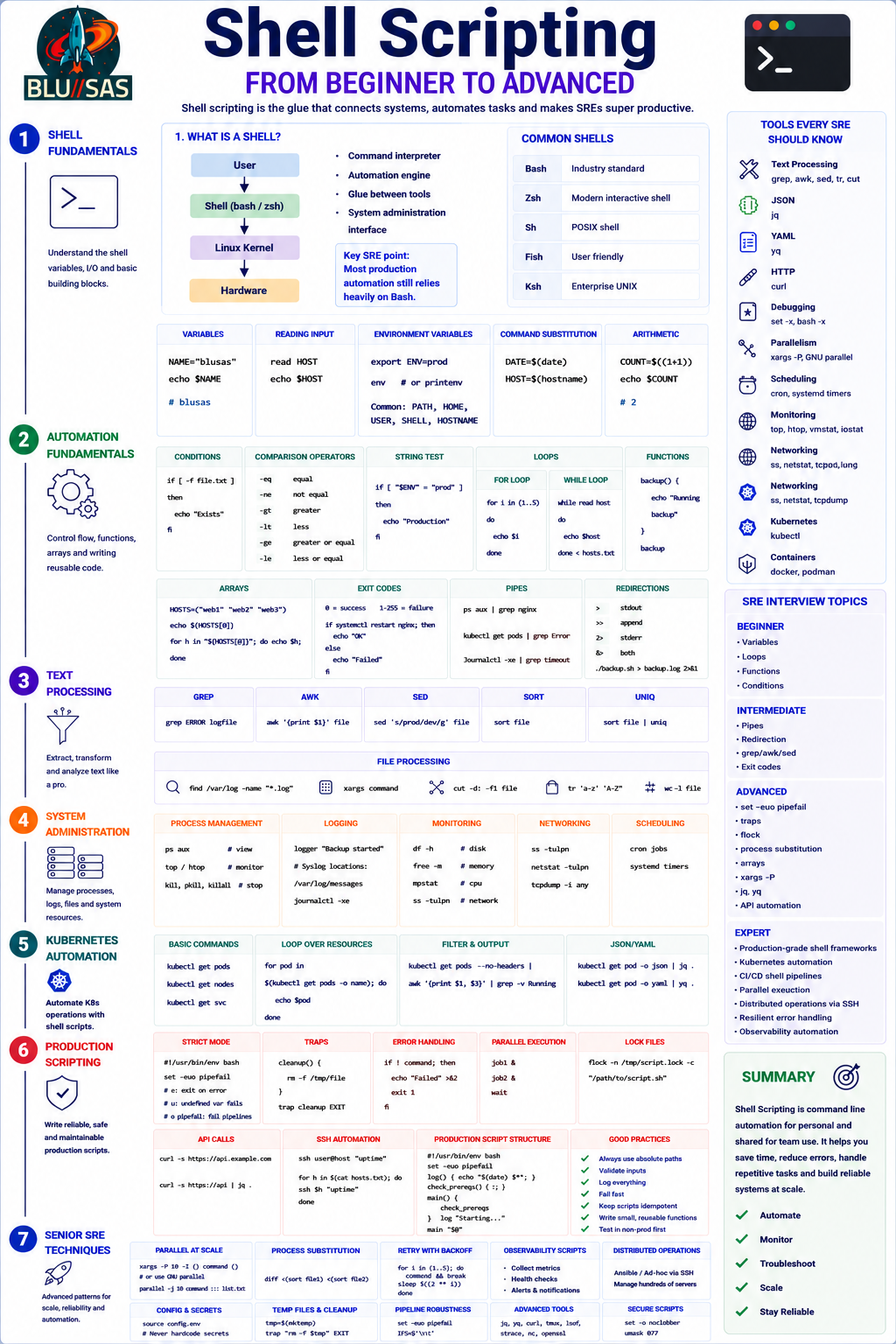
1. What Is A Shell?
      User
       ↓
Shell (bash / zsh)
       ↓
   Linux Kernel
       ↓
    Hardware
Shell acts as:
- Command interpreter
- Automation engine
- Glue between tools
- System administration interface
Common shells:
| Shell | Purpose |
|---|---|
| Bash | Industry standard |
| Zsh | Modern interactive shell |
| Sh | POSIX shell |
| Fish | User friendly |
| Ksh | Enterprise UNIX |
Key SRE point:
Most production automation still relies heavily on Bash.
2. Shell Basics
Variables
NAME="Son"
echo $NAME
Output:
SonReading Input
read HOST
echo $HOST
Environment Variables
export ENV=prodView:
env
printenv
Common examples:
PATH
HOME
USER
SHELL
HOSTNAME
3. Command Substitution
Capture command output.
DATE=$(date)or
HOST=$(hostname)4. Arithmetic
COUNT=$((1+1))echo $COUNTOutput:
25. Conditions
If Statement
if [ -f file.txt ]
then
   echo "Exists"
fi
Comparison Operators
| Operator | Meaning |
|---|---|
| -eq | equal |
| -ne | not equal |
| -gt | greater |
| -lt | less |
| -ge | greater equal |
| -le | less equal |
String Tests
if [ "$ENV" = "prod" ]6. Loops
For Loop
for i in {1..5}
do
  echo $i
done
While Loop
while read host
do
  echo $host
done
7. Functions
Reusable code.
backup() {
  echo "Running backup"
}
Call:
backup8. Arrays
HOSTS=("web1" "web2" "web3")Access:
echo ${HOSTS[0]}Loop:
for h in "${HOSTS[@]}"Intermediate SRE Skills
9. Exit Codes
Every command returns:
0 = success
1-255 = failure
Example:
systemctl restart nginx

if [ $? -ne 0 ]
then
   echo "Failed"
fi
Better:
if systemctl restart nginx
then
   echo OK
fi
10. Pipes
Linux superpower.
ps aux | grep nginxkubectl get pods | grep Errorjournalctl | grep timeout11. Redirection
stdout
>append
>>stderr
2>both
&>Example:
./backup.sh > backup.log 2>&112. Text Processing
grep
grep ERROR logfileawk
awk '{print $1}'sed
sed 's/prod/dev/g'sort
sort fileuniq
uniq13. File Processing
find /var/log -name "*.log"xargscuttr14. Process Management
View:
ps auxMonitor:
top
htop
Kill:
kill
pkill
killall
15. Logging
logger "Backup started"Syslog:
/var/log/messages
journalctl
Advanced SRE Shell
16. Strict Mode
Production scripts should start with:
#!/usr/bin/env bash

set -euo pipefail
Meaning:
e = exit on error
u = undefined variable fails
o pipefail = fail pipelines correctly
17. Traps
Cleanup handling.
trap cleanup EXITExample:
cleanup() {
 rm -f /tmp/file
}
18. Error Handling
if ! command
then
  exit 1
fi
19. Parallel Execution
job1 &
job2 &
wait
20. Lock Files
Prevent multiple runs.
flockExample:
flock -n /tmp/script.lock21. API Calls
Modern SRE automation.
curlExample:
curl https://api.example.comJSON:
jqExample:
curl api | jq .22. Kubernetes Automation
kubectl get podsLoop:
for pod in $(kubectl get pods -o name)23. SSH Automation
ssh host commandParallel:
parallel-sshor
for host in hosts.txt24. Monitoring Scripts
Disk usage:
df -hMemory:
free -mCPU:
mpstatNetwork:
ss -tulpn25. Production Shell Script Structure
#!/usr/bin/env bash

set -euo pipefail

log()
{
   echo "$(date) $*"
}

check_prereqs()
{
   :
}

main()
{
   check_prereqs
   log "Starting"
}

main "$@"
Shell Scripting Tools Every SRE Should Know
| Category | Tools |
|---|---|
| Text Processing | grep, awk, sed, tr, cut |
| JSON | jq |
| YAML | yq |
| HTTP | curl |
| Debugging | set -x, bash -x |
| Parallelism | xargs -P, GNU parallel |
| Scheduling | cron, systemd timers |
| Monitoring | top, htop, vmstat, iostat |
| Networking | ss, netstat, tcpdump |
| Kubernetes | kubectl |
| Containers | docker, podman |
Senior SRE Shell Interview Topics
Beginner
- Variables
- Loops
- Functions
- Conditions
Intermediate
- Pipes
- Redirection
- grep/awk/sed
- Exit codes
Advanced
- set -euo pipefail
- traps
- flock
- process substitution
- arrays
- xargs -P
- jq
- API automation
Expert
- Production-grade shell frameworks
- Kubernetes automation
- CI/CD shell pipelines
- Parallel execution
- Distributed operations via SSH
- Resilient error handling
- Observability automation
Key Takeaway
A strong SRE uses shell as the operating system automation language:
Linux
   ↓
Shell
   ↓
Automation
   ↓
Monitoring
   ↓
Troubleshooting
   ↓
Platform Reliability
Shell Fundamentals → Automation → Text Processing → System Administration → Kubernetes → Production Scripting → Senior SRE Techniques
Python Programming for SRE
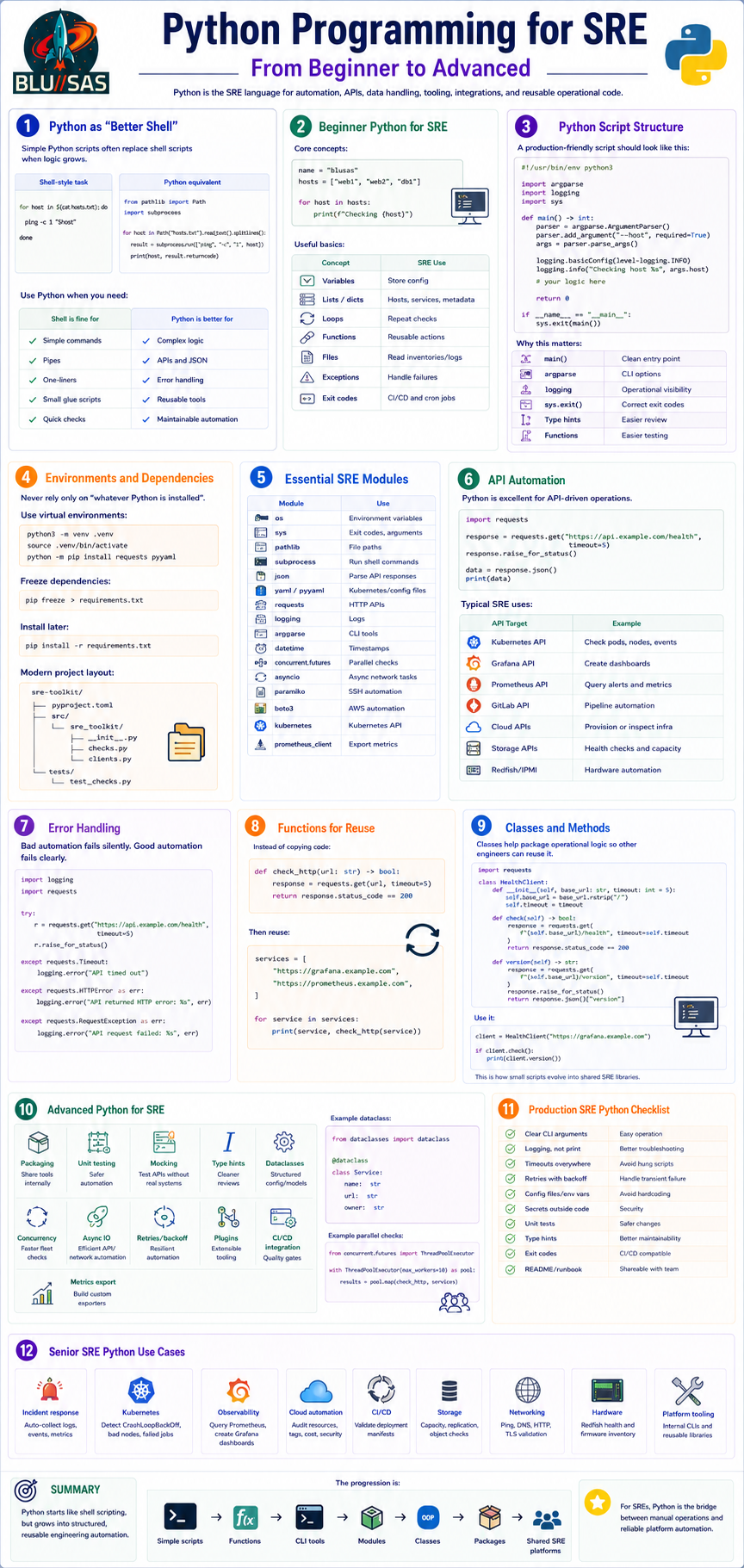
From Shell-Like Scripts to Reusable Automation Libraries
Python is the SRE language for automation, APIs, data handling, tooling, integrations, and reusable operational code.
1. Python as “Better Shell”
Simple Python scripts often replace shell scripts when logic grows.
Shell-style task:
for host in $(cat hosts.txt); do
  ping -c 1 "$host"
done
Python equivalent:
from pathlib import Path
import subprocess

for host in Path("hosts.txt").read_text().splitlines():
    result = subprocess.run(["ping", "-c", "1", host])
    print(host, result.returncode)
Use Python when you need:
| Shell is fine for | Python is better for |
|---|---|
| Simple commands | Complex logic |
| Pipes | APIs and JSON |
| One-liners | Error handling |
| Small glue scripts | Reusable tools |
| Quick checks | Maintainable automation |
2. Beginner Python for SRE
Core concepts:
name = "blusas"
hosts = ["web1", "web2", "db1"]

for host in hosts:
    print(f"Checking {host}")
Useful basics:
| Concept | SRE Use |
|---|---|
| Variables | Store config |
| Lists / dicts | Hosts, services, metadata |
| Loops | Repeat checks |
| Functions | Reusable actions |
| Files | Read inventories/logs |
| Exceptions | Handle failures |
| Exit codes | CI/CD and cron jobs |
3. Python Script Structure
A production-friendly script should look like this:
#!/usr/bin/env python3

import argparse
import logging
import sys


def main() -> int:
    parser = argparse.ArgumentParser()
    parser.add_argument("--host", required=True)
    args = parser.parse_args()

    logging.basicConfig(level=logging.INFO)
    logging.info("Checking host %s", args.host)

    return 0


if __name__ == "__main__":
    sys.exit(main())
Why this matters:
| Pattern | Benefit |
|---|---|
main() | Clean entry point |
argparse | CLI options |
logging | Operational visibility |
sys.exit() | Correct exit codes |
| Type hints | Easier review |
| Functions | Easier testing |
4. Environments and Dependencies
Never rely only on “whatever Python is installed”.
Use virtual environments:
python3 -m venv .venv
source .venv/bin/activate
python -m pip install requests pyyaml
Freeze dependencies:
pip freeze > requirements.txtInstall later:
pip install -r requirements.txtModern project layout:
sre-toolkit/
  pyproject.toml
  src/
    sre_toolkit/
      __init__.py
      checks.py
      clients.py
  tests/
    test_checks.py
5. Essential SRE Modules
| Module | Use |
|---|---|
os | Environment variables |
sys | Exit codes, arguments |
pathlib | File paths |
subprocess | Run shell commands |
json | Parse API responses |
yaml / pyyaml | Kubernetes/config files |
requests | HTTP APIs |
logging | Logs |
argparse | CLI tools |
datetime | Timestamps |
concurrent.futures | Parallel checks |
asyncio | Async network tasks |
paramiko | SSH automation |
boto3 | AWS automation |
kubernetes | Kubernetes API |
prometheus_client | Export metrics |
6. API Automation
Python is excellent for API-driven operations.
import requests

response = requests.get("https://api.example.com/health", timeout=5)
response.raise_for_status()

data = response.json()
print(data)
Typical SRE uses:
| API Target | Example |
|---|---|
| Kubernetes API | Check pods, nodes, events |
| Grafana API | Create dashboards |
| Prometheus API | Query alerts and metrics |
| GitLab API | Pipeline automation |
| Cloud APIs | Provision or inspect infra |
| Storage APIs | Health checks and capacity |
| Redfish/IPMI | Hardware automation |
7. Error Handling
Bad automation fails silently. Good automation fails clearly.
import logging
import requests

try:
    r = requests.get("https://api.example.com/health", timeout=5)
    r.raise_for_status()
except requests.Timeout:
    logging.error("API timed out")
except requests.HTTPError as err:
    logging.error("API returned HTTP error: %s", err)
except requests.RequestException as err:
    logging.error("API request failed: %s", err)
8. Functions for Reuse
Instead of copying code:
def check_http(url: str) -> bool:
    response = requests.get(url, timeout=5)
    return response.status_code == 200
Then reuse:
services = [
    "https://grafana.example.com",
    "https://prometheus.example.com",
]

for service in services:
    print(service, check_http(service))
9. Classes and Methods
Classes help package operational logic so other engineers can reuse it.
import requests


class HealthClient:
    def __init__(self, base_url: str, timeout: int = 5):
        self.base_url = base_url.rstrip("/")
        self.timeout = timeout

    def check(self) -> bool:
        response = requests.get(
            f"{self.base_url}/health",
            timeout=self.timeout,
        )
        return response.status_code == 200

    def version(self) -> str:
        response = requests.get(
            f"{self.base_url}/version",
            timeout=self.timeout,
        )
        response.raise_for_status()
        return response.json()["version"]
Use it:
client = HealthClient("https://grafana.example.com")

if client.check():
    print(client.version())
This is how small scripts evolve into shared SRE libraries.
10. Advanced Python for SRE
| Advanced Skill | SRE Value |
|---|---|
| Packaging | Share tools internally |
| Unit testing | Safer automation |
| Mocking | Test APIs without real systems |
| Type hints | Cleaner reviews |
| Dataclasses | Structured config/models |
| Concurrency | Faster fleet checks |
| Async IO | Efficient API/network automation |
| Retries/backoff | Resilient automation |
| Plugins | Extensible tooling |
| CI/CD integration | Quality gates |
| Metrics export | Build custom exporters |
Example dataclass:
from dataclasses import dataclass


@dataclass
class Service:
    name: str
    url: str
    owner: str
Example parallel checks:
from concurrent.futures import ThreadPoolExecutor

with ThreadPoolExecutor(max_workers=10) as pool:
    results = pool.map(check_http, services)
11. Production SRE Python Checklist
| Requirement | Why |
|---|---|
| Clear CLI arguments | Easy operation |
| Logging, not print | Better troubleshooting |
| Timeouts everywhere | Avoid hung scripts |
| Retries with backoff | Handle transient failure |
| Config files/env vars | Avoid hardcoding |
| Secrets outside code | Security |
| Unit tests | Safer changes |
| Type hints | Better maintainability |
| Exit codes | CI/CD compatible |
| README/runbook | Shareable with team |
12. Senior SRE Python Use Cases
| Area | Example |
|---|---|
| Incident response | Auto-collect logs, events, metrics |
| Kubernetes | Detect CrashLoopBackOff, bad nodes, failed jobs |
| Observability | Query Prometheus, create Grafana dashboards |
| Cloud automation | Audit resources, tags, cost, security |
| CI/CD | Validate deployment manifests |
| Storage | Capacity, replication, object checks |
| Networking | Ping, DNS, HTTP, TLS validation |
| Hardware | Redfish health and firmware inventory |
| Platform tooling | Internal CLIs and reusable libraries |
Summary
Python starts like shell scripting, but grows into structured, reusable engineering automation.
The progression is:
Simple scripts
  → Functions
  → CLI tools
  → Modules
  → Classes
  → Packages
  → Shared SRE platforms
For SREs, Python is the bridge between manual operations and reliable platform automation.
Golang Development for SRE
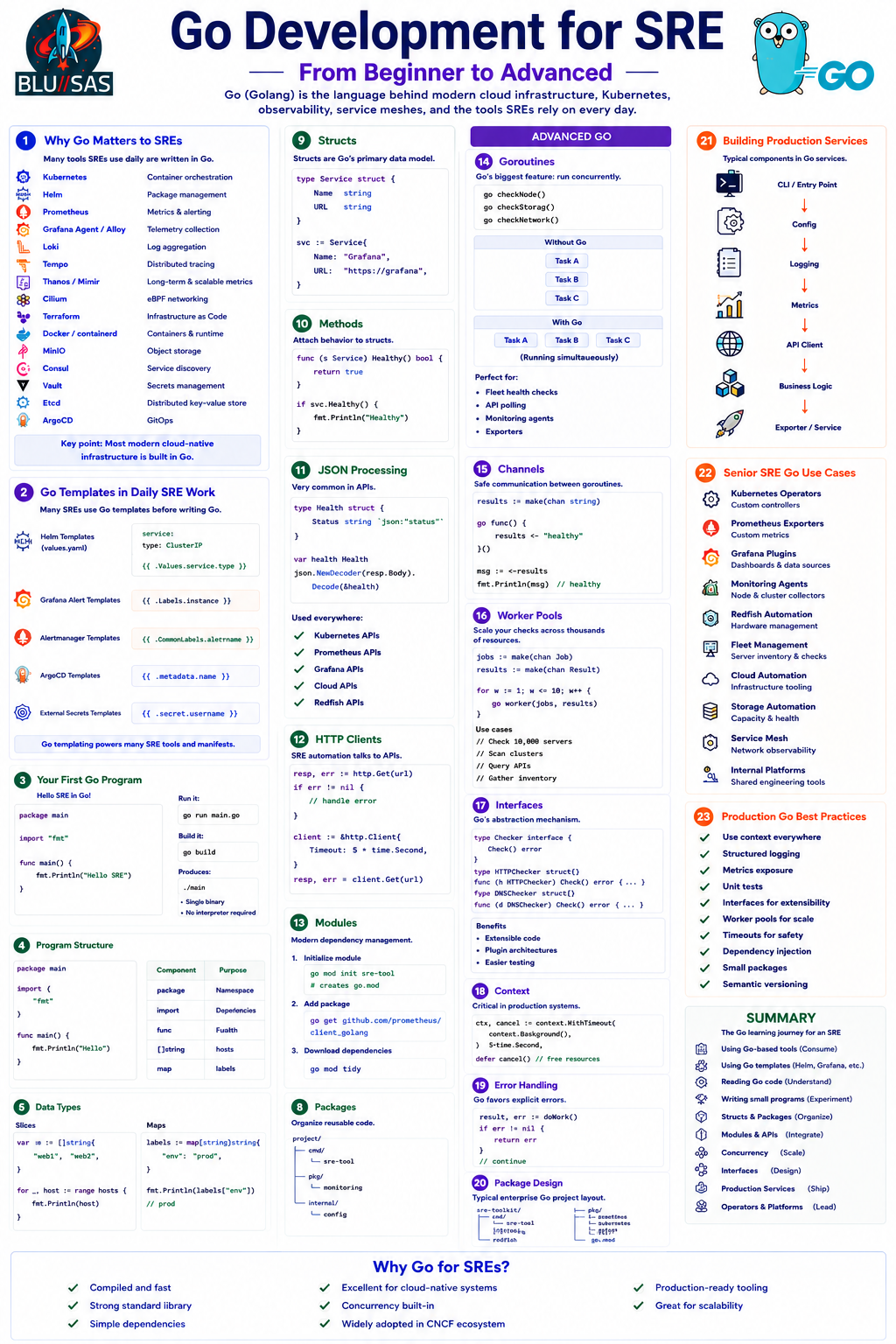
From Using Go-Based Tools to Building Cloud-Native Platforms
Go (Golang) has become the de facto language of cloud infrastructure, Kubernetes, observability, service meshes, and modern platform engineering.
Unlike Python, which is often used for automation scripts, Go is commonly used to build the actual platforms, controllers, exporters, operators, agents, and distributed systems that SREs operate.
1. Why Go Matters to SREs
Many of the tools used daily by SREs are written in Go.
| Tool | Purpose |
|---|---|
| Kubernetes | Container orchestration |
| Helm | Package management |
| Prometheus | Metrics |
| Grafana Agent / Alloy | Telemetry collection |
| Loki | Log aggregation |
| Tempo | Distributed tracing |
| Thanos | Long-term metrics |
| Mimir | Scalable Prometheus |
| Cilium | eBPF networking |
| Terraform | Infrastructure as Code |
| Docker | Containers |
| containerd | Runtime |
| MinIO | Object storage |
| Consul | Service discovery |
| Vault | Secrets management |
| Etcd | Distributed key-value store |
| ArgoCD | GitOps |
Key point:
Most modern cloud-native infrastructure is built in Go.
2. Go Templates in Daily SRE Work
Many SREs use Go before writing Go.
Helm Templates
Helm uses Go templating.
Example:
apiVersion: v1
kind: Service

metadata:
  name: {{ .Release.Name }}

spec:
  type: {{ .Values.service.type }}
Values:
service:
  type: ClusterIP
Output:
type: ClusterIPGrafana Alert Templates
{{ .Labels.instance }}Alertmanager Templates
{{ .CommonLabels.alertname }}ArgoCD Templates
{{ .metadata.name }}External Secrets
{{ .secret.username }}Beginner Go
3. Your First Go Program
package main

import "fmt"

func main() {
    fmt.Println("Hello SRE")
}
Execution:
go run main.goBuild:
go buildProduces:
mainSingle binary.
No interpreter required.
4. Program Structure
package main

import (
    "fmt"
)

func main() {
    fmt.Println("Hello")
}
Key pieces:
| Component | Purpose |
|---|---|
| package | Namespace |
| import | Dependencies |
| func | Function |
| main | Entry point |
5. Data Types
var name string
var count int
var healthy bool
Examples:
name := "grafana"
pods := 5
healthy := true
Common types:
| Type | Example |
|---|---|
| string | hostname |
| int | replicas |
| float64 | latency |
| bool | health |
| []string | hosts |
| map | labels |
6. Collections
Slice
hosts := []string{
    "web1",
    "web2",
}
Loop:
for _, host := range hosts {
    fmt.Println(host)
}
Maps
labels := map[string]string{
    "env": "prod",
}
Lookup:
fmt.Println(labels["env"])7. Functions
func check(host string) bool {
    return true
}
Usage:
healthy := check("web1")Intermediate Go
8. Packages
Organize reusable code.
project/

cmd/
pkg/
internal/
Example:
cmd/
 └── sre-tool

pkg/
 └── monitoring

internal/
 └── config
Import:
import "sre-tool/pkg/monitoring"9. Structs
Structs are Go’s primary data model.
type Service struct {
    Name string
    URL  string
}
Create:
svc := Service{
    Name: "Grafana",
    URL: "https://grafana",
}
10. Methods
Attach behavior to structs.
func (s Service) Healthy() bool {
    return true
}
Usage:
svc.Healthy()11. JSON Processing
Very common in APIs.
type Health struct {
    Status string `json:"status"`
}
Decode:
json.NewDecoder(resp.Body).Decode(&health)Used everywhere:
- Kubernetes APIs
- Prometheus APIs
- Grafana APIs
- Cloud APIs
- Redfish APIs
12. HTTP Clients
SRE automation often talks to APIs.
resp, err := http.Get(url)Production:
client := http.Client{
    Timeout: 5 * time.Second,
}
13. Modules
Modern dependency management.
Initialize:
go mod init sre-toolCreates:
go.modAdd package:
go get github.com/prometheus/client_golangDownload:
go mod tidyAdvanced Go
14. Goroutines
Go’s biggest feature.
Run concurrently:
go checkNode()
go checkStorage()
go checkNetwork()
No threads required.
Without Go:
Task A
Task B
Task C
With Go:
Task A
Task B
Task C

Running simultaneously
Perfect for:
- Fleet health checks
- API polling
- Monitoring agents
- Exporters
15. Channels
Safe communication between goroutines.
results := make(chan string)

go func() {
    results <- "healthy"
}()
Receive:
msg := <-results16. Worker Pools
Massively useful for SRE tooling.
jobs := make(chan Job)
results := make(chan Result)
Multiple workers:
for w := 1; w <= 10; w++ {
    go worker(jobs, results)
}
Use cases:
- Check 10,000 servers
- Scan clusters
- Query APIs
- Gather inventory
17. Interfaces
Go’s abstraction mechanism.
type Checker interface {
    Check() error
}
Implement:
type HTTPChecker struct{}type DNSChecker struct{}Both satisfy:
Check()Benefits:
- Extensible code
- Plugin architectures
- Easier testing
18. Context
Critical in production systems.
ctx, cancel := context.WithTimeout(
    context.Background(),
    5*time.Second,
)
Used for:
- API timeouts
- Kubernetes clients
- Database operations
- Distributed systems
19. Error Handling
Go favors explicit errors.
result, err := doWork()

if err != nil {
    return err
}
This is seen everywhere.
20. Package Design
Typical enterprise Go project:
sre-toolkit/

cmd/
 └── sre-tool

internal/
 ├── config
 ├── api
 ├── logging
 └── monitoring

pkg/
 ├── prometheus
 ├── kubernetes
 ├── grafana
 └── redfish

go.mod
21. Building Production Services
Typical components:
CLI
  ↓
Config
  ↓
Logging
  ↓
Metrics
  ↓
API Client
  ↓
Business Logic
  ↓
Exporter / Service
22. Senior SRE Go Use Cases
| Area | Example |
|---|---|
| Kubernetes Operators | Custom controllers |
| Prometheus Exporters | Custom metrics |
| Grafana Plugins | Dashboards |
| Monitoring Agents | Node collectors |
| Redfish Automation | Hardware management |
| Fleet Management | Server inventory |
| Cloud Automation | Infrastructure tooling |
| Storage Automation | Capacity and health |
| Service Mesh | Network observability |
| Internal Platforms | Shared engineering tools |
23. Production Go Best Practices
| Practice | Why |
|---|---|
| Use context everywhere | Prevent hangs |
| Structured logging | Better debugging |
| Metrics exposure | Observability |
| Unit tests | Reliability |
| Interfaces | Extensibility |
| Worker pools | Scalability |
| Timeouts | Safety |
| Dependency injection | Testability |
| Small packages | Maintainability |
| Semantic versioning | Safe releases |
Summary
The Go learning journey for an SRE typically looks like:
Using Go-based tools
        ↓
Using Go templates (Helm)
        ↓
Reading Go code
        ↓
Writing small programs
        ↓
Structs & Packages
        ↓
Modules & APIs
        ↓
Concurrency (Goroutines)
        ↓
Interfaces
        ↓
Production Services
        ↓
Operators & Platform Engineering
Key Takeaway
Python is often used to automate systems.
Go is often used to build the systems being automated.
Shell
   ↓
Automation

Python
   ↓
Platform Automation

Go
   ↓
Cloud-Native Platforms
   ↓
Kubernetes
   ↓
Observability Systems
   ↓
Infrastructure Services
Go Ecosystem → Templates → Language Basics → Packages → Modules → Concurrency → Interfaces → Production Design → Senior SRE Use Cases → Summary.