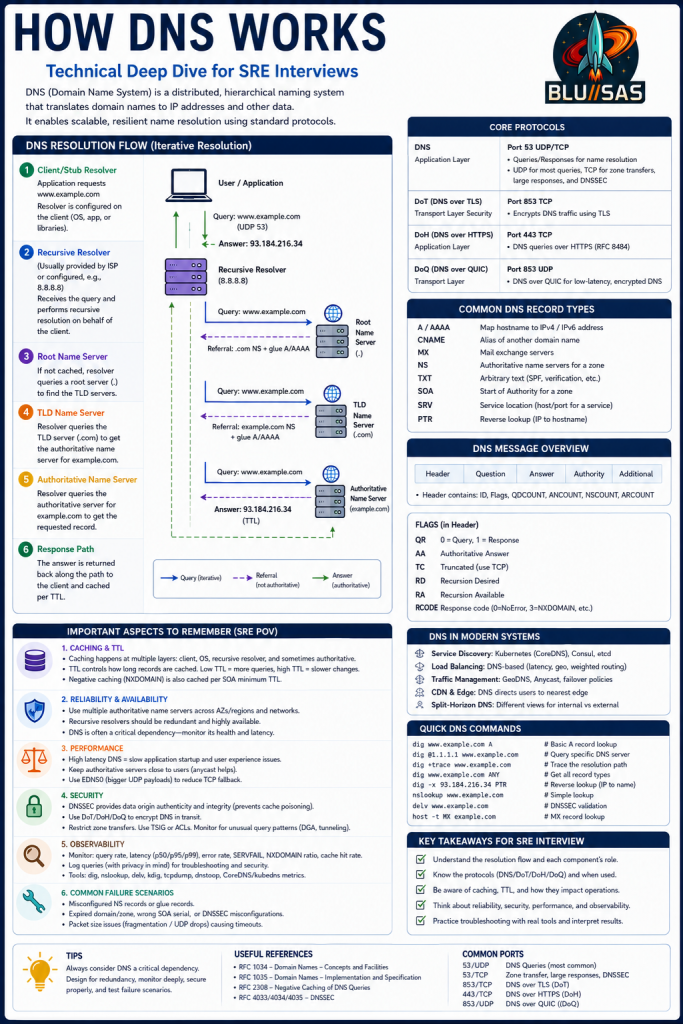
This infographic is designed as a Senior SRE DNS Interview Cheat Sheet. It goes beyond “DNS translates names to IPs” and covers how DNS actually operates in production environments, what protocols are involved, common failure modes, performance considerations, security features, and troubleshooting techniques.
1. What DNS Is
DNS (Domain Name System) is a distributed hierarchical database that translates:
www.example.cominto:
93.184.216.34or:
2606:2800:220:1:248:1893:25c8:1946Without DNS, users would need to remember IP addresses.
Think of DNS as:
Internet Phone Book2. DNS Resolution Flow (Center Diagram)
This is the most important section.
When an application needs:
www.example.comit asks a DNS resolver.
Step 1: Client / Stub Resolver
This is usually:
Browser
Operating System
Application Library
Examples:
glibc
systemd-resolved
Windows DNS Client
The client sends:
Query: www.example.comtypically using:
UDP/53Step 2: Recursive Resolver
Examples:
8.8.8.8
1.1.1.1
ISP Resolver
CoreDNS
The resolver performs all the work on behalf of the client.
Step 3: Root Nameserver
The resolver asks:
Where is www.example.com?The root server replies:
I don't know.

Ask .com
This is called a referral.
Step 4: TLD Server
The resolver asks:
Where is www.example.com?The .com server replies:
Ask example.com's nameserverAnother referral.
Step 5: Authoritative Nameserver
The resolver asks:
Where is www.example.com?Authoritative server replies:
93.184.216.34
TTL=300
This answer is authoritative.
Step 6: Response Returned
The recursive resolver:
- caches answer
- returns answer to client
Client now knows:
93.184.216.34and can connect.
3. Understanding DNS Caching
The infographic correctly highlights caching as critical.
Caching occurs at multiple layers:
Browser
↓
Operating System
↓
Recursive Resolver
↓
Authoritative Server
TTL (Time To Live)
Example:
TTL = 300means:
Cache for 300 secondsHigh TTL
Example:
86400Benefits:
- fewer DNS queries
- less DNS traffic
Drawback:
Changes take longer to propagateLow TTL
Example:
60Benefits:
Faster failoverDrawback:
More DNS traffic4. DNS Protocols (Top Right)
This is a modern SRE topic.
Traditional DNS
Uses:
UDP/53Most queries.
Uses:
TCP/53for:
- large responses
- DNSSEC
- zone transfers
DoT (DNS over TLS)
Port:
853/TCPEncrypts DNS traffic.
DoH (DNS over HTTPS)
Port:
443/TCPDNS traffic travels inside HTTPS.
Benefits:
Privacy
Firewall traversal
Used by:
Chrome
Firefox
Cloudflare
Google
DoQ (DNS over QUIC)
Port:
853/UDPModern encrypted DNS.
Benefits:
Lower latency
Better connection recovery
5. DNS Record Types
An interviewer may ask:
What records do you commonly use?
Know these:
| Record | Purpose |
|---|---|
| A | IPv4 Address |
| AAAA | IPv6 Address |
| CNAME | Alias |
| MX | Mail Server |
| TXT | SPF, DKIM, verification |
| NS | Nameserver |
| PTR | Reverse DNS |
| SRV | Service Discovery |
| SOA | Zone Information |
Example
www.example.com
A
93.184.216.34
Example
mail.example.com
MX
mailserver.example.com
6. DNS Message Structure
The infographic shows DNS packet layout.
Contains:
Header
Question
Answer
Authority
Additional
Important flags:
| Flag | Meaning |
|---|---|
| QR | Query/Response |
| AA | Authoritative Answer |
| TC | Truncated |
| RD | Recursion Desired |
| RA | Recursion Available |
| RCODE | Result Code |
RCODE Examples
0 = NOERROR
3 = NXDOMAIN
2 = SERVFAIL
Interviewers often ask:
Difference between NXDOMAIN and SERVFAIL?
NXDOMAIN
Name doesn't exist.SERVFAIL
Server couldn't answer.7. DNS in Modern Systems
Very relevant for Kubernetes and Cloud.
Kubernetes
DNS provided by:
CoreDNSExample:
grafana.observability.svc.cluster.localService Discovery
DNS is often used instead of static IPs.
Examples:
Consul
etcd
Kubernetes Services
Load Balancing
DNS can return:
Multiple A recordsfor load distribution.
GeoDNS
Different IPs returned based on user location.
Used by:
Cloudflare
AWS Route53
Akamai
8. Performance Considerations
The infographic highlights several SRE concerns.
Latency
High DNS latency causes:
Slow application startup
Slow page loads
Anycast
Large providers use:
AnycastSame IP advertised globally.
Users automatically hit nearest DNS node.
Used by:
Google DNS
Cloudflare DNS
Route53
EDNS0
Extends DNS packet size.
Reduces need for:
TCP fallback9. Security Considerations
Very common interview topic.
DNSSEC
Provides:
Integrity
Authenticity
Prevents:
DNS cache poisoningDNSSEC does NOT provide:
EncryptionMany people get this wrong.
Encryption comes from:
DoT
DoH
DoQ
Zone Transfers
Should be restricted.
Bad configuration can expose:
Entire DNS zoneDNS Tunneling
Attackers may abuse:
TXT records
Subdomains
to exfiltrate data.
10. Observability (SRE Perspective)
This is one of the strongest parts of the infographic.
Monitor:
Query Latency
p50
p95
p99
Error Rates
NXDOMAIN
SERVFAIL
REFUSED
Cache Hit Rate
Higher is generally better.
Query Volume
Sudden spikes may indicate:
DDoS
Misconfigured application
DNS loop
Tools:
dig
nslookup
delv
tcpdump
CoreDNS metrics
KubeDNS metrics
11. Common Failure Scenarios
An SRE interview almost always includes troubleshooting.
Wrong NS Records
Broken delegationDomain unreachable.
Expired Domain
Registrar issueEverything breaks.
Wrong SOA
Replication issues.
DNSSEC Errors
Very common production outage.
Can cause:
SERVFAILeven though records exist.
UDP Fragmentation
Large DNS responses dropped.
Symptoms:
Intermittent failures12. Quick DNS Commands
The infographic includes useful commands.
Basic Lookup
dig www.example.comQuery Specific Resolver
dig @1.1.1.1 www.example.comAll Records
dig www.example.com ANYReverse Lookup
dig -x 93.184.216.34MX Lookup
host -t MX example.comWhat an SRE Should Say in an Interview
A concise answer based on this infographic:
DNS is a distributed hierarchical naming system that translates hostnames into IP addresses. A client sends a query to a recursive resolver, which performs iterative lookups against root, TLD, and authoritative nameservers to obtain an answer. Responses are cached according to TTL values to reduce latency and load. Modern DNS can use traditional UDP/TCP on port 53 or encrypted protocols such as DoT, DoH, and DoQ. As an SRE, I consider DNS a critical dependency and monitor latency, cache hit rates, NXDOMAIN and SERVFAIL rates, and DNSSEC health because DNS failures can make otherwise healthy applications appear completely unavailable.
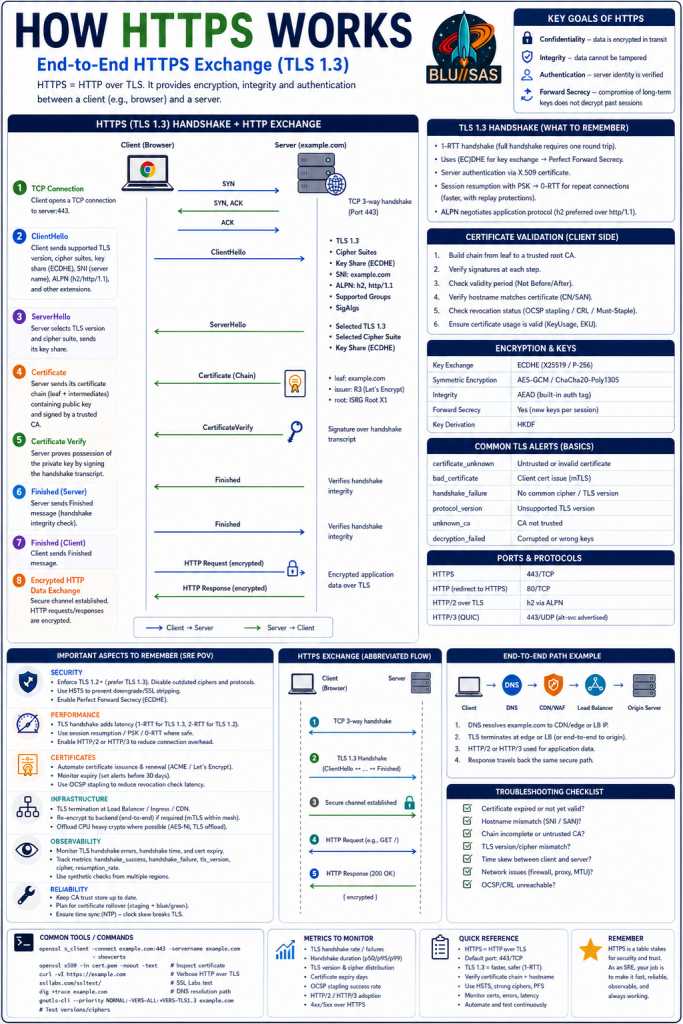
This infographic is an excellent TLS 1.3 / HTTPS SRE Interview Cheat Sheet. It explains not only what HTTPS is, but how a browser establishes trust, negotiates encryption, and securely exchanges HTTP traffic. For SRE interviews, understanding this flow is critical because HTTPS sits at the intersection of networking, security, load balancing, observability, and application delivery.
What HTTPS Actually Is
HTTPS is simply:
HTTP + TLSor:
HTTP over TLSIts purpose is to provide:
Confidentiality
Nobody can read traffic in transit.
Example:
Password
Session Cookie
Credit Card Data
are encrypted.
Integrity
Prevents modification.
Attackers cannot alter:
HTTP Response
JavaScript
API Data
without detection.
Authentication
Proves the server is really:
www.example.comand not a malicious impersonator.
Forward Secrecy
Even if a server’s private key is stolen later:
Old sessions remain securebecause session keys were ephemeral.
Section 1: TCP Connection
Before TLS starts:
The browser must create a network connection.
For HTTPS:
TCP/443is typically used.
TCP Three-Way Handshake
Client:
SYNServer:
SYN-ACKClient:
ACKConnection established.
Why SREs Care
Problems here indicate:
Firewall
Routing
Packet Loss
Load Balancer
issues.
Common commands:
telnet host 443
nc -vz host 443
tcpdump
ss -tn
Section 2: ClientHello
TLS begins.
Browser sends:
ClientHellocontaining:
TLS Versions
Example:
TLS 1.3
TLS 1.2
Cipher Suites
Examples:
TLS_AES_128_GCM_SHA256
TLS_AES_256_GCM_SHA384
SNI
Server Name Indication:
www.example.comThis allows multiple websites on the same IP.
Without SNI:
Virtual hosting breaksALPN
Application Layer Protocol Negotiation.
Used to negotiate:
HTTP/1.1
HTTP/2
HTTP/3
Section 3: ServerHello
Server responds with:
ServerHelloSelecting:
TLS Version
Cipher Suite
Key Share
Example:
TLS 1.3
AES-GCM
ECDHE
Section 4: Certificate Exchange
The server sends:
Certificate ChainExample:
Leaf Certificate
Intermediate CA
Root CA
Leaf Certificate
Contains:
Hostname
Public Key
Issuer
Validity Period
Example:
CN=www.example.comSection 5: Certificate Validation
This is where browsers decide whether to trust the server.
Trust Chain Validation
Browser builds:
Leaf
↓
Intermediate
↓
Root
Example:
www.example.com
↓
Let's Encrypt R3
↓
ISRG Root X1
Hostname Validation
Browser checks:
SANcontains:
www.example.comExpiration Validation
Checks:
Not Before
Not After
dates.
Revocation Validation
Possible methods:
OCSP
CRL
Common Failure
Expired certificate:
NET::ERR_CERT_DATE_INVALIDOne of the most common production outages.
Section 6: ECDHE Key Exchange
TLS 1.3 uses:
ECDHE(Elliptic Curve Diffie-Hellman Ephemeral)
This creates:
Shared Session Secretbetween client and server.
Important Interview Point
The server’s certificate key:
DOES NOT encrypt trafficInstead it:
Authenticates the serverThe actual session key comes from:
ECDHEThis is a common interview question.
Section 7: CertificateVerify
Server proves ownership of its private key.
It signs handshake data.
Browser verifies:
Public Keyfrom the certificate.
Section 8: Finished Messages
Both sides exchange:
Finishedmessages.
These verify:
Handshake IntegrityNo tampering occurred.
Secure Channel Established
At this point:
TLS Tunnel EstablishedNow:
HTTP Traffic EncryptedSection 9: Encrypted HTTP Request
Browser sends:
GET /products HTTP/2
Host: www.example.com
inside TLS.
Network observers see:
Source IP
Destination IP
Port 443
but not:
URL Path
Cookies
Headers
Body
Section 10: HTTP Response
Server returns:
HTTP/2 200 OKplus:
HTML
JSON
Images
CSS
JavaScript
encrypted.
TLS 1.3 Advantages
The infographic highlights an important SRE topic:
TLS 1.2
Required:
2 RTTbefore application data.
TLS 1.3
Requires:
1 RTTbefore application data.
Result:
Lower LatencySession Resumption
Returning users may use:
PSK
Session Ticket
allowing:
0-RTTconnections.
Benefits:
Faster page loadsEncryption Section
The infographic lists the modern cryptography stack.
Key Exchange
ECDHESymmetric Encryption
Typically:
AES-GCMor
ChaCha20-Poly1305Integrity
Provided by:
AEADAuthenticated Encryption with Associated Data.
Key Derivation
Uses:
HKDFto derive session keys.
HTTP/2 and HTTP/3
The infographic highlights modern transport.
HTTP/2
Runs over:
TLS/TCPBenefits:
Multiplexing
Header Compression
Connection Reuse
HTTP/3
Runs over:
QUIC
UDP/443
Benefits:
Lower latency
Faster recovery
No TCP head-of-line blocking
End-to-End Production Path
The infographic correctly shows:
Browser
↓
DNS
↓
CDN/WAF
↓
Load Balancer
↓
Origin Server
This is the real path in production.
Examples:
Cloudflare
Akamai
Fastly
AWS CloudFront
What SREs Monitor
This section is particularly interview-relevant.
TLS Handshake Failures
Monitor:
tls_handshake_failuresHandshake Latency
p50
p95
p99
Certificate Expiry
Alert before:
30 days
14 days
7 days
Cipher Usage
Monitor adoption of:
TLS 1.3and deprecation of:
TLS 1.0
TLS 1.1
HTTP Metrics
4xx
5xx
Latency
Availability
Common TLS Failure Scenarios
Interviewers frequently ask these.
Expired Certificate
Symptoms:
Browser Security WarningWrong Hostname
Certificate issued for:
api.example.comUser visits:
www.example.comFailure.
Incomplete Certificate Chain
Missing intermediate CA.
Works in:
Some browsersFails in:
OthersTLS Version Mismatch
Server:
TLS 1.3 onlyClient:
TLS 1.0Handshake fails.
Time Synchronization Issues
Bad NTP causes:
Certificate appears expiredeven when valid.
Commands Every SRE Should Know
Inspect certificate:
openssl s_client -connect example.com:443 -servername example.comShow certificate details:
openssl x509 -in cert.pem -text -nooutTest HTTPS:
curl -v https://example.comTrace TLS issues:
openssl s_client -tls1_3 -connect example.com:443Interview Answer (60 Seconds)
HTTPS is HTTP running over TLS. After DNS resolution, the client establishes a TCP connection on port 443 and starts a TLS handshake. The browser sends a ClientHello containing supported TLS versions, cipher suites, SNI and ALPN. The server responds with a ServerHello and certificate chain. The browser validates the certificate against trusted root CAs, verifies hostname, expiry and revocation status. TLS 1.3 then uses ECDHE to generate ephemeral session keys providing forward secrecy. Once both sides exchange Finished messages, an encrypted tunnel is established and HTTP requests and responses are transmitted securely. In production, traffic often flows through CDNs, WAFs and load balancers before reaching the application. As an SRE, I monitor handshake latency, TLS failures, certificate expiry, protocol versions and HTTP performance because TLS problems can make healthy services appear unavailable.
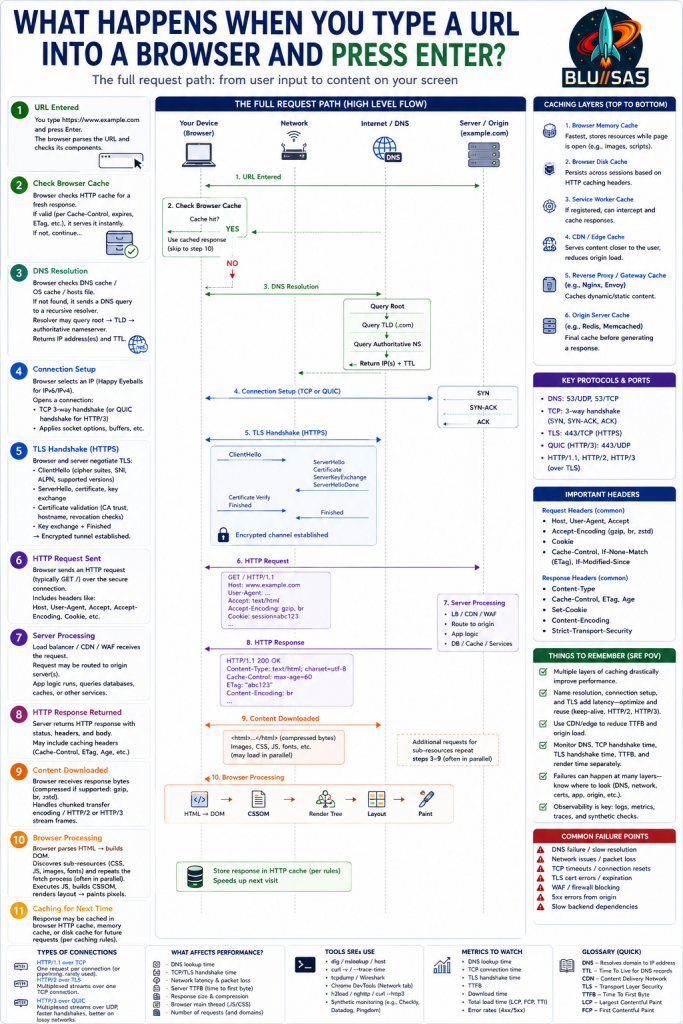
This infographic combines the previous two topics (DNS and HTTPS) and answers one of the most common Senior SRE interview questions:
“What happens when you type a URL into a browser and press Enter?”
What makes this infographic valuable is that it covers the entire request lifecycle, not just DNS or TLS individually. It follows the request from the browser all the way to the application server and back again.
The Big Picture
Suppose the user enters:
https://www.example.com/productsThe browser must perform several major tasks:
1. Parse URL
2. Check caches
3. Resolve DNS
4. Establish connection
5. Negotiate TLS
6. Send HTTP request
7. Process request on server
8. Return response
9. Render page
10. Cache content
The infographic follows this exact flow.
Step 1 — URL Entered
The browser parses:
Protocol: HTTPS
Host: www.example.com
Path: /products
Port: 443
Before any network traffic occurs, the browser checks:
- URL validity
- HSTS policies
- Existing connections
- Browser state
Step 2 — Browser Cache Check
This is often overlooked in interviews.
The browser first asks:
Do I already have this content?Possible answer:
YESand the page loads instantly.
Cache Layers
The infographic shows several cache layers:
Browser Memory Cache
Fastest cache.
Contains:
CSS
JavaScript
Images
Fonts
for open tabs.
Browser Disk Cache
Persistent across browser restarts.
Controlled by:
Cache-Control
ETag
Expires
Last-Modified
Service Worker Cache
Used by modern applications:
Gmail
Slack
Teams
Can even work offline.
Step 3 — DNS Resolution
If the browser does not know the IP address:
www.example.comDNS resolution begins.
Browser DNS Cache
First lookup location.
OS DNS Cache
Examples:
systemd-resolved
Windows DNS Client
Recursive Resolver
If not cached:
8.8.8.8
1.1.1.1
ISP Resolver
Hierarchical DNS Lookup
Resolver performs:
Root Server
↓
TLD Server
↓
Authoritative Server
Result:
93.184.216.34plus TTL.
Step 4 — Connection Setup
Browser now has:
93.184.216.34Connection must be established.
HTTP/1.1 or HTTP/2
Uses:
TCPwith:
SYN
SYN-ACK
ACK
3-way handshake.
HTTP/3
Uses:
QUIC
UDP/443
instead of TCP.
Benefits:
Lower latency
Connection migration
Faster recovery
Step 5 — TLS Handshake (HTTPS)
This is where encryption begins.
Browser sends:
ClientHellocontaining:
TLS Version
Cipher Suites
SNI
ALPN
Key Share
Server responds:
ServerHello
Certificate
CertificateVerify
Finished
Browser validates:
Certificate Chain
Hostname
Expiration
Revocation Status
Key exchange occurs using:
ECDHEResult:
Shared Session KeysThe infographic correctly highlights:
Encrypted Channel EstablishedAt this point:
HTTPS beginsStep 6 — HTTP Request Sent
Now encrypted.
Example:
GET /products HTTP/1.1
Host: www.example.com
User-Agent: Chrome
Accept: */*
Cookie: session=abc123
The infographic shows common headers.
Request Headers
Examples:
Host
User-Agent
Accept
Cookie
Cache-Control
If-None-Match
These are critical in troubleshooting.
Step 7 — Server Processing
This section reflects a real production environment.
Request path:
Browser
↓
CDN
↓
WAF
↓
Load Balancer
↓
Application
Examples:
CDN
Cloudflare
Fastly
Akamai
CloudFront
WAF
Web Application Firewall.
Blocks:
SQL Injection
XSS
Bot Traffic
Load Balancer
Examples:
NGINX
HAProxy
Envoy
AWS ALB
Routes traffic.
Application
Processes:
Authentication
Business Logic
Database Queries
Backend Services
Application may access:
Redis
PostgreSQL
Kafka
Microservices
Object Storage
Step 8 — HTTP Response Returned
Server sends:
HTTP/1.1 200 OKwith:
Content-Type
Cache-Control
ETag
Content-Encoding
Example:
Content-Encoding: brmeans:
Brotli Compressionused to reduce transfer size.
Step 9 — Content Downloaded
Browser downloads:
HTML
CSS
JavaScript
Images
Fonts
The infographic notes:
May load in parallelwhich is especially true with:
HTTP/2
HTTP/3
Step 10 — Browser Rendering
A very important browser-internals topic.
HTML Parsing
Creates:
DOMDocument Object Model.
CSS Parsing
Creates:
CSSOMCSS Object Model.
Render Tree
Combines:
DOM
+
CSSOM
Layout
Calculates:
Position
Size
Dimensions
of page elements.
Paint
Pixels are drawn to screen.
Composite
GPU displays final result.
Step 11 — Cache For Next Time
Browser stores resources according to:
Cache-Control
ETag
Expires
Next visit is faster.
Protocol Section (Right Side)
The infographic summarizes key protocols.
DNS
53/UDP
53/TCP
TCP
SYN
SYN-ACK
ACK
TLS
443/TCPQUIC
443/UDPHTTP Versions
HTTP/1.1
HTTP/2
HTTP/3
Things SREs Should Remember
This section is particularly useful for interviews.
Performance
Major latency contributors:
DNS
TCP
TLS
Application
Database
Connection Reuse
Keepalive reduces:
TCP Handshakes
TLS Handshakes
CDN Benefits
Improves:
Latency
Bandwidth
Origin Protection
Observability
Monitor:
DNS
Lookup latency
NXDOMAIN
SERVFAIL
Network
TCP connect time
Packet loss
TLS
Handshake time
Certificate expiry
HTTP
TTFB
4xx
5xx
Latency
Availability
Common Failure Points
The infographic highlights where things often break.
DNS Failures
NXDOMAIN
SERVFAIL
Bad Delegation
Network Issues
Packet Loss
Firewall Rules
Routing Problems
TCP Issues
Connection Resets
Timeouts
TLS Issues
Expired Certificates
Bad Certificate Chains
TLS Version Mismatch
WAF Blocking
Legitimate traffic blocked accidentally.
Backend Problems
Slow Database
Failed Microservice
Storage Outage
Interview Answer (2-Minute Senior SRE Version)
When a user enters a URL, the browser first parses it and checks local caches. If the content isn’t cached, it performs DNS resolution through browser, OS and recursive resolver caches, potentially querying root, TLD and authoritative name servers. Once an IP address is obtained, the browser establishes a TCP connection or QUIC session, performs a TLS handshake to authenticate the server and negotiate encryption keys, then sends an HTTP request. The request may pass through CDNs, WAFs and load balancers before reaching the application. The application may query databases, caches and backend services before generating a response. The response is returned to the browser, which downloads the content, parses HTML, CSS and JavaScript, builds the DOM and render tree, performs layout and paint operations, and finally renders the page. As an SRE, I view each stage as a dependency and monitor DNS latency, TCP connect time, TLS handshake duration, TTFB, application latency and backend health because performance or availability issues can occur at any point in the chain.
When an interviewer asks:
“What happens when you type a URL into a browser and press Enter?”
they are usually not testing browser trivia.
They are trying to determine whether you think like an engineer who understands distributed systems end-to-end.
For an SRE role, this question is effectively a proxy for:
Can this person reason about an entire production request path?What They’re Actually Assessing
There are typically 7 dimensions being evaluated.
1. Systems Thinking
Can you see the whole system?
Junior engineers often answer:
Browser asks DNS.
DNS returns IP.
Browser connects.
Page loads.
Senior engineers answer:
Browser
→ Cache
→ DNS
→ TCP/QUIC
→ TLS
→ CDN
→ WAF
→ Load Balancer
→ Application
→ Cache
→ Database
→ Response
→ Rendering
This demonstrates understanding of:
- Dependencies
- Request flow
- Failure domains
- Bottlenecks
What impresses interviewers
Statements like:
“I think of each stage as an independent dependency that can fail or become a latency bottleneck.”
That sounds like an SRE.
2. Networking Knowledge
They want evidence that you understand networking fundamentals.
Expected topics:
DNS
Recursive Resolver
Root
TLD
Authoritative
TTL
Caching
TCP
SYN
SYN-ACK
ACK
HTTP
GET
POST
Headers
Status Codes
TLS
ClientHello
ServerHello
Certificates
ECDHE
Modern Protocols
Especially for hyperscalers:
HTTP/2
HTTP/3
QUIC
DoH
DoT
3. Performance Engineering Mindset
A good SRE immediately thinks:
“Which stages contribute latency?”
Interviewers want to hear:
| Stage | Metric |
|---|---|
| DNS | Lookup Time |
| TCP | Connect Time |
| TLS | Handshake Time |
| HTTP | TTFB |
| Backend | Query Latency |
| Browser | Render Time |
Strong answer
“Every stage contributes latency. DNS might add 20ms, TCP 20ms, TLS 20ms, backend processing 200ms, so I want visibility into each component.”
That demonstrates performance engineering.
4. Troubleshooting Ability
Interviewers are often secretly asking:
“Can this person debug production outages?”
For every stage, can you identify failures?
DNS
NXDOMAIN
SERVFAIL
TTL issue
Bad delegation
TCP
Firewall
Routing
Packet loss
TLS
Certificate expiry
Hostname mismatch
Bad chain
Application
500 errors
OOM
Database unavailable
CDN
Cache poisoning
Stale content
If you naturally mention failure modes, interviewers often score very highly.
5. Production Infrastructure Experience
This is where people with real experience stand out.
Interviewers want signals that you’ve actually worked on:
Load Balancers
Ingress Controllers
CDNs
WAFs
Proxies
Kubernetes
For example:
“In Kubernetes, the request may traverse CoreDNS, Cilium, an Ingress Controller, Envoy, and then reach the service.”
Immediately tells them:
This person has operated production systems.6. Observability Knowledge
This is particularly important for your background.
You have extensive experience with:
Prometheus
Mimir
Grafana
Tempo
OpenTelemetry
Elasticsearch
This question gives you an opportunity to demonstrate that.
Strong answer:
“As an SRE, I think about the observability of each stage.”
Metrics
DNS latency
TCP latency
TLS latency
HTTP latency
Error rate
Logs
DNS logs
Proxy logs
Ingress logs
Application logs
Traces
Browser
API Gateway
Backend
Database
Interviewers love hearing:
Metrics
Logs
Traces
because it demonstrates operational maturity.
7. SRE Mentality
This is probably the most important.
They’re trying to determine whether you think:
"My service"or
"My service and all its dependencies"A strong SRE answer sounds like:
“The webpage is only available if DNS, networking, TLS, load balancing, application code, databases and caches are all functioning correctly.”
This shows:
Dependency awareness
Reliability mindset
What They Expect At Different Levels
Junior Engineer
Expected:
DNS
TCP
HTTP
Mid-Level Engineer
Expected:
DNS
TCP
TLS
HTTP
Caching
Senior Engineer
Expected:
DNS
TCP
TLS
HTTP
Load Balancer
CDN
Database
Caching
Staff Engineer
Expected:
Everything above
+
Performance
Reliability
Observability
Failure Modes
Scaling
What the interviewer is looking for
Core Infrastructure
DNS
TLS
TCP/IP
Load Balancers
Kubernetes
CoreDNS
Ingress
Service Discovery
Cloud Platforms
CDN
WAF
Proxy
API Gateway
Observability
Metrics
Logs
Traces
SLIs
SLOs
Troubleshooting
How would you isolate a slow page load?Performance
Where is latency introduced?The Answer That Usually Scores Highest
After explaining the flow, finish with something like:
“As an SRE, I view the request path as a chain of dependencies. A user reaching a webpage depends on DNS resolution, network connectivity, TLS negotiation, load balancing, application health, backend services and browser rendering. My responsibility is ensuring each stage is observable, reliable and performant, and being able to quickly determine which layer is responsible when latency or failures occur.”
That answer demonstrates:
✅ Networking knowledge
✅ Systems knowledge
✅ Production experience
✅ Troubleshooting ability
✅ Observability mindset
✅ Reliability engineering thinking
Those are exactly the signals a Staff-level interviewer is looking for.