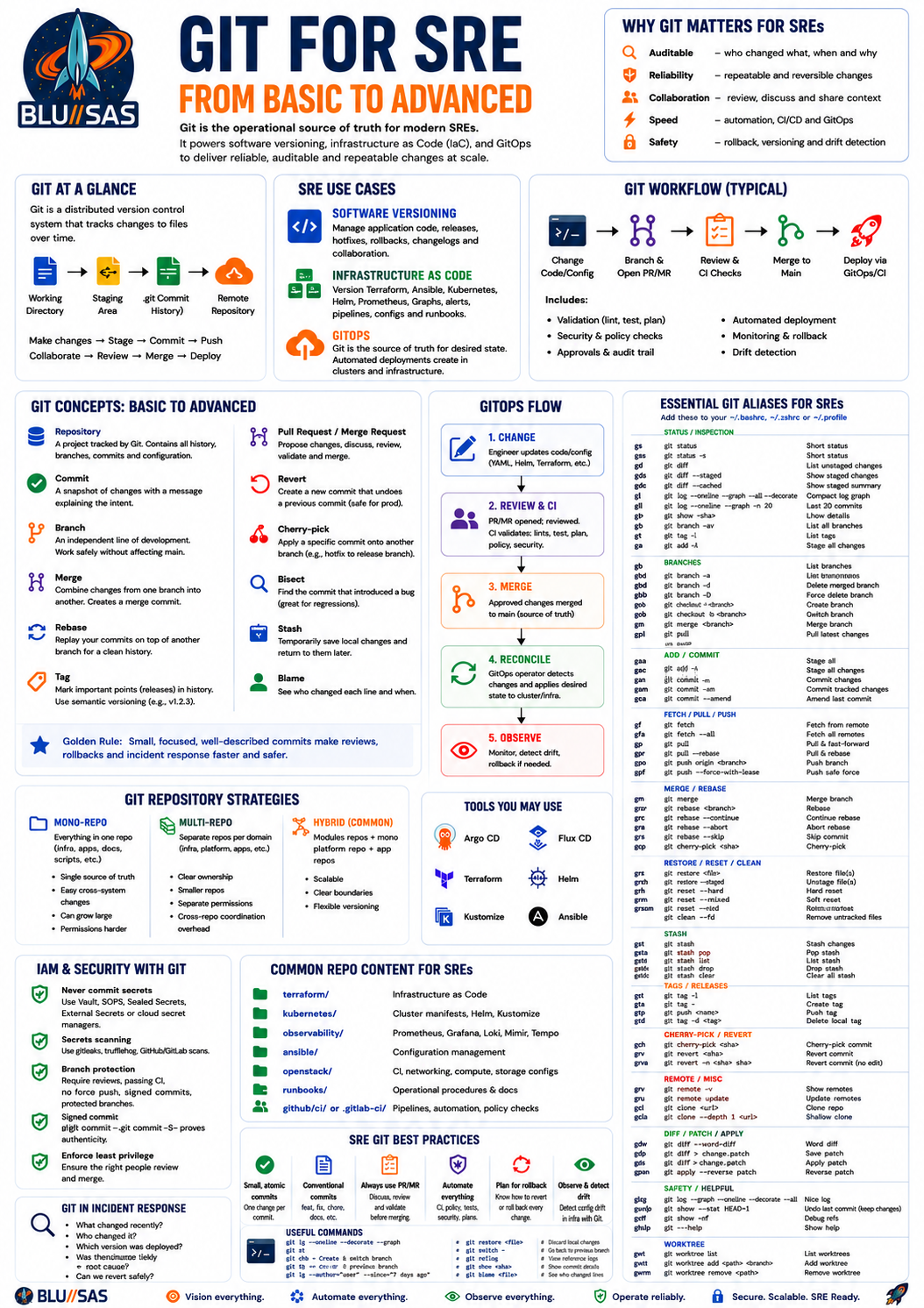
Git for SREs: from basic to advanced
Git is a distributed version control system. For an SRE, Git is not only for application source code. It becomes the control plane for:
Software versioning
Tracking code changes, releases, hotfixes, rollbacks, and collaboration.
Infrastructure as Code
Managing Terraform, Ansible, Helm, Kubernetes manifests, OpenStack configs, CI/CD pipelines, observability configs, and runbooks.
GitOps
Using Git as the declared source of truth for infrastructure and platform state, with automated agents applying changes into environments.
1. Git basics
What Git solves
Before Git, teams often worked with:
app-v1.tar.gz
app-v2-final.tar.gz
app-v2-final-fixed.tar.gz
app-v2-prod-hotfix.tar.gz
This becomes unmanageable.
Git gives you:
who changed what
when it changed
why it changed
what files changed
how to revert it
how to compare it
how to merge it
how to release it
For SREs, this matters because production systems change constantly. Git gives traceability.
2. Core Git concepts
Repository
A Git repository is a project tracked by Git.
git initOr clone an existing one:
git clone https://github.com/org/project.gitA repository contains:
working directory  -> your local files
staging area       -> changes prepared for commit
commit history     -> permanent snapshots
remote             -> shared copy, e.g. GitHub/GitLab
Working tree
This is the current directory you edit.
Check status:
git statusExample:
modified: terraform/main.tf
untracked: ansible/inventory.yml
Staging area
Before committing, you stage changes:
git add terraform/main.tfStage everything:
git add .Commit
A commit is a versioned snapshot.
git commit -m "Add Terraform module for VPC networking"Good commit messages explain intent:
Add Prometheus scrape config for node exporters
Fix Loki retention config for production cluster
Refactor Terraform security group module
Poor messages:
fix
changes
stuff
update
Log
View history:
git logCompact view:
git log --oneline --graph --decorate --allVery useful SRE alias:
alias glog='git log --oneline --graph --decorate --all'Diff
See what changed:
git diffSee staged changes:
git diff --stagedCompare two commits:
git diff abc123 def456For SREs, git diff is critical before applying infrastructure changes.
3. Branching
A branch is an independent line of development.
git branch feature/add-alertmanager-rules
git checkout feature/add-alertmanager-rules
Modern command:
git switch -c feature/add-alertmanager-rulesTypical branch names:
feature/add-mimir-alerts
bugfix/fix-nginx-timeout
hotfix/prod-loki-retention
infra/add-openstack-network
docs/update-runbook
Branches allow work without directly changing main.
4. Merge
Merging combines branches.
git switch main
git merge feature/add-alertmanager-rules
Example:
main
  A---B---C
       \
        D---E feature
After merge:
main
  A---B---C-------M
       \         /
        D---E---
The merge commit records the integration.
5. Rebase
Rebase rewrites your branch on top of another branch.
git switch feature/add-alertmanager-rules
git rebase main
Before:
main:    A---B---C
feature:      \---D---E
After:
main:    A---B---C
                  \---D'---E'
Use rebase to keep a clean history.
Common use:
git fetch origin
git rebase origin/main
Do not casually rebase shared branches unless the team agrees.
6. Pull, fetch, push
Fetch
Downloads changes but does not modify your branch:
git fetch originSafe operation.
Pull
Fetches and merges/rebases:
git pullOften better:
git pull --rebasePush
Uploads your branch:
git push origin feature/add-alertmanager-rulesSet upstream:
git push -u origin feature/add-alertmanager-rules7. Pull requests / merge requests
In GitHub: Pull Request.
In GitLab: Merge Request.
For SRE work, a PR/MR should show:
what changed
why it changed
risk level
how it was tested
rollback plan
related ticket/change request
Example SRE MR description:
## Summary
Adds Prometheus alert rules for Kubernetes node disk pressure.

## Risk
Low. Alert-only change. No runtime workload impact.

## Testing
Validated with promtool:
promtool check rules alerts/node-disk.yml

## Rollback
Revert this MR or remove the alert rule file.
8. Tags and releases
Tags mark important points in history.
git tag v1.2.0
git push origin v1.2.0
Annotated tag:
git tag -a v1.2.0 -m "Release v1.2.0"SRE usage:
application release versions
Terraform module versions
Helm chart versions
Ansible role versions
container image tags
rollback anchors
Example:
git checkout v1.2.09. Git for software versioning
Software teams use Git to manage:
features
bug fixes
release branches
hotfixes
semantic versions
changelogs
build pipelines
deployment promotion
Semantic versioning
Common format:
MAJOR.MINOR.PATCHExample:
1.4.2Meaning:
MAJOR: breaking changes
MINOR: backward-compatible features
PATCH: backward-compatible bug fixes
Examples:
1.4.2 -> 1.4.3  patch fix
1.4.2 -> 1.5.0  new feature
1.4.2 -> 2.0.0  breaking change
For SREs, semantic versioning helps understand upgrade risk.
10. Common Git workflows
Trunk-based development
Most changes go through short-lived branches into main.
main
 |
 +-- short feature branch
 +-- quick MR
 +-- merge
Advantages:
fast delivery
less merge pain
good for CI/CD
encourages small changes
Best for mature teams with strong tests and automation.
Git Flow
Older, more structured model:
main
develop
feature/*
release/*
hotfix/*
Advantages:
clear release process
useful for slower release cycles
Disadvantages:
more branch complexity
slower integration
larger merge conflicts
less ideal for continuous delivery
Environment branch model
Common but risky:
dev
staging
prod
This is sometimes used for infrastructure, but it can become messy because each branch drifts.
Better pattern for IaC:
main
envs/dev/
envs/staging/
envs/prod/
Same branch, different directories.
11. Git for Infrastructure as Code
For SREs, Git is where infrastructure definitions live.
Examples:
terraform/
ansible/
kubernetes/
helm/
packer/
cloud-init/
openstack/
ceph/
slurm/
grafana/
prometheus/
loki/
tempo/
mimir/
Infrastructure becomes reviewable and repeatable.
Example Terraform repository layout
infra/
├── modules/
│   ├── network/
│   ├── compute/
│   ├── security-group/
│   └── object-storage/
├── envs/
│   ├── dev/
│   │   └── main.tf
│   ├── staging/
│   │   └── main.tf
│   └── prod/
│       └── main.tf
└── README.md
SRE workflow:
git switch -c infra/add-prod-network
terraform fmt
terraform validate
terraform plan
git add .
git commit -m "Add production OpenStack network module"
git push
The MR should include the Terraform plan output or CI-generated plan.
Example Kubernetes repository layout
platform-k8s/
├── clusters/
│   ├── dev/
│   ├── staging/
│   └── prod/
├── apps/
│   ├── grafana/
│   ├── prometheus/
│   ├── loki/
│   ├── mimir/
│   └── tempo/
├── base/
├── overlays/
└── README.md
With Kustomize:
base/
  deployment.yaml
  service.yaml

overlays/prod/
  kustomization.yaml
  replica-patch.yaml
Example observability config in Git
observability/
├── prometheus/
│   ├── scrape-configs/
│   └── alert-rules/
├── grafana/
│   ├── dashboards/
│   └── datasources/
├── loki/
│   └── recording-rules/
├── mimir/
│   └── alertmanager/
└── tempo/
Benefits:
alerts are reviewed
dashboards are versioned
rollbacks are possible
production config is auditable
changes can be tested in CI
12. GitOps
GitOps means Git is the source of truth for desired system state.
Instead of manually running:
kubectl apply -f deployment.yamlYou commit the desired state to Git. Then a controller applies it.
Common GitOps tools:
Argo CD
Flux CD
Fleet
Jenkins X
GitLab Agent for Kubernetes
GitOps flow
Engineer changes YAML/Helm/Kustomize
        |
        v
Pull request / merge request
        |
        v
Review + CI validation
        |
        v
Merge to main
        |
        v
GitOps controller detects change
        |
        v
Applies desired state to cluster
        |
        v
Reports sync / drift / health
GitOps mental model
Git contains:
desired stateThe cluster contains:
actual stateGitOps continuously reconciles:
actual state -> desired stateIf someone manually changes the cluster, the GitOps tool detects drift.
13. GitOps with Kubernetes
Example app:
apiVersion: apps/v1
kind: Deployment
metadata:
  name: api
spec:
  replicas: 3
  template:
    spec:
      containers:
        - name: api
          image: registry.example.com/api:v1.4.2
To deploy a new version, change:
image: registry.example.com/api:v1.4.3Commit and merge.
The GitOps controller applies it.
14. GitOps with Helm
Repository:
apps/
└── grafana/
    ├── Chart.yaml
    ├── values-dev.yaml
    ├── values-staging.yaml
    └── values-prod.yaml
Example production values:
replicas: 2

resources:
  requests:
    cpu: 500m
    memory: 1Gi

persistence:
  enabled: true
  size: 20Gi
GitOps tool deploys Helm release from Git.
15. GitOps with Terraform
Terraform GitOps is more sensitive because it modifies infrastructure.
Typical flow:
MR opened
  -> terraform fmt
  -> terraform validate
  -> terraform plan
  -> security scan
  -> approval
  -> terraform apply
Common tools:
Atlantis
Spacelift
Terraform Cloud
Terragrunt pipelines
GitLab CI
GitHub Actions
For production, apply should usually require approval.
16. SRE methodology: Git as operational control
For SREs, Git supports:
change control
incident rollback
auditability
disaster recovery
configuration management
access review
platform standardisation
repeatability
A mature SRE team avoids undocumented production changes.
Bad:
ssh prod-node-01
vim /etc/nginx/nginx.conf
systemctl reload nginx
Better:
change config in Git
open MR
CI validates
merge
GitOps applies
monitor rollout
Emergency changes may still happen, but they should be backfilled into Git afterwards.
17. Advanced Git commands for SREs
Restore file
git restore file.yamlRestore staged file
git restore --staged file.yamlCheckout file from another branch
git checkout main -- path/to/file.yamlModern:
git restore --source main path/to/file.yamlRevert commit
Safe for shared branches:
git revert abc123This creates a new commit that undoes the previous one.
Best for production rollback.
Reset commit
Dangerous if pushed:
git reset --hard HEAD~1This rewrites local history.
Use carefully.
Cherry-pick
Apply one commit onto another branch:
git cherry-pick abc123Useful for hotfixes:
fix goes into main
same fix cherry-picked into release branch
Bisect
Find which commit introduced a problem:
git bisect start
git bisect bad
git bisect good v1.2.0
Then Git walks through commits until the bad one is found.
Very useful for regressions.
Blame
Find who changed a line and when:
git blame config.yamlUse professionally. It is for investigation, not accusation.
Stash
Temporarily save local changes:
git stashRestore:
git stash popUseful during urgent context switching.
Worktree
Have multiple branches checked out at once:
git worktree add ../prod-hotfix hotfix/prod-fixUseful for SREs handling urgent hotfixes while keeping normal work untouched.
18. Git security for SREs
Never commit secrets
Do not commit:
passwords
API tokens
SSH private keys
cloud credentials
kubeconfigs
database URLs with passwords
TLS private keys
Use:
Vault
SOPS
Sealed Secrets
External Secrets Operator
cloud secret managers
Kubernetes secrets generated by pipeline
Secret scanning
Use tools such as:
gitleaks
trufflehog
git-secrets
GitHub secret scanning
GitLab secret detection
Example:
gitleaks detectSigned commits
For regulated or high-trust environments:
git commit -S -m "Update production alert rules"This proves commit authenticity.
Branch protection
Production repositories should require:
MR/PR review
passing CI
no force-push to main
signed commits where required
CODEOWNERS approval
security scanning
status checks
19. CODEOWNERS
Example:
/terraform/prod/ @platform-team @sre-leads
/kubernetes/prod/ @sre-team
/security/ @security-team
/observability/ @observability-team
This ensures sensitive areas get reviewed by the right people.
20. CI/CD with Git
Git events trigger automation:
push
merge request
tag
release
schedule
manual approval
Example GitLab CI:
stages:
  - validate
  - plan
  - apply

terraform_validate:
  stage: validate
  script:
    - terraform fmt -check
    - terraform validate

terraform_plan:
  stage: plan
  script:
    - terraform plan

terraform_apply:
  stage: apply
  when: manual
  script:
    - terraform apply -auto-approve
For SREs, CI protects production from bad changes.
21. Testing infrastructure changes
Before merge, test:
syntax
formatting
schema validation
policy compliance
security
dry-run
diff
plan
integration behaviour
Examples:
terraform fmt -check
terraform validate
terraform plan
ansible-lint
yamllint
kubeconform
kubectl diff
helm lint
helm template
promtool check rules
conftest test
22. Policy as Code
Git can enforce standards.
Examples:
no public S3 buckets
no privileged Kubernetes pods
no LoadBalancer in dev
all resources must have owner labels
production changes require approval
no plaintext secrets
Tools:
OPA
Conftest
Kyverno
Gatekeeper
Checkov
Terrascan
tfsec
Example policy idea:
Deny Kubernetes workloads using privileged: true
unless namespace is explicitly approved.
23. GitOps drift detection
Drift means production differs from Git.
Example:
Git says replicas: 3
Cluster has replicas: 5
Possible causes:
manual kubectl edit
autoscaler
emergency change
failed sync
controller conflict
wrong environment overlay
GitOps tools can show:
Synced
OutOfSync
Healthy
Degraded
Progressing
Missing
SRE response:
identify drift
understand whether intentional
reconcile from Git
or commit the required change back to Git
24. GitOps anti-patterns
Storing secrets directly in Git
Bad:
password: supersecret123Better:
externalSecretRef:
  name: database-password
Manual production changes
Bad:
kubectl edit deployment apiBetter:
change Git
review
merge
sync
Too many environment branches
Bad:
dev branch
test branch
staging branch
prod branch
Often leads to drift.
Better:
main branch
envs/dev
envs/staging
envs/prod
Giant pull requests
Bad:
changed Terraform, Helm, alerts, dashboards, network policy and database config togetherBetter:
small, reviewable, reversible changes25. Git for incident response
During incidents, Git helps answer:
what changed recently?
who changed it?
was there a deployment?
what config changed?
can we revert it?
which version was previously healthy?
Useful commands:
git log --since="2 hours ago"
git diff HEAD~1 HEAD
git show abc123
git revert abc123
For Kubernetes:
git diff HEAD~1 HEAD -- clusters/prod/For Terraform:
git log -- terraform/prod/26. Git rollback strategies
Application rollback
Change image tag back:
image: app:v1.4.2instead of:
image: app:v1.4.3Commit, merge, sync.
Config rollback
git revert abc123Terraform rollback
Be careful. Reverting Terraform code does not always safely reverse infrastructure state.
You must inspect:
terraform planRollback may delete resources.
Helm rollback
If using Helm directly:
helm rollback grafana 12With GitOps, prefer changing Git back to the known-good values.
27. Git repository strategies for SRE teams
Mono-repo
One large repo:
platform/
├── terraform/
├── kubernetes/
├── observability/
├── ansible/
└── docs/
Advantages:
single source of truth
easy cross-system changes
centralised review
Disadvantages:
can become large
permissions harder
CI can become complex
Multi-repo
Separate repos:
terraform-infra
k8s-platform
observability-config
ansible-roles
service-catalog
Advantages:
clear ownership
smaller repos
separate permissions
Disadvantages:
cross-repo coordination harder
versioning complexity
Hybrid
Common mature pattern:
terraform modules repo
environment infra repo
k8s platform repo
app deployment repos
observability repo
28. Git for OpenStack, Kubernetes and AI/HPC platforms
For an SRE working with cloud and HPC-style infrastructure, Git can manage:
OpenStack
Nova configs
Neutron networks
Cinder backend configs
Glance images
Heat templates
Terraform OpenStack provider code
Ansible OpenStack deployment configs
Ceph integration settings
Kubernetes
cluster manifests
CNI configs
ingress controllers
storage classes
Helm releases
network policies
RBAC
operators
Ceph
cephadm specs
Rook manifests
pool definitions
storage class configs
monitoring rules
Slurm / HPC
slurm.conf
gres.conf
cgroup.conf
Prometheus exporters
GPU health checks
node provisioning scripts
job accounting config
Observability
Prometheus rules
Grafana dashboards
Loki pipelines
Tempo sampling config
Mimir overrides
OpenTelemetry Collector configs
Alertmanager routes
SLO definitions
29. Advanced SRE Git practices
Make every production change traceable
Every production change should have:
commit
review
CI result
deployment record
rollback path
owner
ticket/change reference
Use small commits
Good:
Add node disk pressure alert
Add runbook link to alert
Tune alert threshold after staging test
Bad:
Big observability updateUse conventional commits
Example:
feat: add Grafana dashboard for Slurm GPUs
fix: correct Loki retention period
chore: update Terraform provider version
docs: add OpenStack recovery runbook
This helps automation generate changelogs.
Use protected environments
For production:
manual approval
restricted deployers
change window checks
automated rollback signals
Use deployment metadata
Every deployment should expose:
git commit SHA
version
build timestamp
branch
pipeline URL
Example app endpoint:
{
  "version": "1.4.2",
  "commit": "a1b2c3d",
  "build_time": "2026-06-14T10:00:00Z"
}
This makes incident debugging much easier.
30. What an SRE should be able to say in an interview
A strong answer:
Git is the audit trail and collaboration mechanism for both software and infrastructure. For SRE, I use it to manage application releases, Terraform, Kubernetes manifests, Helm values, Ansible, observability configs, alert rules and runbooks. Changes should go through pull requests, CI validation, policy checks, peer review and controlled deployment. With GitOps, Git becomes the desired state, and tools like Argo CD or Flux reconcile that state into Kubernetes. This reduces manual drift, improves rollback, and makes production changes auditable.
31. Practical SRE Git skill checklist
You should be comfortable with:
clone, branch, commit, push, pull
merge and rebase
diff and log
revert and cherry-pick
tags and releases
resolving merge conflicts
writing good commit messages
reviewing pull requests
using CI/CD pipelines
managing Terraform through Git
managing Kubernetes through Git
GitOps with Argo CD or Flux
secret scanning
branch protection
CODEOWNERS
incident rollback using Git
drift detection
32. The key mindset
For a junior engineer, Git is where code is stored.
For a DevOps engineer, Git is where automation starts.
For an SRE, Git is the operational source of truth.
For a platform engineer, Git is the interface between humans, automation, infrastructure and production reality.
Git Aliases for SRE
Add this to ~/.bashrc, ~/.zshrc, or ~/.profile:
# -------------------------------------------------------------------
# Git aliases for SRE / Platform / DevOps work
# -------------------------------------------------------------------

# Status / inspection
alias gs='git status -sb'
alias gst='git status'
alias gd='git diff'
alias gds='git diff --staged'
alias gdc='git diff --cached'
alias gshow='git show --stat --oneline'
alias gsh='git show'
alias gl='git log --oneline --decorate --graph --all'
alias gla='git log --oneline --decorate --graph --all --stat'
alias glp='git log --patch'
alias glast='git log -1 --stat'
alias gbl='git blame'
alias gcount='git shortlog -sn'

# Branches
alias gb='git branch'
alias gba='git branch -a'
alias gbd='git branch -d'
alias gbD='git branch -D'
alias gco='git checkout'
alias gsw='git switch'
alias gswc='git switch -c'
alias gmain='git switch main'
alias gmaster='git switch master'

# Add / commit
alias ga='git add'
alias gaa='git add .'
alias gap='git add -p'
alias gc='git commit'
alias gcm='git commit -m'
alias gca='git commit --amend'
alias gcan='git commit --amend --no-edit'

# Fetch / pull / push
alias gf='git fetch'
alias gfa='git fetch --all --prune'
alias gp='git push'
alias gpu='git push -u origin HEAD'
alias gpf='git push --force-with-lease'
alias gpl='git pull'
alias gpr='git pull --rebase'
alias gup='git fetch origin && git rebase origin/main'

# Merge / rebase
alias gm='git merge'
alias gr='git rebase'
alias gri='git rebase -i'
alias grc='git rebase --continue'
alias gra='git rebase --abort'
alias gmc='git merge --continue'
alias gma='git merge --abort'

# Restore / reset
alias grs='git restore'
alias grst='git restore --staged'
alias grhard='git reset --hard'
alias grsoft='git reset --soft'
alias gclean='git clean -fd'
alias gundo='git reset --soft HEAD~1'

# Stash
alias gstash='git stash'
alias gstashp='git stash pop'
alias gstasha='git stash apply'
alias gstashl='git stash list'
alias gstashd='git stash drop'

# Tags / releases
alias gt='git tag'
alias gta='git tag -a'
alias gtl='git tag --list'
alias gtp='git push origin --tags'

# Cherry-pick / revert
alias gcp='git cherry-pick'
alias gcpc='git cherry-pick --continue'
alias gcpa='git cherry-pick --abort'
alias grev='git revert'
alias grevc='git revert --continue'
alias greva='git revert --abort'

# Remote
alias grv='git remote -v'
alias gro='git remote show origin'

# Useful SRE investigation aliases
alias gchanged='git diff --name-only HEAD~1 HEAD'
alias grecent='git log --since="24 hours ago" --oneline --decorate --all'
alias gprodlog='git log --oneline --decorate --graph --all -- envs/prod terraform/prod clusters/prod'
alias gwho='git shortlog -sn --all'
alias gconflicts='git diff --name-only --diff-filter=U'

# Safety / validation helpers
alias gignored='git status --ignored'
alias guntracked='git ls-files --others --exclude-standard'
alias gignoredfiles='git ls-files --ignored --exclude-standard -o'
alias groot='cd "$(git rev-parse --show-toplevel)"'

# Worktree
alias gw='git worktree'
alias gwl='git worktree list'
alias gwa='git worktree add'
alias gwr='git worktree remove'
Most important aliases to memorise
gs      # short status
gd      # unstaged diff
gds     # staged diff
gaa     # add everything
gap     # interactively stage hunks
gcm     # commit with message
gl      # readable graph log
gfa     # fetch all and prune deleted branches
gpr     # pull with rebase
gpu     # push current branch and set upstream
gpf     # safer force push
gundo   # undo last commit but keep changes
grev    # revert a bad commit safely
gstash  # temporarily save work
gstashp # restore stashed work
groot   # jump to repo root
Why SREs use these
The main problems they solve are speed, safety, and incident response.
gs, gd, and gds stop you committing accidental changes.
gap lets you split messy work into clean, reviewable commits.
gl, gshow, gbl, and grecent help during incidents when you need to answer: “what changed recently?”
gfa, gpr, and gpu make normal branch workflow faster.
gpf uses --force-with-lease, which is safer than raw --force.
grev is the production-safe rollback command because it creates a new undo commit instead of rewriting shared history.
gundo is useful before pushing when your last local commit needs reworking.
gstash and gstashp are useful when you are interrupted by urgent production work.
gprodlog is useful in IaC/GitOps repos where production files live under paths like envs/prod, terraform/prod, or clusters/prod.
GitLab Community Edition
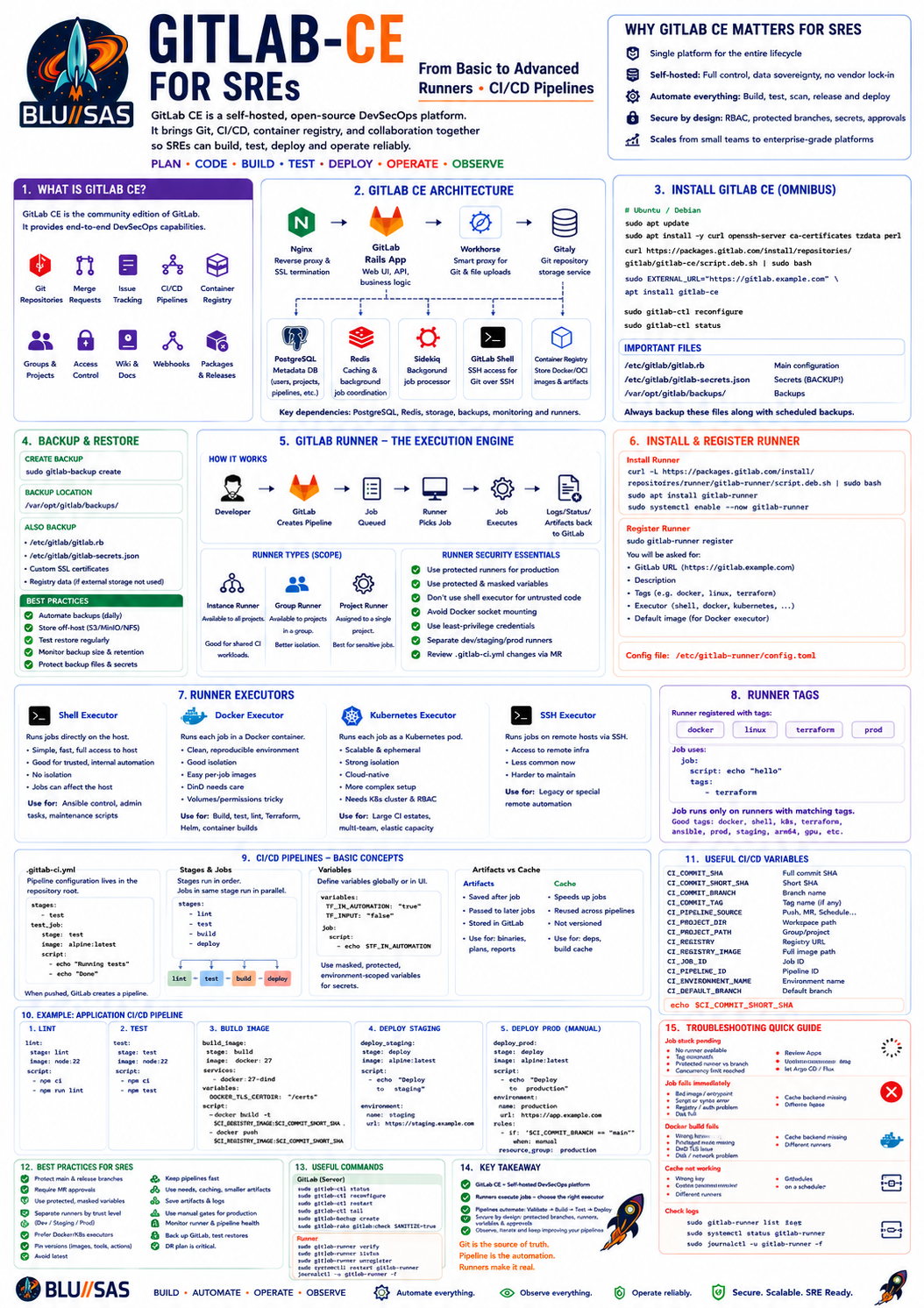
GitLab CE means GitLab Community Edition. It is the self-hosted, open-source edition of GitLab. It provides:
Git repository hosting
Merge requests
Issue tracking
Wiki
Container registry
CI/CD pipelines
GitLab runners
Webhooks
Access control
Branch protection
Deploy keys/tokens
Project/group management
For an SRE, GitLab CE is useful because it can become the internal platform for:
application delivery
infrastructure as code
Terraform pipelines
Ansible automation
Kubernetes deployments
GitOps workflows
observability config management
release management
incident rollback
1. GitLab CE architecture
A basic GitLab CE installation usually contains:
GitLab web UI
GitLab Rails application
Gitaly
PostgreSQL
Redis
Sidekiq
Nginx
GitLab Shell
GitLab Workhorse
Container Registry
GitLab Runner
Main components
GitLab Rails
The main web application.
Handles:
users
projects
groups
merge requests
issues
CI/CD configuration
permissions
API
Gitaly
GitLab’s Git storage service.
Handles Git repository access:
clone
fetch
push
diff
commit browsing
repository metadata
For larger setups, Gitaly performance matters a lot.
PostgreSQL
Stores GitLab metadata:
users
groups
projects
permissions
pipeline records
merge request data
issue data
CI/CD metadata
The actual Git repository data is not stored in PostgreSQL.
Redis
Used for caching and background job coordination.
Sidekiq
Processes background jobs:
pipeline scheduling
email sending
webhooks
merge request updates
repository housekeeping
import/export jobs
GitLab Workhorse
A smart reverse proxy between Nginx and Rails.
Handles:
large Git HTTP traffic
file uploads
archive downloads
repository requests
GitLab Shell
Handles SSH Git operations:
git clone git@gitlab.example.com:group/project.git
git push
Container Registry
Optional but very useful.
Used to store Docker/OCI images:
registry.gitlab.example.com/group/project/app:1.2.3GitLab Runner
Executes CI/CD jobs.
This is the part SREs usually care about most.
2. Typical GitLab CE installation
The common installation method is the Omnibus package.
Example for Ubuntu/Debian:
sudo apt update
sudo apt install -y curl openssh-server ca-certificates tzdata perl

curl https://packages.gitlab.com/install/repositories/gitlab/gitlab-ce/script.deb.sh | sudo bash

sudo EXTERNAL_URL="https://gitlab.example.com" apt install gitlab-ce
Then reconfigure:
sudo gitlab-ctl reconfigureCheck status:
sudo gitlab-ctl statusRestart:
sudo gitlab-ctl restartView logs:
sudo gitlab-ctl tail3. Main GitLab config file
The main config file is:
/etc/gitlab/gitlab.rbAfter changing it, run:
sudo gitlab-ctl reconfigureImportant settings:
external_url 'https://gitlab.example.com'

gitlab_rails['time_zone'] = 'Europe/London'

gitlab_rails['gitlab_shell_ssh_port'] = 22

nginx['redirect_http_to_https'] = true

letsencrypt['enable'] = true
For internal TLS or reverse proxy setups, you may configure Nginx differently.
4. GitLab CE backup and restore
Backups are critical.
Create backup:
sudo gitlab-backup createBackup location usually:
/var/opt/gitlab/backups/Also back up:
/etc/gitlab/gitlab.rb
/etc/gitlab/gitlab-secrets.json
These are essential for restoring the instance.
A proper SRE backup strategy should include:
scheduled backups
off-host storage
restore testing
database consistency
registry backup
artifact backup
repository backup
secret file backup
5. GitLab Runner
GitLab Runner is the agent that executes pipeline jobs.
GitLab itself schedules jobs.
Runner actually runs them.
Basic flow:
Developer pushes code
        ↓
GitLab creates pipeline
        ↓
Job waits for runner
        ↓
Runner picks up job
        ↓
Runner executes script
        ↓
Runner sends logs/status/artifacts back to GitLab
6. Runner installation
On Ubuntu/Debian:
curl -L https://packages.gitlab.com/install/repositories/runner/gitlab-runner/script.deb.sh | sudo bash

sudo apt install gitlab-runner
Check service:
sudo systemctl status gitlab-runnerStart/enable:
sudo systemctl enable --now gitlab-runner7. Registering a runner
You register a runner against GitLab.
Typical command:
sudo gitlab-runner registerIt asks for:
GitLab URL
registration/authentication token
runner description
tags
executor type
default image if Docker executor
Example:
sudo gitlab-runner register \
  --url "https://gitlab.example.com" \
  --token "RUNNER_AUTH_TOKEN" \
  --description "docker-runner-01" \
  --executor "docker" \
  --docker-image "ubuntu:24.04"
Runner config is stored in:
/etc/gitlab-runner/config.tomlRestart after changes:
sudo systemctl restart gitlab-runner8. Runner types
Instance runner
Available to all projects.
Good for:
shared CI workloads
general build jobs
small internal platforms
Risk:
less isolation
capacity contention
possible secret exposure if misconfigured
Group runner
Available to projects in a group.
Good for:
platform team repos
environment-specific runners
team-level isolation
Project runner
Assigned to one project.
Good for:
sensitive deployments
production infrastructure repos
regulated workloads
privileged jobs
9. Runner executors
The executor determines how jobs run.
Shell executor
Runs jobs directly on the runner host.
Example:
executor = "shell"Advantages:
simple
fast
good for controlled internal automation
easy access to host tools
Disadvantages:
weak isolation
jobs can modify runner host
dependency conflicts
not ideal for untrusted code
Use for:
Ansible control node
simple scripts
internal admin tasks
trusted infra jobs
Avoid for:
untrusted projects
public repositories
multi-tenant workloads
Docker executor
Runs each job inside a container.
Example:
executor = "docker"Advantages:
clean job environment
reproducible builds
better isolation than shell
easy per-job images
good for most CI/CD workloads
Disadvantages:
Docker-in-Docker needs care
volume/cache permissions can be annoying
privileged mode can be risky
Use for:
builds
tests
linting
Terraform plans
Helm validation
container image builds
Kubernetes executor
Runs each CI job as a Kubernetes pod.
Advantages:
scalable
ephemeral
good isolation
native cloud/platform fit
works well for large CI estates
Disadvantages:
more complex
requires Kubernetes cluster
RBAC and network policy design needed
cache/artifact configuration required
Use for:
large CI platforms
multi-team environments
elastic runner capacity
cloud-native organisations
SSH executor
Runs jobs over SSH on remote machines.
Less common now.
Use only for specific legacy workflows.
10. Runner tags
Tags match jobs to runners.
Runner registered with tags:
docker
linux
terraform
prod
Job uses:
job:
  tags:
    - terraform
GitLab schedules the job only on runners with matching tags.
Good tag strategy:
docker
shell
k8s
terraform
ansible
prod
staging
gpu
arm64
x86_64
privileged
Avoid vague tags:
runner1
test
misc
11. Runner config example
Example Docker runner:
concurrent = 4
check_interval = 3

[[runners]]
  name = "docker-runner-01"
  url = "https://gitlab.example.com"
  token = "TOKEN"
  executor = "docker"

  [runners.docker]
    image = "ubuntu:24.04"
    privileged = false
    disable_entrypoint_overwrite = false
    oom_kill_disable = false
    disable_cache = false
    volumes = ["/cache"]
    shm_size = 0
Important settings:
concurrent          total jobs this runner process can run
executor           shell/docker/kubernetes/etc.
image              default container image
privileged         needed for some Docker builds, but risky
volumes            cache/shared mounts
12. Runner security
Runner security is critical.
Key risks
secrets leaked to logs
untrusted code running on privileged runner
shared runner accessing production credentials
Docker socket exposure
persistent workspace contamination
branch from fork accessing secrets
Safer practices
use protected runners for production
use protected variables
avoid shell executor for untrusted code
avoid Docker socket mounting where possible
prefer short-lived credentials
use masked variables
use scoped deploy tokens
separate build and deploy runners
separate dev/staging/prod runners
restrict who can modify .gitlab-ci.yml
13. Basic GitLab CI/CD
Pipeline config lives in:
.gitlab-ci.ymlMinimal example:
stages:
  - test

test:
  stage: test
  image: alpine:latest
  script:
    - echo "Running tests"
    - echo "Done"
When pushed, GitLab creates a pipeline.
14. Stages and jobs
A pipeline contains jobs.
Jobs are grouped into stages.
Example:
stages:
  - lint
  - test
  - build
  - deploy

lint:
  stage: lint
  script:
    - echo "Linting"

test:
  stage: test
  script:
    - echo "Testing"

build:
  stage: build
  script:
    - echo "Building"

deploy:
  stage: deploy
  script:
    - echo "Deploying"
Default behaviour:
all jobs in a stage run in parallel
next stage starts only when previous stage succeeds
15. Using images
With Docker/Kubernetes runners, each job can define an image:
terraform_plan:
  image: hashicorp/terraform:latest
  script:
    - terraform version
    - terraform init
    - terraform plan
Better: pin versions.
image: hashicorp/terraform:1.9.8Avoid unpinned latest for production pipelines.
16. Variables
Define variables globally:
variables:
  TF_IN_AUTOMATION: "true"
  TF_INPUT: "false"
Use them:
job:
  script:
    - echo "$TF_IN_AUTOMATION"
Sensitive variables should be stored in GitLab UI:
Settings → CI/CD → VariablesUse:
masked
protected
environment-scoped
17. Artifacts
Artifacts are files saved after a job.
Example:
build:
  stage: build
  script:
    - mkdir dist
    - echo "binary" > dist/app
  artifacts:
    paths:
      - dist/
    expire_in: 1 week
Use artifacts for:
compiled binaries
test reports
Terraform plans
coverage reports
SBOMs
generated manifests
18. Cache
Cache speeds up pipelines.
Example:
cache:
  key: "$CI_COMMIT_REF_SLUG"
  paths:
    - .npm/
    - vendor/
Artifacts and cache are different:
cache      speeds future jobs
artifact   passes output or stores result
19. Rules
rules control when jobs run.
Example:
test:
  script:
    - echo "test"
  rules:
    - if: '$CI_PIPELINE_SOURCE == "merge_request_event"'
    - if: '$CI_COMMIT_BRANCH == "main"'
Run only on main:
deploy_prod:
  script:
    - echo "deploy prod"
  rules:
    - if: '$CI_COMMIT_BRANCH == "main"'
Manual job:
deploy_prod:
  script:
    - echo "deploy prod"
  when: manual
Better with rules:
deploy_prod:
  script:
    - echo "deploy prod"
  rules:
    - if: '$CI_COMMIT_BRANCH == "main"'
      when: manual
20. Protected branches and protected variables
For production:
main branch protected
production variables protected
production runner protected
deployment job manual
approval required through MR
This prevents feature branches from accessing production secrets.
21. Basic application pipeline
Example:
stages:
  - lint
  - test
  - build
  - deploy

variables:
  IMAGE_TAG: "$CI_REGISTRY_IMAGE:$CI_COMMIT_SHORT_SHA"

lint:
  stage: lint
  image: node:22
  script:
    - npm ci
    - npm run lint

test:
  stage: test
  image: node:22
  script:
    - npm ci
    - npm test

build_image:
  stage: build
  image: docker:27
  services:
    - docker:27-dind
  variables:
    DOCKER_TLS_CERTDIR: "/certs"
  script:
    - docker build -t "$IMAGE_TAG" .
    - docker push "$IMAGE_TAG"

deploy_staging:
  stage: deploy
  image: alpine:latest
  script:
    - echo "Deploy $IMAGE_TAG to staging"
  rules:
    - if: '$CI_COMMIT_BRANCH == "main"'
22. Docker image builds
There are several approaches.
Docker-in-Docker
image: docker:27

services:
  - docker:27-dind

variables:
  DOCKER_TLS_CERTDIR: "/certs"

build:
  script:
    - docker build -t "$CI_REGISTRY_IMAGE:$CI_COMMIT_SHA" .
    - docker push "$CI_REGISTRY_IMAGE:$CI_COMMIT_SHA"
Requires privileged runner in many setups.
Risk:
privileged containers
larger attack surface
careful runner isolation needed
Kaniko
Good for Kubernetes runners.
build:
  image:
    name: gcr.io/kaniko-project/executor:debug
    entrypoint: [""]
  script:
    - /kaniko/executor
      --context "$CI_PROJECT_DIR"
      --dockerfile "$CI_PROJECT_DIR/Dockerfile"
      --destination "$CI_REGISTRY_IMAGE:$CI_COMMIT_SHORT_SHA"
Advantage:
builds container images without Docker daemon
safer for Kubernetes-based CI
Buildah / Podman
Useful in Red Hat-style environments.
23. Terraform pipeline
Basic Terraform pipeline:
stages:
  - validate
  - plan
  - apply

variables:
  TF_IN_AUTOMATION: "true"
  TF_INPUT: "false"

terraform_fmt:
  stage: validate
  image: hashicorp/terraform:1.9.8
  script:
    - terraform fmt -check -recursive

terraform_validate:
  stage: validate
  image: hashicorp/terraform:1.9.8
  script:
    - terraform init -backend=false
    - terraform validate

terraform_plan:
  stage: plan
  image: hashicorp/terraform:1.9.8
  script:
    - terraform init
    - terraform plan -out=tfplan
  artifacts:
    paths:
      - tfplan
    expire_in: 1 day

terraform_apply:
  stage: apply
  image: hashicorp/terraform:1.9.8
  script:
    - terraform init
    - terraform apply -auto-approve tfplan
  dependencies:
    - terraform_plan
  rules:
    - if: '$CI_COMMIT_BRANCH == "main"'
      when: manual
Production improvements:
remote backend
state locking
manual approval
protected variables
protected runner
separate plan/apply credentials
policy checks
cost estimation
drift detection
24. Ansible pipeline
stages:
  - lint
  - syntax
  - deploy

ansible_lint:
  stage: lint
  image: cytopia/ansible-lint:latest
  script:
    - ansible-lint .

syntax_check:
  stage: syntax
  image: alpine/ansible:latest
  script:
    - ansible-playbook site.yml --syntax-check

deploy_prod:
  stage: deploy
  image: alpine/ansible:latest
  script:
    - ansible-playbook -i inventories/prod site.yml
  rules:
    - if: '$CI_COMMIT_BRANCH == "main"'
      when: manual
Use runners carefully here. Ansible often needs network access to internal infrastructure.
25. Kubernetes / Helm pipeline
stages:
  - validate
  - deploy

helm_lint:
  stage: validate
  image: alpine/helm:3.15.4
  script:
    - helm lint charts/myapp

helm_template:
  stage: validate
  image: alpine/helm:3.15.4
  script:
    - helm template myapp charts/myapp -f values-prod.yaml > rendered.yaml
  artifacts:
    paths:
      - rendered.yaml

deploy_staging:
  stage: deploy
  image: bitnami/kubectl:latest
  script:
    - kubectl apply -f rendered.yaml
  rules:
    - if: '$CI_COMMIT_BRANCH == "main"'
For production, GitOps is often better than direct kubectl apply.
26. GitOps-style GitLab pipeline
Instead of deploying directly, the pipeline updates a deployment repo.
Example:
app repo builds image
        ↓
pipeline pushes image
        ↓
pipeline updates image tag in GitOps repo
        ↓
Argo CD / Flux applies change
This gives better auditability.
Example flow:
update_gitops_repo:
  stage: deploy
  image: alpine/git:latest
  script:
    - git clone https://oauth2:${GITOPS_TOKEN}@gitlab.example.com/platform/gitops.git
    - cd gitops
    - sed -i "s/tag:.*/tag: ${CI_COMMIT_SHORT_SHA}/" apps/myapp/values-prod.yaml
    - git config user.email "ci@gitlab.example.com"
    - git config user.name "GitLab CI"
    - git add apps/myapp/values-prod.yaml
    - git commit -m "deploy: myapp ${CI_COMMIT_SHORT_SHA}"
    - git push
  rules:
    - if: '$CI_COMMIT_BRANCH == "main"'
      when: manual
27. Advanced pipeline control: needs
By default, stages are sequential.
needs allows DAG-style pipelines.
Example:
stages:
  - test
  - package
  - deploy

unit_tests:
  stage: test
  script:
    - echo "unit tests"

security_scan:
  stage: test
  script:
    - echo "security scan"

package:
  stage: package
  needs:
    - unit_tests
  script:
    - echo "package without waiting for security_scan"
This makes pipelines faster.
28. Parallel jobs
test:
  stage: test
  parallel: 4
  script:
    - echo "Running test shard $CI_NODE_INDEX of $CI_NODE_TOTAL"
Useful for:
large test suites
matrix builds
multi-platform validation
29. Matrix builds
test:
  stage: test
  parallel:
    matrix:
      - PYTHON_VERSION: ["3.11", "3.12"]
        OS: ["ubuntu", "debian"]
  image: python:$PYTHON_VERSION
  script:
    - echo "Testing on $OS with Python $PYTHON_VERSION"
30. Child pipelines
Useful for mono-repos.
Parent:
stages:
  - trigger

terraform:
  stage: trigger
  trigger:
    include: terraform/.gitlab-ci.yml

kubernetes:
  stage: trigger
  trigger:
    include: kubernetes/.gitlab-ci.yml
Benefits:
smaller pipeline files
domain-specific CI
better monorepo scalability
31. Multi-project pipelines
A pipeline in one project can trigger another.
Example:
trigger_deploy:
  stage: deploy
  trigger:
    project: platform/gitops
    branch: main
Useful for:
app repo triggering platform deployment repo
build repo triggering release repo
infra repo triggering environment repo
32. Includes and templates
Avoid huge .gitlab-ci.yml files.
Example:
include:
  - local: ci/templates/terraform.yml
  - local: ci/templates/security.yml
Remote project include:
include:
  - project: platform/ci-templates
    file: /terraform/base.yml
This allows centralised SRE CI standards.
33. YAML anchors
Useful for reuse.
.default_terraform:
  image: hashicorp/terraform:1.9.8
  before_script:
    - terraform version
    - terraform init

plan:
  <<: *default_terraform
However, GitLab CI has its own extends, which is often clearer.
34. Extends
.terraform_base:
  image: hashicorp/terraform:1.9.8
  before_script:
    - terraform version
    - terraform init

terraform_plan:
  extends: .terraform_base
  script:
    - terraform plan
Good for platform-wide consistency.
35. before_script and after_script
before_script:
  - echo "Prepare environment"

after_script:
  - echo "Cleanup"
Per-job:
job:
  before_script:
    - echo "Job-specific setup"
  script:
    - echo "Main job"
  after_script:
    - echo "Collect logs"
36. Environments
GitLab environments model deployment targets.
deploy_staging:
  stage: deploy
  script:
    - echo "deploy"
  environment:
    name: staging
    url: https://staging.example.com
Production:
deploy_prod:
  stage: deploy
  script:
    - echo "deploy prod"
  environment:
    name: production
    url: https://example.com
  rules:
    - if: '$CI_COMMIT_BRANCH == "main"'
      when: manual
Benefits:
deployment history
environment visibility
manual controls
rollback awareness
37. Review apps
Review apps create temporary environments for merge requests.
Example:
review_app:
  stage: deploy
  script:
    - echo "Deploy review app for $CI_COMMIT_REF_SLUG"
  environment:
    name: review/$CI_COMMIT_REF_SLUG
    url: https://$CI_COMMIT_REF_SLUG.review.example.com
    on_stop: stop_review_app
  rules:
    - if: '$CI_PIPELINE_SOURCE == "merge_request_event"'

stop_review_app:
  stage: deploy
  script:
    - echo "Destroy review app"
  environment:
    name: review/$CI_COMMIT_REF_SLUG
    action: stop
  when: manual
Useful for:
testing branch-specific changes
previewing UI/API changes
validating infrastructure modules
38. Resource groups
Prevent concurrent production deploys.
deploy_prod:
  stage: deploy
  script:
    - echo "deploy prod"
  resource_group: production
This ensures only one production deployment runs at a time.
Very important for SRE-controlled deployments.
39. Retry and timeout
flaky_test:
  script:
    - ./run-tests.sh
  retry: 2
  timeout: 30 minutes
Use carefully. Retrying hides real failures if abused.
40. Allow failure
experimental_scan:
  script:
    - ./scan.sh
  allow_failure: true
Good for:
new checks being introduced
non-blocking advisory scans
experimental jobs
Not good for critical checks.
41. Manual gates
deploy_prod:
  stage: deploy
  script:
    - ./deploy-prod.sh
  when: manual
Better:
deploy_prod:
  stage: deploy
  script:
    - ./deploy-prod.sh
  rules:
    - if: '$CI_COMMIT_BRANCH == "main"'
      when: manual
Use for:
production deploys
Terraform apply
database migrations
dangerous maintenance tasks
42. Pipeline schedules
Use scheduled pipelines for:
nightly builds
drift detection
dependency scanning
backup verification
certificate expiry checks
Terraform plan against production
container rebuilds
Example scheduled job:
drift_detection:
  stage: validate
  script:
    - terraform init
    - terraform plan -detailed-exitcode
  rules:
    - if: '$CI_PIPELINE_SOURCE == "schedule"'
43. Advanced Terraform drift detection
terraform_drift:
  stage: validate
  image: hashicorp/terraform:1.9.8
  script:
    - terraform init
    - terraform plan -detailed-exitcode
  rules:
    - if: '$CI_PIPELINE_SOURCE == "schedule"'
  allow_failure: true
Terraform detailed exit codes:
0 = no changes
1 = error
2 = changes detected
For stricter behaviour, wrap it:
terraform plan -detailed-exitcode
code=$?

if [ "$code" -eq 0 ]; then
  echo "No drift"
elif [ "$code" -eq 2 ]; then
  echo "Drift detected"
  exit 1
else
  echo "Terraform error"
  exit 1
fi
44. Pipeline for observability config
Example:
stages:
  - validate
  - deploy

prometheus_rules:
  stage: validate
  image: prom/prometheus:v2.55.0
  script:
    - promtool check rules prometheus/rules/*.yaml

alertmanager_config:
  stage: validate
  image: prom/alertmanager:v0.27.0
  script:
    - amtool check-config alertmanager/alertmanager.yml

grafana_dashboards:
  stage: validate
  image: python:3.12
  script:
    - python scripts/validate-dashboards.py grafana/dashboards/

deploy_observability:
  stage: deploy
  script:
    - echo "Deploy via GitOps or API"
  rules:
    - if: '$CI_COMMIT_BRANCH == "main"'
This is a strong SRE use case.
45. Pipeline for Kubernetes manifests
stages:
  - validate

kubeconform:
  stage: validate
  image: ghcr.io/yannh/kubeconform:latest
  script:
    - kubeconform -strict -summary manifests/*.yaml

kubectl_dry_run:
  stage: validate
  image: bitnami/kubectl:latest
  script:
    - kubectl apply --dry-run=client -f manifests/
Better with server-side validation in a test cluster:
kubectl apply --dry-run=server -f manifests/46. Policy checks
Example with Conftest:
policy_check:
  stage: validate
  image: openpolicyagent/conftest:latest
  script:
    - conftest test manifests/
Typical policies:
no privileged containers
CPU/memory limits required
owner label required
no latest image tag
no public ingress without annotation
production requires replicas >= 2
47. Pipeline for GitLab Runner health
For SRE-managed GitLab, monitor runners.
Useful checks:
runner online/offline
runner job queue time
runner failure rate
runner disk space
runner CPU/memory pressure
Docker daemon health
Kubernetes executor pod failures
cache backend latency
artifact upload failures
Operational commands:
sudo gitlab-runner verify
sudo gitlab-runner list
sudo gitlab-runner status
sudo journalctl -u gitlab-runner -f
48. Runner scaling
Small setup
1 GitLab CE VM
1 or 2 Docker runners
local disk cache
manual production deploys
Medium setup
GitLab CE VM
separate runner VMs
runner tags by workload
S3-compatible cache
container registry
protected production runner
Larger setup
GitLab CE with external PostgreSQL/Redis
multiple runners
Kubernetes executor
autoscaling runners
object storage for artifacts/cache
monitoring and alerting
backup and restore testing
49. Runner capacity planning
Important metrics:
pipeline duration
queued duration
job concurrency
CPU usage
memory usage
disk I/O
network throughput
cache hit rate
artifact upload time
container pull time
failure rate
Symptoms of undercapacity:
jobs pending for a long time
pipelines blocked waiting for runners
Docker pull time dominates
runner host high load
frequent job timeouts
disk full on runner
Fixes:
increase concurrent
add runners
split runner pools
use caching
pre-pull common images
use Kubernetes executor
avoid oversized artifacts
optimise pipeline DAG
50. Useful GitLab CI variables
Common built-in variables:
CI_COMMIT_SHA
CI_COMMIT_SHORT_SHA
CI_COMMIT_BRANCH
CI_COMMIT_TAG
CI_COMMIT_REF_SLUG
CI_PIPELINE_SOURCE
CI_PROJECT_DIR
CI_PROJECT_NAME
CI_PROJECT_PATH
CI_REGISTRY
CI_REGISTRY_IMAGE
CI_JOB_ID
CI_JOB_URL
CI_PIPELINE_ID
CI_PIPELINE_URL
CI_ENVIRONMENT_NAME
CI_DEFAULT_BRANCHExample:
script:
- echo "Commit: $CI_COMMIT_SHA"
- echo "Branch: $CI_COMMIT_BRANCH"
- echo "Image: $CI_REGISTRY_IMAGE:$CI_COMMIT_SHORT_SHA"51. Common SRE GitLab CI/CD patterns
Pattern 1: validate everything on MR
validate:
script:
- ./ci/validate.sh
rules:
- if: '$CI_PIPELINE_SOURCE == "merge_request_event"'Purpose:
catch errors before merge
protect main
improve review qualityPattern 2: deploy only from main
deploy:
script:
- ./deploy.sh
rules:
- if: '$CI_COMMIT_BRANCH == "main"'Purpose:
only reviewed code reaches shared environmentsPattern 3: production deploy is manual
deploy_prod:
script:
- ./deploy-prod.sh
rules:
- if: '$CI_COMMIT_BRANCH == "main"'
when: manualPurpose:
human gate for productionPattern 4: tags create releases
release:
script:
- ./release.sh
rules:
- if: '$CI_COMMIT_TAG'Purpose:
versioned release processPattern 5: scheduled drift detection
drift:
script:
- ./terraform-drift.sh
rules:
- if: '$CI_PIPELINE_SOURCE == "schedule"'Purpose:
detect infrastructure drift52. Advanced pipeline example for SRE/IaC repo
stages:
- lint
- validate
- security
- plan
- apply
variables:
TF_IN_AUTOMATION: "true"
TF_INPUT: "false"
workflow:
rules:
- if: '$CI_PIPELINE_SOURCE == "merge_request_event"'
- if: '$CI_COMMIT_BRANCH == "main"'
- if: '$CI_PIPELINE_SOURCE == "schedule"'
terraform_fmt:
stage: lint
image: hashicorp/terraform:1.9.8
script:
- terraform fmt -check -recursive
yamllint:
stage: lint
image: cytopia/yamllint:latest
script:
- yamllint .
terraform_validate:
stage: validate
image: hashicorp/terraform:1.9.8
script:
- terraform init -backend=false
- terraform validate
checkov:
stage: security
image: bridgecrew/checkov:latest
script:
- checkov -d .
allow_failure: false
terraform_plan:
stage: plan
image: hashicorp/terraform:1.9.8
script:
- terraform init
- terraform plan -out=tfplan
artifacts:
paths:
- tfplan
expire_in: 1 day
rules:
- if: '$CI_PIPELINE_SOURCE == "merge_request_event"'
- if: '$CI_COMMIT_BRANCH == "main"'
terraform_apply:
stage: apply
image: hashicorp/terraform:1.9.8
script:
- terraform init
- terraform apply -auto-approve tfplan
dependencies:
- terraform_plan
resource_group: production-infra
rules:
- if: '$CI_COMMIT_BRANCH == "main"'
when: manual53. Common GitLab CI/CD mistakes
Using shell runners for everything
Problem:
poor isolation
host contamination
security risk
hard-to-reproduce buildsBetter:
Docker or Kubernetes executor for most jobs
shell only for trusted admin automationPutting secrets in .gitlab-ci.yml
Bad:
variables:
PASSWORD: "supersecret"Better:
GitLab CI/CD protected masked variables
Vault integration
short-lived tokens
environment-scoped secretsUsing latest everywhere
Bad:
image: terraform:latestBetter:
image: hashicorp/terraform:1.9.8No branch protection
Problem:
anyone can modify main
production variables exposed
deployment jobs unsafeBetter:
protected main
protected prod variables
protected prod runners
MR approvals
CODEOWNERSOne huge pipeline
Problem:
slow
hard to debug
hard to reuse
poor ownershipBetter:
includes
templates
child pipelines
domain-specific jobs
DAG with needs54. Troubleshooting GitLab runners
Job stuck pending
Likely causes:
no runner assigned
runner offline
tag mismatch
protected runner cannot run unprotected branch
runner reached concurrency limit
runner locked to another projectCheck:
sudo gitlab-runner verify
sudo gitlab-runner list
sudo systemctl status gitlab-runner
sudo journalctl -u gitlab-runner -fJob fails immediately
Likely causes:
bad image
bad entrypoint
script syntax error
missing shell
runner cannot pull image
authentication problemDocker build fails
Likely causes:
Docker daemon unavailable
privileged mode missing
DinD TLS mismatch
registry login failed
disk full
network cannot pull base imageArtifacts fail to upload
Likely causes:
GitLab storage issue
Nginx/body size limit
object storage problem
large artifact
network timeoutCache not working
Likely causes:
wrong cache key
cache backend missing
runner cache path misconfigured
different runners with no shared cache
permissions issueProduction job cannot access secret
Likely causes:
variable is protected but branch is not protected
variable environment scope does not match
masked variable contains unsupported characters
runner is not protected
job is running from MR/fork55. What an experienced SRE should say
A strong SRE explanation:
GitLab CE gives us self-hosted Git, merge requests, access control and CI/CD. The key operational component is GitLab Runner, which executes jobs using shell, Docker, Kubernetes or other executors. I would separate runners by trust level and workload: general Docker runners for build/test, restricted protected runners for production deploys, and possibly Kubernetes runners for scalable ephemeral CI. Pipelines should validate on merge requests, deploy only from protected branches, use masked/protected variables, generate artifacts such as Terraform plans, and use manual gates for production. Advanced usage includes DAG pipelines with
needs, child pipelines, reusable includes, policy-as-code, scheduled drift detection, GitOps deployment flows, and resource groups to prevent concurrent production changes.
56. Practical SRE checklist
You should know how to:
install GitLab CE
configure /etc/gitlab/gitlab.rb
run gitlab-ctl reconfigure
backup and restore GitLab
install GitLab Runner
register shell, Docker and Kubernetes runners
use runner tags
secure protected runners
write .gitlab-ci.yml
use stages, jobs, variables, artifacts and cache
write rules
use manual gates
build container images
run Terraform plan/apply
run Ansible jobs
validate Kubernetes and Helm manifests
use includes and templates
use child pipelines
use scheduled pipelines
detect drift
protect production branches and variables
troubleshoot stuck jobs
monitor runner health57. Core summary
For an SRE:
GitLab CE = self-hosted Git platform
GitLab Runner = execution engine
.gitlab-ci.yml = automation definition
CI = validate, test, scan, build
CD = deploy, release, reconcile
GitOps = Git becomes desired stateA mature GitLab setup should make production changes:
reviewed
tested
auditable
repeatable
reversible
secure
observableThat is why GitLab CI/CD is one of the most important practical tools for SRE, platform engineering and infrastructure automation.
GitHub for SRE
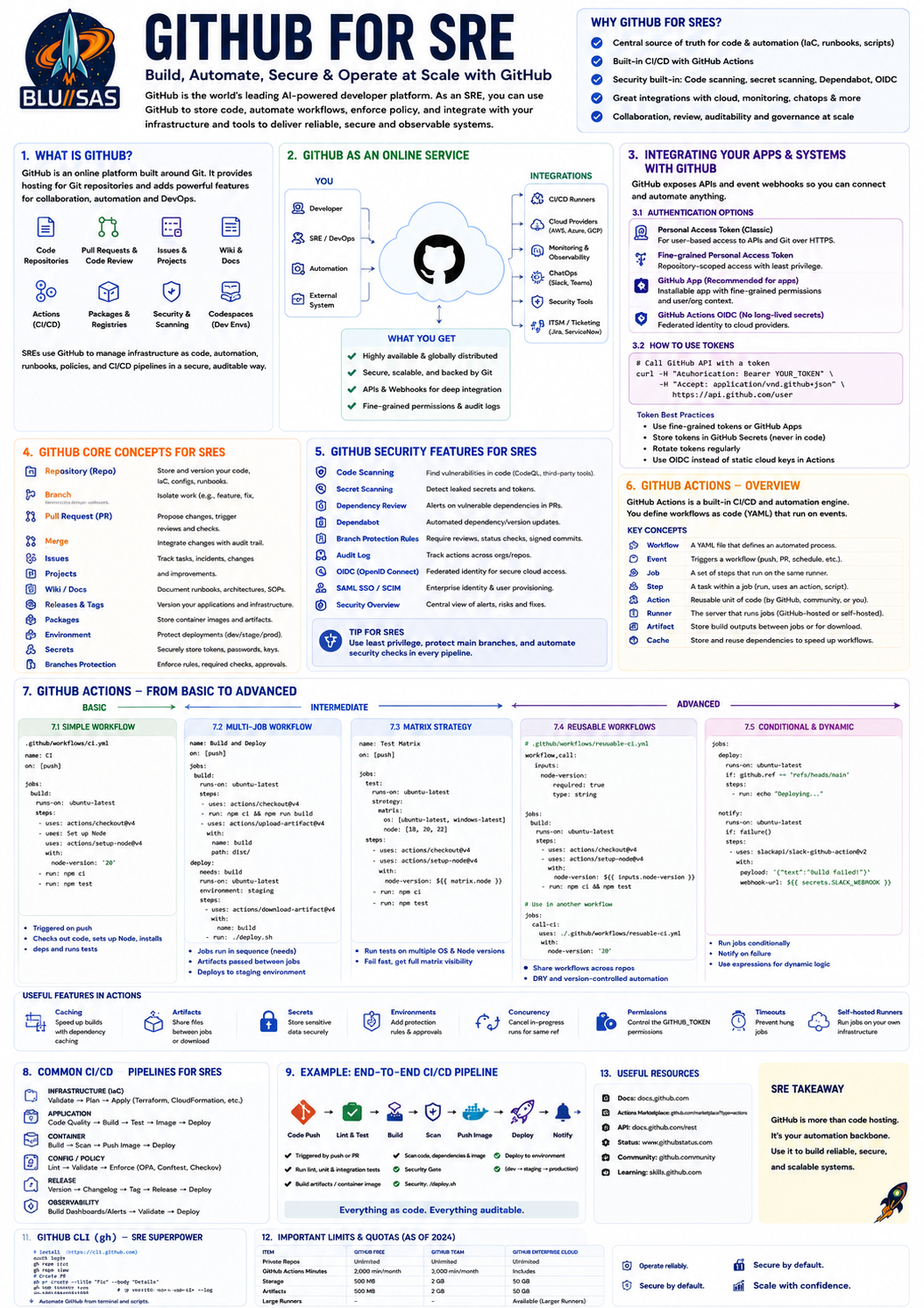
GitHub for SREs: From Basic to Advanced
Most engineers initially think of GitHub as “Git in the cloud.”
That is true, but for modern SREs, platform engineers, cloud engineers, and DevOps teams, GitHub is really a software delivery platform consisting of:
Git Repositories
Pull Requests
Issues
Projects
Actions (CI/CD)
Packages
Container Registry
Security Scanning
Dependabot
Code Owners
Environments
Secrets Management
Webhooks
Apps & Integrations
REST APIs
GraphQL APIs
GitOps IntegrationGitHub is effectively:
GitLab SaaS equivalent
+
Marketplace ecosystem
+
Developer platform
+
API platform1. GitHub Architecture
At a high level:
Developer
|
v
GitHub Repository
|
+--> Pull Requests
|
+--> Actions
|
+--> Security
|
+--> Webhooks
|
+--> APIs
|
+--> PackagesGitHub stores:
source code
infrastructure code
documentation
Helm charts
Terraform modules
Kubernetes manifests
GitHub Actions workflows2. GitHub Cloud vs GitHub Enterprise
GitHub.com
SaaS service.
GitHub manages:
servers
backups
scaling
availability
security
upgradesYou manage:
repositories
users
permissions
workflowsGitHub Enterprise Server
Self-hosted.
Similar to GitLab CE.
Used by:
banks
government
defence
regulated environmentsProvides:
private deployment
air-gapped environments
full data ownership
custom integrations3. GitHub Repository Structure
Example:
repo/
├── .github/
│ ├── workflows/
│ ├── CODEOWNERS
│ └── dependabot.yml
├── terraform/
├── kubernetes/
├── ansible/
├── src/
└── README.mdSpecial GitHub folder:
.github/Contains:
Actions workflows
issue templates
PR templates
dependabot config
security policies4. GitHub Authentication
Historically:
username/passwordNo longer recommended.
Modern methods:
PAT (Personal Access Token)
SSH Keys
GitHub App Tokens
OIDC Tokens
Deploy Keys
GITHUB_TOKEN5. Personal Access Tokens (PATs)
Most common.
Example:
git clone https://github.com/org/project.gitUsing PAT:
https://username:TOKEN@github.com/org/project.gitPAT permissions can be scoped:
repo
workflow
packages
read-only
adminBest practice:
least privilege
short lifetime
rotation6. SSH Keys
Very common.
Generate:
ssh-keygen -t ed25519Add public key:
GitHub
→ Settings
→ SSH KeysClone:
git clone git@github.com:org/repo.gitBenefits:
secure
easy automation
widely used7. GitHub Apps
Modern integration mechanism.
Instead of:
long-lived PATGitHub Apps use:
signed JWT
short-lived access tokens
fine-grained permissionsUsed by:
ArgoCD
Dependabot
Renovate
Backstage
Jenkins
Atlantis
Terraform CloudPreferred over PATs.
8. GitHub REST API
GitHub exposes almost everything through APIs.
Example:
curl \
-H "Authorization: Bearer TOKEN" \
https://api.github.com/repos/org/repoUse cases:
create repositories
manage PRs
create issues
manage runners
read workflow status
manage secrets
query commits9. GitHub GraphQL API
More powerful than REST.
Example:
{
repository(name:"repo", owner:"org") {
pullRequests(first:10) {
nodes {
title
state
}
}
}
}Useful for:
automation
dashboards
reporting
large-scale repository management10. Webhooks
GitHub can notify systems when events occur.
Example:
push
pull request
merge
issue
release
workflow completedExample:
GitHub
|
+----> Jenkins
|
+----> Slack
|
+----> ArgoCD
|
+----> Internal Platform11. GitHub Actions
This is GitHub’s CI/CD platform.
Equivalent to:
GitLab CI/CD
Jenkins Pipelines
Azure DevOps Pipelines
CircleCIActions are defined in:
.github/workflows/Example:
.github/workflows/build.yml12. Basic Workflow
Example:
name: Build
on:
push:
jobs:
build:
runs-on: ubuntu-latest
steps:
- uses: actions/checkout@v4
- run: echo "Hello World"Workflow:
Push
|
v
GitHub Actions
|
v
Runner
|
v
Job executes13. Workflow Structure
name:
on:
jobs:
steps:Example:
name: CI
on:
push:
pull_request:
jobs:
test:
runs-on: ubuntu-latest
steps:
- uses: actions/checkout@v4
- run: npm test14. Events
Actions can trigger on events.
Examples:
on:
push:on:
pull_request:on:
release:on:
workflow_dispatch:on:
schedule:15. Manual Pipelines
Equivalent to GitLab:
on:
workflow_dispatch:Provides:
Run Workflow buttonUseful for:
Terraform apply
Production deploy
Database migration
Disaster recovery16. Scheduled Workflows
Equivalent to cron.
Example:
on:
schedule:
- cron: "0 2 * * *"Runs daily at 2am.
Useful for:
drift detection
certificate checks
backup validation
dependency updates17. Jobs
A workflow contains jobs.
Example:
jobs:
lint:
test:
build:Jobs run:
parallel by defaultUnlike GitLab stages.
18. Dependencies
Example:
jobs:
build:
deploy:
needs: buildEquivalent to:
GitLab needs:Creates DAG pipelines.
19. Runners
GitHub Actions jobs execute on runners.
Equivalent to GitLab Runners.
Options:
GitHub-hosted
Self-hosted
Larger runners
ARM runners
GPU runners20. GitHub Hosted Runners
GitHub provides:
runs-on: ubuntu-latestExamples:
runs-on: ubuntu-latest
runs-on: windows-latest
runs-on: macos-latestAdvantages:
easy
maintained
ephemeral
secureDisadvantages:
limited customization
usage costs21. Self Hosted Runners
You provide infrastructure.
Example:
runs-on: self-hostedCommon labels:
runs-on:
- self-hosted
- linux
- terraformUseful for:
internal deployments
private networks
GPU builds
Kubernetes management
Terraform applies22. Self Hosted Runner Architecture
GitHub
|
v
Self Hosted Runner
|
+---- Terraform
+---- Kubernetes
+---- Ansible
+---- Internal APIsRunner polls GitHub.
Receives jobs.
Executes locally.
23. Actions Marketplace
Huge GitHub advantage.
Examples:
uses: actions/checkout@v4uses: docker/build-push-action@v6uses: hashicorp/setup-terraform@v3uses: azure/setup-kubectl@v4Thousands available.
24. Reusable Actions
Example:
.github/actions/setup/runs:
using: compositeReusable organization-wide automation.
25. Reusable Workflows
Example:
jobs:
call-workflow:
uses: org/platform/.github/workflows/terraform.yml@mainEquivalent to GitLab CI templates.
Very useful for platform teams.
26. Secrets
GitHub stores secrets.
Repository
Environment
OrganizationExample:
AWS_ACCESS_KEY_IDAccess:
${{ secrets.AWS_ACCESS_KEY_ID }}Never hardcode credentials.
27. Variables
Example:
${{ vars.ENVIRONMENT }}Useful for:
regions
URLs
cluster names
project IDs28. Environments
Examples:
dev
staging
prodProvide:
approval gates
secret scoping
deployment history
protection rules29. Production Protection
Example:
Production Environment
Requires:
Approval
Specific reviewers
Protected branchEquivalent to GitLab protected environments.
30. Basic CI Pipeline
name: CI
on:
pull_request:
jobs:
test:
runs-on: ubuntu-latest
steps:
- uses: actions/checkout@v4
- run: npm install
- run: npm test31. Docker Build Pipeline
jobs:
build:
runs-on: ubuntu-latest
steps:
- uses: actions/checkout@v4
- uses: docker/login-action@v3
- uses: docker/build-push-action@v6Builds:
Docker
OCI
Container images32. Terraform Pipeline
jobs:
terraform:
runs-on: ubuntu-latest
steps:
- uses: actions/checkout@v4
- uses: hashicorp/setup-terraform@v3
- run: terraform fmt -check
- run: terraform validate
- run: terraform plan33. Advanced Terraform
Production pattern:
PR
↓
fmt
↓
validate
↓
security scan
↓
plan
↓
approval
↓
applyTools:
Checkov
tfsec
OPA
Conftest
Infracost34. Kubernetes Pipeline
jobs:
deploy:
runs-on: ubuntu-latest
steps:
- uses: azure/setup-kubectl@v4
- run: kubectl apply -f manifests/Better:
GitOpsrather than direct deployment.
35. GitOps Pattern
Preferred architecture:
App Repo
|
+--> Build Image
|
+--> Push Image
|
+--> Update GitOps Repo
|
+--> ArgoCD
|
+--> FluxThis creates:
audit trail
rollback
change control36. OIDC Authentication
Modern best practice.
Instead of:
AWS Keys
Azure Secrets
GCP Service AccountsUse:
GitHub OIDCExample:
permissions:
id-token: writeBenefits:
short-lived credentials
no stored cloud secrets
better securityUsed heavily by:
AWS IAM
Azure Entra ID
Google Workload Identity37. Matrix Builds
Run multiple builds.
Example:
strategy:
matrix:
os:
- ubuntu
- windows
version:
- 3.11
- 3.12Creates:
Ubuntu + 3.11
Ubuntu + 3.12
Windows + 3.11
Windows + 3.12Automatically.
38. Parallel Testing
Example:
strategy:
matrix:
shard: [1,2,3,4]Useful for:
large test suites39. Artifact Management
Example:
uses: actions/upload-artifact@v4Store:
Terraform plans
reports
binaries
SBOMs
test results40. Cache
Example:
uses: actions/cache@v4Speeds up:
npm
maven
pip
terraform providers41. Security Scanning
GitHub Advanced Security provides:
CodeQL
Secret scanning
Dependency scanning
Dependabot42. Dependabot
Automatically updates dependencies.
Example:
.github/dependabot.ymlCreates PRs.
Great for:
Terraform providers
Helm charts
npm packages
Python packages43. CodeQL
GitHub’s SAST engine.
Example:
uses: github/codeql-action/init@v3Scans:
Go
Python
Java
JavaScript
C#44. Branch Protection
Recommended:
Require PR
Require review
Require checks
Require signed commits
Require linear historyProtect:
main
production
release/*45. CODEOWNERS
Example:
terraform/prod/ @platform-team
kubernetes/prod/ @sre-teamAutomatically requests reviews.
46. Common SRE Use Cases
GitHub Actions excels at:
Infrastructure
Terraform
OpenTofu
CloudFormation
PulumiKubernetes
Helm validation
Manifest validation
GitOps updatesObservability
Prometheus rule validation
Grafana dashboard validation
Loki config validation
OpenTelemetry config validationSecurity
SAST
Secrets scanning
Policy checks
Compliance checks47. Advanced Enterprise Patterns
Large organizations often use:
Reusable workflows
OIDC
Self-hosted runners
GitHub Apps
GitOps
Environment approvals
CODEOWNERS
Security gatesArchitecture:
Developers
|
v
Pull Request
|
v
Actions Workflow
|
+--> Lint
+--> Tests
+--> Security
+--> Terraform Plan
+--> Build Image
|
v
Approval
|
v
GitOps Repository
|
v
ArgoCD / Flux
|
v
Production48. What an SRE should say in an interview
A strong answer:
GitHub is more than Git hosting; it’s a developer platform that exposes repositories, APIs, webhooks, GitHub Apps, Actions, Packages and security tooling. GitHub Actions provides CI/CD through workflow definitions stored in the repository. For production infrastructure I would use pull requests, branch protection, CODEOWNERS, reusable workflows, self-hosted runners where internal access is needed, OIDC instead of long-lived cloud credentials, security scanning, Terraform plan/apply separation, and GitOps deployments through Argo CD or Flux. This gives an auditable, automated and secure software delivery platform.